
 Security+
 CySA+
 PenTest+
 SecAI+
 Network+
 A+
 Cloud+
 Linux+
CompTIA Security+ Study Guide for SY0-701 & SY0-801 (2026)
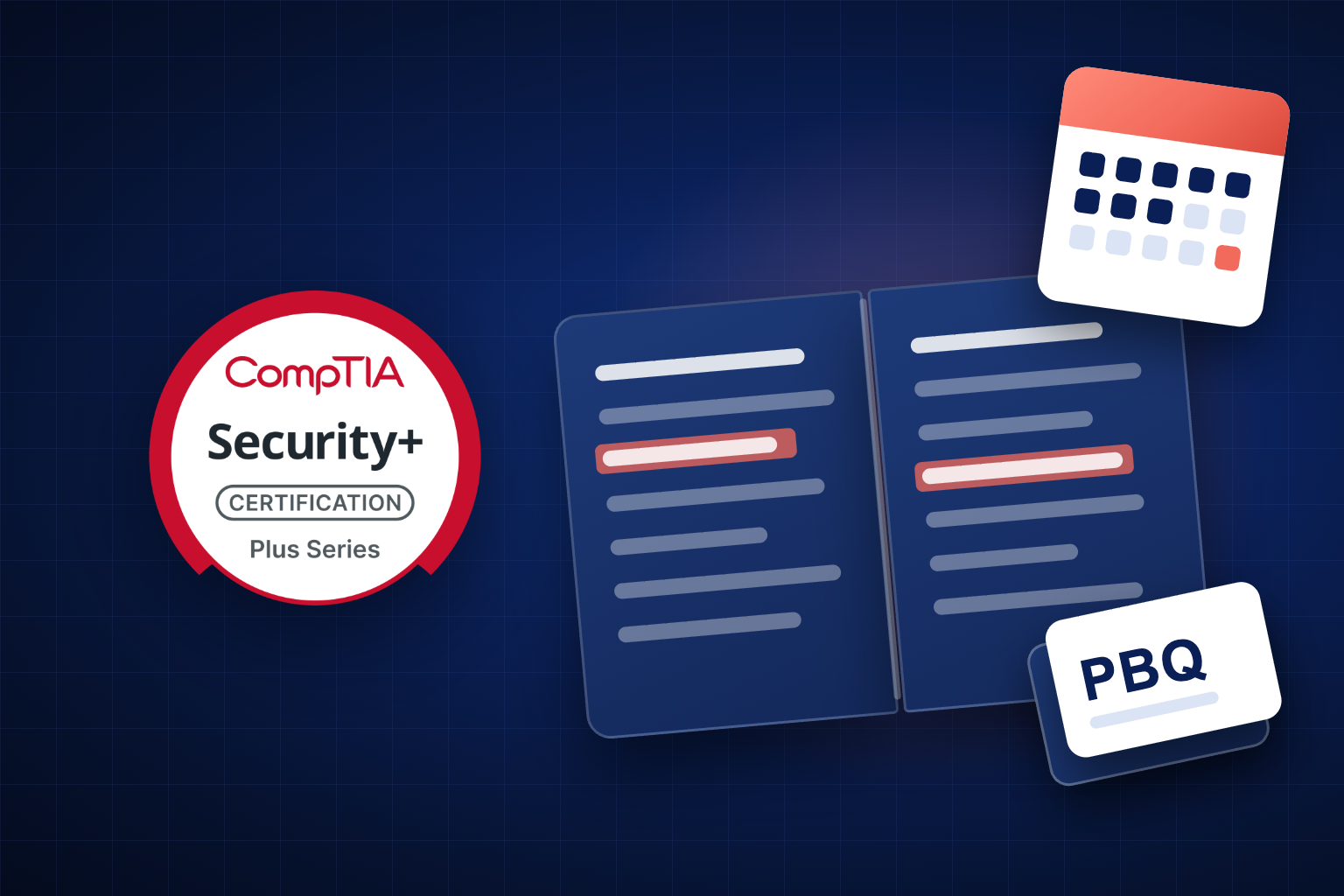
Security+ is a taxing exam that is best prepared for with the help of a study guide. The exam presents hurdles when it comes to both the vast amount of content covered and the type of questions asked. Adequate preparation is needed if you want to pass this exam on your first attempt.
Security+ SY0-701 or SY0-801? (updated November 2026)
CompTIA launched Security+ SY0-801 on 17 November 2026. We recommend SY0-701 for now: it’s valid until 11 June 2027, 801 is brand new with very little training available yet, and employers only ask whether you have Security+, not which version. Our free Security+ cheat sheet covers both.
CompTIA’s Security+ is one of the most coveted entry-level cyber security certifications on the market. Obtaining it demonstrates to yourself and employers that you have a baseline understanding of various cyber security concepts and tools.
More than one million individuals have already earned this certification, but don’t let this number fool you. Security+ is a difficult test that requires diligent studying to pass. To help you ace the exam, we’ve created this comprehensive CompTIA Security+ study guide complete with a breakdown of the exam, tips on creating a study plan, how to choose the best study resources, studying strategies, and more.
Understanding the Security+ Exam
To ace the exam, you first need to understand what you’ll be tested on, the type of questions you’ll face, and other key components of the exam.
Types Of Questions
Security+ comprises a maximum of 90 questions to be answered within 90 minutes. Of these questions, you’ll be tasked with answering both multiple choice and Performance Based Questions (or PBQs).
PBQs are hands-on questions that will test your ability to solve complex cyber security problems that may arise on the job. On Security+, they are delivered as simulations.
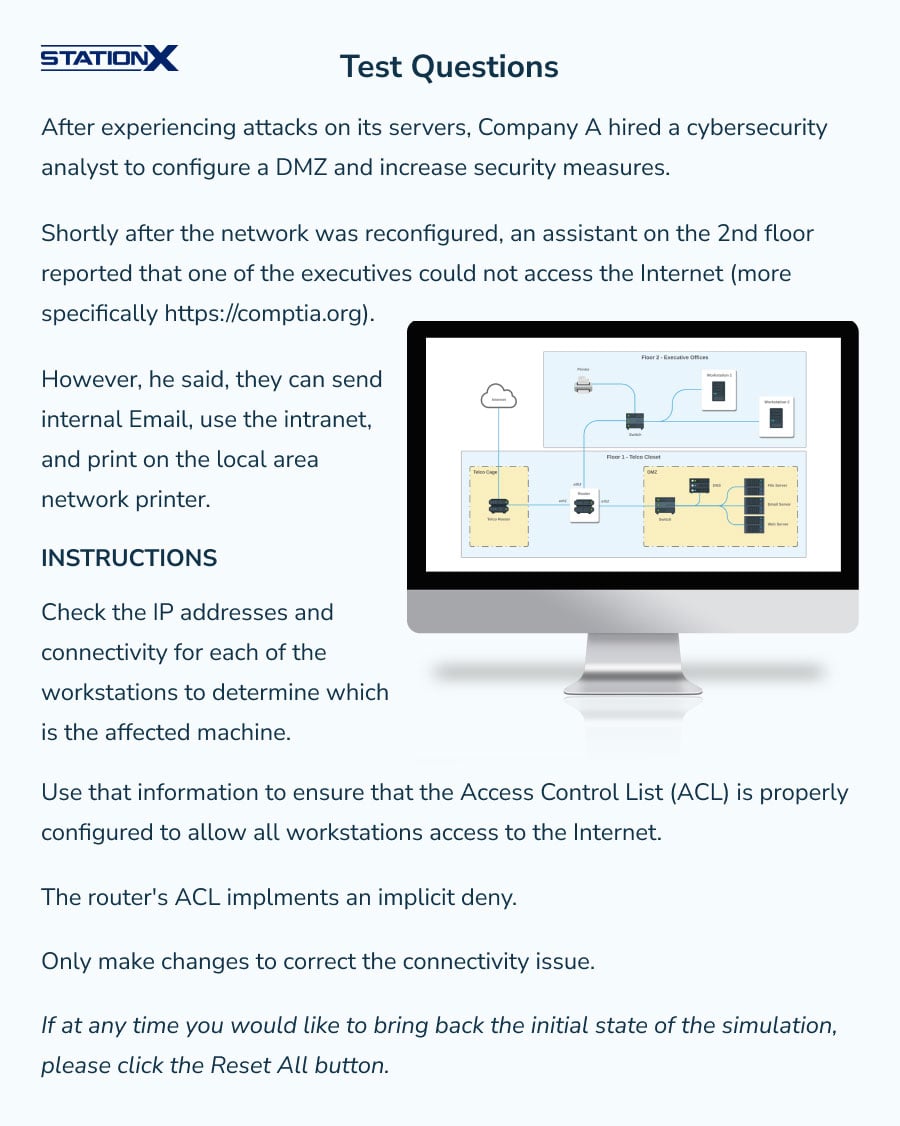
Because PBQs are more involved questions, they may be weighted more heavily than multiple choice questions (CompTIA keeps its question scoring confidential). This also means that the more PBQ questions you have, the fewer multiple choice questions you’ll have to answer. CompTIA doesn’t publish how many PBQs to expect, but test takers commonly report between three and five.
We have an in-depth article which includes some sample Performance Based Questions like the one above. Check it out for some hands-on practice. We also show you the types of multiple-choice questions you might expect and how to approach them in our “Practice Questions & Exam Tips” article.
To pass Security+ you’ll need to score at least 750 on a scale of 100 to 900.
Free Security+ cheat sheet
Download our CompTIA Security+ cheat sheet: SY0-801 and SY0-701 side by side, with ports, cryptography, attacks, risk maths and mnemonics, plus a free PDF.
Exam Domains
CompTIA doesn’t leave you guessing when it comes to what to study for Security+.
To receive a comprehensive breakdown of every exam objective Security+ may test you on, head over to their website and download the exam objectives. You can also review our Security+ exam cheat sheet.
Two versions of Security+ are live right now: SY0-701 and the new SY0-801, launched 17 November 2026. Both lead to the same Security+ certification. Our advice is to take SY0-701 for now, because its training is mature and SY0-801 training is still thin everywhere. Take SY0-801 only if you can’t sit the exam before SY0-701 retires in English on 11 June 2027. Employers don’t ask which version you passed, and we’ll switch our recommendation to SY0-801 once its training is established.
For a high-level overview of what the exam tests, here are the five knowledge domains, SY0-701 vs SY0-801:
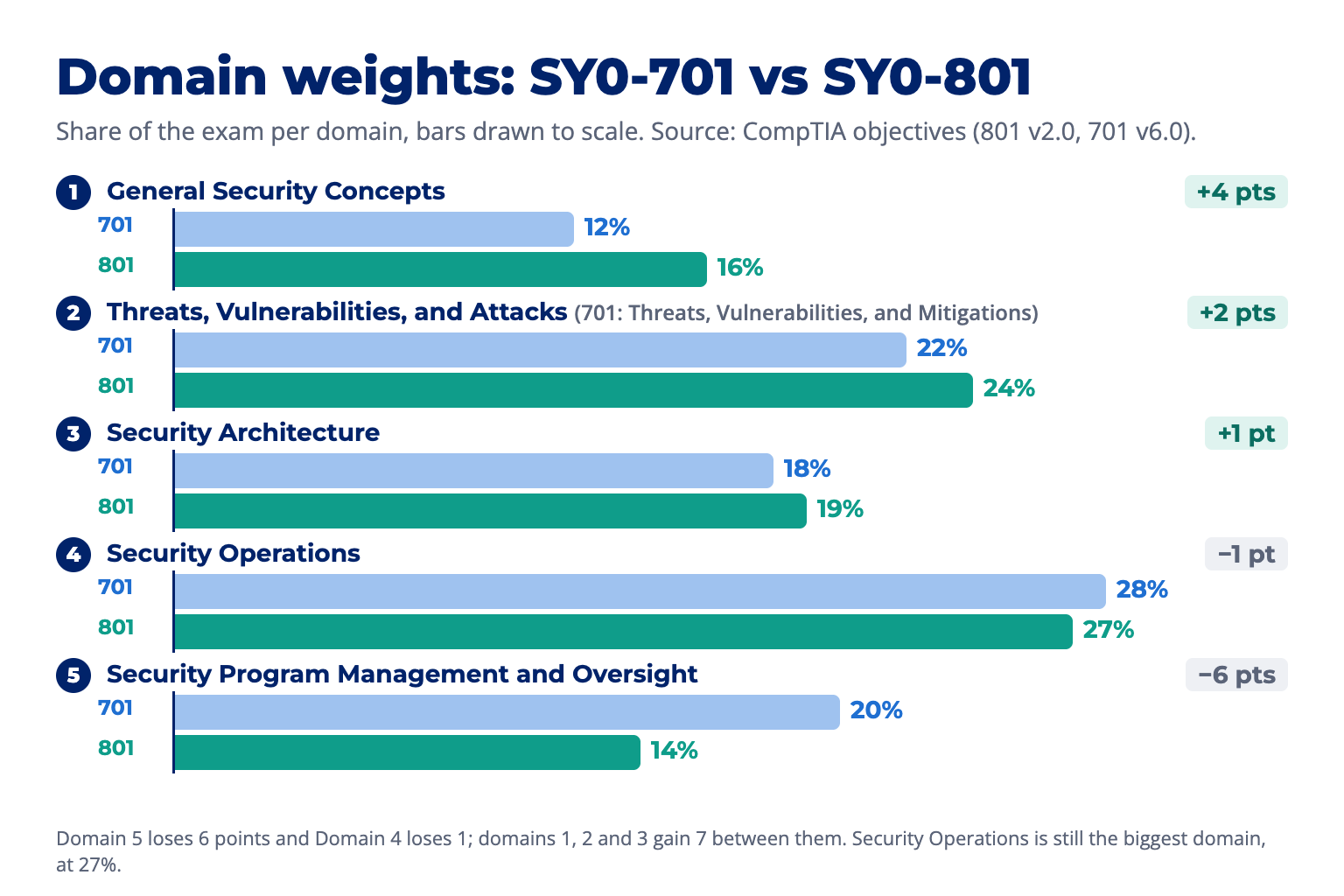
Both versions keep the same five-domain structure, but the weights shift:
| Domain | SY0-701 | SY0-801 |
|---|---|---|
| 1.0 General Security Concepts | 12% | 16% |
| 2.0 Threats, Vulnerabilities, and Mitigations (SY0-801: Threats, Vulnerabilities, and Attacks) | 22% | 24% |
| 3.0 Security Architecture | 18% | 19% |
| 4.0 Security Operations | 28% | 27% |
| 5.0 Security Program Management and Oversight | 20% | 14% |
SY0-701 has 28 objectives and SY0-801 has 27. SY0-801 also adds objective 2.6 on the risks of using AI. For the full breakdown, see our SY0-701 vs SY0-801 comparison.
Security+ will cover a wide range of cyber security-related topics.
To unpack the domains above, let’s expand on the skills you’ll need to pass this exam:
- Assess the security posture of a company and recommend and implement security solutions
- Monitor and secure cloud, mobile, and IoT environments
- Identify, analyze, and respond to security events and incidents
- Be aware of security regulations and policies

How Security+ Compares to Other Certifications
Security+ isn’t the only cyber security certification on the market. We wanted to provide an honest breakdown of how it lines up to other certifications in terms of cost, difficulty, value to employers, and let you know if it’s the best investment. If you’re considering one of the other certifications listed below, take a quick read of our article to make sure you’re choosing the best one for you and your goals.
- CompTIA Security+ vs Google Cybersecurity Professional: What’s Best?
- SSCP vs Security+: Which Is the Right Certification for You?
- GSEC vs Security+: Which Is Right For You?
- CySA+ vs Security+: Which Certification Works Best for You?
- CompTIA Security+ vs CISSP: Which Is Best for You?
Creating a Study Plan
Security+ isn’t the type of certification you can take on a whim. Even if you have the two years of hands-on security or systems administration experience CompTIA recommends before taking the exam, you will still want to set aside time to study.
Assess What You Already Know
The first and most valuable step you can take when assessing what you already know is to review the exam objectives one by one.
We recommend printing out the list and crossing off each tool, concept, and strategy you already know. Being that Security+ covers an abundance of information, you should save time and focus on only the areas that you aren’t well versed in.
While going through the exam objectives, be honest with what you do and don’t know. It’s okay if you’re not an expert on the intricacies behind implementing zero trust - but do you at least know what it is and why it should be implemented?
Even if you feel comfortable that you understand a certain concept, there is no harm in briefly brushing up.
Setting a Timeframe
Too often, those aspiring to obtain Security+ will study here and there without any consistency because they have yet to set a date for the test. We know it can be daunting to pay $439 USD for a test you may fail, but this can be avoided with adequate test preparation.
Note that StationX is a CompTIA Affiliate, and we sell Security+ exam vouchers at a massive discount, some up to 30% off in our voucher store.
For Less.
StationX is a CompTIA Authorized Partner. The same official exam vouchers you'd buy from CompTIA, for less.
CompTIA price USD 878.00
Your exam voucher plus a free second attempt if you don't pass first time.
Today's US prices against CompTIA's US list price. Prices change and vary by country; the voucher page shows yours.
Before setting a date, assess what you know, how much time you can dedicate to studying every day, and how long you’ll need to study before you’re prepared for the exam.
While everyone is different, our experience with study time is as follows:
- Those with prior networking knowledge and some tangential security exposure should plan for four to six weeks of preparation.
- Those without prior networking knowledge or experience should allocate three to six months to prepare (we recommend obtaining a networking certification first, such as Network+ or CCNA).
- If you have just passed your CompTIA Network+ (i.e., you’ve just written the exam, not taken it a year ago), the crossover of networking topics will still be fresh in your mind. You can generally assume that half of your Network+ study time will be sufficient to prepare for Security+ (if Network+ took three months, consider allocating four to six weeks for Security+).
Once you’ve answered the aforementioned questions, we recommend you pay for the test and set the date. This will give you the impetus you need to study diligently and make your goals a reality. You can reschedule without a fee if you do it at least 24 hours before a test center appointment, or before the start time of an online exam.
Choosing Resources
Security+ is one of the most popular cyber security certifications, so there’s a wealth of study resources available. You need to decide how you learn best and identify the best resources.
Preferred Learning Method
How do you prefer to study?
Are you a voracious reader, a hands-on learner, or a video binger? Do you prefer learning via an organized course, or do you prefer to do things your own way?
Answering these questions before investing time and money into studying will reap benefits. Security+ is an in-depth test best attacked with a concrete and detailed action plan. To avoid an unorganized and haphazard study plan, it’s best to develop a cogent study plan.
That all begins with figuring out your preferable learning style.
We recommend enrolling in a course and supplementing your learning by reading articles from reputable sources, watching videos, and taking Security+ practice tests.
If you like to supplement videos with books, we’ve listed our preferred choices with reviews and purchase links in our article, “The best CompTIA Security+ study guides and books.” Today’s books cover SY0-701, the version we recommend for now.

A Multi-Pronged Approach
Relying on any one strategy for too long can make for a listless study process.
Keep things fresh and gather information from various resources by utilizing what we call the big three:
- Written Content
- Video Courses and Lectures
- Practice Tests
If you prefer more of a structured learning approach, we recommend enrolling in a Security+ course that will teach you everything you need to know to ace the exam. A quality Security+ course will address each exam objective in detail and provide real-world examples to help you better understand the material.
- ✓A step-by-step Security+ roadmap: every exam domain in order, so you always know what to study next
- ✓Free video lessons, guides and cheat sheets from our Security+ courses
- ✓Hands-on labs in your browser: nothing to install, try one free
- ✓All your progress in one place, ready for exam day
Built for SY0-701; our SY0-801 roadmap is coming soon.
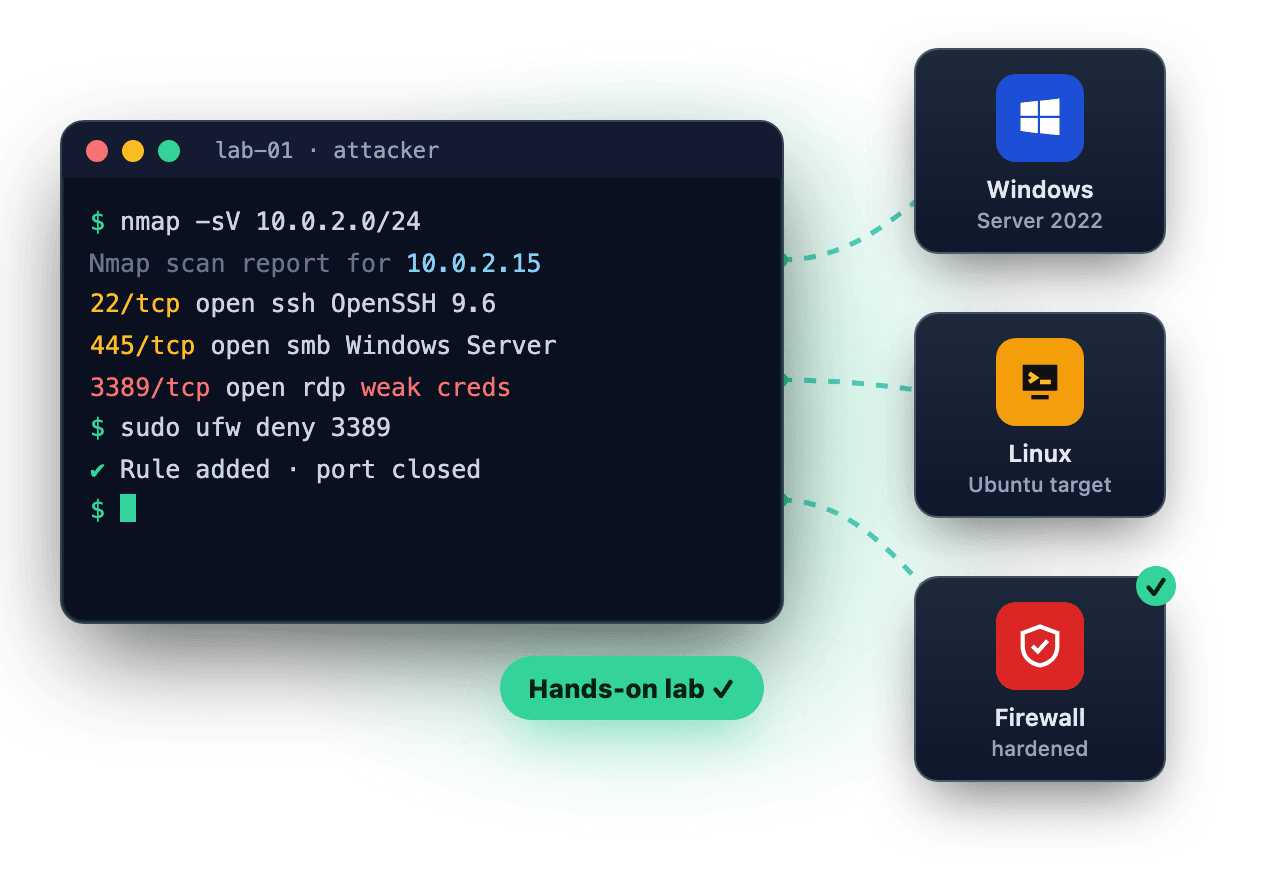
Practice tests are also a valuable resource when preparing for Security+. Before studying we recommend taking a practice test to help assess the domain areas that require studying. Throughout your studying process, you should be taking tests as well. Once you’re consistently scoring at least 83% on these tests, you are prepared to take CompTIA’s Security+.
Scroll to the bottom of this article to view suggested courses and practice tests.
Study Strategies
Not all studying strategies are created equal. Just because you use expert resources to help you study doesn’t mean you’re absorbing the information.
Notetaking
The worst thing you can do (aside from not studying at all) is consuming information but refusing to write it down. The amount of information Security+ covers is daunting. You can’t be expected to understand and remember everything simply by watching a lecture or reading a book.
To understand and remember information, we recommend meticulous note-taking. Writing down every concept you cover isn’t necessary and would take far too long. Only take notes on Security+ topics that are new to you or that you haven’t yet fully grasped.
When taking notes don’t just highlight or copy and paste notes. Studies show taking notes by hand is more effective than taking them digitally.
Writing notes down is just as important as organizing your notes. Categorize notes via the knowledge domains provided by CompTIA. This will make looking back at your notes easier than taking notes haphazardly.
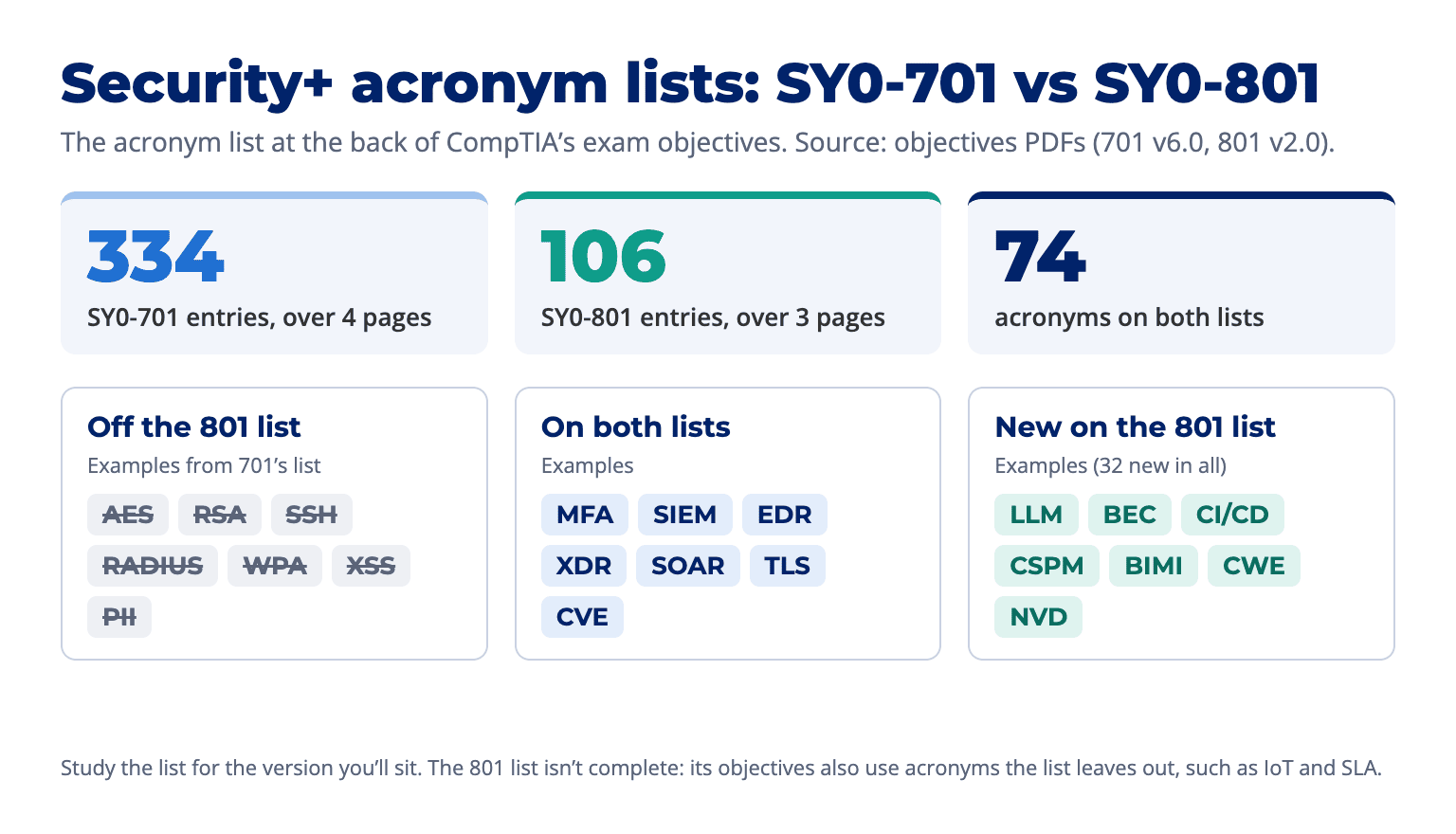
CompTIA’s Acronym List
Download CompTIA Security+’s exam objectives and scroll toward the end.
There you’ll find several pages worth of acronyms (four for SY0-701, three for SY0-801).
Part of your CompTIA Security+ study guide should include extensively studying that list of acronyms. More often than not CompTIA will use acronyms rather than spelling out what they’re referring to.
While this long list of acronyms seems daunting, you will organically memorize acronyms while studying for the exam. Toward the end of your preparation, we recommend reviewing the acronyms to memorize and learn acronyms you don’t already know.
When memorizing acronyms, don’t just take notes but rather create flashcards you can later refer to and test yourself with.
Acronym Hacks
- Keep an index of every acronym you encounter and its definition. Keep it separate from your other notes.
- Use the acronyms in all your notes so you only refer to your index cards as needed.
- Take a look at our CompTIA Security+ Cheat Sheet
Tips for Exam Day
If you’ve adequately studied the material Security+ covers and have abided by your CompTIA Security+ study guide, you should be prepared for the exam. However, there are a few exam strategies you may want to implement when taking Security+.
Skip the PBQs and Leave Them for the End.
PBQs usually appear at the start of the Security+ exam, before the multiple choice questions.
Everyone has their own strategy, but ours is to skip the PBQs for now. They are complex, require ample time to complete, and you may struggle.
Instead of spending a lot of your time on them right away, skip these questions. The multiple choice questions should be relatively easy, provided you’re prepared for the exam. You can knock these off and then not worry about dedicating more time to the PBQs.
Think of the multiple-choice portion of the exam as the warmup for the PBQs. Just be sure to flag any questions you missed or skipped so you can easily go back to them.
Taking the Exam at Home Versus in Person
You have the option of taking Security+ at home or in person.
Neither option is objectively beneficial; it all comes down to personal preference.
You want to take the test where you’ll feel the most comfortable and focused. For some, that may mean leaving home and taking the exam in person. For others, it means staying home.
Taking the test in the comfort of your home makes sense as you’re familiar with, and most likely comfortable, with the environment. You also have the advantage of taking the exam in the same place where you’ve been studying and taking practice exams.
Before taking the exam, take practice tests that simulate the exam environment. Give yourself 90 minutes to complete 90 questions. Do this several times to simulate the test-taking environment so there are no surprises when you write the exam.
If you do choose to take the test at home, the exam will be proctored by PearsonVUE. You are required to have your camera and microphone turned on. You cannot use online resources or look at notes during the exam. Should you break any of their rules you will be warned or, in the worst case, they will end the exam and your result won’t count.
On the flip side, taking the test in-person means you won’t be distracted by pets, friends, family, or other domestic distractions. Taking the exam at a PearsonVUE testing site also means access to a solid internet connection.
Conclusion
It’s difficult to say how long you need to study for the exam before you’re ready. This all depends on how much of the test material you’re already familiar with.
If you’re a seasoned IT professional, you may only need to brush up on a few concepts before you’re ready. If you’re new to the world of networking, IT, and cyber security, you may need a few months of study before you feel comfortable taking the exam.
What is certain is that by creating and adhering to a viable CompTIA Security+ study plan, you will be able to pass this exam.
The most important points to keep in mind are:
- Be aware of what you do and don’t know prior to studying
- Find high-value study resources
- Study consistently
- Take practice tests to gauge how much you really know
If you create and follow a quality CompTIA Security+ study guide, the rest will fall into place.
You can start your study plan with the course bundle below. Our CompTIA Security+ Course & SY0-701 Practice Test Bundle contains two video courses totalling over 50 hours of on-demand video, 15 practice exams, study flashcards, and more!
For Less.
StationX is a CompTIA Authorized Partner. The same official exam vouchers you'd buy from CompTIA, for less.
CompTIA price USD 878.00
Your exam voucher plus a free second attempt if you don't pass first time.
Today's US prices against CompTIA's US list price. Prices change and vary by country; the voucher page shows yours.
The CompTIA Security+ Course & SY0-701 Practice Test Bundle includes:
- CompTIA Security+ Study Guide: SY0-701 Total Course
- CompTIA Security+ Training: Self-Paced Course
- CompTIA Security+ SY0-701 Exam Questions and Answers
- CompTIA Security+ Practice Test Series: Ace the SY0-701
- CompTIA Security+ Exam Objectives Flash Cards: SY0-701 Prep
Frequently Asked Questions
What is the best way to study for Security+?
That all depends on what you already know and your preferred study methods. We recommend enrolling in an online course that walks you through each exam objective.
Can I pass Security+ without A+?
Yes, you can. For SY0-701, CompTIA recommends obtaining Network+ prior to taking Security+, but it isn’t necessary (for SY0-801, CompTIA only recommends two years of hands-on experience as a security administrator). Even if you have little networking, IT, or cyber security experience, an in-depth study plan will prepare you for the certification. Keep in mind, there is significant overlap in Network+ and Security+ content, so studying for one will assist in preparing for the other.
How many questions can I miss on Security+ Exam?
CompTIA doesn’t publish this, because the exam uses a scaled score and question scoring is confidential. You will be asked a maximum of 90 questions, a mix of multiple choice and PBQs. You need a score of at least 750 on a scale of 100 to 900 to pass, which is not the same as a percentage.
Is Security+ easier than CCNA?
CCNA is vendor-specific and drills down into CISCO-related architecture, protocols, and hardware. All CompTIA exams are vendor neutral and not as in-depth. While both exams are difficult, Security+ is easier than CCNA.
What is the hardest part of the Security+ exam?
By far, the most difficult part of Security+ is the PBQs. These require users to solve hands-on cyber security issues that you may face in the workplace. You may be required to solve problems with the help of Linux or Windows commands.
About the Author

Nathan House, Founder & CEO of StationX
Nathan House has 30 years of hands-on cybersecurity experience and is Cambridge-educated, holding CISSP, CISA, CISM, OSCP, CEH, and SABSA. He founded StationX in 1999 — one of the UK’s first cybersecurity companies — and has secured £71 billion in UK mobile banking transactions and the London 2012 Olympics, advising clients including Microsoft, Cisco, BP, Vodafone, and VISA. He authored the world’s most popular cybersecurity course — a #1 Udemy bestseller taken by over 500,000 students — and was named Cyber Security Educator of the Year 2020, AI Security Educator of the Year, and a UK Top 25 Security Influencer 2025. A DEF CON speaker and featured expert on CNN, Fox News, NBC, and the BBC, Nathan leads StationX’s training of more than half a million students worldwide.