Free LLM API: Run 120+ AI Models for $0 in 2026
If you've seen the claims that a free LLM API lets you "stop paying for AI forever," you were right to be sceptical — and right to be curious. The hype is overblown, but underneath it there's something genuinely useful: you really can get a single API key that unlocks more than 120 AI models, with no credit card and no trial timer. The trick is knowing what's real, what the catch is, and how to actually wire it into the tools you already use.
This guide cuts through the noise. You'll see exactly what a free LLM API gives you, which models you get (and which you don't), and three ways to set it up — the easy path in OpenCode, the advanced path of running it inside Claude Code, and the reusable command-and-script approach. We'll be honest about the limits too, because a free tier you don't understand will waste your time.
I run frontier closed models as my daily driver, but I keep these free tiers set up for testing, for teaching, and to make sure my students are never locked out of learning by an API bill. Let's get you set up.
What Is a Free LLM API (and What's the Catch)?
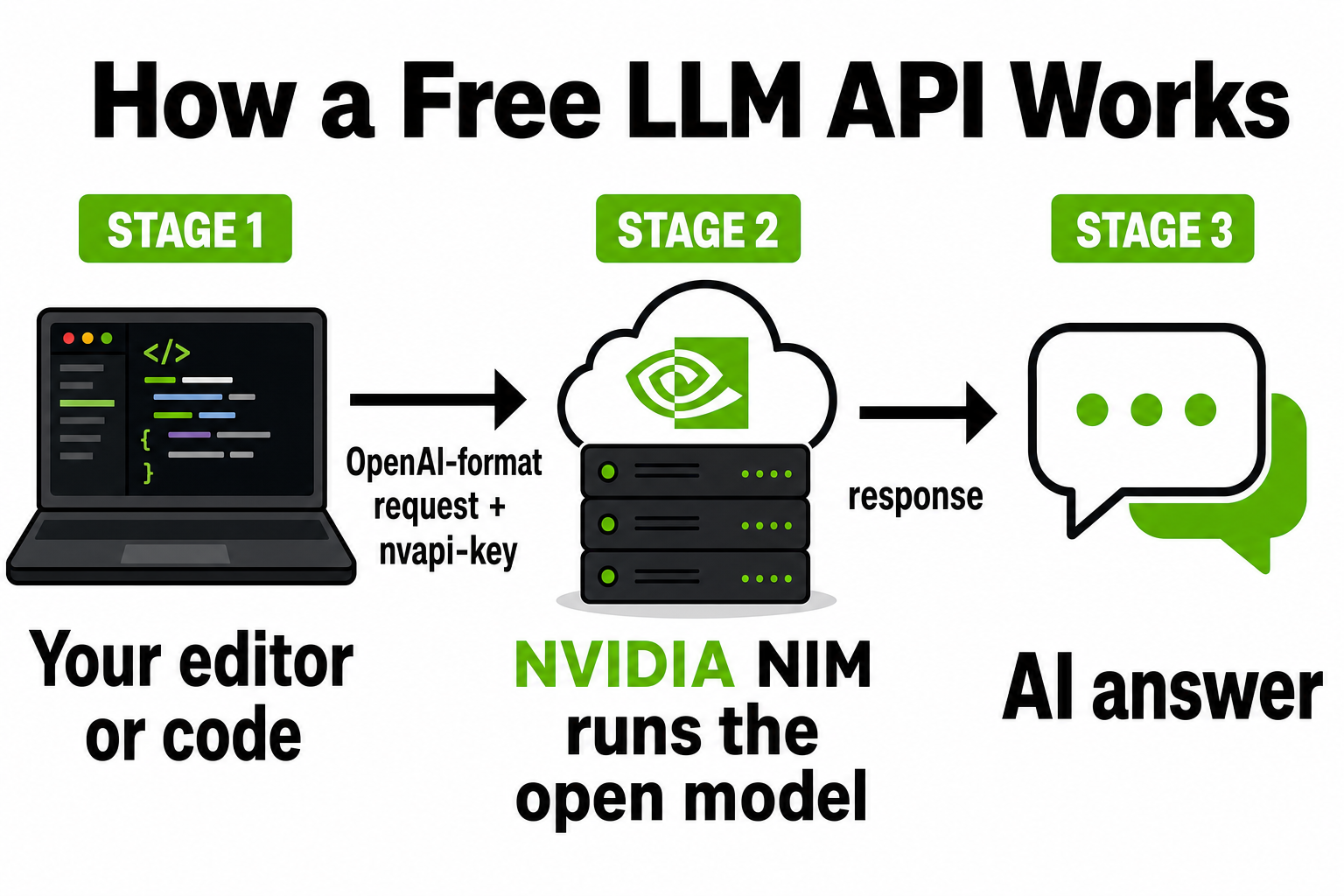
A free LLM API is an endpoint you can send text to and get an AI model's response back — without paying per token, and usually without a credit card. You get an API key, point your code or your editor at a URL, choose a model, and you're running. For learning and prototyping, it removes the single biggest barrier to entry: cost.
But "free" always has a shape, and it's worth naming it up front so nothing surprises you later:
- Rate limits. Free tiers cap how many requests you can send per minute and per day. Fine for a human chatting or coding; a problem for heavy automation.
- Open-weight models only. You'll get excellent open models (DeepSeek, Kimi, Qwen, Llama). You will not get GPT-5, Claude, or Gemini Pro for free — those are closed, and only their owners can serve them.
- Dev and test, not production. Most free tiers are explicitly for prototyping. The moment you have real users, you're expected to pay.
- Hosted ≠ private. Your prompts still leave your machine and hit someone's servers. Free hosting is not the same as privacy.
Keep those four in mind and a free LLM API is one of the best things going for anyone learning to build with AI. Ignore them and you'll hit a wall and blame the wrong thing. Now let's look at the one I'd start with.

NVIDIA NIM: 120+ Free AI Models Through One Key
NVIDIA NIM (NVIDIA Inference Microservices) is NVIDIA's hosted catalogue of AI models, served through an OpenAI-compatible endpoint at https://integrate.api.nvidia.com/v1. You sign up at build.nvidia.com with an email — no card — and get a key that starts with nvapi-. That one key reaches every model in the catalogue.
Why does NVIDIA give this away? Because it's a shop window. NVIDIA wants developers building on its platform, and the free NVIDIA NIM API is the on-ramp to its paid AI Enterprise product. That's a fair trade — and it means the free tier is real, not a bait-and-switch, as long as you stay inside its dev-and-test purpose.
The reason it stands out among free options is the combination: the largest open-weight catalogue of the free providers, an OpenAI-compatible endpoint that drops into almost any tool, no credit card, and Western (NVIDIA-operated) hosting rather than calling a model maker's own servers directly.
Here's the catalogue itself at build.nvidia.com — "free inference with leading models" is right there on the front page:
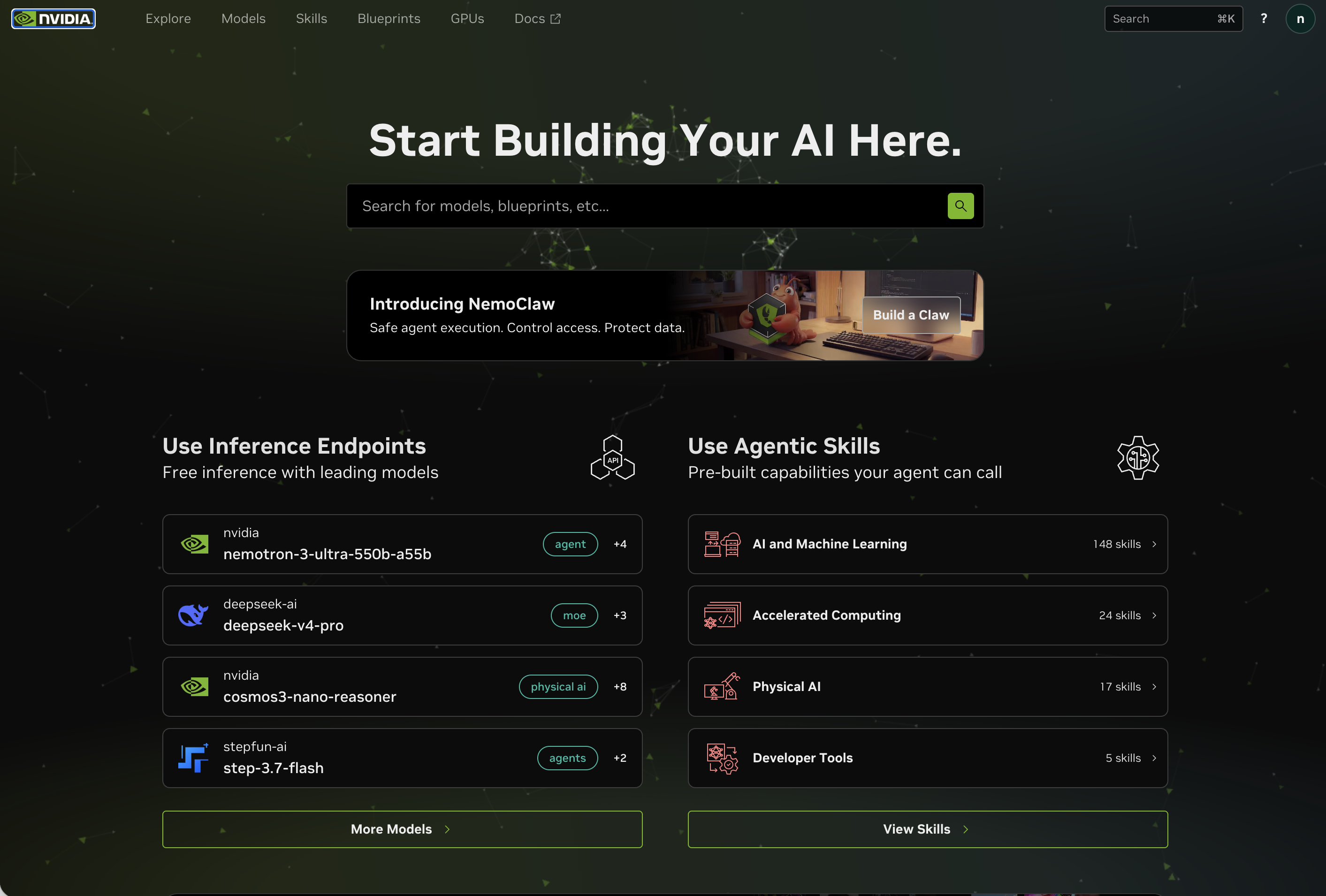
What You Get — the Open-Weight Models
This is where a free LLM API earns its keep. A free AI API is only as good as the models behind it, and NVIDIA NIM hosts open-weight models — models whose weights are publicly released — which is exactly why they can be offered free. These aren't toys; several are genuinely competitive with closed frontier models for everyday work.
The headline models you'll recognise:
| Model | Maker | Good for |
|---|---|---|
| DeepSeek V4 | DeepSeek (China) | Reasoning, code, maths |
| Kimi (K2 series) | Moonshot AI (China) | Long context, agentic work |
| GLM 5.2 | Z.AI / Zhipu (China) | Multilingual reasoning |
| Qwen 3.5 | Alibaba (China) | Strong all-rounder, coding |
| MiniMax M3 | MiniMax (China) | Reasoning, coding |
| Llama 4 | Meta (US) | General-purpose |
| GPT-OSS 120B | OpenAI (open release) | General-purpose |
| Nemotron 3 Ultra | NVIDIA (US) | Frontier reasoning, 1M context |
Two honest points worth making to anyone in cyber security, which is where most of my students sit. First, several of the strongest free models come from Chinese labs. The weights themselves carry whatever bias and content guardrails they were trained with — that travels with the model regardless of who hosts it. Second, and reassuringly: because NVIDIA hosts these, your prompts go to NVIDIA's infrastructure, not to the original lab's servers. The model maker is out of the loop. That's a real plus over calling a Chinese provider's API directly — though it still isn't the same as private (more on that below).
What you won't find here: GPT, Claude, or Gemini Pro. Those are closed-weight, so no free open-model service can host them. (Google does give away its smaller Gemini Flash models free through its own API — more on that later — but the frontier closed models stay paid.) If a video tells you it gives "all the top models for free," that's the tell it's overselling. For a deeper look at choosing among open models, see our best local LLM methodology guide.
How to Get Your Free NVIDIA NIM API Key
This takes about two minutes and needs nothing but an email address. No free LLM API key hunting, no card.
- Go to build.nvidia.com and sign up (email, then verify it).
- Open any model in the catalogue.
- Click Get API Key. You'll get a key beginning with
nvapi-. - Copy it somewhere safe — treat it like a password.
Every model page looks like this — a ready-to-copy code sample, a Generate API Key button, and the model's availability and context window on the right. This is the DeepSeek V4 Pro page:
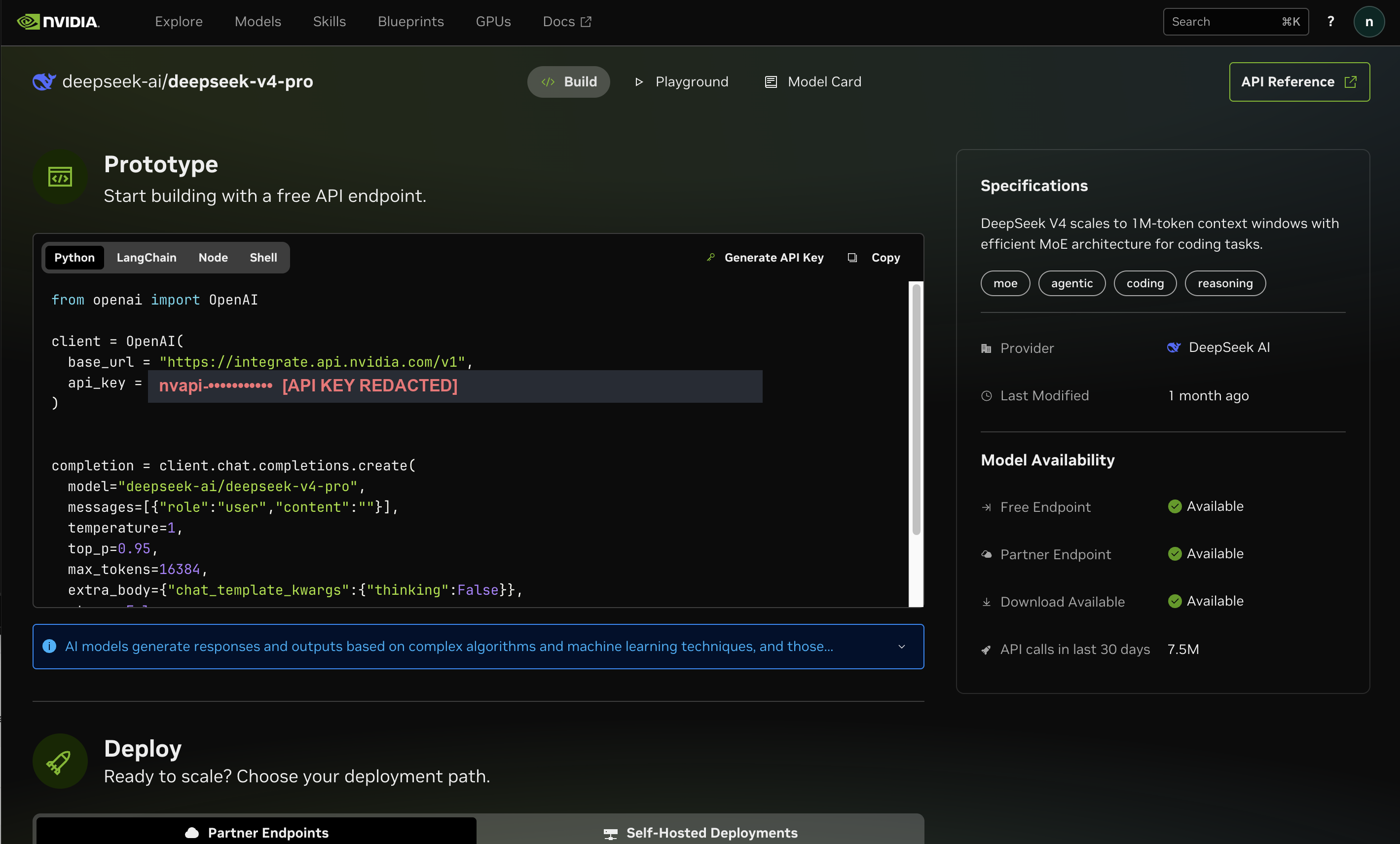
That single key works for every model. To switch models later, you change one string — the model name — and nothing else. Store the key as an environment variable so it's never hard-coded into your projects:
# Save your key as an environment variable (macOS / Linux)
$ echo 'export NVIDIA_NIM_API_KEY=nvapi-your-key-here' >> ~/.zshrc
$ source ~/.zshrc
Quick sanity check that the key works — this lists the models your account can reach:
$ curl -s https://integrate.api.nvidia.com/v1/models \
    -H "Authorization: Bearer $NVIDIA_NIM_API_KEY" | head
Setup 1: OpenCode (the Easy Path)
There are three ways to plug the free NVIDIA NIM API into your workflow, and they're not equal. Here's the map before we dig in:
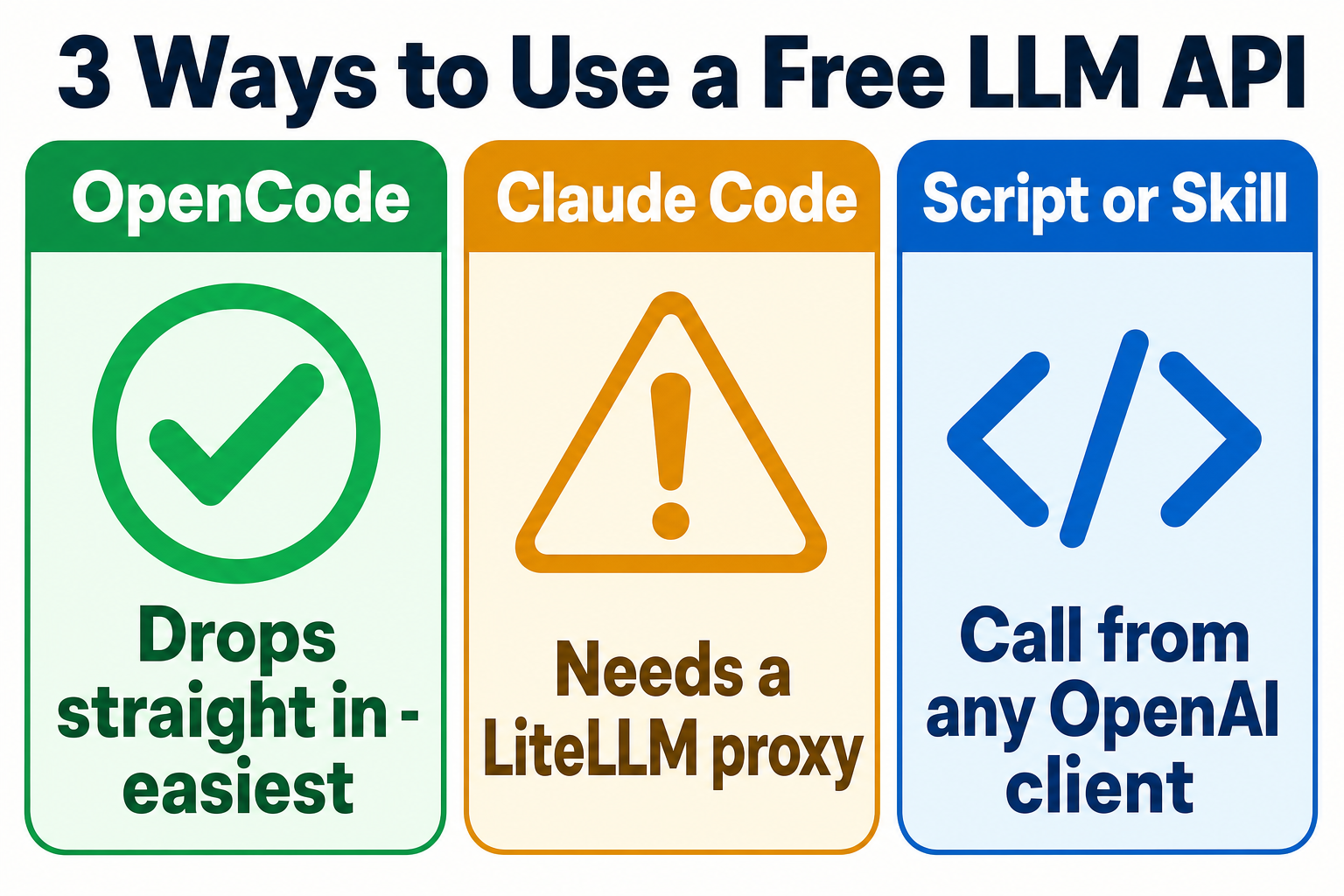
OpenCode is a free, open-source AI coding agent that runs in your terminal. It speaks the OpenAI format natively, so the free NVIDIA NIM API drops straight in — this is the path I'd recommend you try first.
Create or edit ~/.config/opencode/opencode.json and add NVIDIA as a provider:
{
  "$schema": "https://opencode.ai/config.json",
  "provider": {
    "nvidia": {
      "npm": "@ai-sdk/openai-compatible",
      "name": "NVIDIA NIM",
      "options": {
        "baseURL": "https://integrate.api.nvidia.com/v1",
        "apiKey": "{env:NVIDIA_NIM_API_KEY}"
      },
      "models": {
        "deepseek-ai/deepseek-v4-pro": { "name": "DeepSeek V4 Pro" },
        "openai/gpt-oss-120b": { "name": "GPT-OSS 120B" },
        "qwen/qwen3.5-397b-a17b": { "name": "Qwen 3.5" }
      }
    }
  }
}
Then open OpenCode, run /models, pick a NVIDIA NIM model, and start working:
$ opencode
# inside OpenCode, type:
> /models
# choose a NVIDIA NIM model, then chat or code as normal
That's the whole setup. Because OpenCode reads the live model list from the endpoint, you actually get the full catalogue available to pick from, not just the three listed above. One key, every model, in your editor.
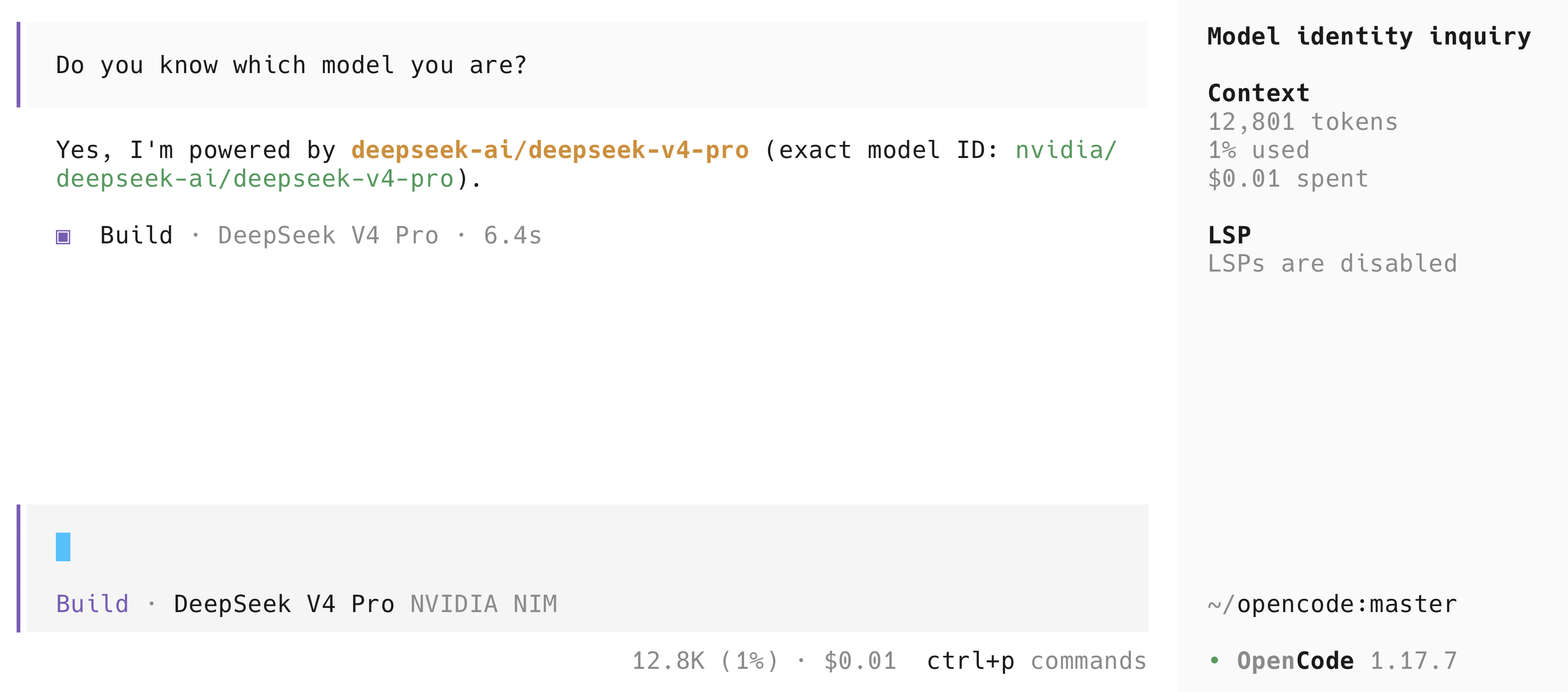
Here's mine running DeepSeek V4 Pro through NVIDIA NIM — I asked the model to confirm its own identity, and notice the cost: $0.01 for the session, on the free tier:
Setup 2: Run Claude Code on a Non-Anthropic Model — Five Ways
⚠️ Be honest with yourself about all of these. Whichever route you take, you're replacing real Claude with an open model pretending to be Claude — Claude Code's interface, someone else's brain. You lose the reasoning quality that makes Claude Code worth paying for, and free-tier rate limits get shredded the instant it fires off parallel tool calls or sub-agents (constant 429 "rate limited" errors). These are great for trying the workflow or running cheap — not a replacement for a real Claude subscription. For pure open-model coding, OpenCode (above) is still the smoother ride.
The catch Claude Code adds over OpenCode is that it only speaks Anthropic's API format, while most free endpoints speak OpenAI's. There are several ways around that. The first three are lightweight (an endpoint or a small proxy); the last two are fuller "router" apps you'll meet the moment you search — popular enough that I audited both, and I've put what that turned up right next to each.
Option A — DeepSeek's native Anthropic endpoint (no proxy)
DeepSeek now runs an Anthropic-compatible endpoint built specifically so tools like Claude Code can point straight at it — no translator, no proxy, just environment variables. It maps Claude's model names onto its own: claude-opus* → deepseek-v4-pro, and claude-sonnet*/claude-haiku* → deepseek-v4-flash.
$ export ANTHROPIC_BASE_URL=https://api.deepseek.com/anthropic
$ export ANTHROPIC_AUTH_TOKEN=sk-your-deepseek-key
$ export ANTHROPIC_MODEL=deepseek-v4-pro
$ export ANTHROPIC_DEFAULT_HAIKU_MODEL=deepseek-v4-flash
$ claude
This is the cleanest route — fewest moving parts of any option here. The honest catch: it isn't free. DeepSeek is a paid API (no free tier), though it's cheap — roughly $0.44 per million input / $0.87 output tokens for v4-pro, less for v4-flash. And every prompt and every line of code you send goes to DeepSeek's servers in China. For learning or hobby projects that's fine; for client work or anything sensitive, that data-residency point should stop you. The endpoint is also relatively new, so the odd advanced tool-calling workflow can misbehave.
Option B — free-claude-code (one proxy, 17 providers)
If you'd rather stay free and keep your choice of models, free-claude-code is an open-source local proxy (its own, not LiteLLM) that makes Claude Code talk to 17 providers — NVIDIA NIM, OpenRouter, Groq, DeepSeek, Mistral, Z.ai, plus local options like Ollama. It installs Claude Code if you don't have it, runs a small admin server, and gives you a web page to paste keys and pick a model.
# 1. Install (read the script first — it's a curl|sh)
$ curl -fsSL "https://github.com/Alishahryar1/free-claude-code/blob/main/scripts/install.sh?raw=1" | sh
# 2. Start the proxy — it prints a local Admin UI link
$ fcc-server
# 3. Open the Admin UI (127.0.0.1:8082/admin), paste your NVIDIA NIM key, pick a model
# 4. Launch Claude Code pointed at your chosen model
$ fcc-claude
Best when you want to switch between free providers rather than commit to one. The honest catch: it's a third-party proxy with no official support, it carries a long open-issues list (normal for something this active), and a Claude Code protocol update can break it until the maintainer catches up. And as with any curl | sh installer — open the script and read it before you run it.
Option C — LiteLLM by hand (the manual route)
The original approach still works and is worth knowing if you want full control: LiteLLM is a free proxy you configure yourself, mapping the model names Claude Code expects onto any OpenAI-format endpoint such as NVIDIA NIM.
model_list:
  - model_name: claude-sonnet-4-5
    litellm_params:
      model: nvidia_nim/deepseek-ai/deepseek-v4-pro
      api_key: os.environ/NVIDIA_NIM_API_KEY
      api_base: https://integrate.api.nvidia.com/v1
  - model_name: claude-3-5-haiku
    litellm_params:
      model: nvidia_nim/openai/gpt-oss-120b
api_key: os.environ/NVIDIA_NIM_API_KEY$ pip install 'litellm[proxy]' $ litellm --config config.yaml # proxy serves on http://localhost:4000 # then, in a new terminal: $ export ANTHROPIC_BASE_URL=http://localhost:4000 $ export ANTHROPIC_AUTH_TOKEN=anything $ claude
Option D — Claude Code Router (the polished, GUI route)
Claude Code Router (CCR) is the most finished option here: an Electron desktop app with a proper web control panel. You add providers, set routing rules and fallback targets, manage the gateway's own API keys, and watch token and cost usage — all from a dashboard, no config files to hand-edit. It supports OpenAI-compatible APIs plus Anthropic, Gemini, OpenRouter, DeepSeek, Mistral, Z.AI and others, and it can connect Claude Code, Codex and other clients for you.
Best when you want the friendliest experience and visual control rather than a terminal setup. The honest catch: because it's GUI-first, there's no clean scriptable config — you drive it through the app. And I read its source, not just its README: it stores your provider keys and tokens in plain text on disk (protected only by file permissions, not encryption — it even names a database column encrypted_key but stores the value in "plain" mode), and it works by editing your other tools' config files to route them through it — so deleting it without disabling it in-app first can leave those tools broken until you undo the change. Of the two router apps here it's the safer design — it proxies over a plain local listener rather than intercepting your system's traffic — but read the router-safety checklist below before you point it at real keys.
Option E — 9router (the widest reach, most caution)
9router casts the widest net: it connects Claude Code (and Cursor, Codex, Cline and more) to 40+ providers and 100+ models. You define an ordered list of models (a "combo") and it automatically fails over to the next one when a provider hits a rate limit or errors, so a single stalled provider doesn't halt your session — plus it has token-saving features. On paper it's the most capable option on this list.
The honest catch — and it's a real one: of everything here, 9router is the tool I'd be most careful with. In the version I audited (July 2026), it disabled TLS certificate verification (rejectUnauthorized: false) on its outbound connections to the upstream providers it proxies — meaning on a hostile network it can't be sure it's really talking to the provider rather than a machine-in-the-middle, which is exactly how traffic and tokens get intercepted. It also stores your provider tokens and API keys as unencrypted data in its local database, and ships without a lockfile (pinning dependencies only to loose version ranges), so the exact code that gets installed isn't reproducible or fully auditable. It's an open-source project under active development, so any of this could change — but as it stands I wouldn't route real credentials through it. Treat it as throwaway/experimental only.
Before you trust any of these proxies with your keys
Options B, C, D and E all sit in the most trusted spot in your setup — every prompt, every line of code, and the keys that authorise them pass through the proxy. That's worth thirty seconds of care. Whichever you pick:
Bind it to localhost only — never expose it to your network or the internet.
Turn off any optional "proxy mode," system-certificate, or remote-access feature you don't actually need.
Use a provider API key (like your free NVIDIA NIM key), not your paid Claude or ChatGPT subscription — routing a subscription through a third-party proxy is a grey area that can put the account at risk.
Treat its config folder as a secret — no cloud sync, no shared backups (several of these store keys in plain text).
If it installs a root certificate, understand why before you approve it — that's the tool asking to intercept your encrypted traffic.
If it's a curl | sh installer, open the script and read it first.
Which to pick? Cheapest-to-just-work, no proxy → DeepSeek native (Option A). Free and want model choice → free-claude-code (Option B). Full manual control → LiteLLM (Option C). Friendliest and GUI-driven → Claude Code Router (Option D), locked down. Widest model choice → 9router (Option E), but only for throwaway experiments given the caveats above. And if your real goal is private and offline, skip the cloud entirely and run models locally — Ollama now speaks Anthropic's format natively, with no proxy at all. See our Claude Code with Ollama guide. Whichever you choose, remember the warning above: the moment it gets busy, free rate limits bite, and none of these is real Claude.
Setup 3: Call It From a Command, Script or Skill
Beyond an interactive editor, you'll often want to call a model from a script — to batch-process text, build a small tool, or wire it into an automation. Because the endpoint is OpenAI-compatible, any OpenAI client library works; you just change the base URL and key.
Here's the minimal pattern in TypeScript using the official OpenAI SDK:
import OpenAI from "openai";

const client = new OpenAI({
  apiKey: process.env.NVIDIA_NIM_API_KEY,
  baseURL: "https://integrate.api.nvidia.com/v1",
});

const res = await client.chat.completions.create({
  model: "deepseek-ai/deepseek-v4-pro",
  messages: [{ role: "user", content: "Explain a free LLM API in one line." }],
});

console.log(res.choices[0].message.content);
The same idea works in Python — pip install openai, set base_url and api_key, done. Once you have a small wrapper like this, you can turn it into a reusable command-line tool, drop it into a coding agent as a skill, or schedule it. The model choice is just a string, so a single script can reach all 120+ models. That's the real power of an OpenAI-compatible free LLM API: write once, swap models freely.
And because it's the OpenAI format, the exact same code works for other free providers — you change two lines. Here's Groq (the fastest free option), which uses the base URL https://api.groq.com/openai/v1:
import OpenAI from "openai";

const client = new OpenAI({
  apiKey: process.env.GROQ_API_KEY,            // get one free at console.groq.com
  baseURL: "https://api.groq.com/openai/v1",
});

const res = await client.chat.completions.create({
  model: "llama-3.3-70b-versatile",
  messages: [{ role: "user", content: "Say hello from Groq." }],
});

console.log(res.choices[0].message.content);
And here's OpenRouter, which routes to many providers' free models — note the :free suffix on the model name, that's how you stay on the no-cost tier:
import OpenAI from "openai";

const client = new OpenAI({
  apiKey: process.env.OPENROUTER_API_KEY,      // get one free at openrouter.ai/keys
  baseURL: "https://openrouter.ai/api/v1",
});

const res = await client.chat.completions.create({
  model: "deepseek/deepseek-chat:free",         // :free keeps it on the free tier
  messages: [{ role: "user", content: "Say hello from OpenRouter." }],
});

console.log(res.choices[0].message.content);
That's the whole trick to an OpenAI-compatible free LLM API: same code, swap the base URL and key, and you can fail over between NVIDIA NIM, Groq, and OpenRouter to dodge any one provider's rate limit. Build the wrapper once and you've got three free backends.
The Honest Limits: Rate Caps, Privacy, and When to Pay
Here's the part the hype videos skip — and the part that actually decides whether this fits your project.
Rate limits. The free NVIDIA NIM API allows roughly 40 requests per minute. NVIDIA doesn't publish an exact free-tier figure any more — it shows your current limit in the top-right of build.nvidia.com, and it varies by model — so treat 40 as the ballpark, not a guarantee. Either way, it's comfortable for chatting and steady coding, but heavy automation or agent swarms will hit the ceiling and throw 429 errors. If you see those, you're not broken — you've hit the limit. Wait, or slow your request rate.
Dev and test only. Every free tier LLM API is built for prototyping, learning, and evaluation — not production traffic with real users. Moving to production means an NVIDIA AI Enterprise licence, or self-hosting. That's the business model, and it's a reasonable one.
Hosted is not private. Your prompts go to NVIDIA's (Western) cloud — good news if your concern was data going to a Chinese lab, because it doesn't. But it still leaves your machine, and free-tier data may be logged per NVIDIA's terms. If you need genuine privacy — client data, anything sensitive — the answer is not "NVIDIA instead of China," it's running models locally with Ollama, where nothing leaves your computer at all. See our Claude Code with Ollama guide for that.
Open-weight only. Worth repeating: no GPT, Claude, or Gemini Pro (Google's free Flash models are the one closed-weight exception). For the frontier closed models, you pay the owner.
Other Free LLM APIs Worth Knowing
NVIDIA NIM is my pick for the widest model choice, but it isn't the only free LLM API worth a place in your toolkit. The smart move is to set up two or three of these free LLM API providers and fail over between them. Here's how the main free tiers compare as of 2026:
| Provider | Free models | Rate limit | Card? | Main catch |
|---|---|---|---|---|
| NVIDIA NIM | 120+ open-weight | ~40 req/min | No | Dev/test only; open-weight only |
| Groq | Llama, Qwen | 30 req/min, ~1,000–14,400/day | No | Fewer models; limits vary by model size |
| OpenRouter | 20+ :free models | 20 req/min, 50/day | No | 50/day is tight; failed calls count |
| Google AI Studio | Gemini Flash, Gemma | 5–15 req/min, up to 1,500/day | No | Uses your data for training (outside the EEA, UK, and Switzerland) |
| Together AI | 100+ open models | Trial credits only | Yes (after credits) | Credits expire — not a lasting free tier |
| Ollama | Any you download | None (your hardware) | No | Runs locally — needs a decent machine |
A few quick takes: Groq is the speed king — if you want fast responses on Llama or Qwen, it's superb, just with a smaller catalogue. OpenRouter gives you one key across many providers' free models, but the 50-requests-a-day ceiling is restrictive (and failed requests still count). OpenRouter doesn't publish these free limits as a fixed promise, so treat them as current-behaviour rather than a guarantee — they can shift. Google AI Studio hands you Gemini Flash free, but uses your prompts for training unless you're in the EEA, UK, or Switzerland — a real consideration for sensitive work. Ollama isn't a hosted API at all; it runs models on your own machine, which is the only genuinely private option here.
Which Free LLM API Should You Use?
Short version, by what you're trying to do:
- Widest choice of models to experiment with → NVIDIA NIM. Start here.
- Fastest responses → Groq.
- One key across many providers → OpenRouter (mind the 50/day).
- Gemini specifically → Google AI Studio (mind the data-training terms).
- Genuine privacy / offline → Ollama, locally.
- A coding agent on free models → OpenCode + NVIDIA NIM.
My honest recommendation for someone learning: set up NVIDIA NIM in OpenCode today, add Groq as a fast backup, and keep Ollama in your back pocket for anything private. That covers breadth, speed, and privacy — for nothing. When a project gets real and you keep hitting the rate limits, that's your signal to graduate to a paid tier. The free LLM API isn't where you ship; it's where you learn. And learning for free is exactly the point.
❓ Free LLM API FAQ
Is there a free LLM API I can actually use?
Yes — there is a free LLM API (several, in fact) with no credit card. NVIDIA NIM gives you an OpenAI-compatible key with access to 120+ open-weight models. Groq, OpenRouter (free models), and Google AI Studio also have real free tiers. The catch is always rate limits and that they're meant for development and testing, not production traffic.
Which LLM API is free with no credit card?
NVIDIA NIM, Groq, OpenRouter's free models, and Google AI Studio all let you start with just an email — no card required. NVIDIA NIM has the largest open-weight catalogue; Groq is the fastest; Google AI Studio gives you Gemini Flash but uses your data for training outside the EEA, UK, and Switzerland. Together AI gives trial credits but asks for a card once they run out.
What is the catch with a free LLM API?
Rate limits and intended use. NVIDIA NIM caps you at roughly 40 requests per minute and is for development and testing only. Free tiers also typically only offer open-weight models — you won't get GPT, Claude, or Gemini Pro for free, because those are closed. And 'free hosted' is not the same as private: your prompts still leave your machine. For true privacy, run models locally with Ollama.
Can I use a free LLM API in Cursor, Claude Code or OpenCode?
Yes for OpenCode and Cursor — they speak the OpenAI format natively, so you just set the base URL to https://integrate.api.nvidia.com/v1 and paste your key. Claude Code speaks Anthropic's format, so you have five routes: DeepSeek's native Anthropic endpoint (no proxy, but paid and China-hosted), the free-claude-code proxy (free tiers across 17 providers), LiteLLM configured by hand, or one of the two full router apps — Claude Code Router (GUI-driven) or 9router (widest reach). For private and offline, run Ollama locally — it speaks Anthropic's format natively now. We walk through each setup in this guide.
Are Claude Code routers like Claude Code Router or 9router safe to use?
They're convenient, but they hold your API keys and login tokens, so treat them as high-trust software. When we audited both, each stored credentials in plaintext on disk — so whichever you use, bind it to localhost only, turn off any optional proxy/remote/certificate features, point it at a provider API key rather than your paid subscription, and keep its config folder out of any cloud sync. See the router-safety checklist in Setup 2 for the details.
What models does the free NVIDIA NIM API include?
Over 120 open-weight models, including DeepSeek, Kimi (Moonshot), GLM (Z.AI), Qwen (Alibaba), MiniMax, Llama (Meta), Mistral, OpenAI's open GPT-OSS, and NVIDIA's own Nemotron family — plus vision, speech, and embedding models. It does not include closed frontier models like GPT-5, Claude, or Gemini Pro.
Is the free tier good enough for a real project?
For learning, prototyping, and personal projects — absolutely. For anything with real users or steady traffic, the ~40 requests-per-minute limit and dev-only terms will get in your way fast. Treat the free tier as the place you learn and test, then move to a paid provider (or self-hosting) when the project gets serious.
Want to go further? Our best local LLM guide shows you how to choose among open models, and the Claude Code with Ollama guide covers running them privately on your own machine.
Last verified: June 2026. Free-tier rate limits and model catalogues change often — check the provider's dashboard for current numbers before you commit.
About the Author

Nathan House, Founder & CEO of StationX
Nathan House has 30 years of hands-on cybersecurity experience and is Cambridge-educated, holding CISSP, CISA, CISM, OSCP, CEH, and SABSA. He founded StationX in 1999 — one of the UK’s first cybersecurity companies — and has secured £71 billion in UK mobile banking transactions and the London 2012 Olympics, advising clients including Microsoft, Cisco, BP, Vodafone, and VISA. He authored the world’s most popular cybersecurity course — a #1 Udemy bestseller taken by over 500,000 students — and was named Cyber Security Educator of the Year 2020, AI Security Educator of the Year, and a UK Top 25 Security Influencer 2025. A DEF CON speaker and featured expert on CNN, Fox News, NBC, and the BBC, Nathan leads StationX’s training of more than half a million students worldwide.