Claude Code Ollama: Run It Locally Free [2026 Guide]
![Claude Code Ollama: Run It Locally Free [2026 Guide]](/public/og/articles/claude-code-ollama.jpg)
If you've been wondering whether you can run Claude Code Ollama locally — for free, fully offline, with your code never leaving your machine — you can. The basic setup takes two environment variables. Making it actually fast takes a bit more work, and that's the part almost every guide online quietly skips over.
I've spent the last few weeks running Claude Code against local models on my own M3 Max, and I can tell you the version of this you'll find on most blogs leaves you with a setup that takes 30+ seconds — sometimes 60+ — to answer "2+2". That's not usable. So we'll walk you through the version that actually works — the one that gets you down to a few seconds on Qwen3.6:27b (the new April 2026 default that hits 77.2% on SWE-Bench Verified), with proper sources for every claim.
By the end of this guide you'll have Ollama running locally with a frontier-class open-weight coding model, Claude Code routed at it with two environment variables, and the optimisations needed to make it feel snappy. We'll also be honest about when local makes sense and when it doesn't.
Let's get into it.
🤔 What Claude Code Ollama Actually Does
Before the setup, a quick clarification — because the phrase "Claude Code Ollama" makes it sound like one tool, and it isn't.
Claude Code is Anthropic's terminal-based coding agent. By default it talks to Claude in the cloud over the Anthropic API.
Ollama is a local server that runs open-source LLMs on your machine. Since version 0.14, Ollama natively speaks the Anthropic Messages API — meaning it accepts the same request format Claude Code sends (Ollama v0.14 release notes). This is what makes the Ollama Claude Code integration work without any middleware.
The trick: Claude Code respects an environment variable called ANTHROPIC_BASE_URL (Claude Code env vars docs). Set that variable to point at Ollama's local port (http://localhost:11434), and Claude Code talks to whatever model Ollama is hosting instead of Anthropic's servers.
No proxy. No middleware. Two environment variables and you're running.
People sometimes ask "Claude Code vs Ollama — which should I use?" That's the wrong framing. They're not competitors. Claude Code is the agent (the brain that plans, edits files, and runs commands). Ollama is the model server. You use them together. Claude Code with Ollama gives you a fully local agent loop.
That's the basic idea. Now let's make sure it's actually worth doing for you.

💡 Why Run Claude Code Locally With Ollama
Cloud Claude is fast and very smart. So why bother running Claude Code locally with Ollama at all? Four real reasons, and one I'd rule out.
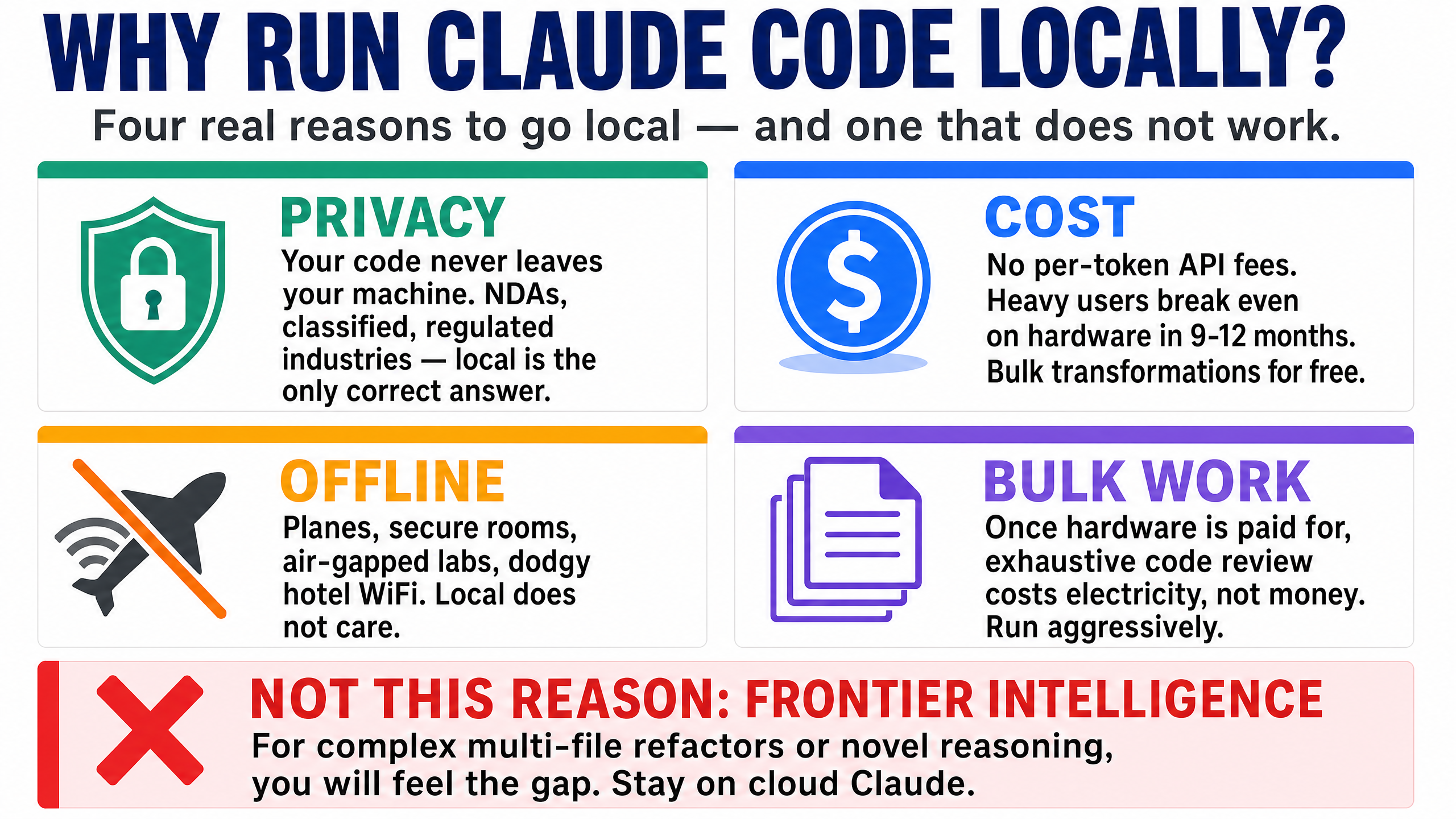
1. Privacy. Your code never leaves your machine. If you work under NDAs, on regulated systems, on classified material, or on anything proprietary your employer doesn't want sitting in someone else's data centre — local is the only correct answer. At StationX we deal with security content where sometimes sensitive vulnerability details are involved; for that work, local Claude Code is non-negotiable.
2. Cost (kind of). There's no per-token API cost. If you're a heavy user burning through a Claude Pro or Max subscription faster than you'd like, or you want to run bulk transformations across a thousand files without thinking about the bill, local makes sense. The "kind of" is because the upfront hardware cost is real — a 128 GB Mac isn't free either. The break-even point is somewhere around heavy daily use for 9–12 months.
3. Offline. Planes, secure rooms, air-gapped environments, dodgy hotel Wi-Fi. If you've ever had cloud Claude fail mid-task because of a flaky connection, you know how irritating that is. Local doesn't care.
4. Bulk work without per-token anxiety. Once your hardware is paid for, an exhaustive pass over a codebase costs you electricity and patience, not money. That changes how aggressively you'll use the tool.
The reason I'd rule out: "I want frontier intelligence for hard problems." Local models are good. They're not Claude Sonnet or Opus. If you're doing complex multi-file refactors, novel bug detection, or agentic loops with many constraints, you'll feel the gap. We'll come back to this honestly later.
If those reasons resonate, keep going. If not, save yourself an evening and stay on cloud Claude.
💻 Hardware Requirements for Claude Code With a Local LLM
This part matters more than people realise. Running Claude Code with local LLM inference is fundamentally a memory-bandwidth problem on Apple Silicon — not a compute one. The model has to read its entire weight set from RAM for every single token it generates. Bigger model + slower memory = slower output. Simple as that.
The first thing you want to know is: if I do this, what experience do I actually get? Three axes matter — intelligence (how smart the answer is), speed (how fast it comes back), and what hardware lets you have both. Here's the honest map across realistic 2026 hardware tiers, all running Qwen3.6:27b Q4_K_M (the model you'd actually use — released April 2026). Cloud Opus 4.7 sits at the bottom as the reference point.
How smart, how fast, on your hardware
| Hardware | Best model that fits | SWE-Bench Verified | Speed (500-token reply) | Real feel |
|---|---|---|---|---|
| Laptop, no GPU | 7B (painful) | <40% | 1–3 minutes | ❌ Don't bother |
| RTX 3060 12GB / M2 Pro 16GB | Qwen3.6:27b at Q3 (offload) | ~75%* | ~30 seconds | 🟡 Workable for light use |
| M3 Pro 32–36GB | Qwen3.6:27b (Q4_K_M, 17GB) | 77.2% | ~20 seconds | 🟡 Workable |
| M3 Max 32–48GB | Qwen3.6:27b | 77.2% | ~12 seconds | 🟢 Good — daily driver |
| RTX 3090 24GB (used) | Qwen3.6:27b | 77.2% | ~10 seconds | 🟢 Good — best value tier |
| M3 Max 64GB | Qwen3.6:27b-coding-mxfp8 (31GB) | 77.2% | ~10 seconds | 🟢 Good — quality-tuned variant fits |
| M3 Max 128GB (my setup) | Qwen3.6:27b + 35B-A3B MoE | 77.2% | few sec (27B) / ~15 sec (35B) | 🟢 Good — full Qwen3.6 family |
| RTX 4090 24GB | Qwen3.6:27b-coding-nvfp4 (20GB, MLX) | 77.2% | ~5 seconds | 🟢 Snappy — near-cloud feel |
| M3 Ultra 96–192GB | Qwen3.6:27b-coding-bf16 (55GB, full precision) | 77.2% | ~7 seconds | 🟢 Excellent |
| RTX 5090 32GB | Qwen3.6:27b (luxurious headroom) | 77.2% | ~3 seconds | 🟢 Near-cloud |
| 2–5× M3 Ultra Mac Studio cluster (RDMA over Thunderbolt 5, macOS 26.2+) | Kimi K2 Thinking (1T params; ~1TB FP8 / ~594GB INT4) / DeepSeek 671B / GLM-5.1 — multi-node tensor parallelism | Kimi K2 ~74% / GLM-5.1 77.8% | ~5–32 tok/s (scales up with nodes via Exo) | 🟢 Frontier self-hosted at home |
| M3 Ultra 256GB / 8× H100 | DeepSeek V4-Pro / GLM-5.1 self-hosted (or :cloud routing) | V4-Pro 80.6% / GLM-5.1 77.8% | varies | 🟢 Frontier-class self-hosted |
| ☁️ Cloud Claude Opus 4.7 | (n/a — cloud frontier) | 87.6% | 1–5 seconds | ⚡ Frontier intelligence |
*All locally-runnable rows running Qwen3.6:27b at Q4_K_M show the same 77.2% — its published score on SWE-Bench Verified (HF model card). Hardware buys speed, not intelligence; see the insight box below. The 12GB tier drops to Q3 quantisation to fit, which costs roughly 2–3 points (rounded to ~75%).
The hidden insight
Look at the intelligence column. Qwen3.6:27b's 77.2% on SWE-Bench Verified is the same number whether it runs on M3 Pro 32 GB, M3 Max 128 GB, RTX 4090, or RTX 5090. Your hardware doesn't make the local model smarter — it only makes it faster. The model determines the ceiling; the hardware determines how patiently you wait. Spending more on hardware buys you speed, not capability.
The honest read on the gap to cloud: Qwen3.6:27b scores 77.2% on SWE-Bench Verified, 53.5% on SWE-Bench Pro, and 59.3% on Terminal-Bench 2.0 (Qwen3.6-27B model card). Claude Opus 4.7 scores 87.6% on Verified and 64.3% on Pro (Anthropic Opus 4.7 announcement). So local does roughly 88% of frontier intelligence on Verified and 83% on Pro — for free, fully offline, on your own hardware. For most coding tasks (function-level edits, refactors, debugging, writing tests) that's plenty. For multi-file novel reasoning, the gap shows up.
⚠️ If you're under 24 GB unified, stop here
Qwen3.6:27b's Q4_K_M build is 17 GB and recommends 24 GB+ unified RAM (or VRAM). It will technically load on a 16 GB Mac, but it'll spill to swap and you'll get under 5 tokens per second. That's not a coding assistant — that's a coding pen-pal. Either save up for a 24 GB+ machine, or stay on cloud Claude.
A note on Apple Silicon vs NVIDIA
The bandwidth split tells the whole story. An RTX 4090 has 1,008 GB/s of memory bandwidth (NVIDIA RTX 4090 product page) versus the M3 Max's 400 GB/s (on the 16-core CPU / 40-core GPU bin — the lower-binned M3 Max is 300 GB/s; Apple M3 Max specs) — so the same model runs about 2–3× faster on the 4090. The M3 Ultra closes some of that gap at 819 GB/s (Apple Mac Studio specs), and the RTX 5090 pulls ahead again at 1,792 GB/s (NVIDIA RTX 5090 product page).
Apple wins on capacity — you can fit a 70B+ model in unified memory on a Mac Studio that simply won't fit on a single consumer GPU. NVIDIA wins on speed per parameter — for any model that fits in VRAM, the 4090 and 5090 are faster than any Mac. Pick based on the workload you actually have. If you mostly want Qwen3.6:27b and want it fast, an RTX 4090 is the sweet spot. If you want headroom to run a 70B+ MoE (or a future 100B+) at all, the Mac route is the only consumer answer.
The setup steps below work on both — you just install Ollama via its native installer rather than Homebrew on Windows.
The cluster tier — running trillion-parameter models at home
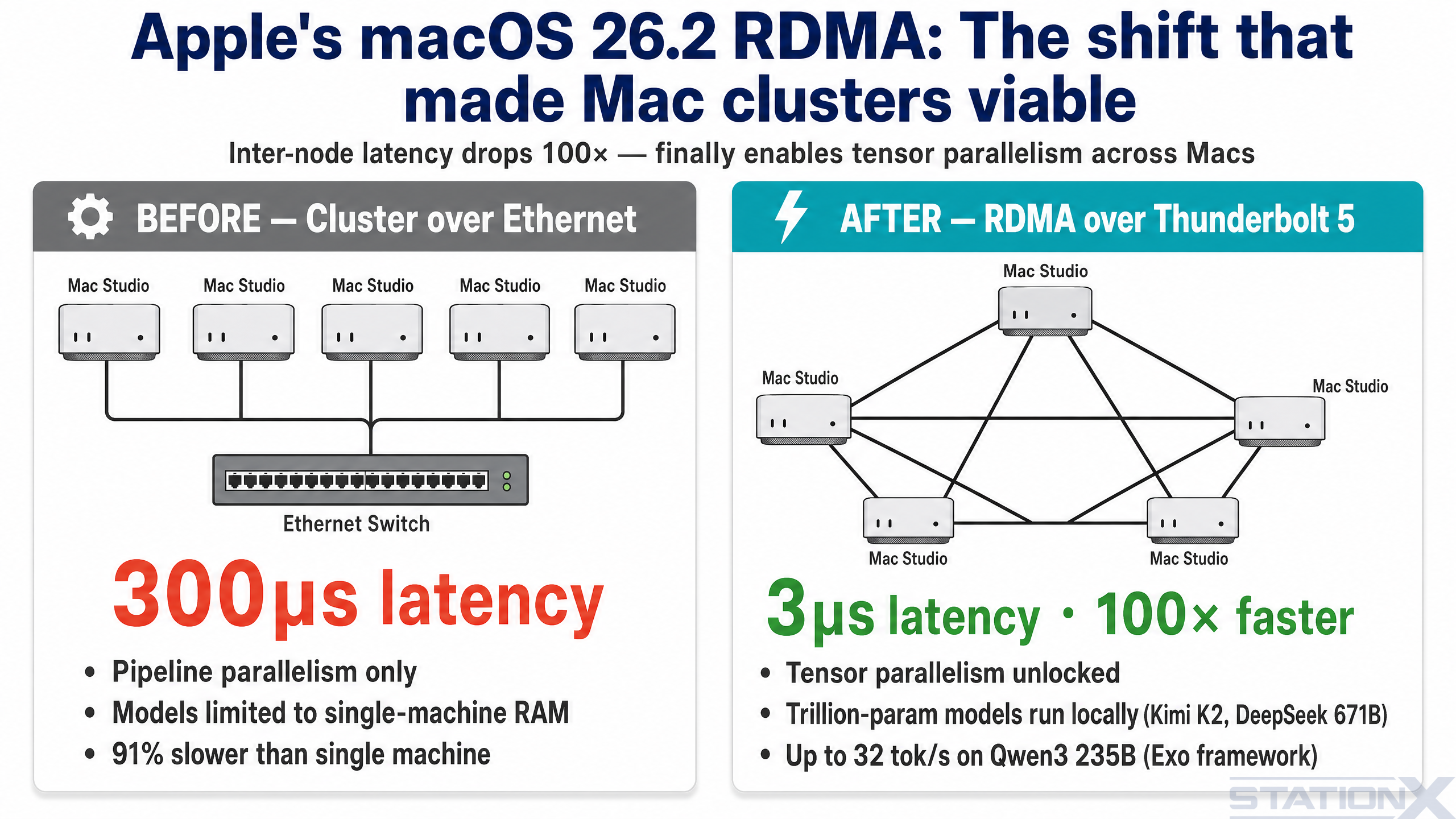
One bracket above any single machine: clustering Mac Studios over Thunderbolt 5. Until late 2025, this didn't really work — Ethernet between Macs added 300+ microseconds of latency per hop, which killed tensor parallelism and forced the slower pipeline-parallel mode. macOS 26.2 changed that. Apple shipped native RDMA (Remote Direct Memory Access) over Thunderbolt 5, dropping inter-node latency to about 3 microseconds — a 100× improvement that finally makes a Mac Studio cluster behave like one bigger machine (Jeff Geerling: 1.5 TB of VRAM on Mac Studio).
What this unlocks: models that don't fit on any single consumer machine. Kimi K2 Thinking is a 1-trillion-parameter MoE model — roughly 1 TB at FP8 precision, around 594 GB at INT4 — that won't load on a single Mac. Spread across four or five Mac Studios with RDMA, it runs. Jeff Geerling's RDMA cluster tests on Qwen3 235B hit 32 tokens per second on the full cluster using the Exo framework, which is currently the only runner that supports Apple's RDMA implementation (llama.cpp does not, yet). NetworkChuck's 5-Mac Studio cluster walkthrough is the best end-to-end demo if you want to see what's involved.
For a Claude Code workflow specifically, the cluster tier matters in one situation: you want frontier-grade open-weight models (Kimi K2 Thinking, DeepSeek 671B, GLM-5.1 at full precision) running locally with zero outbound traffic. For most readers of this guide, a single M3 Max or RTX 4090 running Qwen3.6:27b is the right answer. The cluster is for the small group who genuinely need frontier-class self-hosted — typically regulated industries, classified work, or teams running bulk transformations against confidential codebases.
Cluster prerequisites at a glance
Mac Studios with M3 Ultra (or M4 Ultra when available), 256 GB or 512 GB unified memory each, Thunderbolt 5 cables between them (no switch needed for small clusters — direct connect works), macOS 26.2 or later on every node, and the Exo framework. Expect $30–60k for a usable 4–5 node cluster. Watch for our standalone guide on this — it's the next article we're writing.
🏆 Choosing the Best Ollama Model for Claude Code
For coding work in 2026, the realistic options ladder up from "fits on most laptops" to "needs a workstation". Here's the full picture, sourced where it matters.
The model ladder — from daily driver to frontier-class
| Model | Params | Disk size | SWE-Bench Verified | Hardware needed | Best for |
|---|---|---|---|---|---|
qwen3.6:27b | 27.8B dense | 17 GB (Q4_K_M) | 77.2% | 24 GB+ unified or 24 GB GPU | Daily driver. Fast, capable, the new default. |
qwen3.6:27b-coding-nvfp4 | 27.8B dense | 20 GB (NVFP4 MLX) | 77.2% (same weights) | 32 GB+ unified | Coding-tuned, MLX-optimised. Text-only. |
qwen3.6:27b-coding-mxfp8 | 27.8B dense | 31 GB (MXFP8 MLX) | 77.2% (same weights) | 48 GB+ unified | Coding-tuned, less aggressive quantisation. |
qwen3.6:35b-a3b | 35B / ~3B active (MoE) | 24 GB (Q4_K_M) | not yet published | 32 GB+ unified | More headroom, fast for its total size. |
qwen3.6:27b-coding-bf16 | 27.8B dense | 55 GB (BF16 MLX) | 77.2% (full precision) | 64 GB+ unified | Quality ceiling for the 27B family. |
deepseek-v4-pro:cloud | 1.6T total / 49B active (MoE) | served via Ollama Cloud | 80.6% (Pro 55.4%) | Cloud — not local-runnable | Frontier reasoning, 1M context, 93.5% LiveCodeBench v6. |
glm-5.1:cloud | ~355B / 32B active (MoE) | served via Ollama Cloud | 77.8% (Pro 58.4% — top open) | Cloud — not local-runnable | Best open-weight on SWE-Bench Pro right now. |
Sourced figures only. Qwen3.6 27B benchmarks (77.2% Verified, 53.5% Pro, 59.3% Terminal-Bench 2.0, 83.9% LiveCodeBench v6) come from the official Qwen3.6-27B HF model card. DeepSeek-V4-Pro 80.6% / 55.4% / 93.5% LCB v6 and GLM-5.1 77.8% / 58.4% come from their respective Ollama library pages. Numbers checked against authoritative pages on 29 April 2026.
⚠️ Local vs cloud-served: read the tag suffix
Tags ending in :cloud (deepseek-v4-pro:cloud, glm-5.1:cloud, kimi-k2.6:cloud) are served by Ollama Cloud, not your machine. Ollama acts as the router, but the inference happens remotely. If you want true offline operation — the entire reason for this guide — stay on the Qwen3.6 family. Use :cloud tags only when you specifically want a single Ollama-driven workflow that can dip into a frontier model when needed.
How to think about the ladder
Tier 1 — qwen3.6:27b (most readers). If you have a 24–32 GB Mac or a 24 GB GPU, this is what you run day to day. Released April 2026, 27.8B dense, Apache 2.0, 17 GB on disk, 77.2% on SWE-Bench Verified and 59.3% on Terminal-Bench 2.0. Beats the older Qwen3-Coder 30B on every benchmark while being smaller. Ships with a 256K context window by default — no Modelfile fiddling required. This is the new default, and it replaces last year's qwen3-coder:30b recommendation entirely.
Tier 2 — Coding-tuned variants (:27b-coding-nvfp4 and :27b-coding-mxfp8). Same 27B weights, fine-tuned for coding and shipped as MLX-format builds (Apple Silicon-optimised). NVFP4 is 20 GB and surprisingly punchy on Macs with 32 GB+. MXFP8 is 31 GB with less aggressive quantisation — fits a 48 GB+ Mac. Both are text-only (no vision support). On modern Apple Silicon these are usually faster than the GGUF base for coding workflows. NVFP4 also runs efficiently on RTX 50-series Blackwell GPUs.
Tier 3 — qwen3.6:35b-a3b (32 GB+ Mac, 64 GB ideal). The MoE sibling — 35B total parameters, only ~3B activate per token. 24 GB on disk at Q4_K_M; fits a 32 GB Mac with light other usage, runs comfortably on 64 GB. Larger total pool means slightly better answers on harder multi-step tasks; the active-parameter trick keeps generation fast. Worth pulling as a second model if your hardware has the room.
Tier 4 — Frontier via Ollama Cloud (deepseek-v4-pro:cloud, glm-5.1:cloud, kimi-k2.6:cloud). When local quality isn't enough and you don't want to leave the Ollama workflow. DeepSeek V4-Pro (released 24 April 2026) is a 1.6T-parameter MoE with 49B active and a 1M-token context window — frontier-class reasoning, hits 93.5% on LiveCodeBench v6 (per its Ollama page). GLM-5.1 from Z.AI leads SWE-Bench Pro at 58.4% — the top score for any open-weight model right now (per its Ollama page). Kimi K2.6 from Moonshot is multimodal and tuned for long-horizon agentic work. All three route via Ollama Cloud — your code does leave your machine for these, so privacy guarantees revert to Ollama's hosting policy. Useful when you'd otherwise reach for cloud Claude anyway.
# Daily driver — most readers start here (truly local)
$ ollama pull qwen3.6:27b

# Coding-tuned MLX variants (Apple Silicon / RTX 50-series)
$ ollama pull qwen3.6:27b-coding-nvfp4
$ ollama pull qwen3.6:27b-coding-mxfp8

# MoE sibling — more headroom on 64 GB+ machines
$ ollama pull qwen3.6:35b-a3b

# Frontier via Ollama Cloud — NOT local, code leaves your machine
$ ollama pull deepseek-v4-pro:cloud
$ ollama pull glm-5.1:cloud
Qwen3.6:27b is 17 GB and downloads in five minutes on gigabit, an hour on slower connections. The 35B-A3B is 24 GB. The coding-bf16 variant is 55 GB. The :cloud tags don't download — they're routed.
How close to frontier can local actually get?
The honest answer, ranked:
| What you can run | SWE-Bench Verified | SWE-Bench Pro | Gap to cloud Opus 4.7 |
|---|---|---|---|
| Qwen3.6:27b (24 GB+ Mac, 24 GB GPU) — fully local | 77.2% | 53.5% | ~10 points (~88% of Opus on Verified) |
| Qwen3.6:35b-a3b MoE (32 GB+ Mac) — fully local | not yet published | not yet published | unpublished — likely close to 27B sibling |
| GLM-5.1 via Ollama Cloud (cloud-served, not local) | 77.8% | 58.4% (top open) | ~6 points on Pro |
| DeepSeek V4-Pro via Ollama Cloud (cloud-served) | 80.6% | 55.4% | ~7 points (closest open-weight to Opus) |
| Anthropic Claude Sonnet 4.6 (cloud, default) | 79.6% (Anthropic) | — | ~8 points below Opus |
| Anthropic Claude Opus 4.7 (cloud, frontier) | 87.6% (Anthropic) | 64.3% | — (this is the ceiling) |
Two things to take from this:
- Truly-local Qwen3.6:27b now reaches ~88% of cloud frontier on SWE-Bench Verified. That's a meaningful jump from where local was a year ago — and it runs on a 24 GB Mac. For a huge swathe of coding work, the gap is gone.
- More hardware mostly buys you speed, not intelligence. Same model on bigger hardware = same SWE-Bench number, faster generation. Bigger model = higher intelligence ceiling. The hardware enables the model choice; the model choice determines the intelligence.
For most readers of this guide, start with qwen3.6:27b. It hits the price-performance sweet spot in April 2026. Move up to a coding-tuned variant or the MoE sibling only when the workload genuinely demands it.
🛠️ Claude Code Ollama Setup: Step-by-Step
Now the actual setup. Seven steps. I've tested every one on a clean M3 Max install. Each step builds on the last — don't skip.
1️⃣ Step 1 — Install Ollama
$ brew install ollama
$ brew services start ollama
Verify it's running:
$ ollama --version
Ollama runs as a background daemon on port 11434. You won't see a window — it just sits there waiting for requests.
On Linux: curl -fsSL https://ollama.com/install.sh | sh. On Windows: download the installer from ollama.com.
2️⃣ Step 2 — Pull the Coding Model
$ ollama pull qwen3.6:27b
Test it works:
$ ollama run qwen3.6:27b "Write a Python function to reverse a string"
You should get a response in a few seconds. If you don't, check ollama ps — if the model isn't listed, something failed during the pull.
3️⃣ Step 3 — Context Window: Already Sorted
If you've followed older Claude Code + Ollama guides, you'll have seen a step here about creating a custom Modelfile with PARAMETER num_ctx 262144 to override Ollama's old 16K default. Earlier qwen3-coder models needed it.
Qwen3.6 ships with a 262,144-token context window by default (1,010,000 with YaRN scaling, per the official model card). No Modelfile work required. If you're upgrading from an older guide and have a leftover qwen3-coder:30b-256k tag lying around, you can ollama rm it.
If you specifically need to override the default for some reason — e.g. clamp it lower to save VRAM — that's still done via Modelfile, but the situations where you'd want to are rare.
4️⃣ Step 4 — Tune Ollama's Runtime
Restart Ollama with these environment variables. They give Apple Silicon a meaningful speedup and stop the model from unloading between prompts:
$ brew services stop ollama
$ launchctl setenv OLLAMA_FLASH_ATTENTION 1
$ launchctl setenv OLLAMA_KV_CACHE_TYPE q8_0
$ launchctl setenv OLLAMA_KEEP_ALIVE 60m
$ brew services start ollama
| Flag | What it does |
|---|---|
OLLAMA_FLASH_ATTENTION=1 | Optimised attention kernels — faster prefill |
OLLAMA_KV_CACHE_TYPE=q8_0 | Quantises the KV cache, halves its memory cost with negligible quality loss |
OLLAMA_KEEP_ALIVE=60m | Keeps the model loaded in memory for an hour — no reload between prompts |
These persist across reboots. To remove them later: launchctl unsetenv VARNAME and restart Ollama.
One thing worth knowing: if you've seen guides recommend OLLAMA_NUM_BATCH=2048, that env var is silently ignored by Ollama — verified against the official envconfig source. The num_batch option is per-model only — set it via PARAMETER num_batch 2048 inside a custom Modelfile derived from qwen3.6:27b if you want larger prefill batches.
5️⃣ Step 5 — Wire Claude Code to Ollama (Three Env Vars, Plus One for Privacy)
Three environment variables tell Claude Code to talk to Ollama instead of Anthropic. Add a fourth if you want to go fully offline:
$ export ANTHROPIC_BASE_URL=http://localhost:11434
$ export ANTHROPIC_AUTH_TOKEN=ollama
$ export ANTHROPIC_API_KEY=""
$ export CLAUDE_CODE_DISABLE_NONESSENTIAL_TRAFFIC=1   # disables telemetry + auto-update pings to api.anthropic.com
That fourth variable matters more than people realise. Without it, even when Claude Code is routed at local Ollama, the binary still pings api.anthropic.com on startup for telemetry, error reporting, and auto-update checks. Your code doesn't leave your machine — but your usage metadata does. If your reason for going local is privacy, set this. If it's just speed and cost, you can skip it.
Set them in any terminal where you want Claude Code to use the local model. They're session-scoped — they don't leak into other terminals where you still want cloud Claude.
Verify the endpoint works:
$ curl http://localhost:11434/v1/messages \
    -H "Content-Type: application/json" \
    -d '{"model":"qwen3.6:27b","max_tokens":50,"messages":[{"role":"user","content":"hi"}]}'
You should get a JSON response in a few seconds. If you do, Ollama is correctly serving the Anthropic-compatible endpoint.
6️⃣ Step 6 — The --bare Flag (the Fix Most Guides Skip)
This is the bit that took me hours to find. The Unsloth and Roborhythms teams have written about the underlying cause, but most setup guides walk readers through Steps 1–5 and stop there — leaving you with a setup that takes 30+ seconds to answer "2+2". Here's why.
Claude Code attaches an "attribution header" to every request. That header changes per request, which invalidates the local model's KV cache, which forces the model to re-process the entire 20K+ token system prompt from scratch on every prompt — even on a question as simple as "2+2".
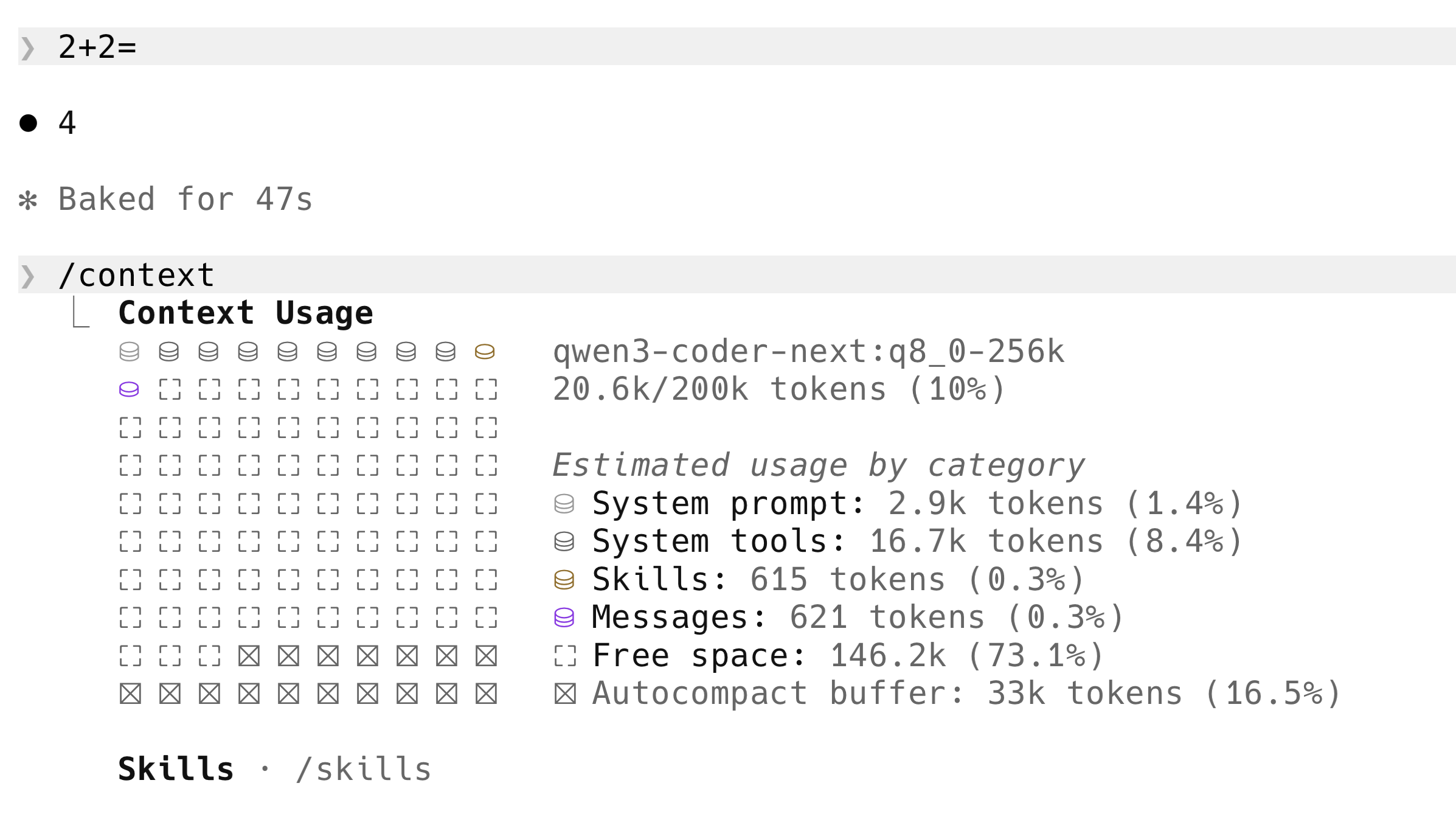
The exact problem on my own machine — "2+2" took 47 seconds before the fix. The /context panel underneath shows why: 16.7k tokens of System tools flooded into every prompt, plus the attribution header invalidating the KV cache on top.
The Unsloth team flagged this publicly: "Claude Code recently prepends and adds a Claude Code Attribution header, which invalidates the KV Cache, making inference 90% slower with local models" (Unsloth Claude Code docs). Roborhythms reported the same effect on Qwen2.5-Coder 14B — first-token latency climbing from a ~1.8 second baseline to ~24 seconds on a 6K-context follow-up when the attribution header was active (Roborhythms write-up). An order of magnitude regression, fixed by stripping the header.
The fix is built into Claude Code itself. There's a --bare flag, added in Claude Code v2.1.81. Per its official --help output, --bare is "minimal mode" and skips:
- Hooks
- LSP integration
- Plugin sync
- Attribution headers ← this is the one that fixes our slowness problem
- Auto-memory
- Background prefetches
- Keychain reads
CLAUDE.mdauto-discovery
It also disables OAuth, so ANTHROPIC_API_KEY (or apiKeyHelper via --settings) is required — which is fine because we're routing at Ollama, which accepts any token.
Because --bare skips the attribution header, it incidentally avoids the KV-cache invalidation Unsloth identified. There's also a narrower, directly-documented fix that targets just the header: set CLAUDE_CODE_ATTRIBUTION_HEADER: "0" in the env section of ~/.claude/settings.json. Either fix gets you the speed back; --bare is the simpler one if you don't need the rest of Claude Code's features for the local session.
Run Claude Code with --bare and inference returns to expected speed.
$ claude --bare --model qwen3.6:27b
Combined with Step 4 above, this gets you from "minutes to answer 2+2" down to "a few seconds" on Qwen3.6:27b on an M3 Max. The MoE 35B-A3B is comparable speed thanks to its small active-parameter count.
One thing worth knowing: --bare requires ANTHROPIC_API_KEY to be set (it doesn't go through OAuth). The ANTHROPIC_API_KEY="" line in Step 5 satisfies that requirement when paired with ANTHROPIC_AUTH_TOKEN=ollama.
7️⃣ Step 7 — Make It Persistent
Add this to your ~/.zshrc (or ~/.bashrc on Linux) so you can flip between cloud and local Claude Code with one word:
claude-local() {
  export ANTHROPIC_BASE_URL=http://localhost:11434
  export ANTHROPIC_AUTH_TOKEN=ollama
  export ANTHROPIC_API_KEY=""
  export CLAUDE_CODE_DISABLE_NONESSENTIAL_TRAFFIC=1
  echo "Claude Code -> local Ollama (fully offline)"
}

claude-cloud() {
  unset ANTHROPIC_BASE_URL ANTHROPIC_AUTH_TOKEN ANTHROPIC_API_KEY CLAUDE_CODE_DISABLE_NONESSENTIAL_TRAFFIC
  echo "Claude Code -> api.anthropic.com (default)"
}
Reload your shell with source ~/.zshrc. Now in any terminal:
$ claude-local                                    # route to local Ollama
$ claude --bare --model qwen3.6:27b               # launch optimised
When you're done and want cloud Claude back:
$ claude-cloud # back to normal
That's the full Claude Code Ollama setup. Let's talk about what's actually happening under the hood, then about what you can realistically expect from it.
🔄 How Claude Code With Ollama Talks to Each Other
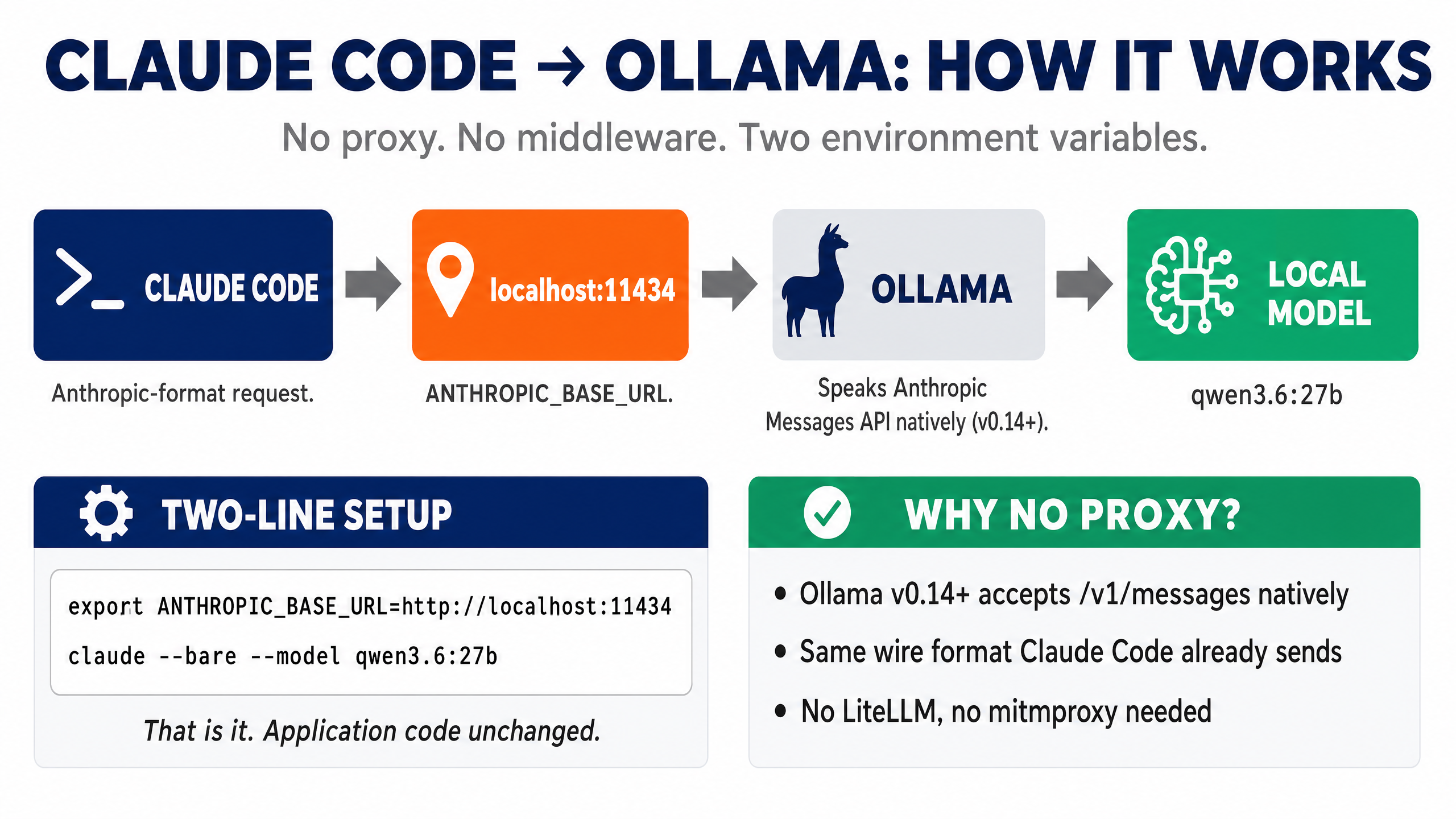
It's worth understanding the architecture, because it explains why the setup is so simple and why no proxy is needed.
When you run cloud Claude Code, it sends requests to https://api.anthropic.com/v1/messages with your API key. The body is in Anthropic's Messages API format — system prompt, user messages, tool definitions, etc.
When you set ANTHROPIC_BASE_URL=http://localhost:11434, Claude Code sends the same request to your local machine instead. Ollama (since v0.14) listens on that port and accepts requests at /v1/messages in Anthropic's exact format. It translates internally to whatever the underlying model expects, runs inference, and returns a response in the same Anthropic format.
So the data flow looks like this: Claude Code sends Anthropic-format request → Ollama receives it on port 11434 → Ollama runs your local model → Ollama returns Anthropic-format response → Claude Code displays it. Claude Code thinks it's talking to Anthropic. Ollama is doing the work.
This is why you don't need LiteLLM, mitmproxy, claude-code-router, or any other middleware. Anthropic-format-in, Anthropic-format-out, all native. The only friction is the attribution header, which --bare handles.
⏱️ Honest Performance: What to Expect
This is where most local-LLM articles oversell. I'm going to give you my actual measured numbers on an M3 Max with 128 GB unified memory. Adjust expectations down for less RAM or smaller chips, and up for M3 Ultra Studios or NVIDIA GPUs.
| Setup | Time to respond to "2+2" |
|---|---|
| Cloud Claude Sonnet/Opus | <2 seconds |
| Qwen3.6:27b with all optimisations | A few seconds |
| Qwen3.6:35b-a3b MoE with all optimisations | ~5 seconds |
Qwen3.6:27b without --bare | ~30+ seconds (KV cache invalidation) |
| Older qwen3-coder:30b without context override | 60+ seconds |
The progression matters. When I started this experiment last year on qwen3-coder:30b, "2+2" took over a minute. The Ollama runtime tuning and --bare got it down to a few seconds. With Qwen3.6:27b in April 2026, the default context is already 256K, so the bottleneck is purely memory bandwidth and the attribution-header issue — and --bare still matters as much as ever.
The bottleneck on Apple Silicon, again, isn't compute — it's memory bandwidth. Qwen3.6:27b reads its 17 GB weight set from RAM for every generated token; on the M3 Max's 400 GB/s memory bandwidth, that takes real time. Larger models read more per token, which is why a 70B+ feels noticeably slower.
For comparison, an RTX 4090 has 1,008 GB/s memory bandwidth and an M3 Ultra has 819 GB/s. Both are significantly faster for the same model. If you're sitting in front of a 4090 or an Ultra, Qwen3.6:27b will feel close to cloud-speed.
Throughput-wise, on Qwen3.6:27b I'm seeing roughly 16–25 tokens per second on the M3 Max 128 GB at Q4_K_M (matching Simon Willison's measurements on the same hardware). On RTX 5090 the same model runs at ~30 tok/s per community benchmarks. Cloud Claude (Opus 4.7 / Sonnet 4.6) runs at roughly 45–80 tokens per second per Artificial Analysis benchmarks — meaningfully faster than local but not the order-of-magnitude gap many guides claim.
So local is slower. We don't pretend otherwise. But "a few seconds for a small response on Qwen3.6:27b" is firmly in the territory of "I forgot I was offline" most of the time.
How to read the benchmarks (skip if you already know)
Before the numbers — a quick honest explainer, because "77.2%" means nothing if you don't know what's being measured or who's doing the measuring.
| Benchmark | What it actually tests | Who runs it | Why it matters here |
|---|---|---|---|
| SWE-Bench Verified | Given a real GitHub issue + the repo at the time it was filed, can the model produce a code patch that passes hidden unit tests? 500 human-cleaned issues from real Python projects. | Princeton NLP (swebench.com) — Carlos Jimenez, John Yang, Ofir Press et al. | Closest thing to 'real coding work' any benchmark measures. Not synthetic. Most-cited headline metric. |
| SWE-Bench Pro | Same idea, harder set — 1,865 unfiltered issues, multi-file, no human cleanup. Scores are lower because it's brutal. | Same Princeton team | Tests harder reasoning. Where Opus's lead over open-weight is biggest. |
| Terminal-Bench 2.0 | Drop the model into a sandboxed Linux shell. Give it a task in plain English ('set up Postgres, populate from CSV'). Can it complete using shell commands? | Stanford / Anthropic researchers (tbench.ai) | Measures the agent loop — running commands, reading output, deciding next step. Closest to how Claude Code actually works. |
| LiveCodeBench v6 | Coding-interview problems (LeetCode, Codeforces). Generate code → run against test cases → measure pass@1. Problems dated to resist training-set contamination. | UC Berkeley + ETH Zürich (livecodebench.github.io) | Resists contamination via dating. Less predictive of real engineering work — closer to puzzle-solving. |
| Aider Polyglot | Edit existing files across 6+ languages (Python, JS, Go, Rust, C++, Java). Closest to what you actually do in Claude Code: open file, ask agent to edit it. | Aider open-source project — Paul Gauthier (aider.chat/docs/leaderboards) | Most predictive of day-to-day usefulness for Claude Code workflows. Underused as a metric. |
| Artificial Analysis Intelligence Index v4.0 | Composite of 10 benchmarks rolled into one 0–100 score. Adds speed (tok/sec) and cost ($/M tokens) as separate axes. | artificialanalysis.ai — independent third party | They re-run models themselves with their own harness, don't trust vendor self-reports. Best independent cross-check. |
⚠ One honest caveat about every benchmark number on this page
Vendor self-reports run higher than independent re-runs. When Artificial Analysis or the SWE-Bench leaderboard team verify a model with their own harness, scores typically drop 2–5 points. So Qwen3.6:27b's reported 77.2% is probably 73–75% in production conditions. Same applies to Anthropic's, OpenAI's, and Google's published numbers. Don't read benchmark deltas under 3 points as meaningful.
And on intelligence — where local actually lands
Speed is half the story. The other half is whether the model is smart enough for what you're doing. Here's where the local options sit against cloud frontier on the relevant coding benchmarks:
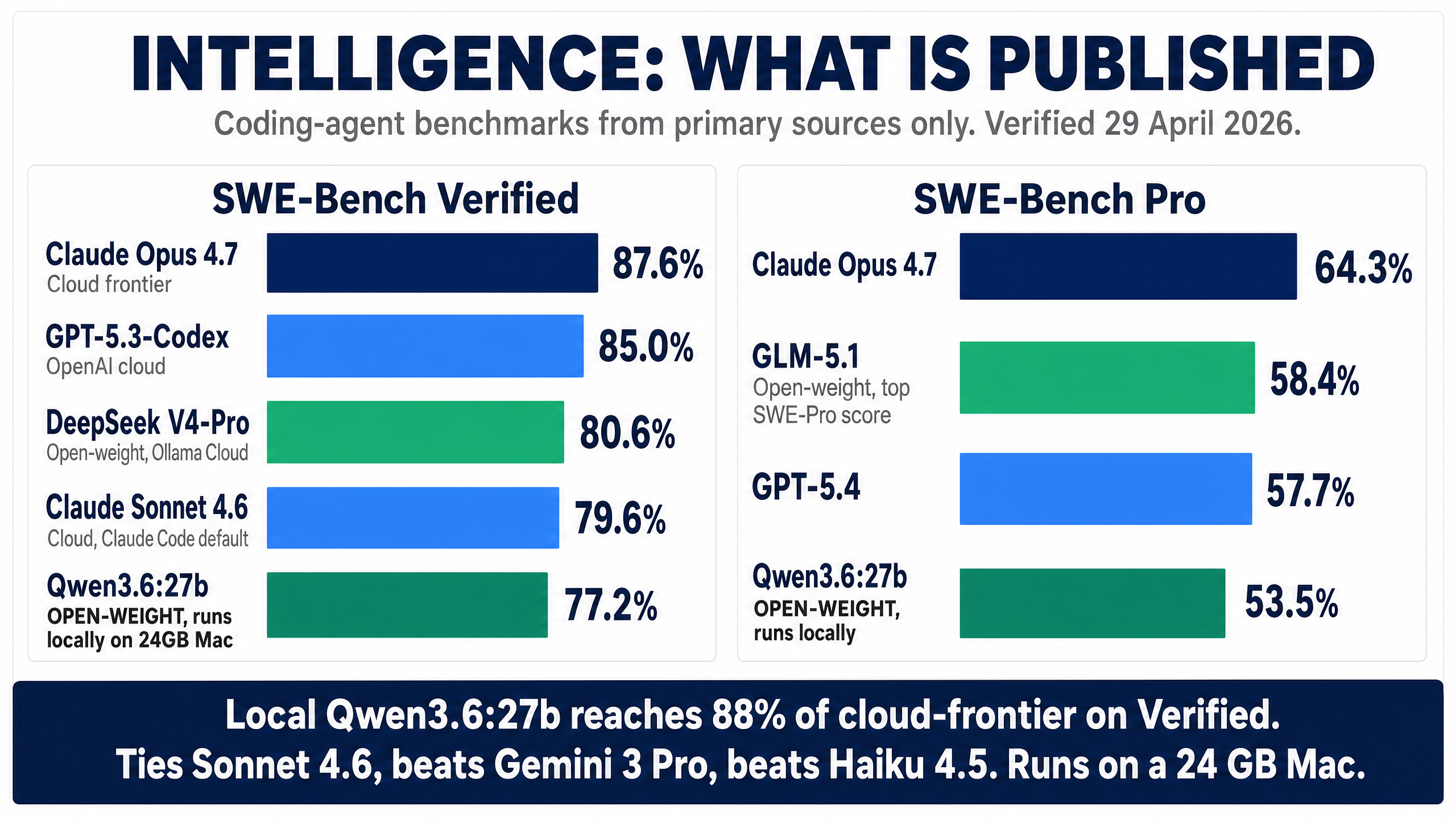
| Provider | Model | SWE-Bench Verified | SWE-Bench Pro | Terminal-Bench 2.0 | Where it runs |
|---|---|---|---|---|---|
| Anthropic | Claude Opus 4.7 (frontier) | 87.6% | 64.3% | 69.4% | Cloud |
| OpenAI | GPT-5.3-Codex | 85.0% | 56.8% | 77.3% | Cloud |
| DeepSeek | DeepSeek V4-Pro (1.6T MoE, 1M ctx, Max thinking) | 80.6% | 55.4% | 67.9% | Ollama Cloud — not local |
| Gemini 3.1 Pro | 80.6% | 54.2% | 68.5% | Cloud | |
| Anthropic | Claude Sonnet 4.6 (Claude Code default) | 79.6% | — | 59.1% | Cloud |
| OpenAI | GPT-5.4 | 78.2% | 57.7% | 75.1% | Cloud |
| Z.AI | GLM-5.1 (open-weight) | 77.8% | 58.4% (top open) | 63.5% | Ollama Cloud — not local |
| Alibaba | Qwen3.6:27b ⭐ (Apache 2.0, 17 GB) | 77.2% | 53.5% | 59.3% | Local — 24 GB+ daily driver |
| Gemini 3 Pro | 76.2% | 54.2% | 56.9% | Cloud | |
| xAI | Grok 4.20 (see footnote ⚠) | ~75% | 73.5%⚠ | — | Cloud |
| Anthropic | Claude Haiku 4.5 | 73.3% | 39.5% | — | Cloud |
| — | Smaller / older open coders | <60% | <35% | <40% | Below the agentic-viability line |
All figures verified against primary references on 29 April 2026. Opus 4.7 87.6%/64.3% (Anthropic); Sonnet 4.6 79.6% (Anthropic); Haiku 4.5 73.3%/39.5% (Anthropic); GPT-5.3-Codex / 5.4 (Artificial Analysis); Gemini 3 / 3.1 Pro (DeepMind model cards); DeepSeek V4-Pro 80.6% / 55.4% / 67.9% (Ollama page); GLM-5.1 77.8% / 58.4% / 63.5% (Ollama page); Qwen3.6:27b 77.2% / 53.5% / 59.3% (Qwen HF model card).
⚠ Grok 4.20 SWE-Bench Pro caveat
xAI's reported 73.5% on SWE-Bench Pro would be the highest of any model in this table — higher than Claude Opus 4.7's 64.3%. That score comes from a single-source SEAL leaderboard reference and has not been independently corroborated by community evaluations on Artificial Analysis or the SWE-Bench leaderboard at time of writing. Treat as provisional pending independent confirmation. Grok's other coding benchmarks place it around the GPT-5 / Gemini 3 tier, which makes the Pro outlier worth scepticism.
The honest read: with Qwen3.6:27b local, you're at 77.2% on SWE-Bench Verified versus Opus 4.7's 87.6% — that's about 88% of frontier on this benchmark, on a 17 GB model that runs on a 24 GB Mac. The remarkable thing is the company Qwen3.6:27b keeps: it ties Sonnet 4.6 (79.6% — within 2.4 points), beats Gemini 3 Pro (76.2%), beats Haiku 4.5 (73.3%), and edges GPT-5.4 (78.2% — within 1 point). The cloud-frontier providers are not that far ahead anymore for everyday coding work. Where they still pull away is multi-file novel reasoning and long agentic loops with many constraints — Opus 4.7's 87.6% / 64.3% remains genuinely above the field. Knowing which side of that line your work falls on is most of the decision.
What each model is actually good at (and bad at)
Benchmark scores tell you the order of finish. They don't tell you what task to use which model for. Here's the practical decoder — based on what each scores well on, what it scores poorly on, and where it's been trained.
| Model | 🟢 Good at | 🟡 OK at | 🔴 Bad at / avoid for |
|---|---|---|---|
| Qwen3.6:27b (your local default) | Function-level edits • refactoring • writing tests • debugging single-file issues • shell-driven agentic work (Term-B 59.3%) • long context (256K) • reading large repos | Multi-file refactors across 3-5 files • cross-language polyglot edits • design decisions | Novel architectural reasoning • subtle multi-file race conditions • problems requiring deep multi-step planning over 10+ steps |
| Claude Opus 4.7 | Hard multi-file refactors • novel bug detection • architectural decisions • long agentic loops with many constraints • genuinely-novel reasoning the model hasn't seen before • SWE-Pro 64.3% (best in class) | Cost-sensitive work • bulk transformations • simple edits (overkill) | Speed-critical work — slowest of the cloud frontier • cost-sensitive bulk work ($10/M tokens) |
| Claude Sonnet 4.6 (Claude Code default) | Daily coding workflow • most edit-existing-file work • the all-rounder. Anthropic's own choice as the Claude Code default isn't an accident. | Hardest novel reasoning (use Opus) • single-file pure code generation (GPT-5.3-Codex edges it) | Same as Opus on truly hard problems — slightly less capable. Pick Opus when you'd otherwise pick Sonnet but the task feels hard. |
| Claude Haiku 4.5 | Fast cheap drafts • boilerplate generation • simple edits • code review for obvious issues • when speed and cost matter more than capability | Mid-complexity refactors | Anything requiring real reasoning. SWE-Pro 39.5% — clearly tier-2. Don't use for complex agentic loops. |
| GPT-5.3-Codex | Pure code generation from scratch • Terminal-Bench 77.3% (highest of the major models — strong agentic shell work) • SWE-V 85% (close to Opus on raw bug-fixing) | Long-context reasoning (Anthropic still ahead) | Tasks requiring honest 'I don't know' — GPT family historically more confidently-wrong than Claude family. Less reliable on subtle bugs. |
| GPT-5.4 | Algorithmic / competitive-coding-flavour problems • LeetCode-style work • cheap fast iteration | Real engineering work (similar tier to Qwen3.6:27b but cloud-only and metered) | Privacy-sensitive code (cloud) • workflows where you'd rather use Codex variant for the agentic side |
| Gemini 3.1 Pro | Long-context document work (1M ctx baseline) • multimodal coding (UI from screenshot, debugging from error photo) • bulk-throughput code review with massive batches | Single-file edits • short interactive Q&A | Tight agentic loops — historically less reliable on Claude-Code-style tool use than Anthropic models. Pick this when context size dominates the decision. |
| DeepSeek V4-Pro (Ollama Cloud) | Algorithmic problem-solving • LiveCodeBench 93.5% (best of any model) • long-context reasoning (1M ctx) • cost-effective frontier alternative | Edit-existing-file workflows (Aider Polyglot scores lower than agentic-trained Claude family) | Privacy-critical work (cloud-served, code leaves your machine despite Ollama branding) |
| GLM-5.1 (Ollama Cloud) | SWE-Bench Pro 58.4% — the highest of any open-weight model. Hard multi-file fix-the-bug work. | Speed (slower than Qwen3.6 family) • western-language idioms (trained primarily on Chinese-language sources) | Privacy-critical work (cloud-served) • single-file iterative editing — overkill |
| Grok 4.20 | Real-time information (X/Twitter integration) • opinionated takes • politically-uncensored output | Generic coding (around GPT-5/Gemini 3 tier on most metrics) | Anyone needing a verified benchmark story — its 73.5% SWE-Pro is single-source and not independently corroborated. Treat the marketing scores with scepticism. |
How this table was derived (transparency note): The 🟢/🟡/🔴 rows mix two kinds of evidence. Benchmark-derived claims — e.g. "Qwen3.6:27b good at function-level edits", "Opus best at hard refactors", "Haiku tier-2" — come directly from reading the SWE-Bench Verified, SWE-Bench Pro, and Terminal-Bench 2.0 numbers in the table above. Conventional-wisdom claims — e.g. "GPT historically more confidently-wrong than Claude", "Sonnet is the all-rounder default", "GLM-5.1 weaker on western-language idioms", model-specific failure modes like "subtle multi-file race conditions" — come from widely-reported practitioner reports (Aider leaderboards, r/LocalLLaMA threads, hallucination benchmarks like TruthfulQA / SimpleQA) and are not independently re-benchmarked here. Where a number is disputed (e.g. Grok's 73.5% SWE-Pro), it's flagged in the row. Treat the granular task lists as informed inference from the benchmarks, not per-task measurement. The benchmark scores in the comparison table above are primary-sourced; the task-level interpretations here are editorial.
How to actually pick a model in 30 seconds
If your code can't leave your machine → Qwen3.6:27b. Period. Nothing else qualifies.
Privacy doesn't matter, you want one model → Claude Sonnet 4.6 in cloud Claude Code. Best all-rounder, best agentic UX, default for a reason.
You hit a hard problem Sonnet's struggling with → Switch to Opus 4.7 for that session. Switch back to Sonnet when done.
You're doing bulk work and cost matters → Haiku 4.5 (cloud) or Qwen3.6:27b (local). Both cheap, both fast.
Your task is 'understand 200K tokens of one file' → Gemini 3.1 Pro for the context handling, or Qwen3.6:27b locally (256K context, free).
🔧 Common Problems and How to Fix Them
These are the issues I hit during setup and the fixes that worked.
"Model not found" on first prompt
Claude Code launches with Anthropic's default model name, not yours. Switch inside Claude Code with /model qwen3.6:27b, or pass --model qwen3.6:27b as a launch flag to skip this step entirely.
Everything is unbearably slow
Check the model is actually loaded on the GPU:
$ ollama ps
The PROCESSOR column should show 100% GPU. If it shows anything less, the model has spilled to CPU and you'll get under 5 tokens per second. Close other apps to free RAM, then restart Ollama with brew services restart ollama.
Check swap pressure:
$ sysctl vm.swapusage
If "used" is close to "total", your machine is thrashing. Quit Chrome/Slack/Docker and try again, or switch to a smaller model. Larger variants like qwen3.6:27b-coding-mxfp8 (31 GB) and qwen3.6:35b-a3b (24 GB Q4) need real headroom — anything else heavy on the system will push them into swap, especially on 32 GB Macs running Chrome alongside.
If those check out and it's still slow, you almost certainly forgot --bare. That's the most common cause.
Endpoint test fails
If the curl test from Step 5 fails:
- No response → Ollama isn't running.
brew services start ollama. - 404 → Wrong path. Should be
/v1/messages(not/api/chat). - "Model not found" → Run
ollama listand verify the name matches exactly. Pull if needed.
Claude Code prompts for an API key
When using --bare, Claude Code expects ANTHROPIC_API_KEY to be set rather than going through the normal OAuth flow. The ANTHROPIC_API_KEY="" line in claude-local satisfies this — Ollama accepts empty/dummy keys.
Ollama keeps unloading the model
This was annoying me until I found OLLAMA_KEEP_ALIVE=60m in Step 4. By default, Ollama unloads models after 5 minutes of inactivity, which means every "2+2" after a coffee break paid the full cold-load cost. Setting keep-alive to 60 minutes (or longer) keeps the model warm. There's no good reason to unload it if you have the RAM.
🔀 Alternatives to Claude Code + Ollama
Claude Code is what most people coming to this guide want, but it's not the only option for local agentic coding. A few alternatives worth knowing.
OpenCode (sst/opencode)
An open-source coding agent designed for local models from day one. Faster than Claude Code → Ollama because it doesn't carry Claude Code's overhead (no attribution headers to begin with, no plugin sync, no auto-memory). Works with any provider — Anthropic, OpenAI, Ollama.
$ brew install sst/tap/opencode
$ opencode auth login
Configure it to use Ollama by editing ~/.config/opencode/opencode.json:
{
  "$schema": "https://opencode.ai/config.json",
  "provider": {
    "ollama": {
      "npm": "@ai-sdk/openai-compatible",
      "options": { "baseURL": "http://localhost:11434/v1" },
      "models": {
        "qwen3.6:27b": {},
        "qwen3.6:35b-a3b": {}
      }
    }
  }
}
Then run opencode and pick a model with /model.
If you want maximum local speed and don't specifically need Claude Code's UX, OpenCode is the cleaner choice. I use both — Claude Code for the parts of my workflow that integrate with everything else I have set up, OpenCode for fast local exploration.
Aider
A minimalist git-first coding agent. Runs as a CLI, edits files, makes commits. More minimal than Claude Code or OpenCode — closer to "command-line collaborator" than "agent".
$ brew install aider
$ aider --model ollama/qwen3.6:27b
If your workflow is edit-and-commit cycles in a single repo and you want the simplest possible tool, aider is the answer.
Codex CLI
OpenAI's Codex CLI. Comparable to Claude Code in concept but tied to OpenAI's models for their own routing. Less interesting for our local-Ollama use case unless you also want a Codex-flavoured workflow on cloud GPT-5 alongside local. Mentioning it for completeness.
LiteLLM proxy and claude-code-router
You'll see these recommended in some guides. I tried both. Both add infrastructure to maintain and neither actually fixes the attribution-header KV-cache issue, because they intercept bodies, not headers. The --bare flag does the same thing natively in one flag without a proxy. Save yourself the maintenance burden.
The exception: if you genuinely need multi-provider routing (route to OpenAI for one task, Ollama for another, Anthropic cloud for a third), LiteLLM has its place as an actual router. For the "I just want Claude Code to talk to local Ollama fast" use case, it's solving a problem we don't have.
🏢 Is a Local Frontier Model Worth It for a Small Business?
Most of this guide assumes you're a solo developer setting up your own machine. But once you know Qwen3.6:27b runs on a 24 GB Mac and hits 77.2% on SWE-Bench Verified, a different question opens up: could a small team self-host this instead of paying for everyone's Claude Code seats?
Worth thinking through honestly, because the answer changes the maths.
The case for a team Mac Studio
Three things tip in favour of self-hosting at small-business scale:
- Privacy across the whole team. No code leaves the office. Useful for NDA-bound contract work, regulated industries (healthcare, finance, defence-adjacent), or any team where "send our entire codebase to a third party" is a hard no. One Mac Studio in the office serves everyone, no per-seat data exposure.
- No per-seat fees. Claude Code Team plan is $25/seat/month on monthly billing or $20/seat/month on annual billing, with a 5-seat minimum (Anthropic pricing). Across 10–20 people that's $2,400–$6,000 a year, every year, forever. A Mac Studio is a one-time hardware buy.
- The intelligence floor is now usable. Qwen3.6:27b hits 77.2% on SWE-Bench Verified per its Hugging Face model card — about 88% of what Claude Opus 4.7 (87.6%) gets on the same benchmark, and within a few points of GPT-5.4, Sonnet 4.6, and Gemini 3 Pro. And it runs on a 24 GB Mac, not a workstation. Five years ago, "self-hosted open model" meant a substantial quality drop. In 2026, for most coding work, it's good enough that the team won't constantly be reaching for the cloud anyway.
The honest maths
For a 20-person dev team, the rough payback calculation looks like this:
| Option | Year 1 cost | Year 2+ cost | 3-year total |
|---|---|---|---|
| Claude Code Team @ $25/seat × 20 (monthly billing) | $6,000 | $6,000 | $18,000 |
| Claude Code Team @ $20/seat × 20 (annual billing) | $4,800 | $4,800 | $14,400 |
| Mac Studio M3 Max 64 GB + setup* (running Qwen3.6:27b) | ~$2,800 | ~$300 (electricity, occasional updates) | ~$3,400 |
| Mac Studio M3 Ultra 256 GB + setup (running 35B-A3B or larger) | ~$7,500 | ~$500 | ~$9,000 |
*Base 64 GB M3 Max Mac Studio starts at around $2,499 (Apple Mac Studio configurator). For a single shared box serving Qwen3.6:27b to a 20-person team that's plenty — the 27B uses ~17 GB of RAM and a single Mac handles concurrent requests through Ollama's batching. Teams that want headroom for the 35B-A3B MoE or DeepSeek-class models step up to the Ultra.
Break-even on the M3 Max Studio option sits at roughly 6 months against monthly billing (~7 months against annual billing) for a 20-person team — dramatically faster than last year's calculation. Smaller teams take longer; larger teams break even faster. A 5-person team takes ~28 months to break even — still longer than most teams will plan for, and Claude Code Team plan is simpler. A 30-person team breaks even inside 4 months. At 50+ devs the maths becomes obvious — you're funding a Mac Studio inside three months just on what you'd spend on subscriptions, and you keep the hardware.
I won't pretend that's the whole calculation — there's also the cost of a technical lead spending a day or two getting it set up, the soft cost of the team adopting a slightly slower workflow, and the fact that some senior devs will (justifiably) still want cloud Claude for hard architectural problems.
When self-hosting at team scale doesn't work
Three honest no-go signals:
- Under 5 people. Subscriptions are cheaper and someone has to maintain the box. Not worth it.
- No technical staff to keep it running. A Mac with Ollama + Claude Code is far simpler than an enterprise GPU rack, but it's still infrastructure. Someone needs to handle updates, model pulls, and occasional troubleshooting. If that "someone" doesn't exist on your team, stay on cloud.
- Frontier reasoning is the bottleneck. If your team's work genuinely needs the top 10 percentage points of intelligence — novel architectural decisions, hard multi-file refactors, agentic loops with many constraints — Qwen3.6's gap to Opus 4.7 will hurt. Pay for cloud Claude and accept the per-seat cost. (Or use
deepseek-v4-pro:cloudvia Ollama Cloud as a hybrid — but that breaks the privacy guarantee.)
For most small dev teams that fall in the 10–25 person band, do regulated or NDA-sensitive work, and have at least one person comfortable with a terminal, a shared Mac Studio running Claude Code + Ollama + Qwen3.6:27b is a genuinely good 2026 setup. Not for everyone — but for the right team, it pays for itself inside two years and gives you a privacy posture that's hard to argue with. The hardware bar is also dramatically lower than it was a year ago — you no longer need a $7,500 Mac Studio Ultra to run a frontier-class local model.
📊 Where to Check Current Rankings
Local model rankings shift monthly. The numbers in this article were verified on 29 April 2026 against authoritative pages — but by the time you read this, a new Qwen, DeepSeek, or GLM release has probably moved the field. Bookmark these four leaderboards and check them before any major decision:
| Source | What it ranks | Authority |
|---|---|---|
| SWE-Bench | Verified, Pro, Lite — gold standard for coding agents (% Resolved on real GitHub issues) | Princeton (Carlos Jimenez, Ofir Press) |
| Artificial Analysis | Intelligence Index v4.0 (10-test composite), tokens/sec, cost per million tokens | Industry-standard cross-model comparison |
| LiveCodeBench | Contamination-resistant coding benchmark, refreshed monthly | UC Berkeley + ETH Zürich |
| Aider Polyglot | Edit-existing-file accuracy across languages — closest to real Claude Code workflow | Aider project |
| Ollama Library | What's actually shippable on Ollama, with download counts and tag enumeration | Ollama (the source of truth for tags and sizes) |
If you only check one, make it Aider Polyglot — it measures the thing Claude Code actually does (edit existing files based on a request), so it predicts real-world quality better than synthetic benchmarks.
One thing worth knowing: Artificial Analysis includes speed (tokens/sec) and $/M tokens alongside intelligence. That's the missing dimension in most "best local model" articles — they list intelligence scores from cloud-class hardware, then leave you to discover your laptop can't run any of them at usable speed. Three axes always matter: intelligence × speed × hardware.
⚖️ When Claude Code Ollama Makes Sense (and When It Doesn't)
Putting it all together — the decision is roughly this.
✅ Use Claude Code Ollama when…
- You're working on code that genuinely cannot leave your machine (NDAs, classified, regulated industries)
- You're offline (planes, secure rooms, air-gapped labs)
- You want to burn tokens without per-API-call costs (bulk transformations, exhaustive code review across a large repo)
- You're comfortable with ~85–88% of frontier coding quality (Qwen3.6:27b on SWE-Bench Verified) and want everything to stay local
- You have at least 24 GB of unified memory (or a 24 GB NVIDIA GPU) and the patience to set this up properly
❌ Stay on cloud Claude Code when…
- You need frontier intelligence for genuinely hard problems (complex multi-file refactors, novel bug detection, agent loops with many constraints)
- You're a casual user — the maths doesn't justify the time investment to make local work
- Your hardware is below 24 GB unified memory
- You want it to 'just work' without env var fiddling
- You haven't exhausted what cloud can do for you yet
In practice I find I use both. About 80% of my coding sessions are on cloud Sonnet/Opus, because the quality difference matters for the work I'm doing. The other 20% — when I'm on a plane, when I'm working on something I don't want sent anywhere, when I'm doing repetitive bulk work where Qwen3.6:27b is plenty — I'm on Claude Code Ollama. Both running on the same machine with one word to switch between them.
That's a good place to land.
❓ Claude Code Ollama FAQ
Is Claude Code with Ollama really free?
Once you've bought the hardware, yes — Claude Code Ollama free use is the whole point of the local setup. There are no API costs, no subscriptions, no per-token fees. Ollama is open-source, Qwen3.6 is open-weight (Apache 2.0), and Claude Code is free to install. Your only ongoing cost is electricity. The catch is that capable hardware is not cheap — a 32 GB M3 Max MacBook Pro that comfortably runs Qwen3.6:27b was around $3,200 new at launch (now superseded by the M5 generation; ~$2,500 refurbished). So 'free' means 'no incremental cost on top of hardware you already have or are willing to buy'.
Do I need an internet connection?
No. Once Claude Code, Ollama, and the model are installed, the entire stack runs offline. This is a major reason to use it — no cloud dependency, no rate limits, no outages. The only things that need internet are the initial Claude Code installer download, the initial ollama pull, and updates.
Will this work on Windows?
Yes. Ollama has a native Windows installer at ollama.com. The environment variable trick is the same — you'll set ANTHROPIC_BASE_URL, ANTHROPIC_AUTH_TOKEN, and ANTHROPIC_API_KEY via PowerShell or the System Properties UI rather than export. On NVIDIA GPUs, Qwen3.6:27b will likely outpace the same model on a Mac because of the memory bandwidth advantage. The --bare flag is the same regardless of platform.
Is this the same as a Claude Code router or proxy?
No, and intentionally so. A Claude Code router (like claude-code-router or LiteLLM) is a middleware proxy that sits between Claude Code and a backend, transforming requests. The setup in this guide doesn't use a proxy — Ollama natively speaks Claude Code's wire format since v0.14, so Claude Code talks to it directly. Less software to maintain, fewer failure points. If you have a need for genuine multi-provider routing, a router has its place; for plain Claude Code to local Ollama, you don't need one.
How does Claude Code Ollama compare to using Claude Code in the cloud?
The basic UX is identical — you run claude in a terminal, you get an agent loop. What changes is speed and intelligence. Cloud Claude on Sonnet or Opus is faster (sub-2-second responses for small queries) and smarter (handles harder reasoning, longer multi-file tasks better). Local Qwen3.6:27b is slower (a few seconds for small queries) and not quite as smart, but hits 77.2% on SWE-Bench Verified versus Opus 4.7's 87.6% — about 88% of cloud frontier on that benchmark. For privacy, offline use, or bulk work, local wins. For raw capability, cloud wins.
Can I switch back to cloud Claude Code easily?
Yes. The claude-cloud shell function in Step 7 unsets all four local-routing environment variables, and Claude Code returns to its default behaviour of talking to api.anthropic.com. You can flip back and forth between the two within a single terminal session by re-running claude-local or claude-cloud. Different terminal windows can run different modes simultaneously without interfering.
Which Ollama model should beginners start with?
Qwen3.6 27B (qwen3.6:27b). Released April 2026, Apache 2.0, 17 GB at Q4_K_M, ships with a 256K context window by default. It hits 77.2% on SWE-Bench Verified and 59.3% on Terminal-Bench 2.0 — putting it within a few points of cloud Sonnet on coding. It's the best balance of capability and speed for most real hardware. Don't start with the 35B-A3B MoE variant even if you have the RAM — the 27B dense model is a faster feedback loop. Avoid older models like Qwen3-Coder 30B and Qwen2.5-Coder; they're now superseded.
Will my code be sent anywhere?
Your code stays local. The honest fuller picture: Ollama is a local-only server, so your code is processed entirely on your machine. By default, the Claude Code binary still contacts api.anthropic.com on startup for telemetry, error reporting, and auto-update checks even when routed at local Ollama. Set CLAUDE_CODE_DISABLE_NONESSENTIAL_TRAFFIC=1 to disable these (already included in the claude-local function in Step 7). With that flag set, no metadata leaves your machine either. For genuinely sensitive work, run lsof -i while Claude Code is active to confirm no outbound connections, or run the whole thing inside an outbound firewall rule.
If you found this useful, you might also like our Claude Opus 4.7 review — covers what cloud Claude is currently capable of so you can compare honestly against the local numbers above.
Last verified: 29 April 2026. Model rankings shift monthly — check the leaderboards section above for current numbers.
About the Author

Nathan House, Founder & CEO of StationX
Nathan House has 30 years of hands-on cybersecurity experience and is Cambridge-educated, holding CISSP, CISA, CISM, OSCP, CEH, and SABSA. He founded StationX in 1999 — one of the UK’s first cybersecurity companies — and has secured £71 billion in UK mobile banking transactions and the London 2012 Olympics, advising clients including Microsoft, Cisco, BP, Vodafone, and VISA. He authored the world’s most popular cybersecurity course — a #1 Udemy bestseller taken by over 500,000 students — and was named Cyber Security Educator of the Year 2020, AI Security Educator of the Year, and a UK Top 25 Security Influencer 2025. A DEF CON speaker and featured expert on CNN, Fox News, NBC, and the BBC, Nathan leads StationX’s training of more than half a million students worldwide.