Self-Hosted AI: I Spend $1,000 a Month on Claude. Worth It?
Is self-hosted AI cheaper than paying for Claude? I spend about $1,000 a month on AI subscriptions, so it's a question I have a real stake in. That's four Claude Max accounts plus ChatGPT Pro, and most of my business runs on them every day. If you pay for any AI subscription, you've probably wondered the same thing: could I run my own AI on my own hardware and stop paying?
So I priced it up for three kinds of buyer: one power user, a small business, and a whole company. For each one, we'll look at what to buy, what it costs today, which open model to run, how it compares with Claude, and how long the hardware takes to pay for itself. I recorded the video in July. Prices and models have moved a lot since then, so everything below was checked again on 30 September 2026.
Let's start with what I actually pay.
TL;DR if you've only got 30 seconds
One person: a Mac Studio from about $3,100 runs Qwen 3.8 27B. It only pays back fast if you spend hundreds a month on AI.
Small business: about $11,000 of Mac Studio runs DeepSeek V4 Flash for a small office (test it against your expected load), and pays back in about 11 months against a $1,000 monthly API bill.
Whole company: an 8-GPU server costs $320,000 to $500,000 and only makes sense for a narrow list of buyers.
The desk-sized open model trails well behind Claude on the one coding test both sides report, and in my experience on hard real work too. Run local for routine jobs and keep a frontier subscription for the hardest 20%.
What I Pay for AI Now, and Why I Priced Up the Alternative
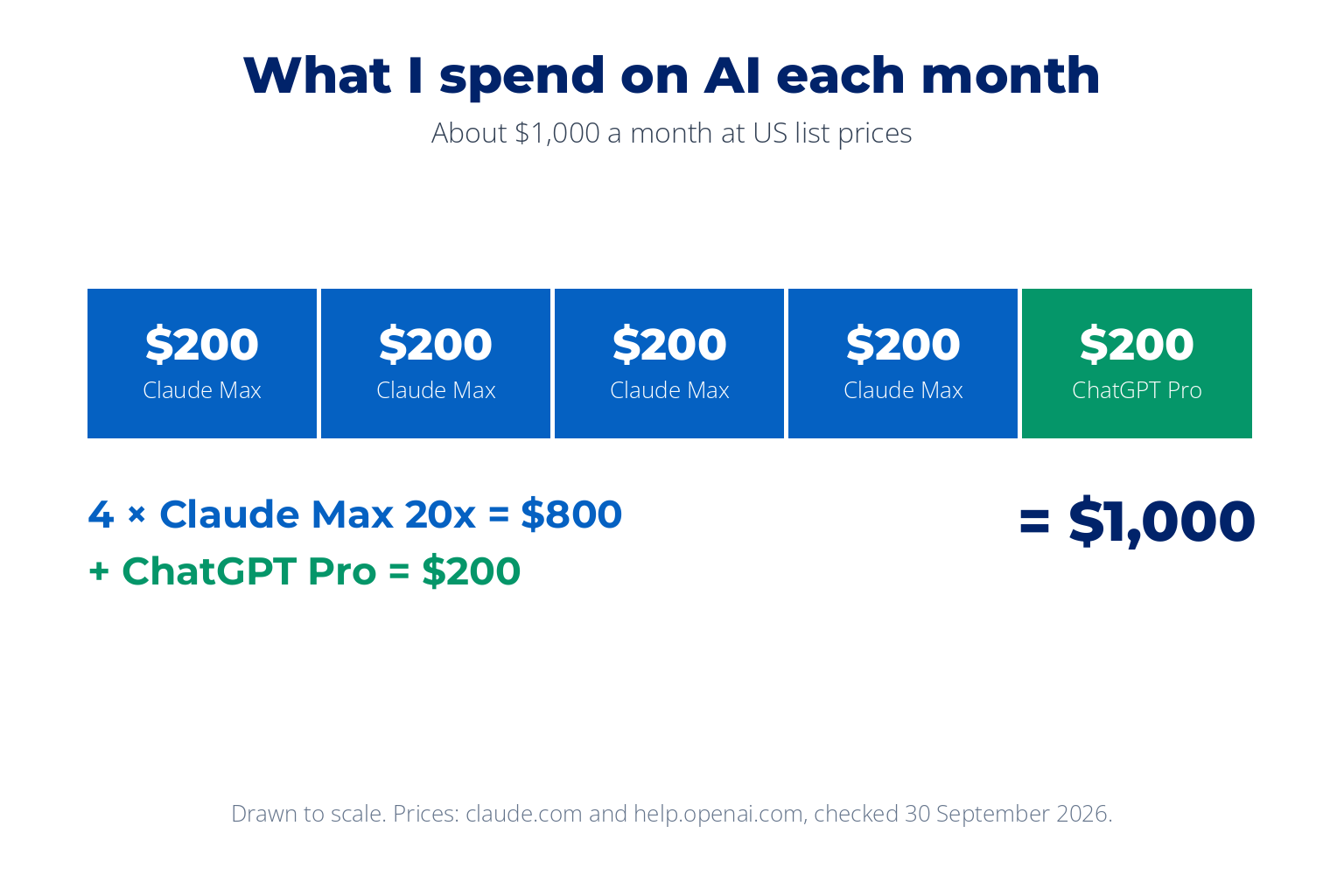
Here's the bill, at US list prices. Four Claude Max 20x accounts at $200 each is $800. Add ChatGPT Pro at $200 and it comes to $1,000 a month, or $12,000 a year. I'm billed in pounds, so my actual bill isn't exactly that, but it's in that region, and the US prices are the fair ones to do the maths with. When I made the video in July it was $800, because I hadn't added ChatGPT Pro yet. That's how these bills grow: one more account at a time.
A subscription is like renting a car. A local AI server is like buying one: a big payment up front, then it's yours, but you pay for the fuel, the servicing and the parking. Whether buying wins depends on how much you drive. So for each tier below, I'll show the maths against real subscription and API prices.
One piece of jargon first. An open-weight model is an AI model whose files you can download and run on your own machine, like Qwen from Alibaba or DeepSeek. Claude and ChatGPT are closed: you can only use them through the company's servers, either with a subscription or through the API (a pay-per-use connection that software calls directly). Self-hosted AI means running an open-weight model on hardware you own.
Why Local AI Server Prices Keep Moving
Before the builds, a warning about prices. AI runs on memory, and memory is in short supply. According to TrendForce, DRAM (computer memory) contract prices roughly doubled in the first quarter of 2026, were forecast to rise by more than half again in the second, and are forecast to climb another 13 to 18% this quarter. Storage is climbing too.
You can see it in the shops. Earlier this year Apple cut the Mac Studio back to a single 96GB memory option as the shortage bit. The RTX 5090 graphics card launched at $1,999, and by September it had almost vanished from US online retail, with third-party sellers asking $6,395 to $9,500.
My advice is the same as with property: take your time and hurry up at the same time. Don't panic-buy hardware you don't need because it's scarce. But if the maths below works for you, move before price and availability make the decision for you. So what does the cheapest setup that works well look like?
Tier 1: A Home AI Server for One Person
The first tier is one user: a solo developer, a power user, anyone who wants serious AI on their own desk. There are two ways to build it.
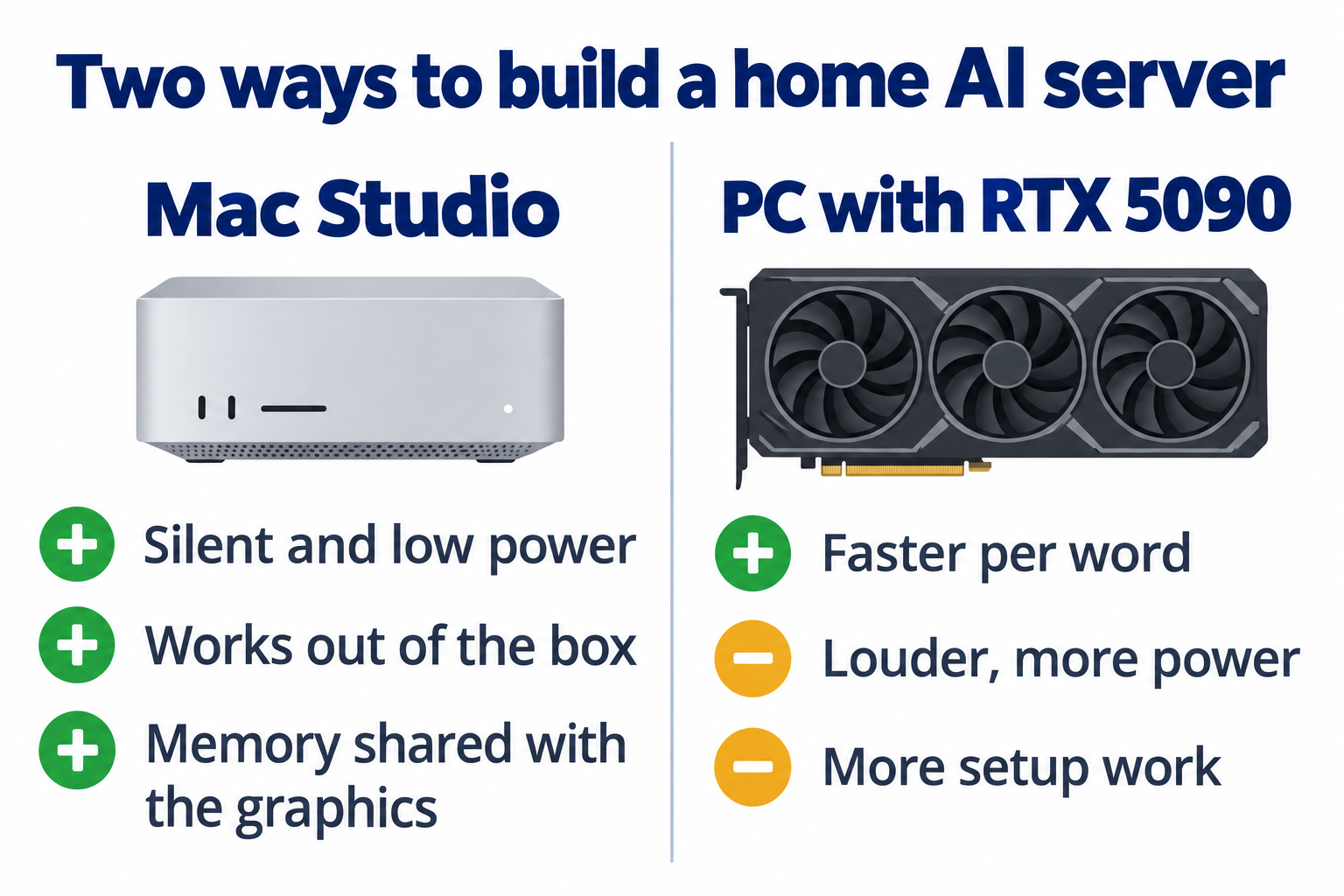
Mac Studio. Apple's new Mac Studio with M5 Max starts at $2,499, and a 64GB configuration is $3,099. The M5 Ultra starts at $5,499 with 96GB. Macs share one pool of memory between the processor and graphics, so a 64GB or 96GB Mac can hold a model that would need an expensive graphics card on a PC. It's silent, sips power, and works the moment you plug it in.
PC with an RTX 5090. If you already have a desktop PC, the upgrade path is an RTX 5090 with 32GB of memory. It's faster per word, but louder, hungrier for power, and fiddlier to set up. With the card at today's prices, a full build is roughly $7,600 to $11,500, my estimate depending on how much of the PC you already have.
Other options. NVIDIA's DGX Spark (128GB, $4,699 list) and AMD Ryzen AI Max+ mini PCs such as the Framework Desktop (128GB, $3,449) are good value, but both were out of stock when I checked.
Pick based on what you already own and how much hassle you're willing to take on. For most people starting from scratch, I'd buy the Mac.
Which model to run
As of September 2026, the model I'd run on it is Qwen 3.8 27B from Alibaba, released in August under the Apache 2.0 licence, so you can use it commercially. It has 27 billion parameters. Think of parameters as the model's knobs: more usually means smarter, but also more memory. Every one of those 27 billion is used on every word it writes, and in its 8-bit version (a slightly compressed copy that uses less memory) it needs about 30GB. That's why a 64GB Mac runs it comfortably.
This space moves fast. Qwen 3.8 replaced the Qwen 3.6 I recommended in the video, just three months later. So rather than trusting any single pick, including mine, use our guide on how to find the best local LLM. It shows which leaderboards to trust, what the licences mean, and a 10-minute check you can run each month.
Who this tier is for
Personal document search. Ask questions across your own notes and files, without uploading them anywhere.
A voice assistant that doesn't phone home. Everything you say stays on your desk.
Client work under an NDA. When the code or documents can't leave your machine, local is often the only honest option.
Routine coding on a hybrid pattern. The local model does the everyday work. A frontier model (the most capable cloud AI, such as Claude) does the hard parts.
Chinese open models without their servers. Run Qwen or DeepSeek on your own hardware instead of sending data through their API.
The payback maths
Take the 96GB M5 Ultra at $5,499. Against one Claude Max 20x plan at $200 a month, it pays for itself in about 27 months. Against four Max accounts, it's about 7 months. Against my full $1,000 a month, about 5 and a half, but only if I cancelled everything. The 64GB M5 Max at $3,099 runs the same Qwen model and pays back in about 15 months against a single Max plan. And if you're on Claude Pro at $20 a month, the Mac never pays back. Don't bother.
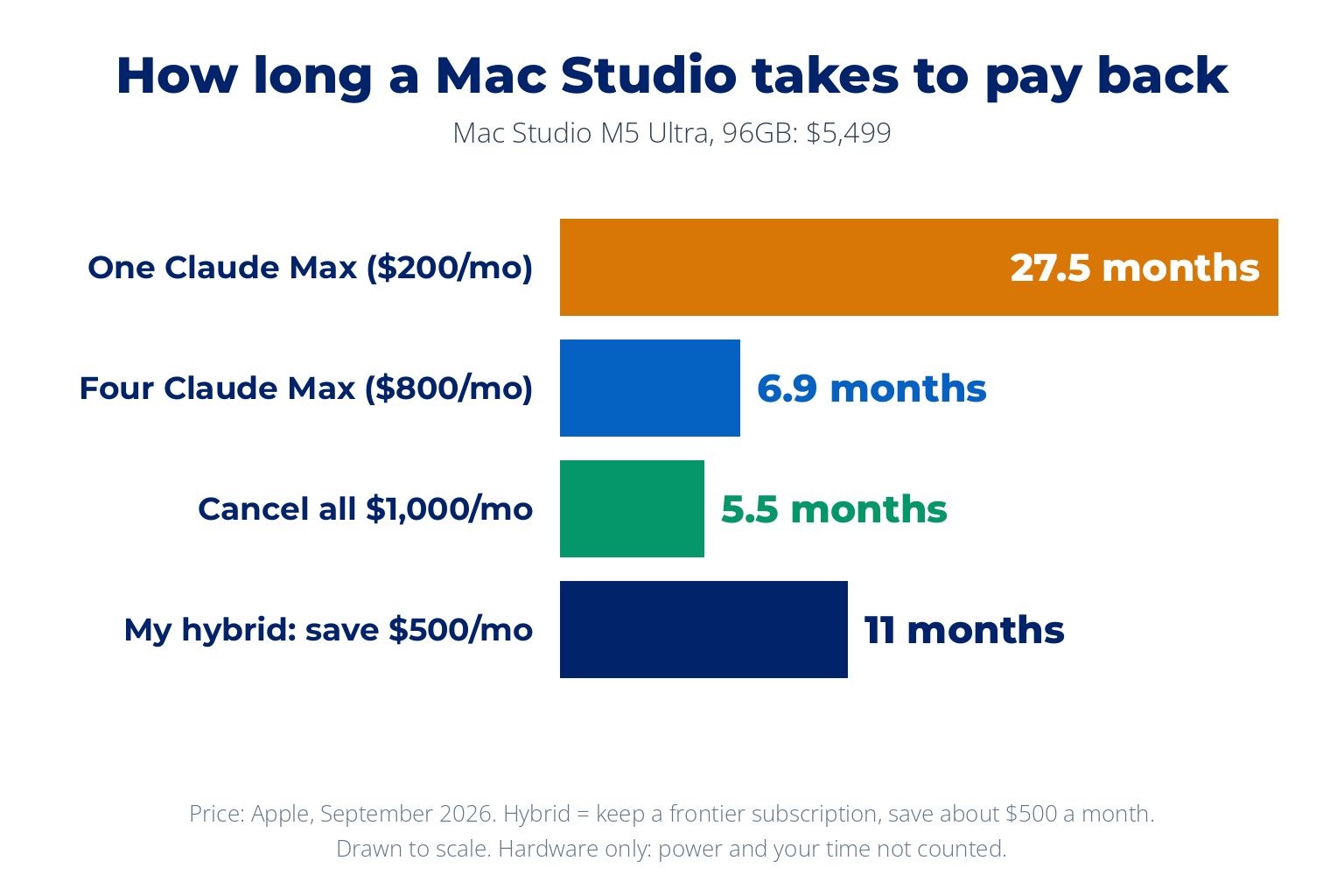
This is the key point, though: I wouldn't cancel everything. My plan is to run local for the routine work and keep a frontier subscription for the hard jobs, which could roughly halve my bill. By my estimate that saves about $500 a month, so the Mac pays back in about 11 months, before power and upkeep. Why keep paying Claude at all, when the open models look so good on paper?
How Close Are Open Models to Claude? (And Why Benchmarks Mislead)
In the video I compared scores on SWE-bench Verified, the coding test everyone quoted. Since then, the big labs have stopped using it. In February, OpenAI said it had "stopped reporting SWE-bench Verified scores" and recommended others do the same, because the test questions had leaked into training data. Picture a student who has seen the exam paper in advance: a high score no longer tells you much.
So today there's no official test where Claude and the open models are measured side by side. Anthropic reports newer tests: its flagship, Claude Opus 5.5, scores 66.4% on Terminal-Bench 4.0, ahead of OpenAI's GPT-6 Astra at 57.9%. Alibaba reports 61.7% on SWE-bench Pro for Qwen 3.8 27B. Those are different exams, so you can't line them up.
The closest thing to a shared test is DeepSWE, which several labs publish. As each publisher reports it, OpenAI's GPT-6 Astra scores 74.1%, DeepSeek puts Claude Opus 5 at 74.0%, and Alibaba puts Qwen 3.8 27B, the model that fits on your desk, at 42.2%. That gap matches what I see in practice.
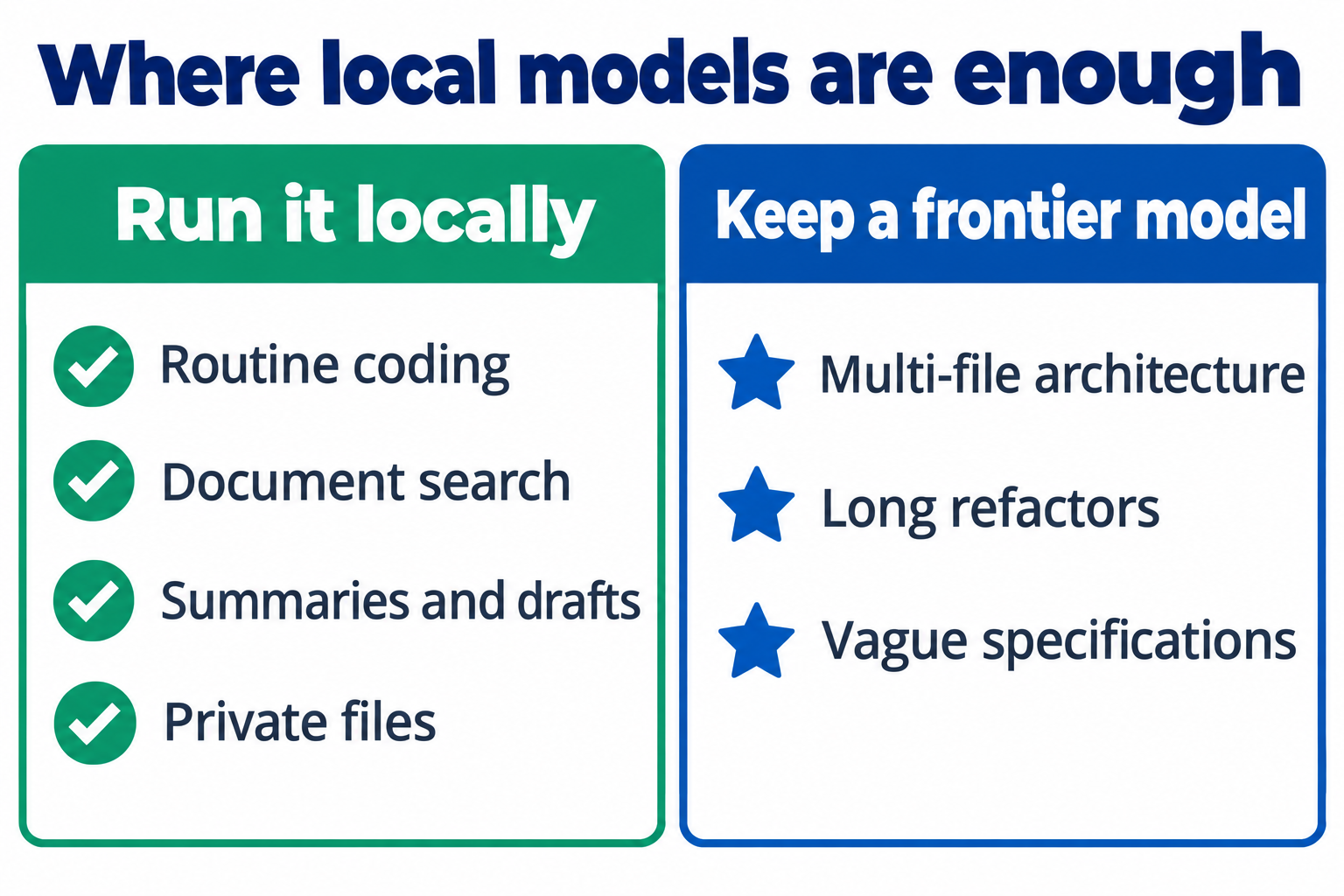
Anthropic makes the same point about its own results: "benchmark margins have become a less reliable guide to real-world differences." In my experience, Claude still handles the hard work noticeably better: reasoning across many files at once, long refactors, and vague specifications where it has to work out what you meant. The gap is closing. It hasn't closed.
Don't take my word for it
Take ten real prompts from your own work, run them on a local model and on Claude, and compare the answers side by side. Ten of your own problems will tell you more than any leaderboard.
That's the personal answer. But what if it's not just you, and a whole office needs it?
Tier 2: Self-Hosted AI for a Small Business
Now think of a business with 5 to 50 people. The personal box doesn't scale to a team: if it fails, everyone stops. At this tier you need more memory, because the model I recommend for teams is much larger, and several people will be using it at once.
The hardware
In the video I recommended two Mac Studios, because at the time Apple sold nothing bigger than 96GB. That changed in September. You now have two good options:
Two 96GB Mac Studios, linked. Two M5 Ultras at $5,499 each is $10,998. If one fails, the other can still run a smaller model such as Qwen 3.8 27B. The trick is a feature Apple calls RDMA over Thunderbolt, added in macOS 26.2. It lets two Macs joined by a Thunderbolt 5 cable share one model, so they behave more like one big machine than two small ones.
One 256GB Mac Studio. Apple now sells the M5 Ultra with 256GB, and a fully specced one costs about $11,300. It holds the team model on its own, with no linking to set up. A 512GB option is due in late October.
Two RTX 5090s in a workstation. Roughly $13,000 to $20,000 at today's card prices, my estimate. Its 64GB of graphics memory can't hold the team model below, so it suits smaller models, where it's faster per word, and batch jobs like overnight invoice runs or fine-tuning a model on your own data.
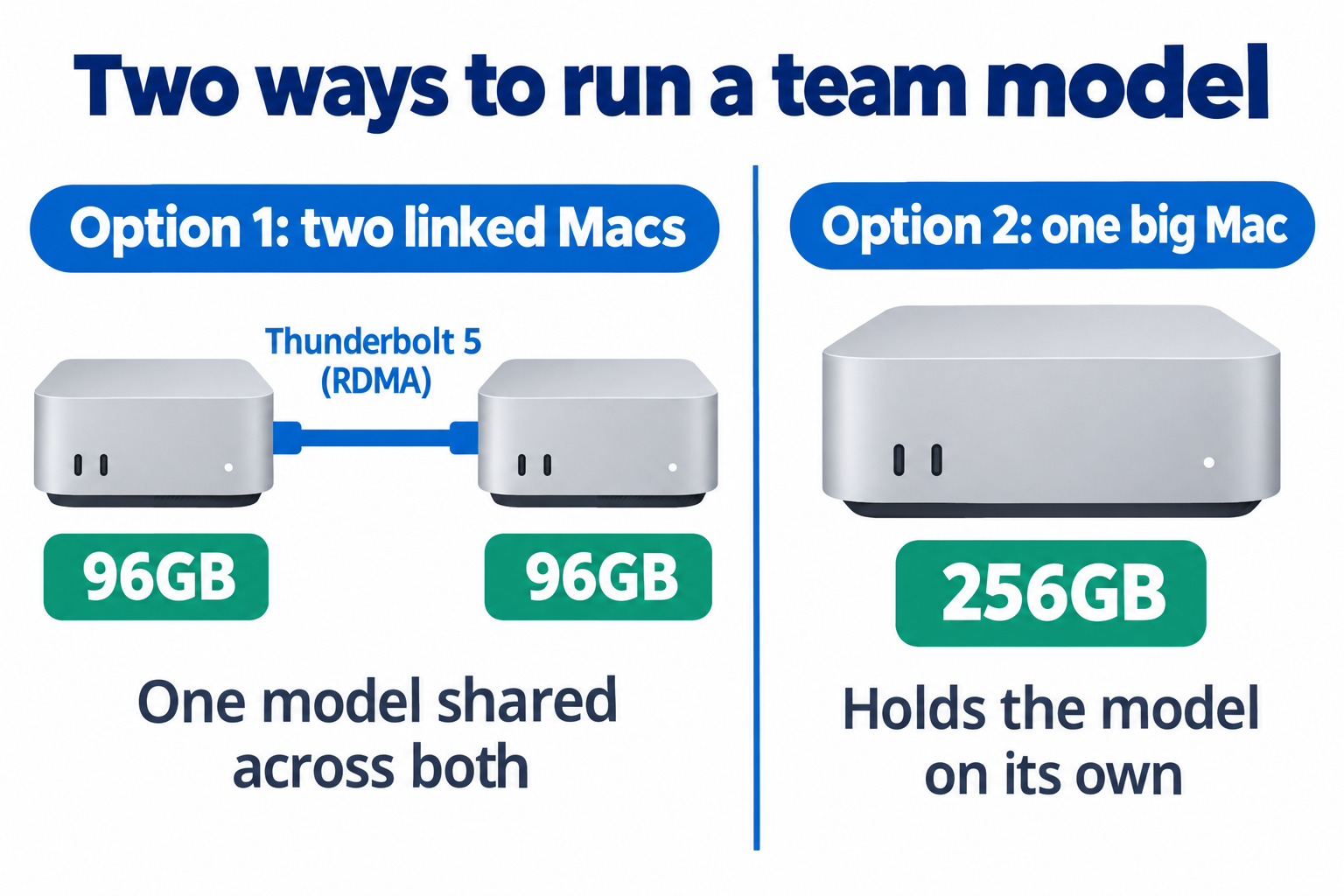
Apple's macOS 26.2 release notes describe the linking feature as "low-latency communication between Thunderbolt 5 hosts for use cases including distributed AI inference using MLX". (MLX is Apple's software for running AI models.) To use it, you need a Thunderbolt 5 cable and a free program called Exo. Ollama, the most popular way to run local models, still can't split one model across two machines. My rule of thumb: the Mac path wins for quiet, customer-facing work; the PC path wins for raw speed on models that fit its memory.
Which model to run
For a team, I'd run DeepSeek V4 Flash, in its July 0731 release, under the MIT licence, so commercial use is allowed. It's a mixture-of-experts model: 284 billion parameters in total, but only 13 billion work on any one word. Think of a hospital with hundreds of specialists where each patient only sees the two or three they need. You get a very knowledgeable model that still runs quickly. Its files take about 166GB, which fits across two 96GB Macs or on one 256GB Mac. The files fitting isn't the whole story, though: every person using it at the same time needs extra memory too, so test it against your expected load. The 256GB Mac leaves more headroom. DeepSeek has since released V4.1 Flash, which is stronger but needs about 500GB of memory, so it's out of reach at this tier.
One caveat from my own use: DeepSeek can be confidently wrong. That's fine for code, document processing and search, where you can check the output. Be careful with medical or legal drafting, where a model needs to know when it isn't sure.
The hardware and model are only half the picture. The other half is what you run on top: coding agents, automation platforms, security tools. Our free AI and automation tool landscape compares hundreds of them, with licences and prices.
Who this tier is for
An internal knowledge base. Your team asks questions in plain English across company documents, instead of hunting through folders.
A support chatbot. Trained on your own product documentation and ticket history.
Document and invoice processing. Pulling out amounts, flagging anything odd, and doing a first pass on contracts.
Sales call analysis. Patterns, sentiment and lead scoring across your recorded calls.
None of these need frontier reasoning. A strong open model is more than enough. But if you have fewer than five employees, don't build this: a Claude Team seat costs $25 a month ($20 billed yearly), which is cheaper and simpler.
The payback maths
These team workloads usually run on the API, where you pay per use rather than per seat. For a 30-person business running a knowledge base, a chatbot and document processing on a mid-tier model, I estimate about $1,000 a month in API costs. Against that, about $11,000 of hardware pays back in about 11 months, then avoids roughly $12,000 a year of API spend, less power and upkeep, as long as prices hold. A busy team spending $3,000 a month, say with developers on top, pays back in under 4 months.
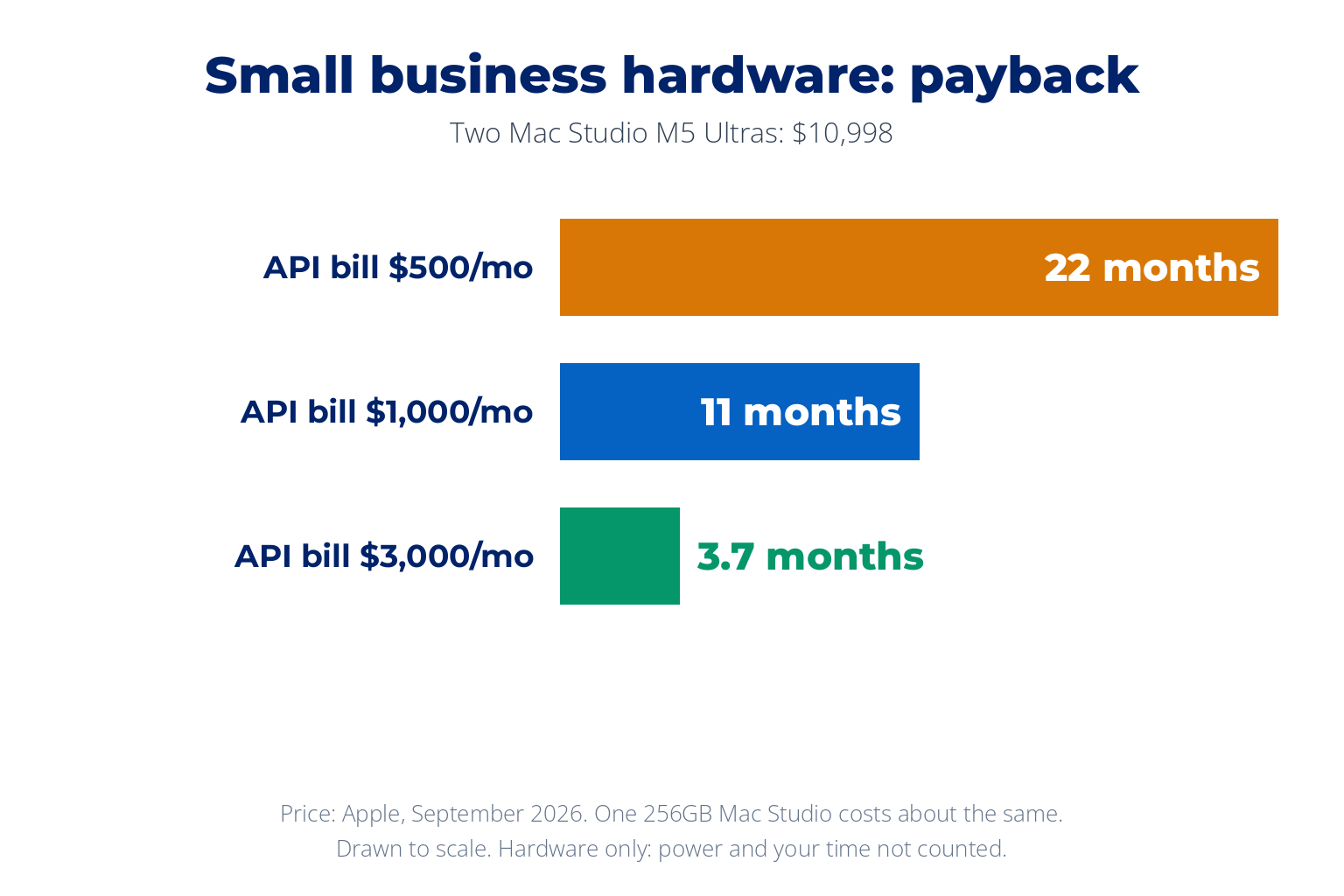
Below $500 a month, it takes nearly two years to pay back before you count power and the time to look after it, so stay on the API. And the same rule as Tier 1 applies: if a senior development team relies on AI for serious code review, keep paying for the frontier model there. Senior developer time is too expensive to lose to a weaker model. So is there ever a case for going all the way?
Tier 3: Running AI Locally for a Whole Company
There's one more setup, and it's the one that lets you run the largest open models, the same class of hardware Claude and ChatGPT run on. Most of us will never buy it, but it's worth knowing it exists.
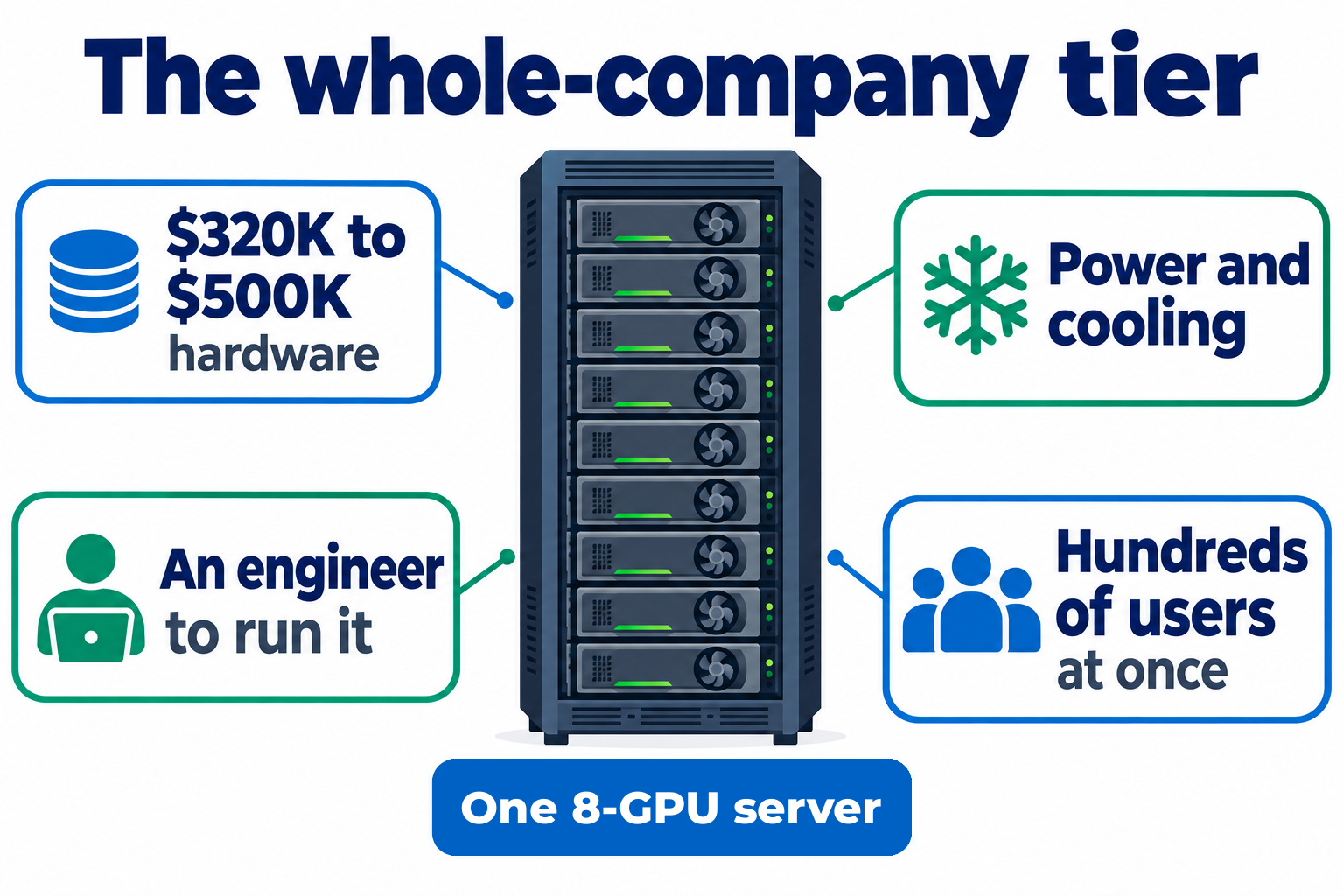
At the whole-company end, you're looking at a server with eight NVIDIA data-centre GPUs. Resellers quote an 8-GPU H200 server at roughly $320,000 to $420,000, and the newer Blackwell B200 systems, now the usual new purchase, at $400,000 to $500,000. That's before power, cooling and a team to run it. One of these serves hundreds of people at once. It's the same class of hardware that runs ChatGPT and Claude, just one rack instead of thousands.
A quick correction you'll need: marketing often claims the H200 is three or four times faster than the H100 before it. NVIDIA's own page says "1.9X Faster" on its Llama 2 70B test. Nearly twice as fast is impressive. Four times isn't real.
On this hardware you'd run something like DeepSeek V4 Pro: 1.6 trillion parameters, with 49 billion active per word, MIT-licensed, and shipped in the compact FP4 and FP8 formats (low-precision number formats that save memory) it was built for, so you don't lose quality squeezing it down. At launch it matched Google's Gemini 3.1 Pro on SWE-bench Verified, the coding test of the day. It's the ceiling for open models, running on hardware you own, but as with every tier, test it on your own work before you trust it.
The payback maths
Take $400,000 of hardware, plus about $2,500 a month for power and data-centre space, plus about $7,000 a month for an engineer to run it. Over three years that's roughly $742,000. For a company spending $80,000 to $100,000 a month on AI through the API, which in my experience is what serious use across thousands of employees costs, the hardware pays back in about 4 to 6 months. Frontier API prices are falling, though: Claude Opus 5.5 costs 20% less per token than Opus 4.7 did, and at those prices payback stretches to about 6 to 7 months.
The HIPAA myth
Before anyone writes that cheque, there's a myth to kill. People say regulated industries must host their own AI because of rules like HIPAA, the US law that protects patient data. That's often overstated. Anthropic signs a BAA (business associate agreement, the contract HIPAA requires) for its API and Enterprise plans. Claude is also available through AWS Bedrock and Google Cloud's Vertex AI. And the US Department of Veterans Affairs' own guidance approves VA GPT and Microsoft Copilot Chat for use with patient data, and lists Claude for Government and ChatGPT's FedRAMP edition among its gated tools. If the VA can use cloud AI with patient records under the right controls, your mid-sized hospital probably can too.
The real buyer list is much narrower than people think:
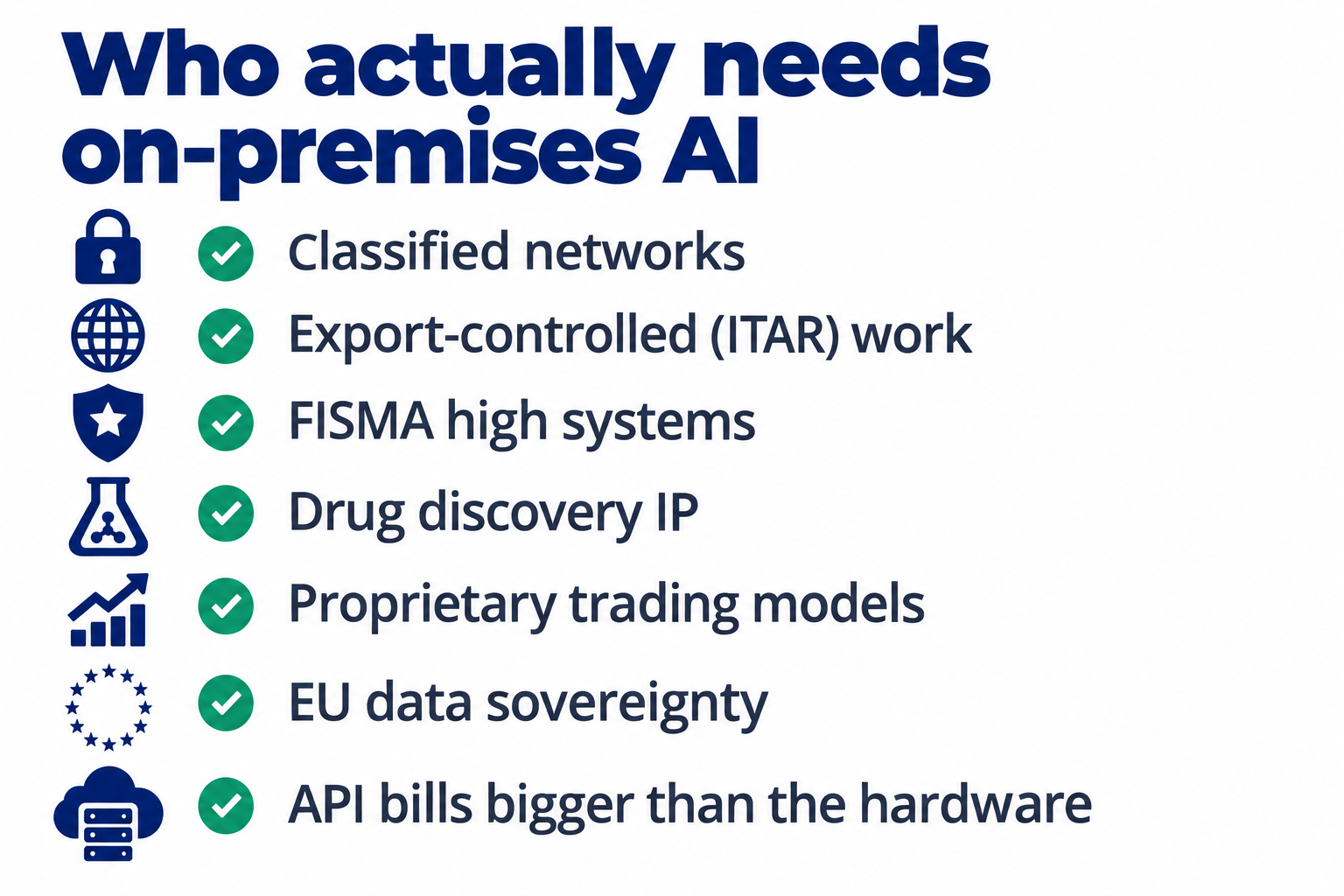
Classified networks, work restricted under ITAR (US export controls on defence technology), FISMA high systems (US government systems with the strictest security rating), drug discovery where the intellectual property is a board-level risk, proprietary trading models at investment banks, and some EU data sovereignty cases. Or pure economics: you already spend so much on AI that the hardware maths is obvious. Whichever tier you're considering, though, there's a cost the build videos never mention.
The Security Problems Local AI Brings
Running AI yourself moves the security job from the provider to you. There are three problems to know about.
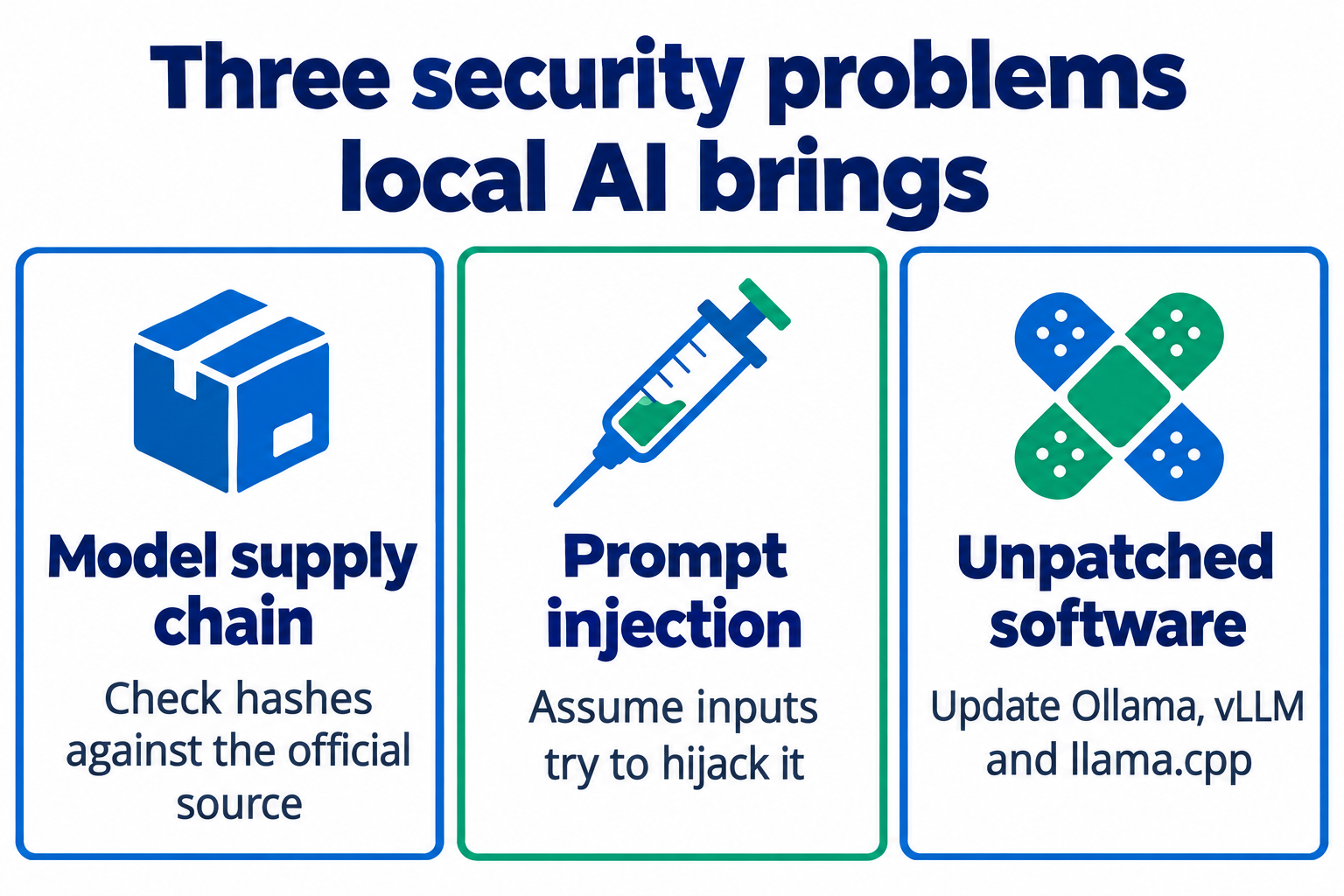
The model supply chain. A downloaded model is software, and it can be tampered with. The security foundation OWASP ranks supply chain third in its 2025 Top 10 of risks for LLM applications, and describes PoisonGPT, a real attack that got past Hugging Face's safety features by changing a model's parameters directly. Download from the official source and check the file hashes, not a mirror.
Prompt injection. If your local AI reads emails or documents for you, assume some of them will contain hidden instructions trying to hijack it. Cloud providers filter some of this. Your own server filters nothing unless you build it.
Unpatched AI software. The software that runs the model, such as Ollama, vLLM and llama.cpp, gets security fixes like anything else. A local AI server six months out of date is a soft target on your network.
Run it in a container (a sealed-off space on the machine that limits what it can touch), keep it off the public internet, and treat it like any other service an attacker could reach. And since most of the best open models come from China, it's fair to ask whether running Qwen or DeepSeek is safe at all. Running open weights on your own hardware avoids sending your data through their servers, but it's more nuanced than that, and I cover it properly in this video on whether you should use Chinese AI.
Should You Build Your Own AI? Find Your Row
So, should you build your own AI? It comes down to what you actually do with AI, not how much you can spend. Find your row:
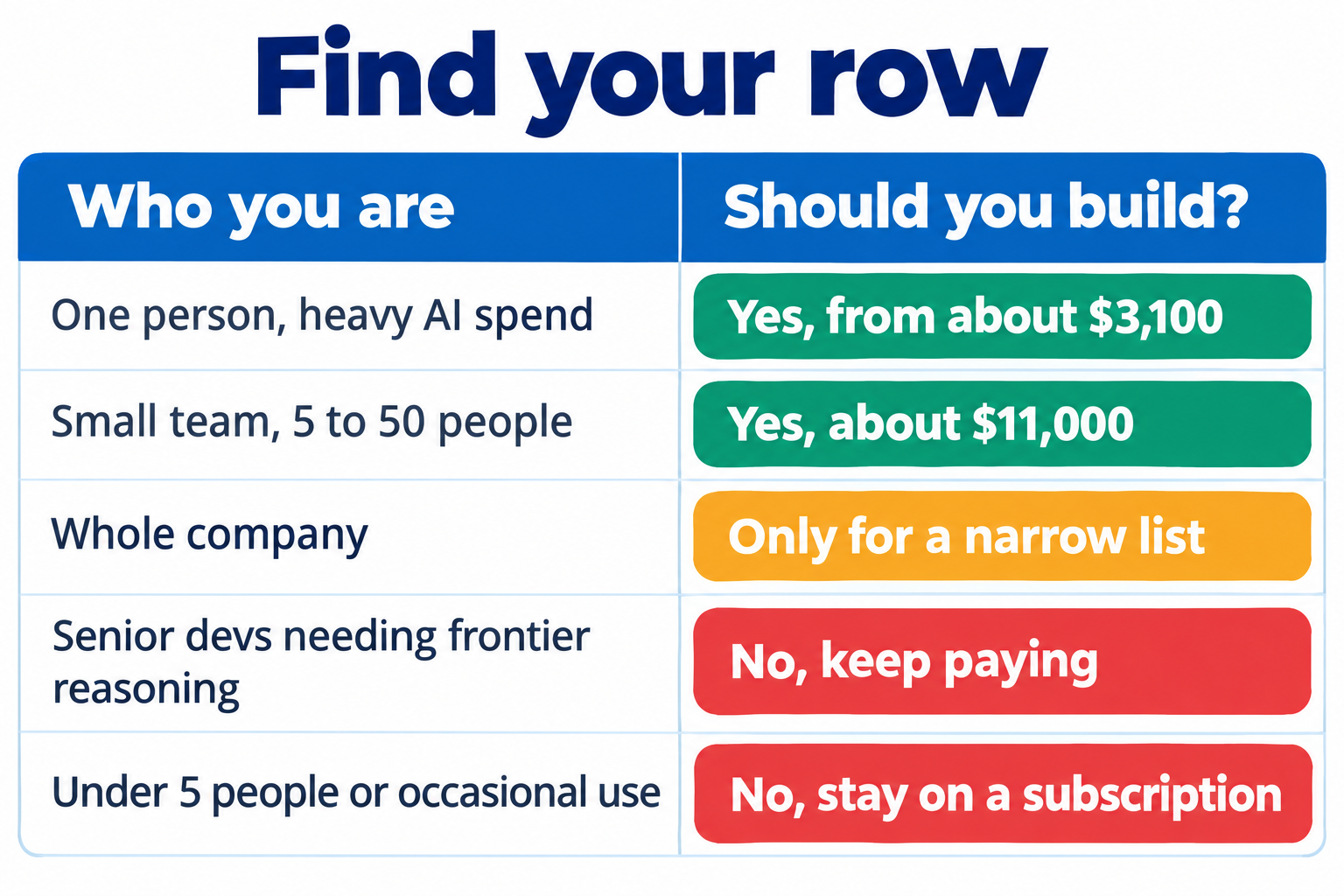
For most people reading this, the answer is no, and that's fine. A $20 subscription is hard to beat if you use AI now and then. But if you're in one of the yes rows, there's a build that makes sense for you, and now you know what to buy, what it costs, and when it pays for itself. For me, it's the hybrid: a local model for the routine work, and one frontier subscription for the hard 20%.
Prices and models were checked on 30 September 2026. Both move fast, so check the latest before you buy.

Frequently Asked Questions
Is self-hosted AI cheaper than a Claude or ChatGPT subscription?
Only if you spend a lot. A Mac Studio with M5 Ultra and 96GB costs 5,499 dollars, which takes about 27 months to pay back against one 200 dollar Claude Max plan, and about 5 and a half months if I cancelled all of the roughly 1,000 dollars a month I spend. Keeping a frontier subscription, as I recommend, saves more like 500 dollars a month, which means about 11 months. If you pay 20 dollars a month for Claude Pro, a local AI server never makes financial sense.
What hardware do I need to run AI locally?
For one person, a Mac Studio with at least 64GB of memory runs a strong open model such as Qwen 3.8 27B, which needs about 30GB at 8-bit. A PC with an RTX 5090 is faster but costs more today because the card sells well above its 1,999 dollar launch price. A small team needs around 192GB, either two linked 96GB Macs or one 256GB Mac Studio.
What is the best model for a self-hosted AI server?
As of September 2026, Qwen 3.8 27B (Apache 2.0) is the pick for one person, and DeepSeek V4 Flash (the July 0731 release, MIT licence) for a small team. This changes every few months, so check our best local LLM guide for how to pick the current best model yourself.
Are open-weight models as good as Claude?
Not yet, for the model that fits on a desk. On DeepSWE, a coding test several labs report, OpenAI reports 74.1 percent for GPT-6 Astra, DeepSeek reports 74.0 percent for Claude Opus 5, and Alibaba reports 42.2 percent for Qwen 3.8 27B. Open models handle routine work well. Keep a frontier subscription for the hardest 20 percent.
Do hospitals and regulated businesses have to self-host AI?
Usually not. Anthropic signs a business associate agreement (BAA) for HIPAA-ready use of its API and Enterprise plans, Claude is available through AWS Bedrock and Google Vertex AI, and the US Department of Veterans Affairs approves cloud AI tools for patient data. Self-hosting is for the narrow cases such as classified networks and export-controlled work.
About the Author

Nathan House, Founder & CEO of StationX
Nathan House has 30 years of hands-on cybersecurity experience and is Cambridge-educated, holding CISSP, CISA, CISM, OSCP, CEH, and SABSA. He founded StationX in 1999 — one of the UK’s first cybersecurity companies — and has secured £71 billion in UK mobile banking transactions and the London 2012 Olympics, advising clients including Microsoft, Cisco, BP, Vodafone, and VISA. He authored the world’s most popular cybersecurity course — a #1 Udemy bestseller taken by over 500,000 students — and was named Cyber Security Educator of the Year 2020, AI Security Educator of the Year, and a UK Top 25 Security Influencer 2025. A DEF CON speaker and featured expert on CNN, Fox News, NBC, and the BBC, Nathan leads StationX’s training of more than half a million students worldwide.