Claude Code Mods: The Complete Guide + 34 Videos (2026)
On 1 October 2026, Anthropic let anyone rewrite Claude Code from the inside. Claude Code mods can put buttons above the prompt, hold a risky command until you say yes, or swap one of Claude Code's own features for your own. Three days later, one community catalogue listed 1,740 public mods. The guides haven't kept up: many still describe the September preview, and a security report keeps getting retold without its caveats.
So we did the slow version: the official docs, 34 YouTube videos, and our own mods built into HAL, my Claude Code setup. Some worked; one we switched off within a day. Here's what we learned, a copy-paste lab, and every resource compared.
TL;DR: if you've only got 30 seconds
What it is. A small JavaScript or TypeScript file inside a Claude Code plugin that stays loaded all session to watch, change or answer what Claude Code does, and draw on screen. On by default since v2.1.287 (1 Oct 2026).
You don't need to code. Claude writes the mod; you read, validate and test it. Our lab walks you through one.
Use the lightest tool first: an instruction, a setting or status line, a hook, and only then a mod. Hooks can do more than most guides say.
Mods are not sandboxed. A mod runs with your access to files, network and keys, and Anthropic's guard only loads on Team/Enterprise plans or managed machines. Read the code and run claude plugin validate first.
Watch first: Thariq Shihipar (Anthropic) on Latent Space.
How we researched this (3 to 4 Oct 2026)
All ten official docs pages, the changelog and Anthropic's samples; 35 videos transcribed and read (34 about mods); the design thread and the Pluto Security report; 20 community repos checked for licence and calls. Then we built three mods for HAL's daily use. Every figure is as of 4 Oct 2026 unless dated otherwise. On 5 Oct we fact-checked every claim again against the docs and our own captures, and corrected this page.
What Are Claude Code Mods?
Say Claude is about to run rm -rf on a folder. A mod can stop that command, list the files it would delete, and wait for you to press Proceed or Cancel. That's Anthropic's sample mod, blast-radius. Or say Claude has just finished some work: a mod can offer three buttons for the next step. That one's ours.
A mod is a plugin made of small JavaScript or TypeScript functions that run inside Claude Code. (A plugin is the package Claude Code installs: a folder with a small manifest file.) Each function listens for an event, a moment like "Claude wants to run a tool" or "a turn finished" (a turn is one round: you ask, Claude works and answers). When it fires, the mod can let it through, change it first, or answer it itself so the original never runs.
Chase AI has the clearest picture. Take a delete command: a mod can act before it (preview the files), instead of it (send them to the bin), after it (print a receipt) or around it (back up first, so you can undo). His video is in the lab below.
Thariq Shihipar of Anthropic on Latent Space, starting where the mods part begins (34:00; it runs to about 51 minutes). Anthropic hasn't posted its own video about mods (checked 4 Oct 2026), so this is the closest thing: where mods are going, and why forking matters.
What changed on 1 October
Claude Code already had hooks: things it runs at set moments, such as just before a tool runs. A command hook starts, does its job and exits. A mod stays running all session, so it can remember things, keep a live panel on screen, ask you a question with its own options, add slash commands that never call the model, and message other sessions.
But don't over-read it. As Kevin Riedl of wavect put it, "Mods do not invent the ability to stop an action." Hooks could already block. What's new is owning the input and the result in one place, plus the screen.
Anthropic builds its own features this way: /diff, the AGENTS.md loader, a security guard called sec-default and telemetry are built-in mods (an opt-in "You should know" agent is off by default). The built-in plugin-authoring plugin, which teaches Claude to write mods, holds only a skill.
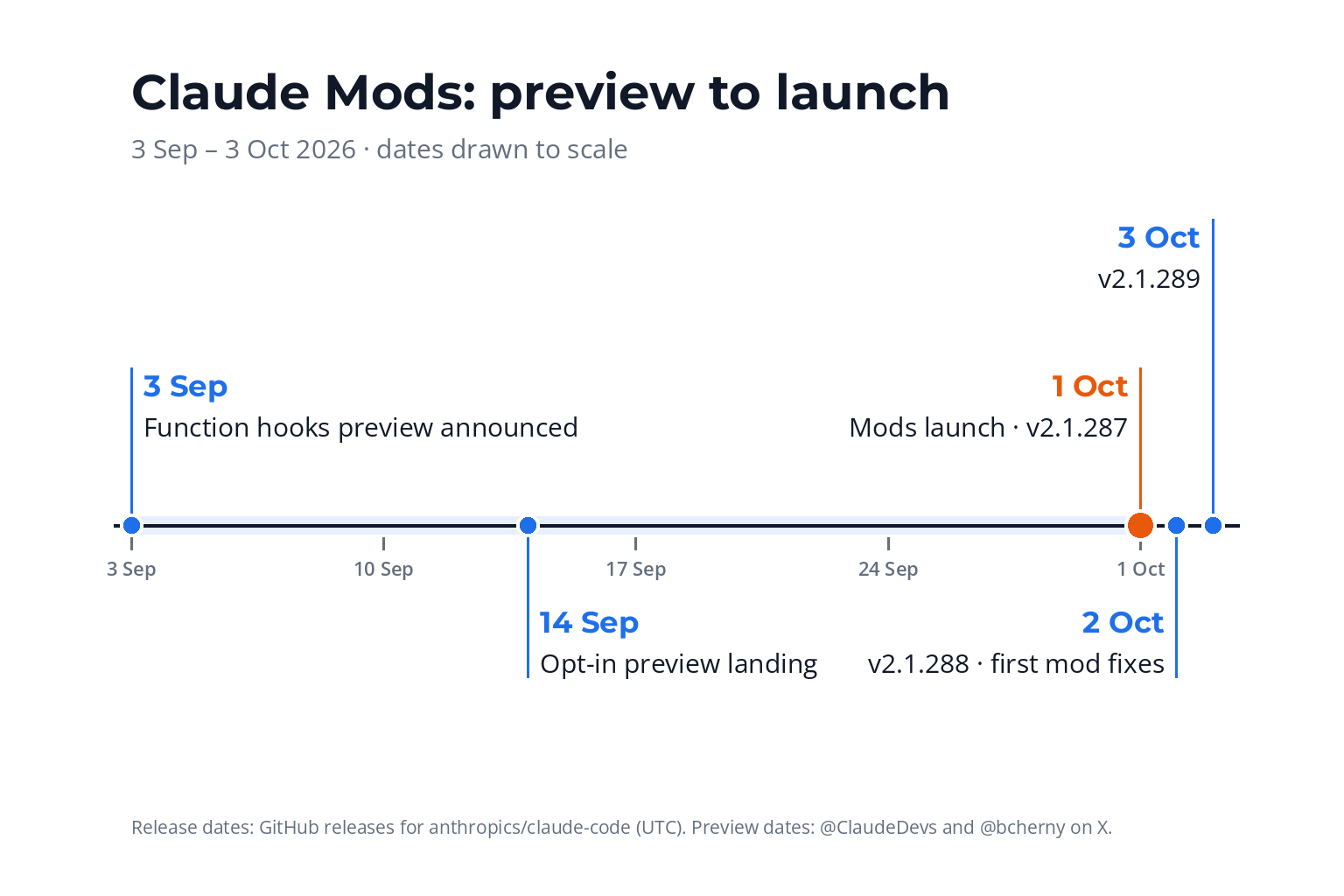
From preview to launch: most blogs get the launch date wrong.
| Date (2026) | What happened |
|---|---|
| 3 to 14 Sep | Preview. "Function Hooks" shown on X (3 Sep) and usable behind an opt-in flag soon after, renamed "Claude Mods" (9 Sep); "Claude Mods are landing now" (Boris Cherny, 14 Sep). |
| 1 Oct | Launch, v2.1.287. @ClaudeDevs: "You can now mod Claude Code" (20.3k likes, 4.3M views by 4 Oct). |
| 2 Oct | v2.1.288: the first mod fixes, plus $.ui.selection(). |
| 3 Oct | v2.1.289 fixes stale local-marketplace copies, and a mod's approval beating a deny rule on part of a compound command (managed machines). |
Not to be confused with
0xDarkMatter/claude-mods (created November 2025), a skills-and-agents kit with session save-and-restore, or posts about AI building mods for video games. A page that predates October 2026 or says to set CLAUDE_CODE_ENABLE_FUNCTION_HOOKS=1 describes the preview or something else.
So when do you actually need a mod? Claude Code already has lighter tools, and picking the right one is most of the skill.

Mods vs Hooks vs Skills vs Plugins
First, the question people search for most: what are hooks in Claude Code? Say you never want Claude to force-push. You write a short script that refuses any command containing --force, and list it in Claude Code's settings file under "before a tool is used". That's a hook. The docs now call it a settings hook (on the mods pages, "hook" means a mod's function), and it can be one of five types: a shell command, an HTTP request, an MCP tool, a prompt to a model, or an agent.
Claude Code hooks are good at a rule that must always hold, checked by a program rather than Claude's judgement. They work unattended, and they have more than a yes or no to give. Before a tool runs, a hook can allow it (skipping the permission prompt, though your own ask and deny rules still apply), deny it, ask you through Claude Code's standard permission prompt, or defer it (that last one works only in a claude -p run driven by another program). It can also rewrite the call before it runs (updatedInput), replace a tool's result, and add context for Claude (additionalContext).
What a hook can't do: draw panes, bands or buttons (it can show text, such as a message or its own spinner text), show you a question with its own choices (its "ask" is the standard permission prompt), or rewrite the text of your prompt. And a command hook starts fresh each time, so it keeps nothing in memory between runs, though it can save state to files.
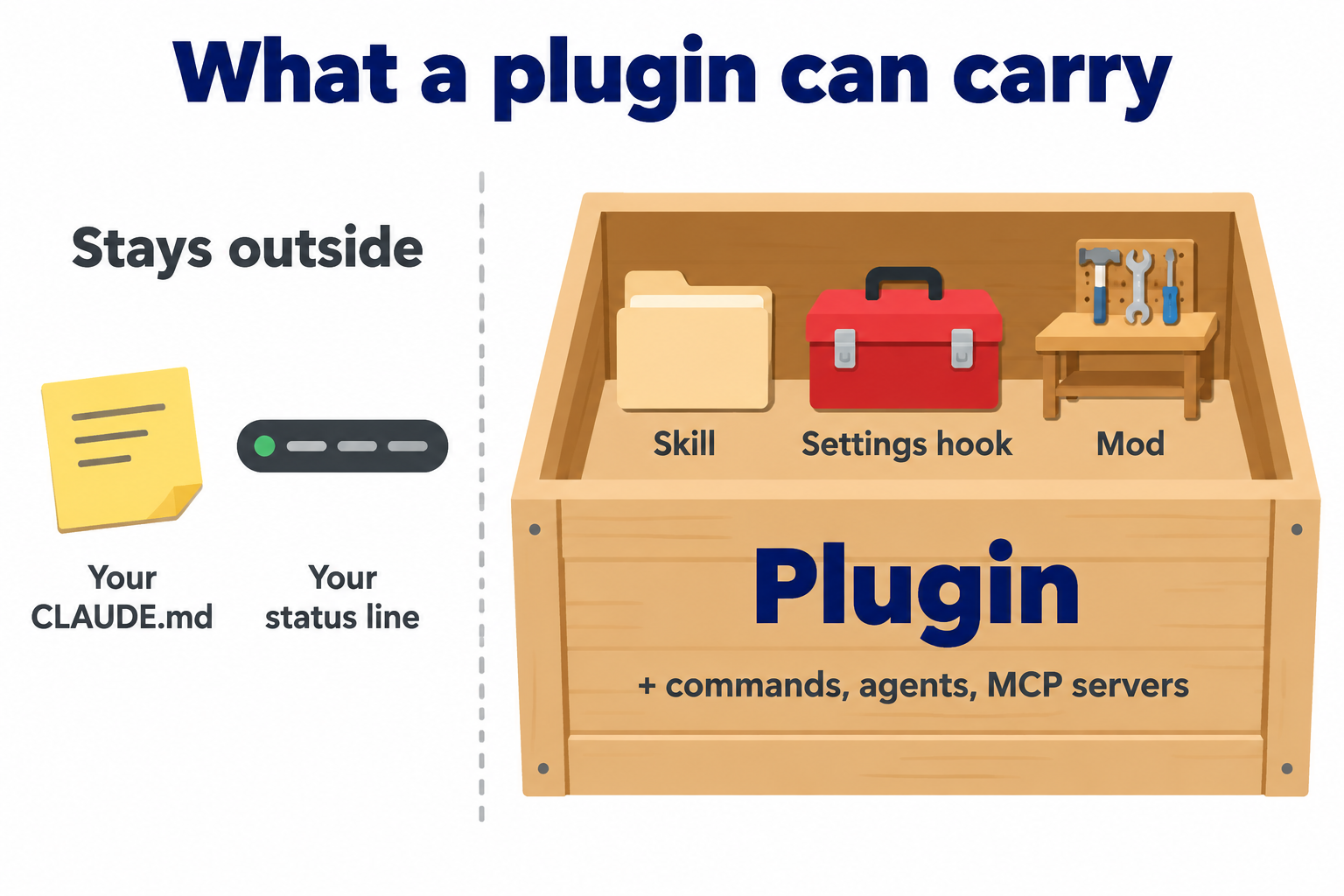
A plugin is the box that ships skills, settings hooks and mods (plus commands, agents and MCP servers). Your CLAUDE.md and your main status line stay outside it.
Instruction CLAUDE.md, a rule
- What it is
- Plain words Claude reads
- Runs when
- Every session, or when called
- Shows on screen
- No
- Costs tokens?
- Yes, while in context
- Use it when
- You want Claude to behave differently
- Our example
- A rule that ends answers with a summary
Status line
- What it is
- A script whose output shows under the prompt
- Runs when
- Every refresh
- Shows on screen
- One or more lines
- Costs tokens?
- No
- Use it when
- Claude Code already hands you the data
- Our example
- HAL's cache countdown
Settings hook
- What it is
- A shell command, HTTP request, MCP tool, prompt or agent run at an event
- Runs when
- Once per event
- Shows on screen
- Text only: a message or spinner text
- Costs tokens?
- Prompt and agent hooks, plus any text it adds to Claude's context
- Use it when
- A rule must always hold; a block or log is enough
- Our example
- Blocking a force-push
Mod
- What it is
- JavaScript or TypeScript loaded inside Claude Code
- Runs when
- Dozens of events, all session
- Shows on screen
- Bands, panes, buttons, toasts
- Costs tokens?
- If it calls a model or adds text to Claude's context
- Use it when
- You need a real exchange, a live display, memory or other sessions
- Our example
- HAL's next-steps buttons
Skill
- What it is
- A folder of instructions (
SKILL.md) - Runs when
- When your request matches, or you call it
- Shows on screen
- No
- Costs tokens?
- Its description every turn; the full text once loaded
- Use it when
- A repeatable process to follow
- Our example
- Our skill writer
Plugin the box, not a tool
- What it is
- A package that can ship skills, settings hooks, mods, commands, agents and MCP servers (not a CLAUDE.md or your main status line)
- Use it when
- You want to share a bundle
- Our example
- Our private hal-mods plugins
Claude Code plugins vs skills
The short version of Claude Code plugins vs skills: a skill is what Claude should do, in words. A plugin is the box you ship things in, and can hold skills, settings hooks and a mod at once; Anthropic's code-modernization carries shell hooks and a mod in one hooks.json. Mark Kashef's line: "the plugin is the Trojan horse for your specific mod". For skills in depth, see Claude Code Skills: 8 Rules From 17,000 Real Sessions.
Hooks vs mods, side by side
Here's how the two compare, from the docs.
| Settings hook | Mod | |
|---|---|---|
| Block a command | Yes | Yes |
| Ask you first | Raises the permission prompt, but anything that answers permission prompts can answer it for you | Its own question and options, in Claude Code's question dialog. Rejected in claude -p, and another mod or hook can answer it first |
| Show you its own choices (e.g. "save as draft") | No: its "ask" is the standard permission prompt | Yes |
| Rewrite a tool call before it runs | Yes (updatedInput) | Yes |
| Remember things between events | Command hooks: no (use files) | Yes |
| Draw, add slash commands, message other sessions | No | Yes |
| If it crashes or times out | On a tool-call guard (PreToolUse): exit 2 is the only exit code that blocks on its own; with valid JSON output the JSON decides (allow, deny, ask). A command, HTTP or MCP-tool hook that crashes without valid JSON, can't start, or times out doesn't block: the call continues through the normal permission flow, where your own ask and deny rules still apply. Other events differ (a timed-out hook on a model switch blocks it). | Skipped, so a guard fails open: the call carries on to the next handler and your normal permissions, unless a .catch fallback decides |
Unattended runs (claude -p, nobody at the keyboard) | Work; "ask" becomes a refusal | Run; your fallback decides |
The second row matters. A hook's "ask" uses Claude Code's standard permission prompt, so anything set up to answer permission prompts for you, such as an auto-approve hook, can settle it before it reaches you. A mod's question uses Claude Code's question dialog instead. Neither is a guarantee: whatever answers first wins.
The ladder: reach for the lightest tool first
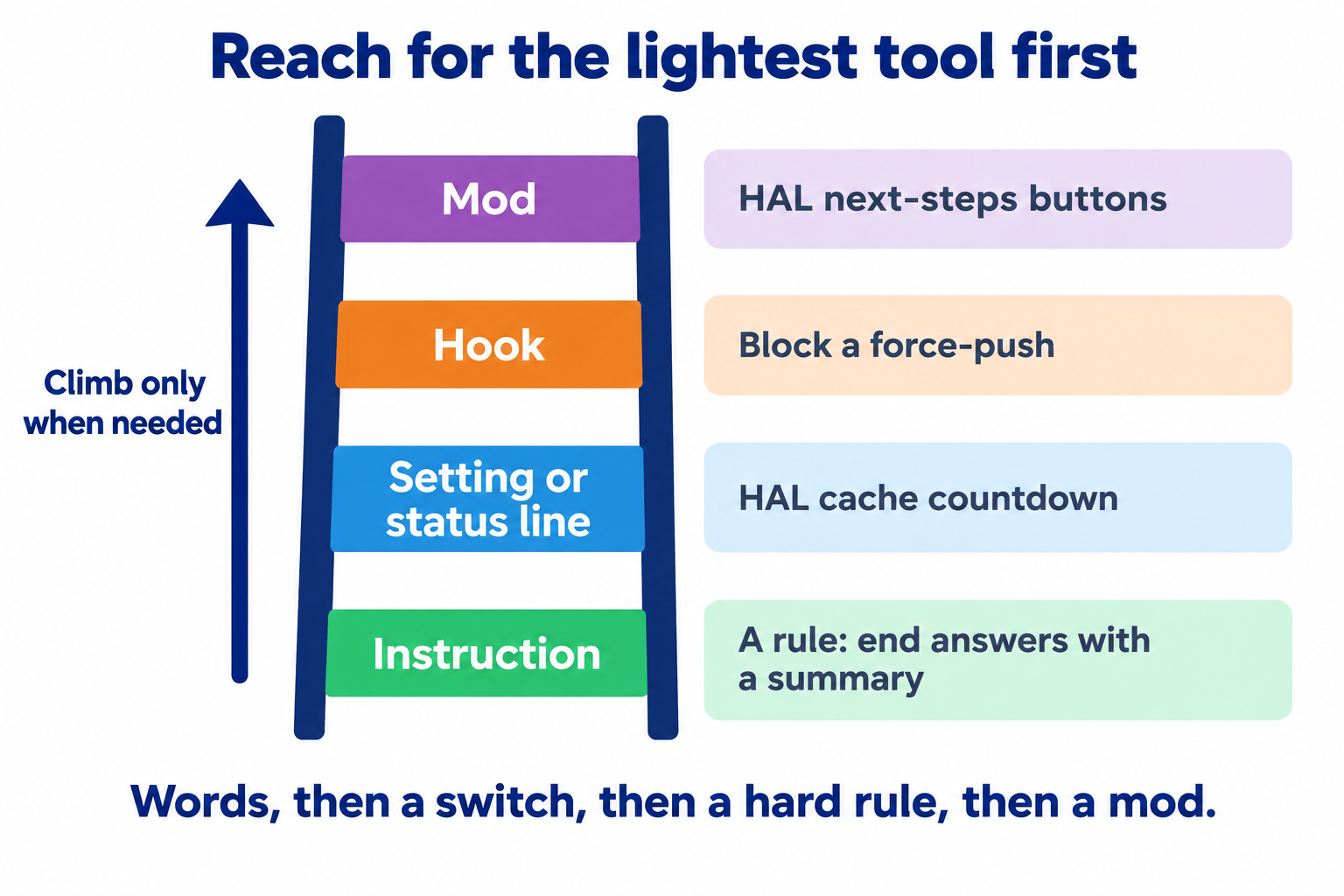
Climb only when the rung below can't do the job: words, then a switch Claude Code already has, then a hard rule, then a mod.
We started at the top rung, twice, and the case study has the receipts. But when a mod is the right tool, what does one look like inside?
How a Claude Code Mod Works
A mod is a small folder. Ours looks like this.
next-steps/
├── .claude-plugin/
│   └── plugin.json      name, version, description
├── hooks/
│   ├── hooks.json       {"modules": ["./register.ts"]}  ← this line makes it a mod
│   ├── register.ts      the mod: which events it handles
│   └── verdict.ts       plain helper logic, tested on its own
└── tests/               Anthropic's test kit
The hooks.json line pointing at a module turns a plugin into a mod. No build step, no Node.js. The module exports one function, register(on), built on three ideas.
on(event, …) picks the moment: a tool call, a finished turn, a screen redraw, a slash command. A matcher narrows it, such as only the Bash tool.
next(e) lets Claude Code carry on, changed or not. Mods stack like layers of an onion; calling next passes the event to the next layer. Don't call it, and you've answered the event yourself.
$ is Claude Code's toolbox: draw, ask, save data, set timers, read files, run programs, call a model. Everything goes through $, which is how claude plugin validate lists what a mod touches without running it.
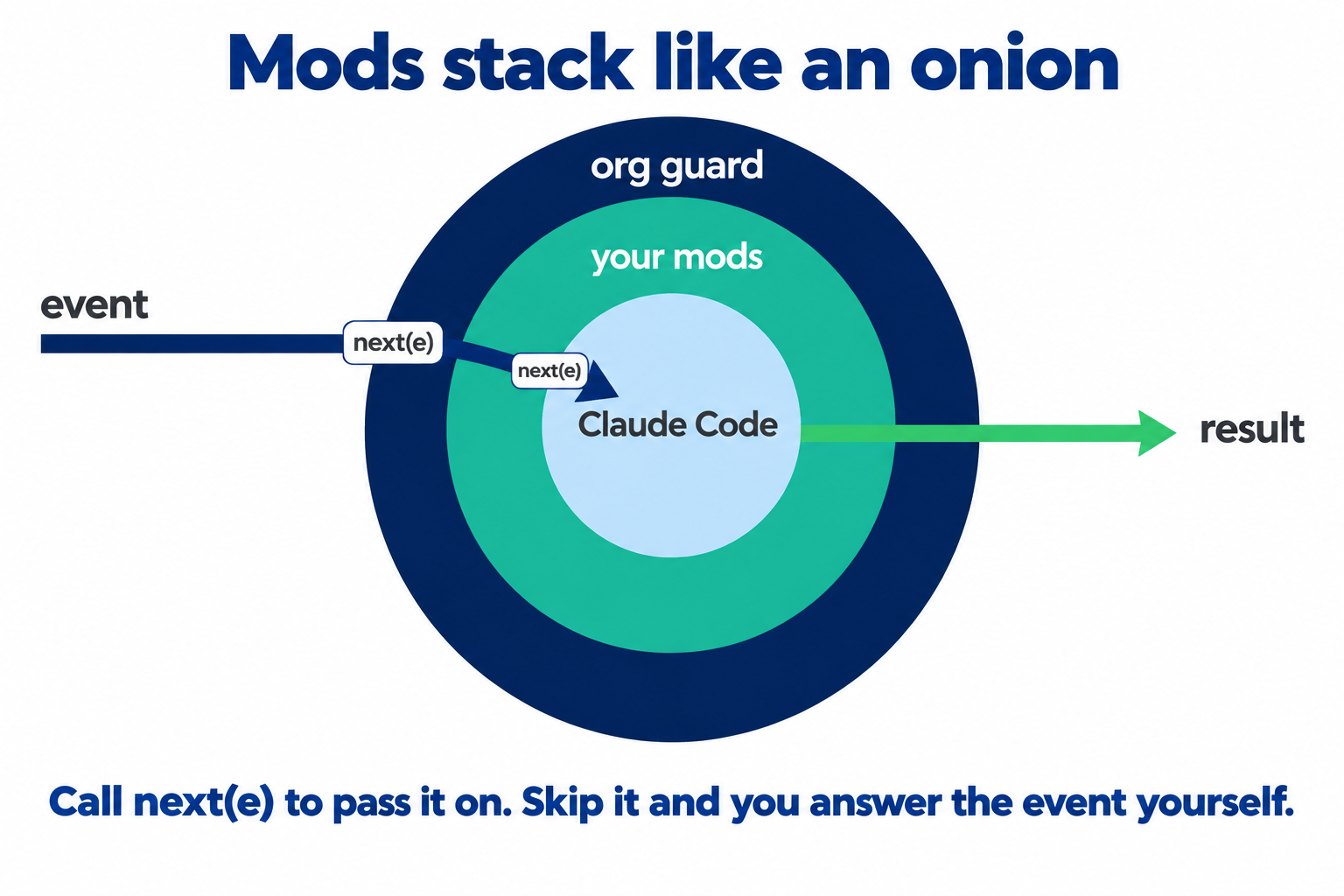
Mods stack like an onion: each layer calls next(e) to pass the event inward, and the result comes back out.
Where a mod can draw
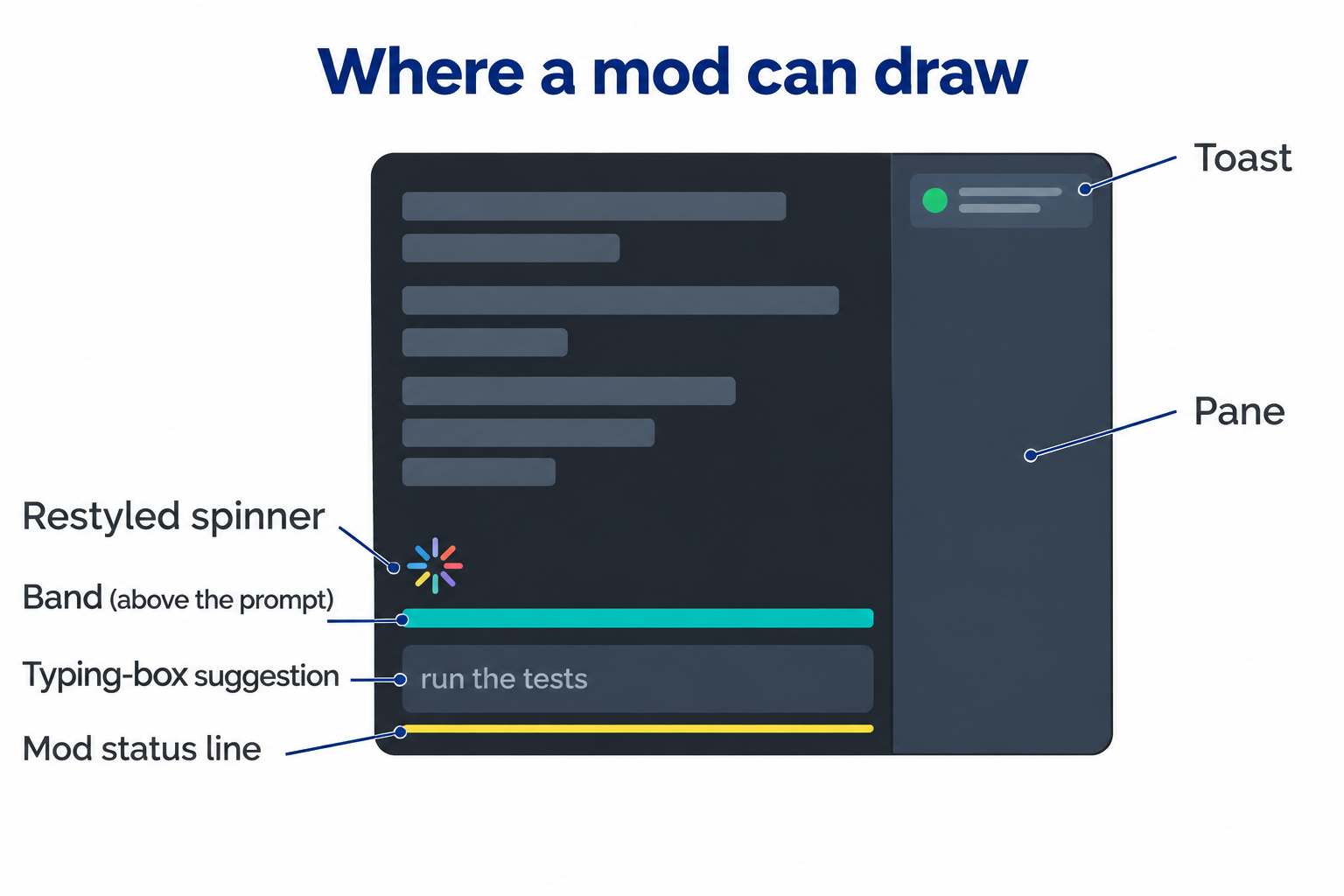
Six places a mod commonly draws (it can also add a log line to the transcript). Name one in your prompt and Claude puts the mod there.
The band (AbovePrompt): the strip above the typing box, shared by every mod.
A pane: docked right in a wide fullscreen terminal, otherwise above the prompt.
A toast: a pop-up at the top right for about 4 seconds.
A mod status line: one line under the prompt, prefixed with the mod's name.
The typing-box suggestion: dim text you accept with Tab ($.prompt.suggest).
Claude Code's own rows: the spinner, tool rows and question dialog can be redrawn. The permission prompt cannot.
lustoykov's tip: name the surface in your prompt ("a cost band", "a pane"), and Claude puts it there.
Real code: our next-steps mod
A simplified excerpt from our register.ts: one hook decides whether a finished turn deserves a check, one draws the buttons.
// Simplified from HAL's next-steps mod (hal-mods, 4 Oct 2026)
export function register(on) {
  // 1. A turn finished. Let Claude Code carry on first, then decide.
  on("turn.complete", async ($, e, next) => {
    const result = await next(e);
    // Ask the fork only after the turn has ended.
    if (isWorthChecking(e)) $.clock.after(0, () => check($));
    return result;
  });

  // 2. Draw our buttons ABOVE other mods' rows in the band, never instead of them.
  on("ui.render", { component: "AbovePrompt" }, async ($, e, next) => {
    const below = await next(e); // what the mods after ours drew (Claude Code draws nothing here)
    if (steps.length === 0) return below;
    const { Box, Button } = $.ui.resolve(e);
    const row = Box({ flexDirection: "row", columnGap: 3, children:
      steps.map((s, i) => Button({ label: s.label, hotkey: String(i + 1),
                                   onPress: send($, s.prompt) })) });
    return below ? Box({ flexDirection: "column", children: [row, below] }) : row;
  });
}
The line that matters most is const below = await next(e). Leave it out and your band replaces whatever the mods after yours drew there. Keep a band small, too: our first mod, a dashboard, drew a band that also hid Claude Code's own task list and running agents.
Mr. Cloud Book's walkthrough is the most detailed tour of events, ordering, packaging and the test kit, for readers who want the architecture in 18 minutes.
Drawing and listening are free. The interesting mods also think about what just happened, using a technique hooks don't have. (Settings hooks can call a model, but they can't fork the conversation.)
Forking: The Technique That Makes Mods Smart
Picture a long meeting. You photocopy the minutes and hand the copy to a colleague with one question: "Did we actually agree on a deadline?" They answer, the copy goes in the bin, and the meeting carries on untouched.
That's a fork. In mod code it's one line:
const reply = await $.model.fork({ prompt: forkPrompt(lastAnswer) });
The fork gets a copy of the whole conversation, answers one question, and disappears without touching the original.
It's cheap because of the cache. Every message re-sends the whole conversation, but while it's fresh in Claude's cache, re-reading it costs far less. On a Claude subscription the main conversation's cache lasts an hour; with an API key, a cloud provider or usage credits, it's five minutes unless you change it. While the cache is warm, a fork pays a reduced cache-read price for the conversation, plus the question and answer. When we read them on 5 Oct, the last next-steps fork in each of four HAL windows had read between about 200,000 and 900,000 tokens from the cache: cheaper, not free.
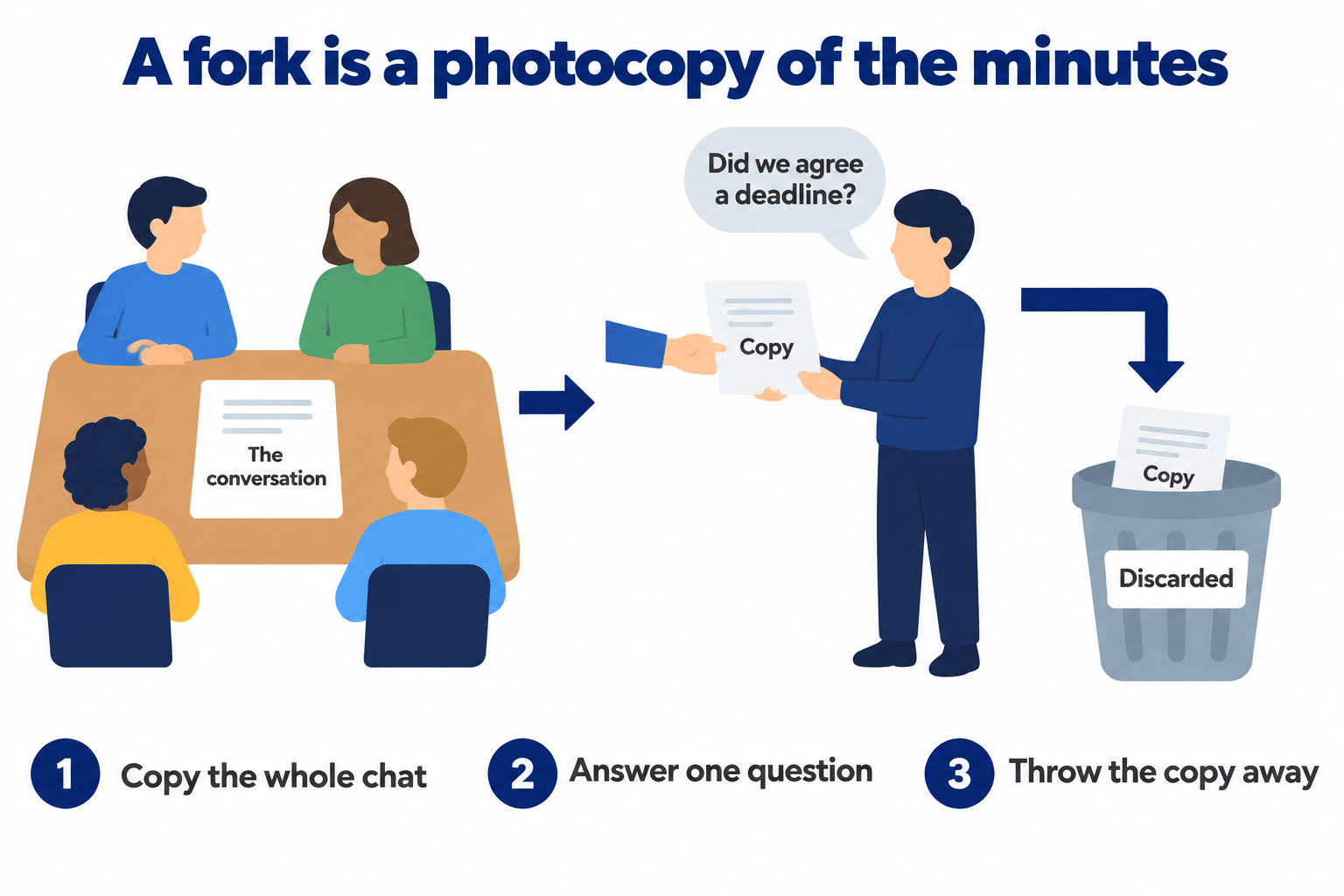
A fork is a photocopy of the conversation: it answers one question, then goes in the bin.
Thariq's examples
Thariq Shihipar, who works on Claude Code at Anthropic, covered forks in a Latent Space interview released two days before launch.
A quiz after each turn. A fork asks "is this task complete?" and, if so, writes quiz questions above the prompt. It costs a little every turn.
A supervisor. Thariq and the host describe a fork that asks what the goal was, whether the work met it, whether corners were cut, and what needs your approval.
Side questions. Claude Code's own "by the way" questions use forks too.
When the host asked whether a per-query model router would burn through a plan, Thariq said someone can share one that doesn't break the prompt cache, and Anthropic wants a mod-writing skill that warns you. (It's at about 38 minutes in the video at the top of this guide. A built-in mod-writing skill, plugin-authoring, now ships with Claude Code.)
The limits of a fork
It can't run tools, and it uses the same model and setup as the main conversation (which keeps the cache valid).
It's cheap only while the cache is warm. If the cache has expired, the fork still runs and pays to read the whole conversation again.
It costs usage. $.model.fork and $.model.complete bill your plan or API key.
A fork is not an adversary. Same model, same conversation, same blind spots. Use it to supervise the process, not instead of a review by a different model.
None of that helps until the mod is running, and that's the step we got wrong first.
How to Install Claude Code Plugins and Mods
There are two ways in: install a mod for every window, or load it into one window while you try it.
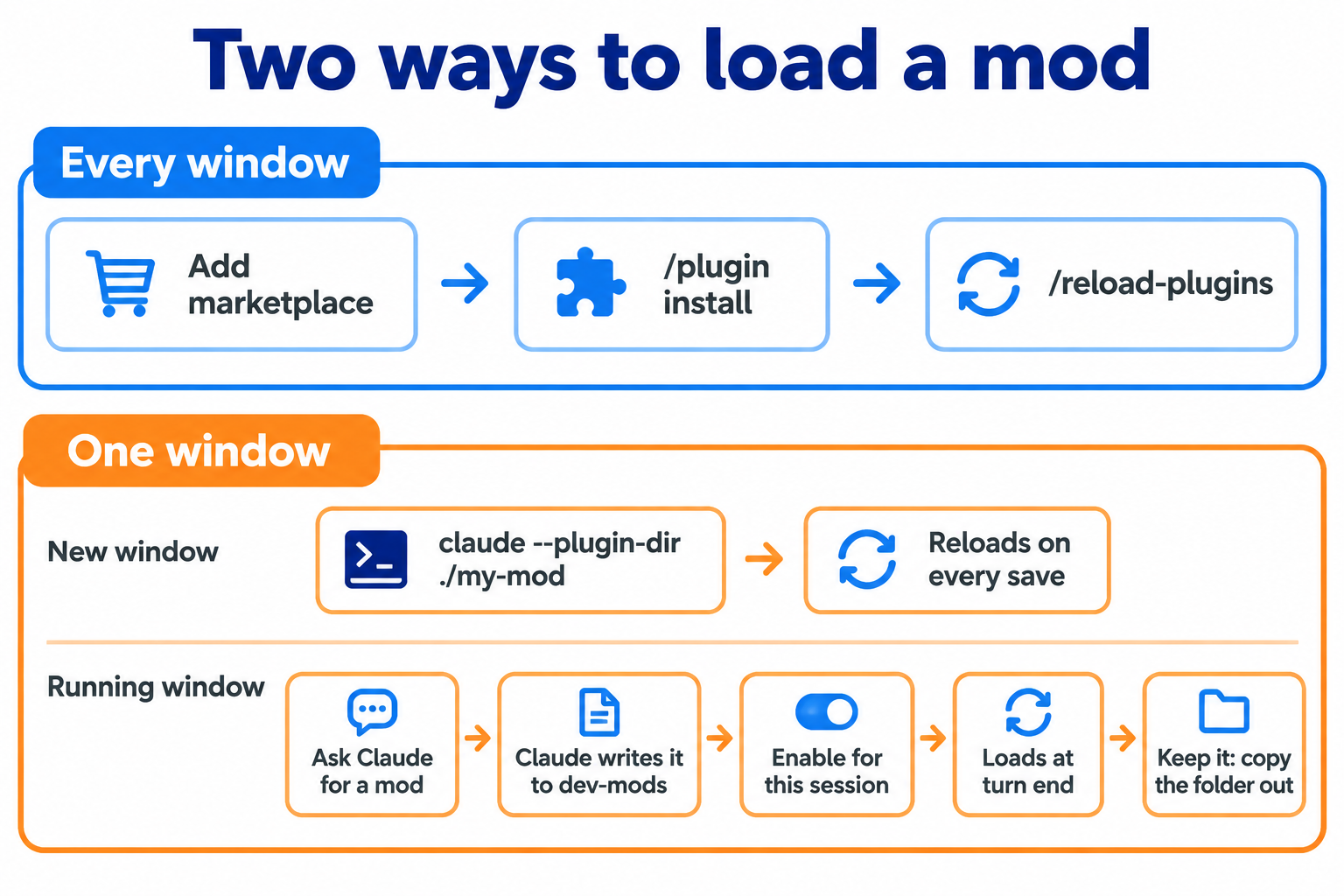
Two ways in. The one-window route is the most common "my mod does nothing" trap.
Before you start
You need Claude Code v2.1.287 or later (claude --version). Mods are on by default; the old CLAUDE_CODE_ENABLE_FUNCTION_HOOKS setting is ignored.
Use a terminal
Mods draw in a terminal (IDE terminals and JetBrains included) and the desktop app's Code tab. In VS Code's chat panel and claude -p they run but draw nothing, Remote Control shows them only in the terminal on your own machine, and desktop WSL sessions don't run them. In a cloud session they run only if the plugin reaches that session, and draw nothing. A few elements are terminal-only. If a working mod looks broken, check where you're running it.
Option 1: install for every window
This is how to install Claude Code plugins in general, and mods are just plugins.
Add the marketplace (a list of plugins someone publishes, usually a GitHub repo): /plugin marketplace add owner/repo.
Install: /plugin install name@marketplace, or claude plugin install … from your shell, for yourself (user scope) or one project.
Reload with /reload-plugins in any session already open, if you installed from the shell.
Check: /plugin shows a dim line such as 1 mod active · first-mod.
Updates. The docs say /reload-plugins loads an update; if it says the change is pending (to protect your prompt cache), /reload-plugins --force applies it. Restart only if an update doesn't show. 2.1.289 fixed a bug that left stale copies of local-folder marketplaces.
Option 2: load into one window
claude --plugin-dir ./my-mod loads a mod into one new session and reloads it every time you save.
In a session that's already running, the documented route is to ask Claude for the mod. This is where we tripped up first.
Ask Claude for a mod. Claude works from the built-in plugin-authoring skill (or run /plugin-authoring yourself).
Claude writes it into a hidden folder, ~/.claude/dev-mods/<session-id>/, asking before each file in default mode.
Answer the prompt. Claude Code asks "Enable hot reloading for this session?" Only you can pick Enable for this session. With Not now, nothing loads for now; the mod loads the next time that session starts.
Use the next turn. The mod loads when the turn ends.
Keep it. A mod Claude wrote loads only in that session. Copy its folder out and load it with --plugin-dir, or add it to a marketplace.
Copying a finished mod into that folder yourself isn't a documented route: when we tried it, it did nothing at first ("Unknown command"). For a mod you already have, use --plugin-dir.
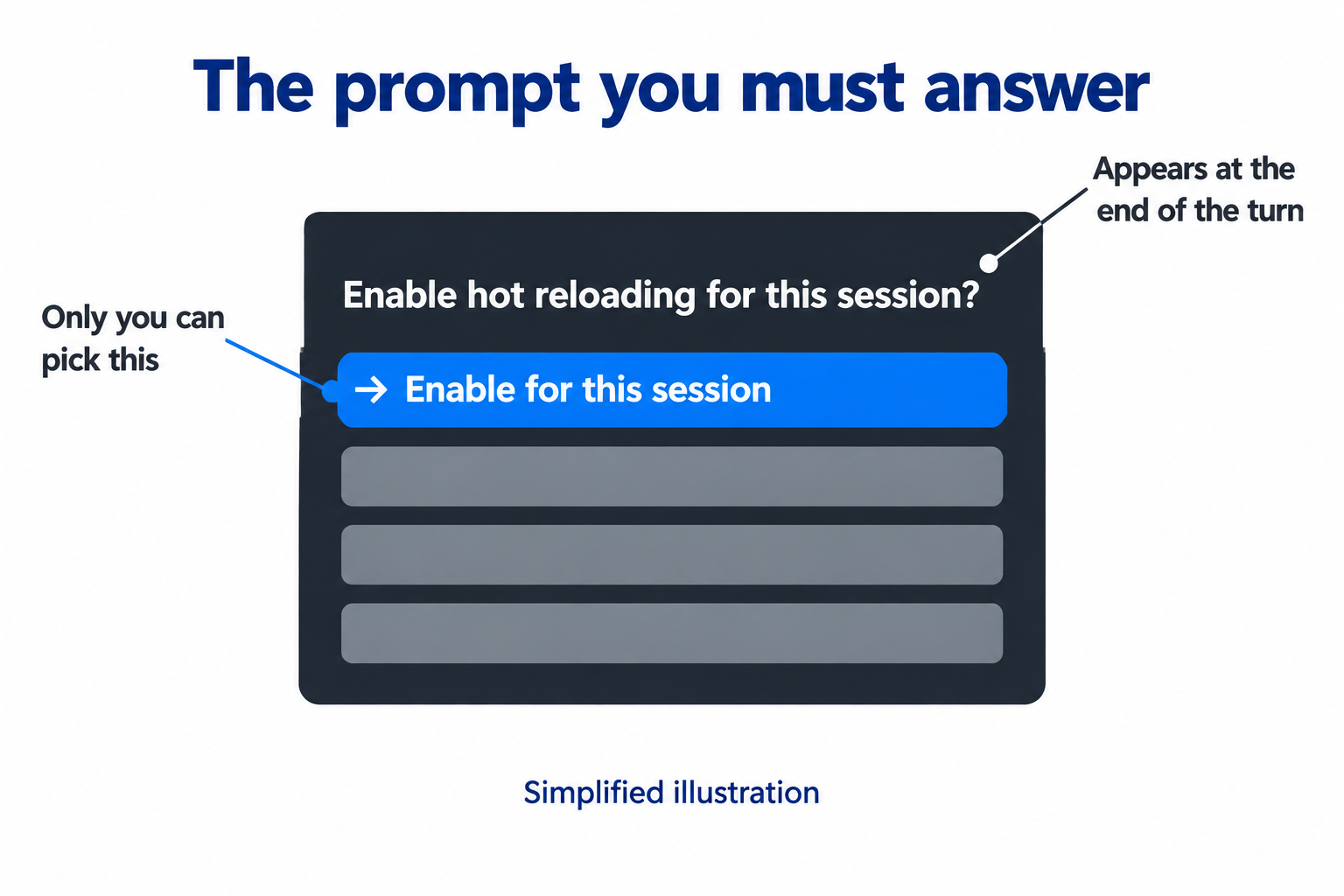
The step most guides skip. Simplified illustration.
What breaks live: the gotchas in one place
Each hook gets 10 seconds of its own time (50 ms for prompt.edit). Time waiting inside next and most $ calls doesn't count, but $.clock.sleep does. A .catch handler gets 1 second.
All installed mods share one worker thread (a single lane of work), so a mod that blocks it gets unloaded. If three worker crashes can't be traced to one mod, Claude Code unloads every non-built-in mod until you run /reload-plugins.
Write every call in full ($.ui.ask, never const ui = $.ui), because the validator reads code without running it.
dev-mods folders get cleaned up after a while, so copy out anything you want to keep.
Now you can load anything. The harder question is which mods are worth loading.
The Best Claude Code Plugins and Mods Right Now
Our bias in ranking the best Claude Code plugins: someone running several sessions who cares about cost and deploy safety, with anything that touches less of your machine pushed higher. We checked each repo's licence and the calls it makes, not every line of its code.
Start with Anthropic's three samples
These live in anthropics/claude-code-playground (Apache-2.0). They're "not an official Anthropic product", but each README's "How it was built" section includes what didn't work, which makes them the best learning material available.
blast-radius holds risky commands (rm -r, git reset --hard, force pushes, migrations), shows what they'd affect, and asks Proceed or Cancel, with Cancel focused so Enter refuses.
token-weather is the smallest: one line above the prompt forecasting how full your context is (how much conversation Claude can hold), from ☀ under 25% to ↯ at 90% and over.
replay-theater lets you step through the last turn's file changes with /replay.
All three came from one prompt: Claude listed ten ideas, and the build prompt boiled down to "implement 1, 2, 7".
Community mods, ranked
| # | Mod (author) | What it does | Licence | Safety note |
|---|---|---|---|---|
| 1 | claude-flightdeck (scasella) | Read-only pane: context, cost, permission decisions, subagents (helpers Claude starts) | MIT | No file, process or network calls |
| 2 | whats-agent-doing (tzafrir) | One box saying what Claude is doing now | MIT | Only lists agents |
| 3 | claude-code-redact (karanb192) | Swaps secrets (and personal data, if you turn those rules on) for placeholders before the model reads them | MIT | Sees everything; no process or network access |
| 4 | claude-agent-watch-mod (estruyf) | Counts open sessions, warns at a limit, lists ones waiting on you | MIT | Reads and writes files and sees every prompt you send; strict mode holds a prompt and puts it back in the box |
| 5 | nateherkai/claude-code-mods (Nate Herk) | Collision Guard (asks before editing a file another chat changed in the last 30 min), Cache Keeper, Goal Meter, Recording Mode | MIT | No network calls of its own; Cache Keeper's forks spend tokens |
| 6 | yash-gadodia/claude-mods | 13 mods, incl. merge-gate (no merge unless you said "merge") | MIT | Runs programs; scope-guard calls a model |
| 7 | OneWave-AI/claude-code-mods | 11 mods, incl. launch-codes: a one-time code before vercel --prod, force-push or a database reset | MIT | Asks you; plays sounds |
| 8 | hamzafer/claude-code-mods | 17 mods (5 Oct), incl. a merge-gate that waits for CI (automated checks) and a Codex review | MIT | 90★ on 5 Oct. Runs programs, calls a model, makes web requests |
| 9 | cc-pr-tracker (sezaakgun) | Pull requests and CI checks above the prompt | MIT | Runs the gh tool |
| 10 | claude-fleet (Dubbus) | Every session: busy or waiting, git state, context | MIT | Calls a model, runs programs, writes files, can submit a prompt |
| 11 | modsmith (Dan McAteer) | A mod-building skill plus seven templates, incl. next-steps-supervisor | MIT | Forks; shows each fork's actual token use |
| 12 | ctx-handoff-mod (cablate) | At 80% context (or 600k tokens), writes a handoff, clears the chat, continues | MIT | 37★ on 5 Oct. Runs /clear and submits prompts: trial only |
| 13 | intermission (jarrodwatts) | A shared Doom deathmatch while you wait on Claude | MIT | Downloads a game; hard-coded server. See safety |
| 14 | Arunjay4213/claude-mods | quota-meter, token-ledger, budget-guard, context-lens | No LICENSE file (README says MIT) | Check before reusing |
Two honest notes. Account-switching mods are only just appearing: as of 4 Oct, Rocha101/claude-code-quickswitch and simplecore-inc/claude-mods both switch Claude accounts. Both are days old: try them in one window first. And I'd rather you build one small mod for your own workflow than install six of these: "the best use case is going to be one that's unique to you", as Chase AI put it.
Plugins that aren't mods
Many Claude Code plugins have no mod code at all. A plugin can add commands, agents, skills, settings hooks, and MCP and LSP servers (connections to outside tools and code services). Claude Code adds Anthropic's official marketplace, claude-plugins-official, the first time you start it in a terminal, so you can install straight away: /plugin install commit-commands@claude-plugins-official adds commands for committing, pushing and opening pull requests. The details pane shows what a plugin will add and, for official ones, an estimate of the tokens it adds to every turn. Browse more at claude.com/marketplace, and vet them like mods: plugins can run hooks and MCP servers too.
Fourteen repos is a start. The full count is over a thousand, so where do they all live, and how do you tell a good one from a risky one?
Where to Find Mods: Catalogues and Marketplaces
People search for "the Claude Code plugins marketplace" as if it were one app store. It isn't: any GitHub repo with a marketplace file is one, and you can add as many as you like. Anthropic runs the official one (home of code-modernization) and takes submissions for its claude.ai directory. For mods, community catalogues are ahead.
| Catalogue | What it is | Note |
|---|---|---|
| awesome-claude-code-mods (karanb192) · mods.aidojo.si | 1,740 mods, auto-scanned with claude plugin validate, each with an access badge | The largest we found. CC0 |
| claudemods.ai | An unofficial, voted catalogue with a mod of the day | 45 mods |
| awesome-claude-code-function-hooks (Ray Amjad) | The first list, from before the rename | Small; MIT |
GitHub topics claude-code-mods, claude-code-mod | Where new mods appear first | Unfiltered |
| Anthropic's playground | The three samples, as a local marketplace | Apache-2.0 |
| Built-in mod source | sec-default, diff, telemetry, agents-md, type definitions | Learn the patterns here |
That first catalogue also shows what mods ask for. Its 2 Oct scan, quoted in two videos, found 359 mods: 55 only drew and remembered, 75 reached the network, 111 saw every prompt. Its 4 Oct rescan of 1,740 found 215, 212 and 537. So about a third of public mods can see every prompt you type.
How to vet a mod before you install it
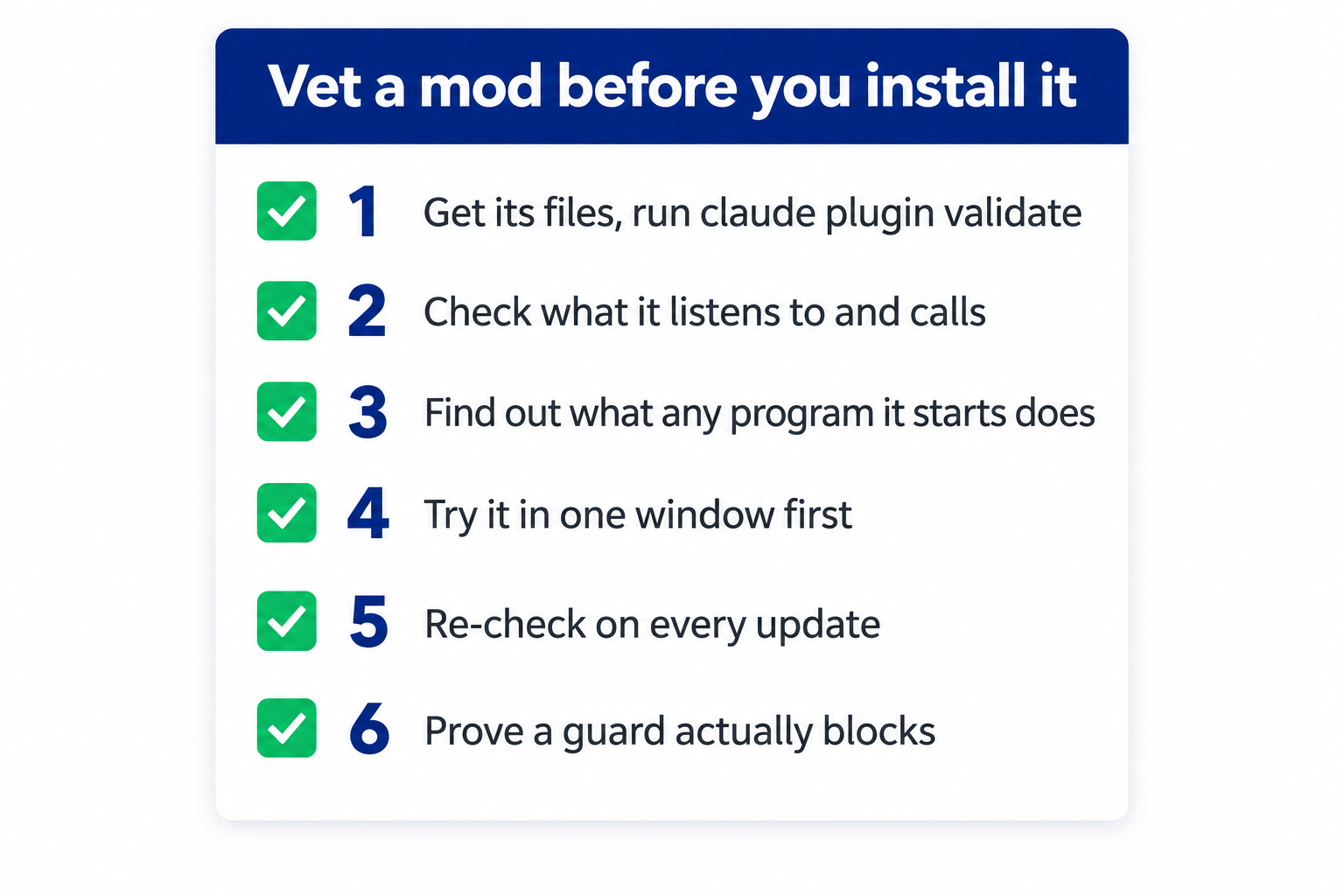
Save this one: six checks before you trust a mod.
Get its files and run claude plugin validate ./the-mod. Without running anything, it lists the events the mod handles (the hooks: line) and every $ call it makes (the calls: line).
Check what it listens to and calls. Watch for $.fs.read or write, $.process.run or spawn, $.http.fetch, $.env, $.settings.read, $.mcp.call, model calls, $.prompt.submit and $.session.send. In hooks:, tool.call and prompt.submit see every call and prompt, and tool.check can approve or deny tool calls.
Find out what any program it starts does. Validate can't see inside a program the mod starts, and network policy doesn't cover one, so treat any $.process.run as possible network access. The Doom mod below downloads its game this way. Read that part of the code, or ask Claude to explain it.
Try it in one window first with --plugin-dir.
Re-check on every update. A mod you trusted can change in a later version.
Prove a guard actually blocks. A failing mod is skipped, so "enabled" isn't "working": Wes Sander's post "The Guard I Installed Was Enabled, Running, and Doing Nothing" describes five preview-era guards that never loaded, because the preview switch was set in only one terminal.
A catalogue tells you what exists. The more useful question is what to build.
Claude Code Mod and Hook Examples
These are the ideas from the 34 videos and the repos, grouped by purpose (mods in the ranked table aren't repeated). If you came for Claude Code hooks examples, the ones marked hook works don't need a mod (a settings hook can do the job), the ones marked status line works could be a status-line segment, and the lab builds one guard both ways.
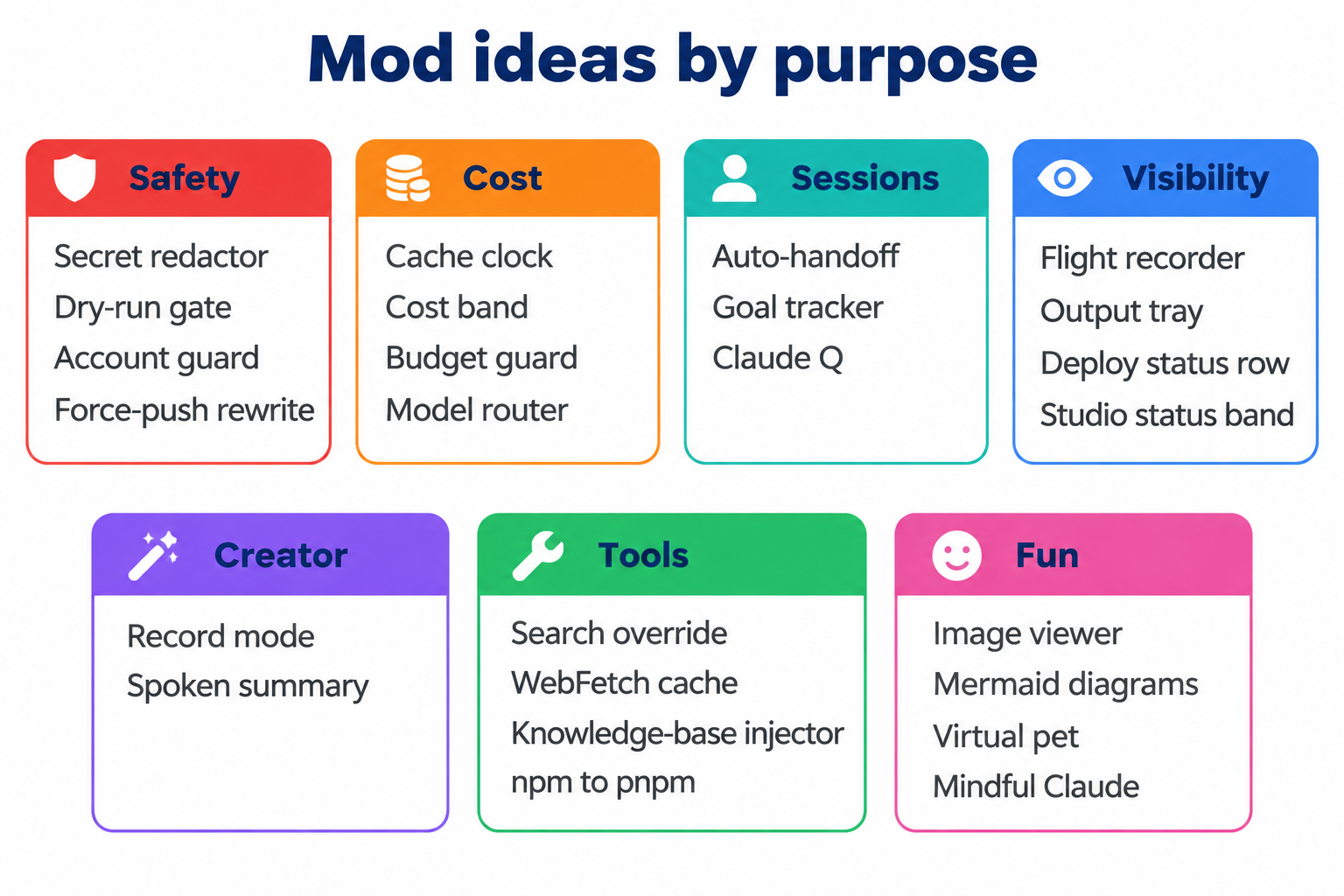
Find your own problem in seconds: mod ideas grouped by purpose.
Safety
- Secret redactor (Ray Amjad): swaps secrets, emails and IP addresses for placeholders before the model sees them.
- Dry-run gate (Ray Amjad): no real run before a dry run, with a red PROD banner. Hook works for the block, with the banner in your status line.
- Account guard (Prompt Engineering): checks which account you're publishing from. Hook works: a hook can ask or deny.
- Force-push rewrite (Prompt Engineering): turns a force-push into a push to a new branch. Hook works: a settings hook can rewrite a command before it runs.
Cost
- Cache clock (Chase AI, Nate Herk): counts down to a cold cache. We used the status line instead.
- Cost band (lustoykov): session cost plus the estimated cost of the next prompt. Status line works.
- Budget guard (Arunjay4213): warns near a spend limit, then refuses tool calls.
- Model router (Mark Kashef): forces subagents onto a cheaper model. Hook works: a hook can rewrite the call, or set a default subagent model.
Sessions
- Auto-handoff (Mark Kashef): a fresh session at a context threshold.
- Goal tracker (Nate Herk) and Claude Q (Gal Elmalah), which queues your next prompt while Claude works.
Visibility
- Flight recorder and output tray (Mark Kashef): every request, model and tool; files created this session.
- Deploy status row (Ray Amjad): Vercel deploy progress in a row at the bottom, next to the status bar, kept for an hour after each deploy. Status line works.
- Studio status band (Simply AI): read-only, refreshed every 20 seconds, no model calls. They built it after finding 21 of their 246 messages were "status?" checks. Status line works.
Creator
- Record mode (Nate Herk) masks emails and money on screen while you film (the model still sees them), and Ray Amjad's spoken summary reads each turn aloud.
Tools (all Ray Amjad)
- Search override, a WebFetch cache, a knowledge-base injector that adds your company docs to the prompt (hook works), and npm to pnpm, which rewrites commands to your package manager (hook works).
Fun
- Image viewer (Jarrod Watts, per lustoykov's video), Mermaid diagrams (Gal Elmalah), a virtual pet (Mark Kashef), and Mindful Claude (halluton), a breathing exercise while Claude works.
Nate Herk makes a fair point: he doubts many viral visual mods would actually help him. The best fix one specific annoyance. So how do you turn yours into a working mod?
Build Your First Mod: A Copy-Paste Lab
You don't need to code. Claude writes the mod; you say what you want, read what comes back, and prove it works. First a quick win with Anthropic's sample, then a real safety mod that asks before Claude force-pushes, built for our Workshop 22 session.
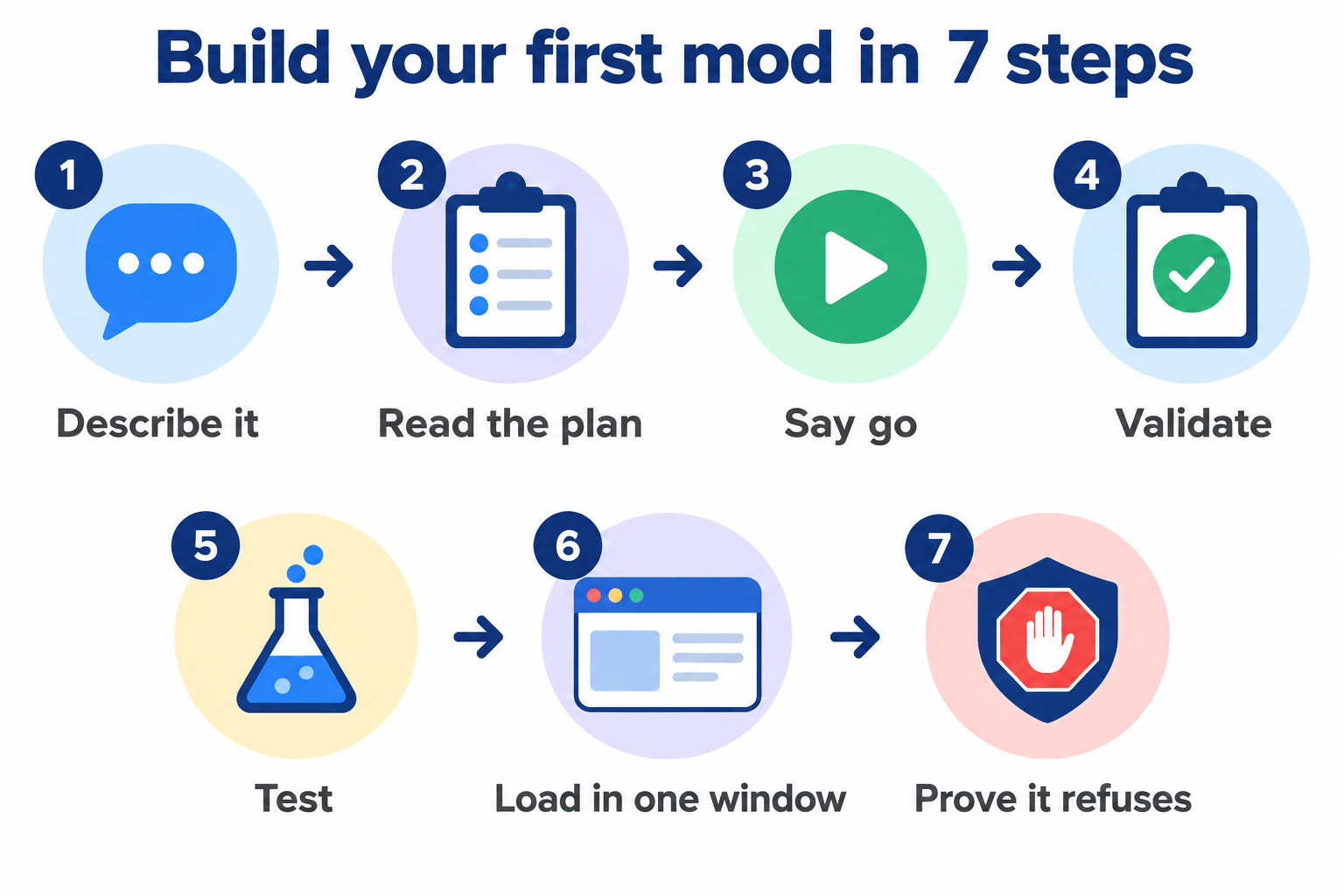
The lab at a glance: the seven steps of our own run.
Warm-up: a first win in one window
Run these in a terminal; they're straight from the playground's README.
$ git clone https://github.com/anthropics/claude-code-playground.git
$ cd claude-code-playground/claude-code/mods
$ claude --plugin-dir ./token-weather
A one-line context forecast appears above the prompt (☀ under 25% full). Close the session and it's gone. To keep it in every window, install it as a local marketplace:
$ claude plugin marketplace add ./
$ claude plugin install token-weather@claude-code-playground-mods --scope user
Step 1: describe it
Make a folder called force-push-guard, open Claude Code in it, and paste this prompt. It's our exact request:
Build a Claude Code mod in this folder called force-push-guard. Load the
plugin-authoring skill first. When Claude is about to run a Bash command that
is a `git push` with -f, --force or --force-with-lease, ask me with $.ui.ask
and two options, "Cancel" first and "Push anyway". Only "Push anyway" lets it
run. If I close the question, there's no one to ask, or the mod's own code
fails, block the push (add a .catch that denies). Don't trigger on commands
that only mention a force-push, like echo or rg. Write tests with Anthropic's
test kit for: a normal push, Cancel, Push anyway, a closed question, and no
false alarm. Show me the plan before you write anything.
Step 2: read the plan
In our run, Claude loaded the plugin-authoring skill, wrote nothing yet, showed a plan, and asked us four decisions: where to write the mod, whether to catch other force forms (such as a +main refspec), whether to catch wrapped commands (such as bash -c), and whether to add more tests.
Step 3: say go
We replied "Go", with no extras. Claude wrote four files: plugin.json, hooks.json, register.ts and a test file. Here's the heart of the hooks/register.ts HAL wrote for the version in this guide, comments trimmed. Yours can differ a lot (a rebuild on 5 Oct wrote a 162-line file with different messages), so read it before you trust it.
export function register(on) {
  on("tool.call", { tool: "Bash" }, guard).catch(async () => ({
    deny: "force-push-guard failed, so the push was blocked.",
  }));
}

async function guard($, e, next) {
  const command = String(e.command ?? "");
  if (!isForcePush(command)) return next(e); // not a force-push: run it

  let answer = "Cancel";
  try {
    answer = await $.ui.ask(
      "Force-push? This can overwrite commits on the remote.",
      ["Cancel", "Push anyway"],
    );
  } catch {
    // You closed the question, or nobody can answer (claude -p): stay safe.
  }
  if (answer === "Push anyway") return next(e);
  return { deny: "Force-push cancelled by the user (force-push-guard)." };
}
Two lines do the safety work. The .catch on the registration makes a crash or a timeout block the push: the guard fails closed. And answer starts as "Cancel", so anything but a deliberate "Push anyway" refuses. (isForcePush, not shown, only counts a part of the command that starts with git push.)
Step 4: validate it
$ claude plugin validate ./force-push-guard
Our real output on Claude Code 2.1.289 (paths shortened):
Validating hooks: .../force-push-guard/hooks/hooks.json

  ❯ ./register.ts hooks: tool.call{tool=Bash}
  ❯ ./register.ts calls: $.ui.ask

✔ Validation passed
That's the mod's whole reach: one hook on Bash, one question. If your plugin.json has no author, the last line reads "✔ Validation passed with warnings" instead; that warning is harmless.
Step 5: run the tests
$ cd force-push-guard && claude plugin test
Our five tests, and their real output on 2.1.289:
tests/hooks.test.ts:
(pass) a normal git push runs with no question
(pass) git push --force + Cancel: denied and never ran
(pass) git push -f + Push anyway: it runs
(pass) closing the question blocks the push (fails closed)
(pass) no false alarm on echo or rg that only mention a force-push

 5 pass
 0 fail
The kit doesn't force a failure, so we also called the hook directly with a fake question and next: all five cases matched, and a forced crash and a forced timeout both returned "force-push-guard failed, so the push was blocked."
A real run on Claude Code 2.1.289: validate finds the Bash hook and the $.ui.ask call, and the test kit passes all five tests.
Step 6: load it in one window
$ claude --plugin-dir ./force-push-guard
If Claude wrote the mod into its own session folder instead, answer Enable for this session when asked about hot reloading.
Step 7: prove it refuses
In a throwaway folder, run git init, then start Claude there with the full path to the mod (claude --plugin-dir /full/path/to/force-push-guard) and ask it to run git push --force origin main. With no remote, nothing can be overwritten. The guard's question appears with Cancel listed first. Pick Cancel, and Claude is told the push was cancelled (with our code, "Force-push cancelled by the user (force-push-guard)."; yours will word it its own way). Try again and close the question: that blocks it too.
On 5 Oct we ran the rebuilt guard headless (claude -p, auto mode, Claude Code 2.1.289, loaded with --plugin-dir), so nobody could answer. Claude tried git push --force origin main, the guard denied it, and Claude didn't try another way. That folder had no remote, so the push would have failed anyway; the guard's deny came first. We haven't captured the Cancel click in a live window: Cancel is proven by the test above. If yours behaves differently, tell us.
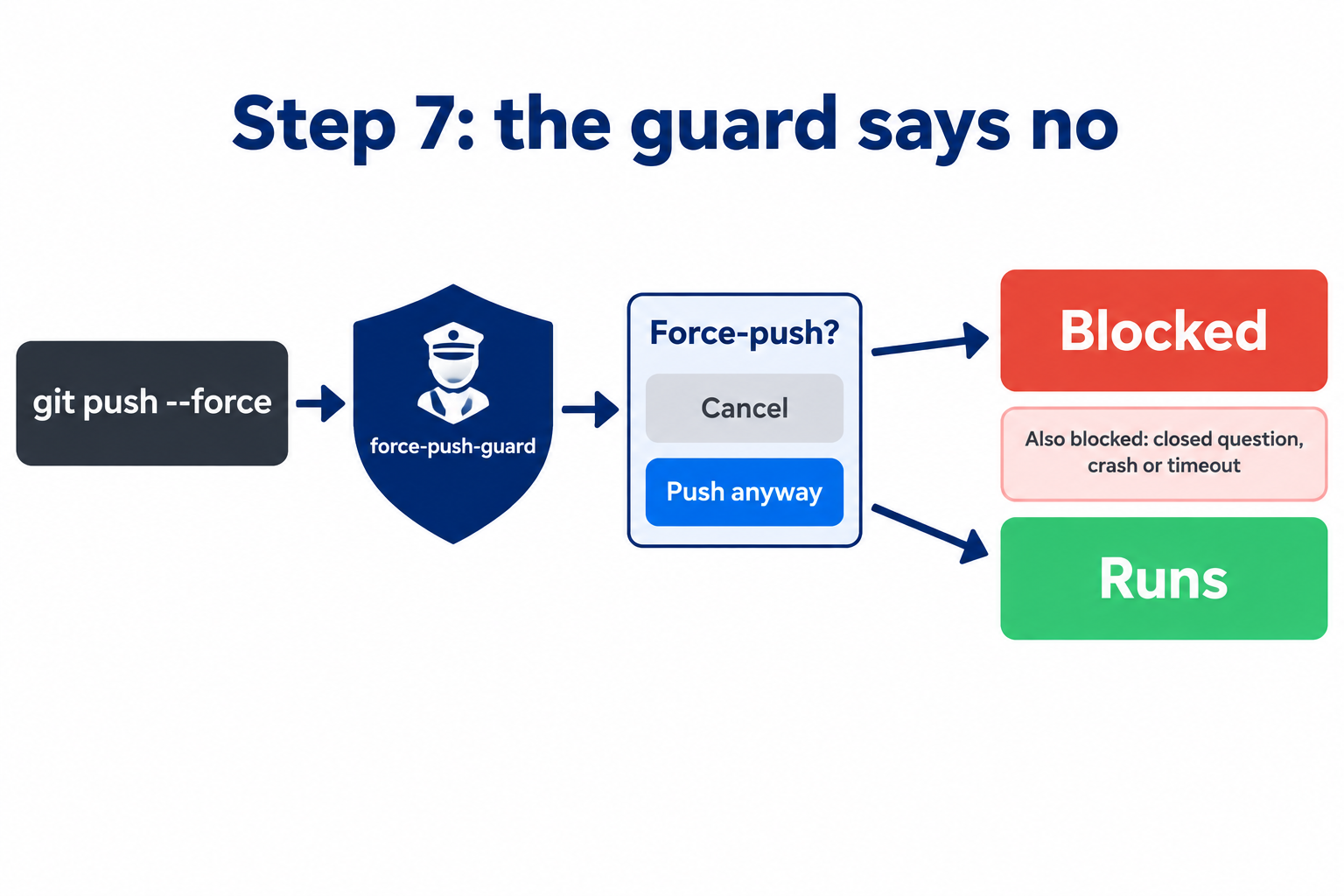
Illustration: the moment your own mod says no. Anything but a deliberate "Push anyway" is blocked.
The hook version, for comparison, adapted from the example in Anthropic's hooks docs. We ran this script on sample input, not inside Claude Code. Add it to .claude/settings.json:
{
  "hooks": {
    "PreToolUse": [
      {
        "matcher": "Bash",
        "hooks": [{
          "type": "command",
          "if": "Bash(git push *)",
          "command": "\"${CLAUDE_PROJECT_DIR}\"/.claude/hooks/no-force-push.sh"
        }]
      }
    ]
  }
}
#!/bin/bash
# .claude/hooks/no-force-push.sh  (chmod +x it; needs jq)
command -v jq >/dev/null || {
  echo "jq not found, so the push was blocked" >&2; exit 2
}
COMMAND=$(jq -r '.tool_input.command // ""')
FORCE='[[:space:]](-f|--force|--force-with-lease[^[:space:]]*)([[:space:]]|$)'
# Split at ; & | and check only the parts that start with "git push"
if printf '%s\n' "$COMMAND" | tr ';&|' '\n\n\n' \
   | grep -E '^[[:space:]]*git[[:space:]]+push([[:space:]]|$)' \
   | grep -qE -- "$FORCE"; then
  echo "Force-push blocked by hook" >&2
  exit 2   # exit code 2 = block
fi
exit 0
The hook script run directly, fed the JSON Claude Code sends before a Bash command, trimmed to the one field the script reads. A plain push passes (exit 0), a force-push is blocked (exit 2), and an echo that only mentions one passes.
Know its limits. The script is a simple text match, so some force-pushes get past it: git -C dir push --force, a push wrapped in bash -c '…' or sudo, and a +main refspec aren't caught. It can also false-alarm: echo "note; git push -f later" is blocked, because it splits at the ; even inside quotes. And if its input isn't valid JSON, it lets the push through. Treat it as a seatbelt, not a lock.
It refuses outright: no "Push anyway", and no permission prompt for an auto-approve hook to answer. A hook doesn't have to refuse: it could return "ask" to show Claude Code's own permission prompt, or rewrite the command with updatedInput. We used exit 2 because an auto-approve hook or mode can answer an "ask" prompt. (A mod that approves tool calls can still overrule it, unless the hook is in managed settings.) That's the ladder in one exercise.
Chase AI: the quickest beginner explainer of what a mod can do (before, instead of, after, or around any event), and the source of the "audit your last 30 sessions" tip in the box below.
The general loop for your own mod
Ask Claude to read your last 20 to 30 sessions and suggest five mods (Chase AI, Nate Herk and Prompt Engineering all start here), adding the rule Prompt Engineering picked up on X: "show me the ideas first. Don't build anything until I pick." Check the ladder, name the surface, test the "no" case, build in a self-check, and pair every pane with a slash command for places that don't draw.
Those habits come from problems we hit ourselves. Here's the honest record.
What We Built, and What Went Wrong
HAL is my Claude Code setup: about 2,000 command files, plus hooks and now mods, running much of StationX's day-to-day work. Here are five things we wanted that a mod could do. Only one is a mod today.
| We wanted | Built as a mod? | What happened |
|---|---|---|
| A dashboard of every session | Yes, then switched off | Claude Code's own task list disappeared under it; its guard false-alarmed |
| A summary after every answer | Yes, then retired | A short rule did the job; then I didn't want it |
| A cache countdown | Never built | The status line already had the data |
| A guard showing me emails before they send | Designed, not built | Right tool; we chose not to build it |
| Next steps after each turn | Yes, on v0.4.2 | Working, after one bad first version |
The dashboard that hid everything
Our first mod, hal-dashboard, showed open sessions, account usage, and a guard holding paid-API calls and deploys for my OK. With its band on, Claude Code's own task list and running agents disappeared. We never pinned down why; we switched it off. My reaction, verbatim: "Where's all the other stuff".
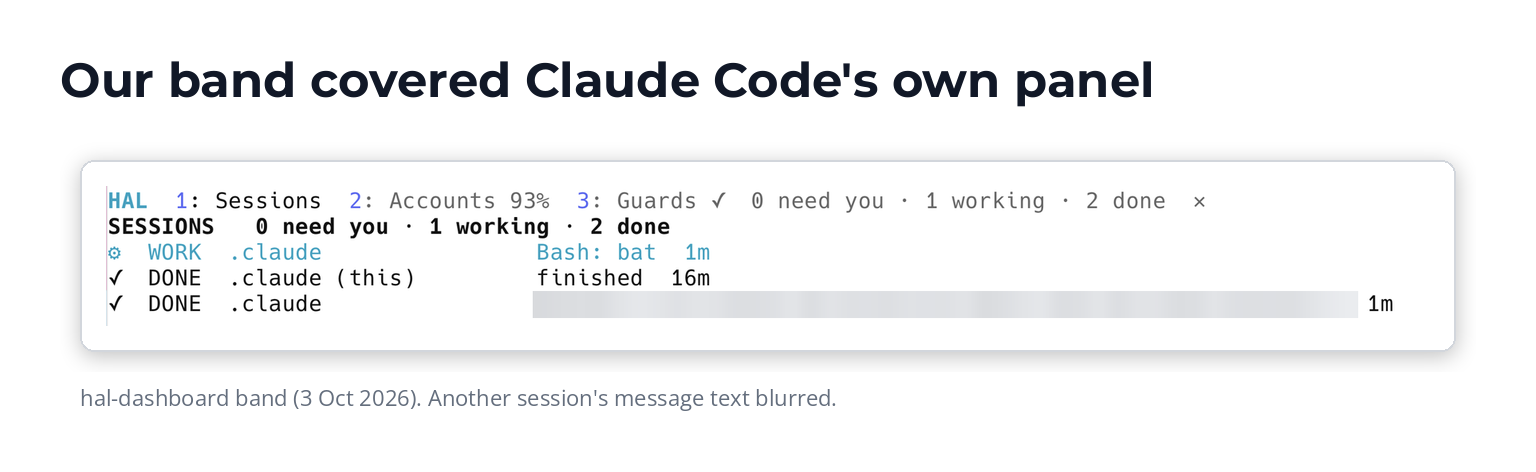
Our hal-dashboard band. With it on, Claude Code's own task list and running agents didn't show. Other sessions' text blurred.
The guard was worse. It matched words anywhere in a command, so a read-only search that merely mentioned a paid API's address was held for approval. "It's unusable now. You can't keep prompting and stopping work." We switched it off. Lesson: match the program being run, not words in the command, as the lab's isForcePush does.
The summary block a one-line rule could do
We built status-block to end every answer with a summary, then noticed a rule in HAL's instructions already did it. Soon I found the summary annoying, and we retired both.
The cache countdown that belonged in the status line
I wanted a countdown to the moment Claude's cache goes cold and messages cost more. A mod could do it, but Claude Code already sends its status line (the line or lines under the prompt, drawn by a script of yours): the cache's lifetime, expiry time and how many tokens the next request would re-cache once it's cold. One new segment plus "refreshInterval": 60, and it was done. No mod, no tokens.
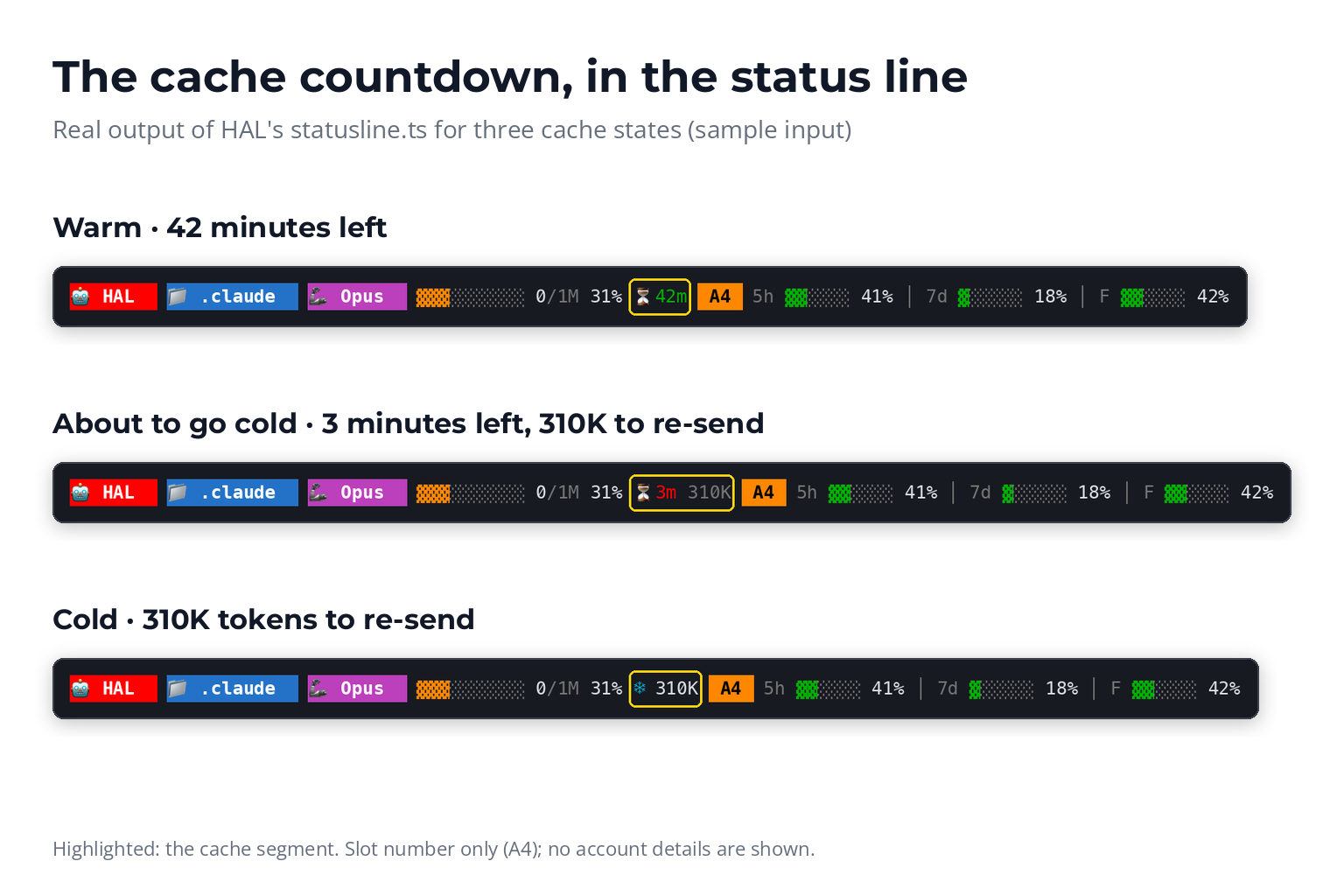
The lighter tool did the job: a cache countdown in the status line, no mod, no tokens.
Next steps: from a "blurge of text" to three buttons
next-steps is the mod we kept. Version 0.1 ran a supervisor fork after each working turn and showed the whole report. I called it "a blurge of text", and it ate the screen.
Version 0.2 shows only the outcome: up to three buttons above the prompt, and the best step as the dim suggestion Tab takes. It forks only after a turn that changed something, made eight or more tool calls, or asked me something, so plain chat costs nothing. The pattern is adapted from Dan McAteer's MIT-licensed next-steps-supervisor; the buttons follow Thariq's next-steps mod as shown in Nate Herk's video.
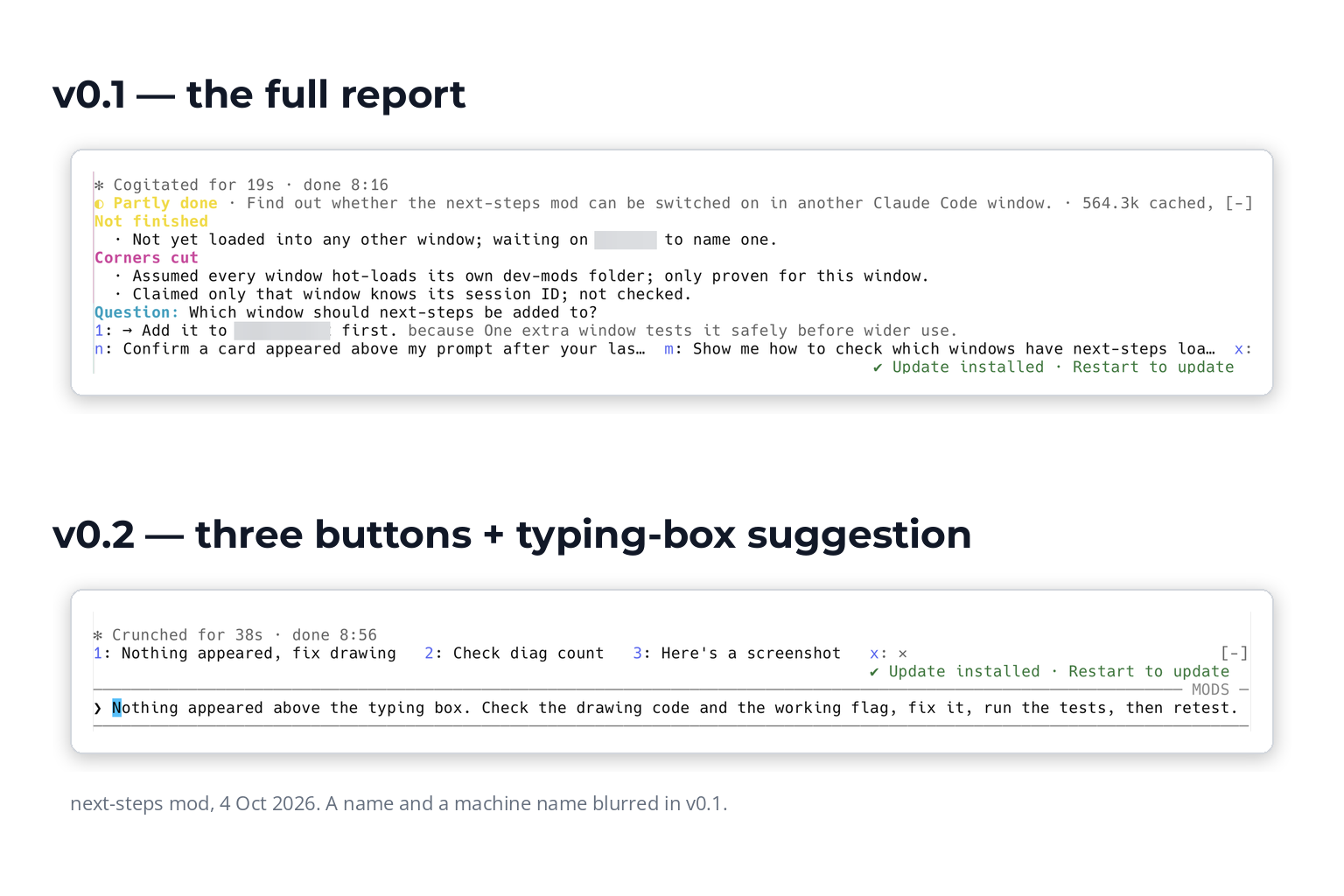
Show the decision, not the reasoning: v0.1 against v0.2.
Version 0.3 also checks the work against the HAL procedure being followed (a deploy, an email send); a broken rule becomes button 1. On six test scenarios (two real, four constructed, one run each), it put the right fix first in all five problem cases, with no false alarm on the clean one. Version 0.3.1 saves a status file HAL reads itself, because HAL kept asking me to run a diagnostic ("Why do you keep asking me to do things? I hate that."). Day to day, I use it to click what I might do next.
Version 0.4 came from using it. The five-word labels were often too short to judge an option by, so a fourth button, + (key 4), swaps them for the full sentences, one per line, and each sentence is still the button you press. Option 1 now carries a ★: the fork lists steps most important first, and the star makes that visible. The key is 4 rather than + because a band hotkey has to be a digit to work without first moving focus to the band.
Testing earned its keep. The test kit caught a logging call that would have crashed the error path; only the live test in a second window caught the missing "Enable hot reloading" step.
That's what a mod can do for you. The bigger question is what one can do to you.
Are Claude Code Mods Safe?
Short answer: as safe as the person who wrote it.
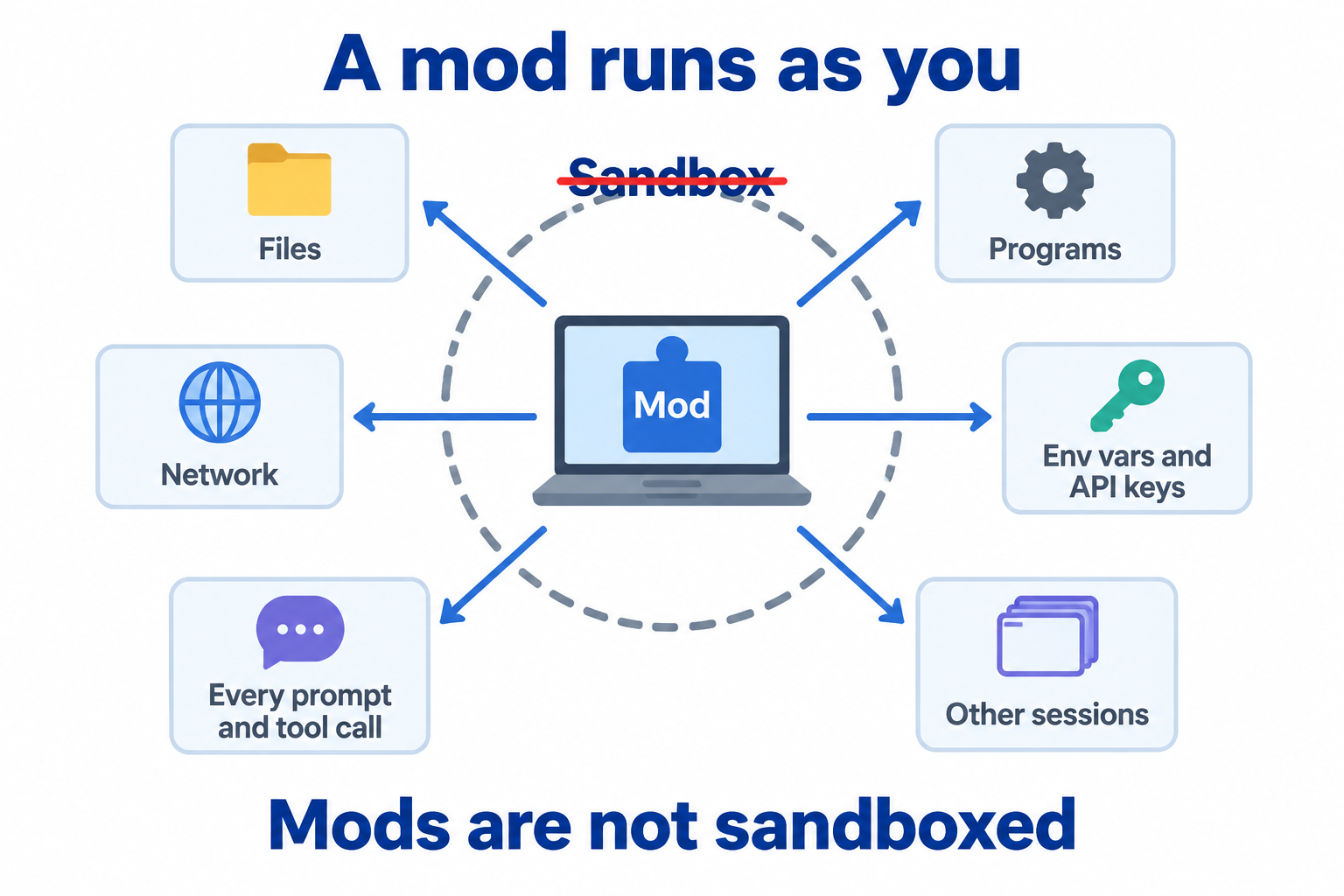
"Not sandboxed" made concrete: a mod runs as you.
Mods are not sandboxed
A sandbox is a fenced-off area where a program can't touch the rest of your machine. Mods don't have one; a mod runs as you. Per Anthropic's docs it can reach your files, programs, the network, environment variables and settings (API keys included) and every prompt and tool call, and it can approve tool calls and spend your plan. Claude Code's Bash sandbox doesn't cover programs a mod starts.
There's one important protection, and most people don't get it. Anthropic's built-in guard, sec-default, stops user mods from lifting your deny rules (settings that tell Claude Code never to run or read something). But it only loads with managed settings (set by an organisation) or on a Team or Enterprise plan. Without it, a mod can override your deny rules. Even with the guard, in auto mode a call a mod approves skips the safety classifier: the guard protects only your deny rules and managed hooks. And deny rules never cover a mod's own file reads: "a rule telling Claude not to read your env file doesn't stop a mod", as AI In View put it.
Three more facts. A mod hook that crashes or times out is skipped, so a careless guard fails open (the lab's registration .catch covers both). Mods cannot change the permission prompt. And Anthropic can switch installed mods off remotely, per the docs, which matters for a safety mod.
What Pluto Security found, with the caveats the videos dropped
The report most videos quote is Pluto Security's (22 September). It found four trust gaps, each demonstrated.
| Finding | What they showed | The caveat |
|---|---|---|
| 1. Silent theft | A mod read Claude's credentials file and history and sent them out, with no prompt | Their note: shell hooks could already do this |
| 2. Hidden hooks | claude plugin details showed "Hooks (0)" for a mod hooking everything | A disclosure gap; the content scan only runs for the claude.ai channel. No fix listed in the changelog through 2.1.289 |
| 3. Spoofed prompts | A fake credential prompt above the input; a swapped question dialog | Descriptive labels like "Delete everything" blocked the swap; generic Confirm/Cancel didn't |
| 4. Fetch after review | A mod downloads and runs a script, so behaviour changes with no version bump | npm packages and curl | sh carry the same risk |
The biggest caveat covers all four: Pluto tested version 2.1.274, the pre-release preview. They confirmed the permission prompt can't be hooked, and for findings 1, 3 and 4 the docs now openly describe this access. When Jack Roberts repeated the findings on YouTube, the caveats and version went missing. Read the report, not the retelling.
Case study: multiplayer Doom
intermission by jarrodwatts is delightful. Once Claude has worked for two seconds, a pane drops you into a shared Doom deathmatch with everyone else waiting on Claude, and hands you back when Claude finishes or needs a permission. It's MIT-licensed and open. It also starts a program (curl) to download the game, and the game connects to a fixed server over UDP. claude plugin validate would show you that it runs programs, but not what they do.
So, the workshop question: would you install it on the laptop that holds your production credentials?
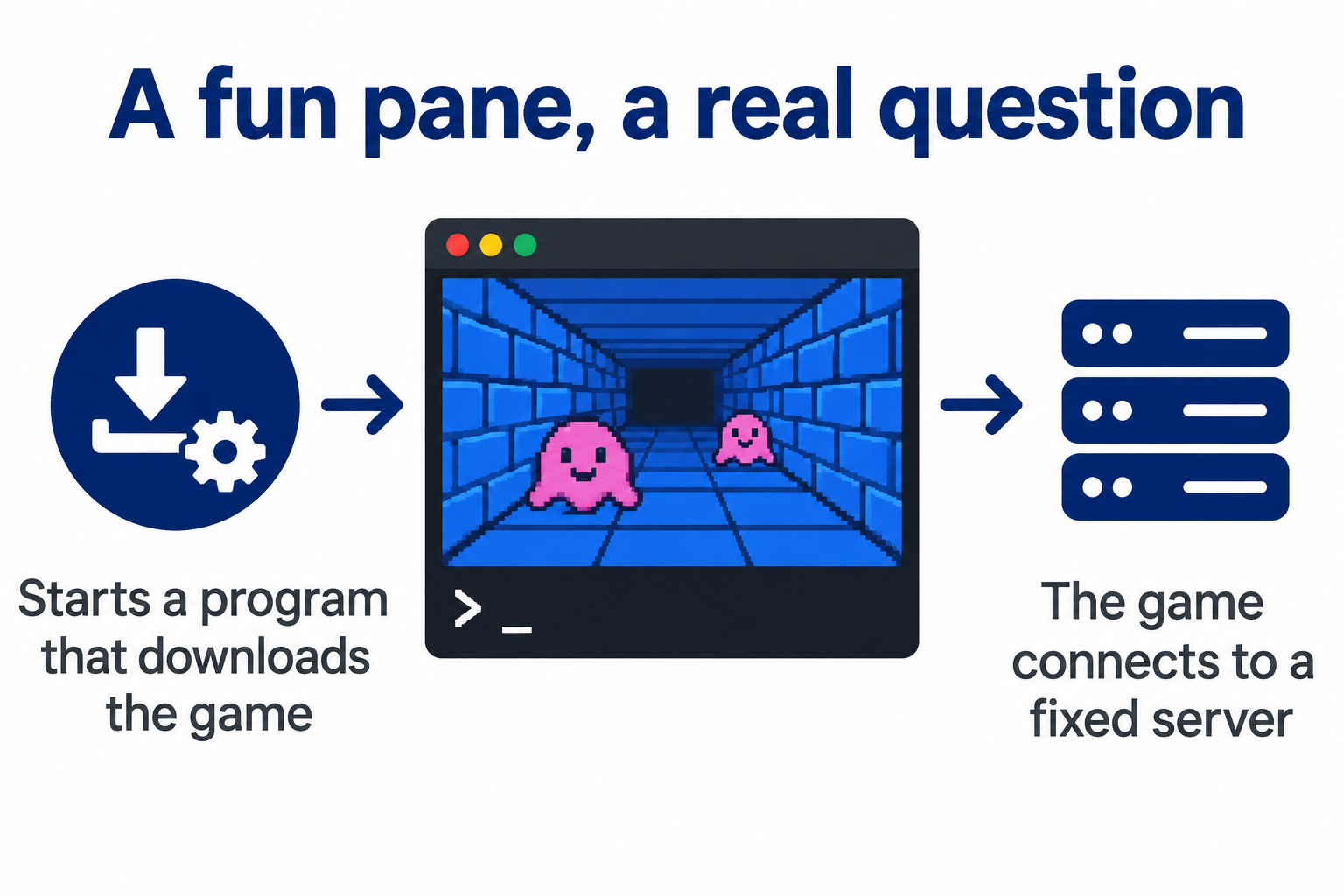
Fun, and a supply-chain question: a program that downloads the game, plus a fixed server.
How to turn mods off
| Want to | Do this | Note |
|---|---|---|
| Stop one mod | Disable or uninstall it in /plugin | |
| Run one session with no mods | Start Claude Code with --safe-mode | Also turns off your other customisations |
| Stop every mod you installed | "disableAllHooks": true in ~/.claude/settings.json | Also stops settings hooks, your status line and a custom file-suggestion command. Mods your organisation manages keep running |
| Lock it down for a company | allowManagedModsOnly, allowManagedHooksOnly, disableAllHooks in managed settings | See the admin page |
Safe mode, --bare and disableAllHooks don't stop Claude Code's built-in mods. To turn one off, disable it in /plugin: every built-in can be turned off that way except the sec-default guard. For the organisation side, see our guides to AI guardrails and the AI governance framework.
You'll want the sources. Here's everything we read and watched, compared.
Resource Hub: Every Video, Doc and Repo Compared
Start here, by what you need
| You want to… | Best doc | Best video | Best repo or read |
|---|---|---|---|
| Understand mods | Mods overview | Thariq (#1) | Anthropic's samples |
| Install one | Install plugins | Code Nik (#24) | The samples, as a local marketplace |
| Build one | Create a mod + Test a mod | Mr. Cloud Book (#3) | The built-in plugin-authoring skill; modsmith |
| Stay safe | Mods overview (trusting a mod) | AI In View (#18) | Pluto's report; awesome-claude-code-mods access badges |
| Run a team | Manage mods for your organization | None yet | Built-in mod source (sec-default) |
Official docs (all ten pages)
Mods overview · Create a mod · Draw in the interface · Interface gallery · React to events · Use the mods API · Test a mod · Troubleshoot a mod · Manage mods for your organization · Mods reference. The overview and Create pages are the place to start; the reference lists every event, method and limit.
Anthropic's own posts and repos
Launch posts. The launch post and Addy Osmani's Getting started with Claude Code mods, which builds token-weather (both 1 Oct); the @ClaudeDevs launch and preview posts.
Design thread. Design thread #91870: 242 comments, opened on 3 Sep by poteat, who describes building the first built-in mods. Why everything goes through $ (so admins can audit it), the onion model, fail-closed guards, and whether the code that runs is the code that was reviewed.
Changelog. Changelog: 2.1.287 added mods; 2.1.288 fixed several mod bugs and added $.ui.selection(); 2.1.289 followed.
Source. Built-in mod source and code-modernization, a mod inside a production plugin.
All 34 videos, compared
Watch first (★): Thariq for where mods are going, Mr. Cloud Book for architecture, SimplyExplain for how Anthropic's safety sample works, Chase AI for the quickest overview. PRE-LAUNCH means published during the September preview: setup steps are out of date even when the ideas hold.

- Mods customise the whole harness, both what it does and what it shows. Anthropic will keep adding hook points as people ask for them.
- Walks through how you'd build a quiz mod: after each turn a forked agent (cheap, because it reuses the prompt cache) checks whether the task is done and, if so, shows questions above the prompt.
- His own mods: a next-steps supervisor, a tool that records each assumption Claude makes, a model router (all in progress), and a mode selector that other plugins register into.
- Why mods beat shell hooks: they run inside Claude Code with the session in scope, see far more events, can start subagents, and can change the screen.
- Mods are an early look at mutable software: the core harness (sandbox, permissions, web access) has to be complex and very secure, but how you work with it can change a lot.
- Reviews third-party mods using the public scan: of 359, only 55 do nothing beyond drawing and remembering, 75 reach the internet and 111 see every prompt.
- Covers cc-arcade, Mindful-Claude, context-lens, blast-radius and secret-redactor, which sees every prompt but has no network and no file writes: the combination to look for.
- Builds a read-only studio status band plus a
/studiotext command, because mods draw nothing over Remote Control, in VS Code chat or with-p. - Build bumps: the safety check held writes to the plugin folder, validate couldn't follow code split across two files, and nothing showed until
/reload-plugins. - Validate shows what a mod can do; only reading the code shows what it does. A trusted plugin can also change in a later update.
- A “guard at the door”: a mod can allow, block or change an event, acting before, after, instead of, or wrapped around it.
- Failures are forgiving: a broken prompt mod lets the original prompt through, slow hooks are skipped, and a crashed UI replacement falls back to Claude Code's own.
- Order: managed (organisation) hooks run first and their deny is final; within a plugin, hooks run in the order they were registered.
- Packaging and tools:
plugin.json,hooks/hooks.json, a TypeScript module, the type definitions Claude Code writes into.claude-plugin/types/for you,--plugin-dir, and a test kit that mocks the clock, the store and the environment. - Mods are not sandboxed: they have the same access to your machine as Claude Code, and the API may still change.
- Blast radius dry-runs
rm,git reset --hard, force-pushes and database migrations. Cancel is the default, and it refuses by itself after 10 minutes. - Replay theater: a hint above the prompt, then R to open and N/P to step through the turn's edits on a timeline.
- How Anthropic made its samples: it asked Claude for 10 mod ideas, picked three, and the build prompt was one line naming the three numbers.
- Anthropic's examples: add the current git branch whenever you mention a PR, and allow
git pushexcept on main. - A mod Claude writes lives only in that session, so copy the folder out and load it with
--plugin-dir. A mod can restyle almost anything except what the permission prompt shows.
- Mods are the released form of “function hooks”, first teased in early September.
- The mental model: act before, instead of, after or around any event. A delete can be previewed, sent to the bin instead, receipted, or backed up first.
- Demos: a next-steps pane with three clickable follow-up prompts, and a cache clock with a compact button.
- Main tip: ask Claude to audit your last 30 sessions and suggest five mods. Pick one and Claude builds and installs it.
- Mods run by themselves like hooks, and you can turn one off in plain English.
- Cache-keeper: cache countdown, context size, 5-hour and weekly limits and the session's API-price cost, with handoff buttons and a warning 5 minutes before the cache goes cold.
- Record mode (
/recordto turn it on,/record off) masks emails and money on screen while he records; the model still sees the real values. - A /goal tracker pane: phase, elapsed time, checklist and % complete, across several sessions.
- A collision guard: before editing a file another chat touched in the last 30 minutes, it asks whether to proceed, move to a worktree or cancel.
- He started by asking Claude to look through his session logs and suggest the top five mods to build, and didn't take all of its suggestions.
- A prompt is a one-off request, a skill is reusable instructions, and a mod is code injected into Claude Code, often using no model tokens.
- “The plugin is the Trojan horse” for a mod. Install scope can be user, project or a shared team project. (The docs' three scopes are user, project, which is shared with the repo, and local: you, in this repo only.)
- His mods: a theme and footer, a file-eating pet, a repo heatmap, a flight recorder, a model router, an output tray, receipts, bookmarks and auto-handoff at 85% context.
- He built them by giving Claude the whole mods article first.
- Clean-up tip: ask Claude for one command that removes every user-scope mod.

- Mods are “browser extensions for Claude Code”: they watch, change or block events like session start, turn complete and screen drawing.
- Demos: a context weather forecast and usage and cache trackers.
- Community examples: multiplayer Doom while you wait, a custom progress bar and a Modern Warfare 2 lobby.
- Security points he credits to a third-party review: a mod can read credential files and send them out, show “no hooks” in plugin details, or fetch new code after you reviewed it. (Pluto found these on a pre-release build, 2.1.274.)
- A long stretch covers his own agentic OS and a Zapier MCP demo, which have little to do with mods.

- Skills, hooks and MCP sit outside Claude Code; mods run inside it.
- A handler gets the event, a way to talk back, and
next: pass it on, change it and pass it on, or answer it yourself. - A hook runs once per event and exits. A mod stays loaded all session, so it can keep state, show live panels, stop and ask, and add slash commands that never call the model. (A settings hook can stop and ask too: its "ask" raises Claude Code's standard permission prompt.)
- Demos: the docs' tool-tally mod, an
rm -rfguard that asks first, a context gauge, and a check on which account he's about to publish from. Reloading resets state, so keep it in the store ($.statealso survives a reload). - Run
claude plugin validatebefore installing to list a mod's events and calls.
- Recorded in early September, when function hooks were behind the
CLAUDE_CODE_ENABLE_FUNCTION_HOOKS=1flag, about four weeks before the mods launch, so the setup steps are out of date. - Function hooks are like Express middleware. He says that beyond rewriting a command, shell hooks can't rewrite prompts, inject context, draw, ask their own questions, change tools or remember anything. (In fact, shell hooks can block, rewrite a tool call's input or result, add context and trigger a permission prompt, and can keep state in files. What they can't do is rewrite your prompt text, draw, ask their own multiple-choice questions, or hold state in memory. Function hooks can.)
- Examples: rewrite
npmtopnpm, cache WebFetch results, send WebSearch to Exa with a fallback, route WebFetch through a proxy. - A ~300-line transcript redactor swaps secrets for IDs and swaps them back when a tool runs.
- A Vercel deploy-status row shown only during deploys, and a spoken Haiku summary of each turn.
- A beginner demo in the desktop app: he asked for a live usage pane and accepted “enable hot reload for this session”.
- Claude's GUI ideas: a session timeline, a project switcher, files touched grouped by folder and a cross-session scratchpad. He added a subagent pane of his own.
- Built a small Excalidraw-style sketch pane Claude can read. Mouse drawing failed at first, then worked. Earlier, the usage pane was hard to close.
- A fast launch recap. Lydia Hallie called mods “middleware for Claude Code”.
- Token weather: a band above the prompt with a 12-turn sparkline, from clear below 25% to “compact soon” at 90%+.
- Blast radius lists the files a risky command would hit; replay theater (
/replay) steps through the turn's diffs. - Build by describing the mod in a prompt and allowing hot reload; share through a GitHub repo with a marketplace file.
- Mods aren't sandboxed. Blast radius is “a safety net, not a permission system”, so use permission rules for hard blocks.

- Pre-launch: function hooks were behind an environment flag and documented only in a GitHub issue.
- Shell hooks run as a separate process; mods run inside Claude Code's process, with access to its React UI.
- Give Claude the built-in mods repo and a cheat sheet as examples. Hot reload works.
- No npm or React dependencies: a mod can import only its own files and Claude Code's modules, so Claude Code can list everything it does.
- Demos a Firecrawl credit meter and Doom with a text HUD (the Firecrawl part is an ad).
($, event, next) shape; ten catalogue mods- Timeline: proposed on 3 Sep in GitHub issue #91870; on 9 Sep the team said it would ship “on the scale of weeks” as Claude mods.
- The
($, event, next)shape.$is also where admins can limit what later mods may do; earlier hooks wrap later ones like middleware layers. - “Zero tokens” only covers drawing: your session still uses tokens, and a mod that calls a model has its own cost.
- Walks through ten mods from claudemods.ai (said as “clawdmods.ai”), the catalogue this channel runs, with daily voting and a mod of the day.
- Pre-launch install steps (an environment variable and a restart); no longer needed.
- Jarrod Watts' image viewer mod: drag an image in and preview it.
- Use the docs' surface names in your prompt (pane, toast, status line, band above the prompt); he wrote “band” so the mod would draw above the prompt.
- Built a cost band: session cost so far plus the estimated cost of the next prompt. The first version assumed a warm cache, so he added a cache state and timer.
- Built a
/checklisttoast of tasks finished in the session. - After he accepted hot reload, the mod was on for that session only; he had to ask Claude to enable the plugin for all sessions.
- Its explanation is almost line for line the same as Prompt Engineering's video, so little is new.
- Expects the first badly behaved mod soon after marketplaces take off; copied trending mods will break when Claude Code updates.
- Best first mod: a force-push guard, because it makes “inside vs outside” click.

- A beginner desktop demo: a token meter, a colour theme, and a
/focusdeck with a Pomodoro timer, token use and a to-do list. - A mod can stay in one chat or be installed for good; asking Claude for ideas produced a deploy guard and a posting log.
- About a sixth of the video is ads for his paid community.

- An engineer asked in one sentence for a secret-hiding plugin; printing his secrets file then showed the keys redacted.
- The 2 Oct GitHub scan: 359 public mods, 75 reaching the internet and 111 seeing every prompt.
- You Should Know demo: a side agent warns that payment retries could double-charge, so Claude adds an idempotency key. It's off by default.
- Pluto Security showed a pre-launch mod reading the Claude login file and sending it out with no warning; a
Read(.env)deny rule doesn't stop a mod. - Advice: install only from people you trust, run
claude plugin validatefirst, and start Claude Code in safe mode, which turns off every mod for that session. (Safe mode turns off the mods you installed; Claude Code's built-in mods keep running.)

- Prompt-built mods: an aquarium where each subagent hatches a fish, a pixel pet that levels up,
/breathe, and an arcade band with snake. - Ideas: a terminal browser Claude can drive, and a live tree of subagents with model, run time and result.
- Shows a community catalogue (heard as “mods.ai dojo”; it's mods.aidojo.si) listing over 359 mods with category filters.
- Says mods work in VS Code, the SDK, Remote Control and the cloud. They run in all four, but what they draw shows up only over Remote Control, in the terminal on your own machine.
- Two long ad breaks for his paid community, about a fifth of the video.
- Covers the 3 Sep reveal: TypeScript functions with editor support, hooks that can say no, and plugins that draw.
- Every side effect goes through one shared object, so Claude Code can track it, and admins can remove abilities for every plugin below them.
- One hook catches a button press in both the terminal and the desktop app; a listen-to-everything hook becomes an audit log.
- Anthropic said the demo thumbnails were AI-made but the demos and code were real.
- About a fifth is ads for his community and a free strategy call.
- Community pushback: if everything can be reworked, why not open-source Claude Code, or let subscriptions work in other front ends?
- v2.1.287 had 106 changes, including a fix for
rmof the home folder losing its permission prompt when output was redirected to~or a wildcard path. - You Should Know needs telemetry and a direct connection to Anthropic.
- Use case: a mod that blocks every command touching a customer-data folder.
- The 3 Sep reveal: two recordings, 2,000+ likes; feedback went to issue #91870.
- Open questions then: can a hook change tool arguments, what happens on an error or timeout, and is a restart needed? All answered in today's docs.
- Example idea: check text against brand rules before a file is written.
- A WordPress credential guard from a four-sentence prompt: four files, and Claude wrote 20 tests that all passed.
- Two checkpoints: swap the secret for a placeholder in the prompt, then swap it back just before the tool runs.
- Limit: the username wasn't redacted. Pattern matching catches distinctive formats, not plain words.
- A CLAUDE.md rule competes with every other instruction and can fade; a hook is deterministic and costs no context.
- Built a task progress-bar pane with an ETA and a completion sound, plus a status bar showing time and tokens per answer.
- Install the samples: clone Anthropic's playground repo, add its
claude-code/modsfolder as a marketplace, then installblast-radius@claude-code-playground-mods.
rm in a script gets past blast radius- Token weather is about 80 lines. Blast radius listed 9 files (1.1 MB): press 1 to run, 2 to refuse with a reason.
- Anthropic plans to move more built-in features into mods, so you could strip Claude Code to a small core.
- A script that calls
rmgets past blast radius. Build your own readouts and guards first; skip strangers' mods until you've read the repo.
- The proposal's four ideas: hooks as TypeScript functions, earlier hooks wrapping later ones, hooking how the screen is drawn, and admins revoking abilities.
- A mod has no file or network access of its own: everything goes through
$, and code that goes around it fails validate.
Also covered (short cuts, recaps and trailers):
- A cut-down version of the cache-keeper segment from his longer video above.
- Says the cache lasts 60 minutes; true on a subscription, but with an API key it's five minutes unless you change it.
- A short cut of Prompt Engineering's longer video: inside vs outside, and how long a hook lives compared with a mod.
- Pre-launch (behind a beta flag): a separate walkthrough by Ray Amjad, posted six days after his own video. It repeats the secret redactor and adds two new demos.
- A trigger.dev band that appears when a workflow starts and shows queued and running jobs; he asked Claude for several designs and picked one.
- A bulk-SQL guard: a model judges whether a command touches over 100 rows, then asks and offers a dry run.
- Session variables last one session; the store survives restarts. (He says it's shared per folder; in fact it's per plugin, shared by every session on the machine.)
- A short recap: before, after or instead of; mods stack; the three samples; folder, code, validate, test, share; not sandboxed.
- A trailer for Drago Agent's longer video.
- You Should Know is experimental:
/plugin enable cc-plugin-you-should-know@builtin. - Other 2.1.287 changes: in VS Code, move running commands or subagents to the background; a filter in the agents view; and Opus 4.7+ and Fable models default to 1M context on Bedrock and Vertex.
- A general explainer: watch, change or block; a delete guard, a memory panel, a custom spinner and instant slash commands.
- Ideas: a context meter, a different code-review panel, and extra confirmation before touching production settings. The API may still change.
Eleven more videos (nine in other languages, two shorts) had no fetchable transcript, so they aren't counted.
Blogs and community threads worth reading
Pluto Security (22 Sep): the four findings above, on a pre-release build.
Wes Sander (17 Sep): the guards that were enabled and doing nothing.
Kevin Riedl, wavect (16 Sep): a risk-and-test table from a documentation and source review. Pre-launch, so ignore its setup steps.
Vanja Petreski: chained mods add delay, and removing file access doesn't sandbox a mod that can run programs.
Reddit launch thread: worries from "ripe for malicious mods" to lock-in.
Hacker News AGENTS.md thread (486 points): AGENTS.md only worked with telemetry on, because the mod sat behind a remote switch.
In our AI-Driven Engineering workshops, this hub is the mods session's reading list; the commands and skills workshop covers the lower rungs of the ladder, and HAL's AI infrastructure shows how it fits together. Still got a question? Try the FAQ.
Frequently Asked Questions
What is a Claude Code mod?
A plugin of small JavaScript or TypeScript functions that run inside Claude Code all session, letting through, changing or answering events like a tool call, and drawing on screen. On by default since v2.1.287.
What are hooks in Claude Code?
A settings hook is something Claude Code runs at a set moment, such as just before a tool runs. There are five types: a shell command, an HTTP request, an MCP tool, a prompt to a model, or an agent. It's ideal for hard rules like refusing a force-push, and it can do more than block: allow, ask you through the standard permission prompt, rewrite the tool call or add context for Claude. It can't draw panes, bands or buttons (it can only show text such as a message or spinner text), and a command hook keeps nothing in memory between runs, though it can save state to a file.
What's the difference between Claude Code plugins and skills?
A skill is written instructions Claude follows when your request matches. A plugin is the package that installs things: it can carry skills, commands, agents, settings hooks, MCP and LSP servers, and mods.
How do I install Claude Code plugins?
Add a marketplace with /plugin marketplace add owner/repo, run /plugin install name@marketplace, and run /reload-plugins after a shell install or an update. To try a mod in one window, use claude --plugin-dir ./my-mod.
Are mods safe?
Only as safe as their author: mods aren't sandboxed, and the sec-default guard only loads with managed settings or on Team and Enterprise plans. Read the code, run claude plugin validate, and re-check on updates.
Do mods cost tokens?
Drawing and listening cost nothing. A mod spends tokens when it calls a model ($.model.fork, $.model.complete or $.model.classify), submits a prompt ($.prompt.submit), or adds text to Claude's requests, and changing text it injects into Claude's instructions can break the prompt cache.
Do mods work in VS Code or the desktop app?
They draw in a terminal (IDE terminals included) and the desktop app's Code tab. In VS Code's chat panel, claude -p and the Agent SDK they run but draw nothing.
How do I turn mods off?
Disable one in /plugin, start a session with --safe-mode, or set "disableAllHooks": true in ~/.claude/settings.json to stop every mod you installed (it also stops settings hooks and your status line; mods your organisation manages keep running). Built-in mods keep running under --safe-mode and disableAllHooks; to stop one, disable it in /plugin (every built-in except the sec-default guard can be turned off there).
Where is the Claude Code plugins marketplace?
There isn't a single one: any GitHub repo with a marketplace file can be added with /plugin marketplace add, and Anthropic's official one is added for you. For mods, the largest catalogue we found is awesome-claude-code-mods (1,740 on 4 Oct 2026).
Methodology: all ten official Claude Code mods docs pages, the changelog and Anthropic's sample mods; 35 YouTube videos transcribed and read in full (34 about mods); the design thread and Pluto Security's report; 20 community repos checked for licence and calls; three mods for HAL's daily use plus the lab's force-push guard, built and tested on HAL (Claude Code 2.1.287 to 2.1.289). Every count, star and view figure is as of 4 October 2026 unless dated otherwise. Fact-checked again and corrected on 5 October 2026.
About the Author

Nathan House, Founder & CEO of StationX
Nathan House has 30 years of hands-on cybersecurity experience and is Cambridge-educated, holding CISSP, CISA, CISM, OSCP, CEH, and SABSA. He founded StationX in 1999 — one of the UK’s first cybersecurity companies — and has secured £71 billion in UK mobile banking transactions and the London 2012 Olympics, advising clients including Microsoft, Cisco, BP, Vodafone, and VISA. He authored the world’s most popular cybersecurity course — a #1 Udemy bestseller taken by over 500,000 students — and was named Cyber Security Educator of the Year 2020, AI Security Educator of the Year, and a UK Top 25 Security Influencer 2025. A DEF CON speaker and featured expert on CNN, Fox News, NBC, and the BBC, Nathan leads StationX’s training of more than half a million students worldwide.