Claude Code Skills: 8 Rules From 17,000 Real Sessions (2026)
If you've watched a video about Claude Code skills lately, you've probably been told the rules have changed. Put a contents list at the top of long files. Keep references one level deep. Test on every model you use. The problem is that none of this is new. Every one of those rules was on Anthropic's best-practices page in October 2025, the week skills launched, and almost nobody has checked whether they actually work.
So we checked. I run my own AI system, HAL, on Claude Code every day, and it keeps a log of every session. We went through 17,000 of those sessions to see how Claude really reads its instructions, then ran 102 controlled tests on Haiku, Sonnet and Opus. Below are the 8 rules that held up, the three popular ones that didn't show up in our tests, and how to build a skill that works.
TL;DR — if you've only got 30 seconds
The description matters most. In our small test, a vague one fired on the wrong request 2 times in 9; a specific one, 0 times in 9.
Put what matters at the top. In 14% of the times Claude opened one of HAL's instruction files, it never read the whole file, and usually looked at just 10 to 100 lines.
Some famous rules made no difference in our tests. Nesting and contents lists didn't change whether Claude found the answer, and capitals gave no clear advantage over a plain rule.
Read a skill before you install it. One audit of 3,984 public skills found a security flaw in 36.82% of them.
What Are Claude Skills?
Say you have a process you repeat every week, like checking a supplier contract for risky clauses. You could explain it to Claude every time. Or you could write the steps down once, in a file, and Claude follows them whenever the job comes up. That file is a skill.
In practice, a skill is a folder with a SKILL.md file in it. The top of the file has a short header with a name and a description. Below that are the instructions. The folder can also hold reference documents, templates and scripts.
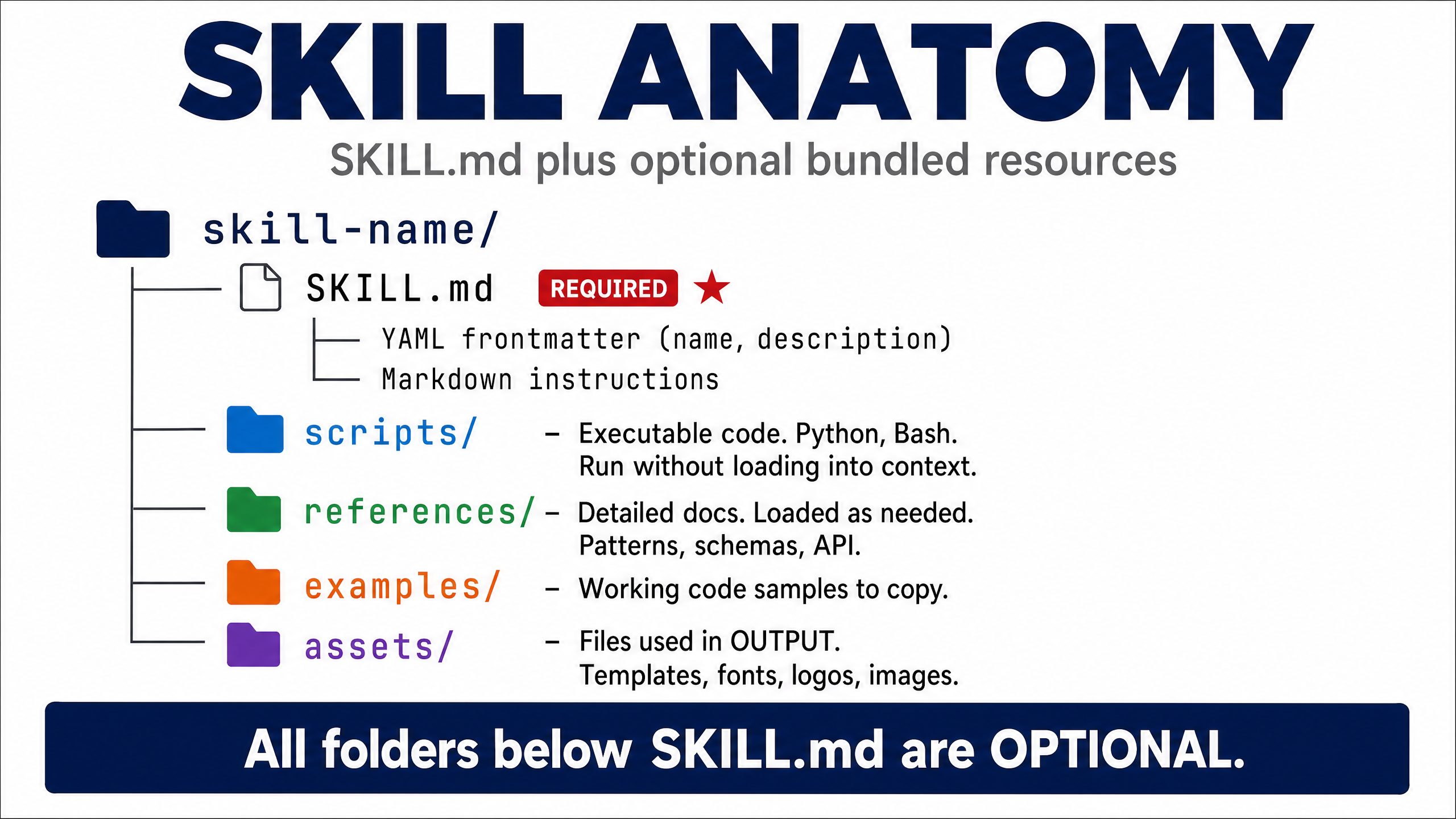
The clever part is how Claude loads them. At the start of a session it only reads the name and description of every skill, a sentence or two each. It opens the full SKILL.md only when your request matches one, and it reads the extra files only when the instructions point to them. Anthropic calls this progressive disclosure. Think of it like a book's contents page: you scan the chapter titles, then turn to the one you need.
Anthropic uses the same idea everywhere, so you'll also see them called agent skills. And if you've used Claude Code's custom commands, they're now the same thing: Claude Code has merged commands into skills. Either kind can be called by name, like /review-contract, and by default Claude can also pick either one on its own. One setting in the header switches that off, and it turns out to matter a lot, which is rule 2.

How We Tested Claude Skills Best Practices
We used two kinds of evidence, and they told us different things.
Real sessions. HAL is built mostly from commands. It has around 2,000 of them, against 42 skills. Commands and skills are the same kind of file, plain written instructions, so they show how Claude treats instructions in real work. We searched every HAL session log since April 2026, 17,244 sessions in total, for each time Claude opened a command file, and recorded whether it read the whole file or only part of it.
Controlled tests. We built small test skills where we knew the right answer, then ran them on Claude Haiku 4.5, Sonnet 5.5 and Opus 5.5, logging every file Claude opened. That was 102 runs in total, covering four questions: does Claude miss information buried in nested files, does a contents list help, does SHOUTING an instruction work better than explaining why, and does the wording of a description change when the skill fires?
Two honest limits
The controlled tests are small, one to three runs per setup, so treat them as a careful look, not a study. And they ran in our own test setup, not inside Claude Code itself. Where a finding rests on thin evidence, we say so.
Each rule below carries a label: backed by our data, from how we run HAL, backed by published research, or Anthropic recommends, but we haven't tested it.
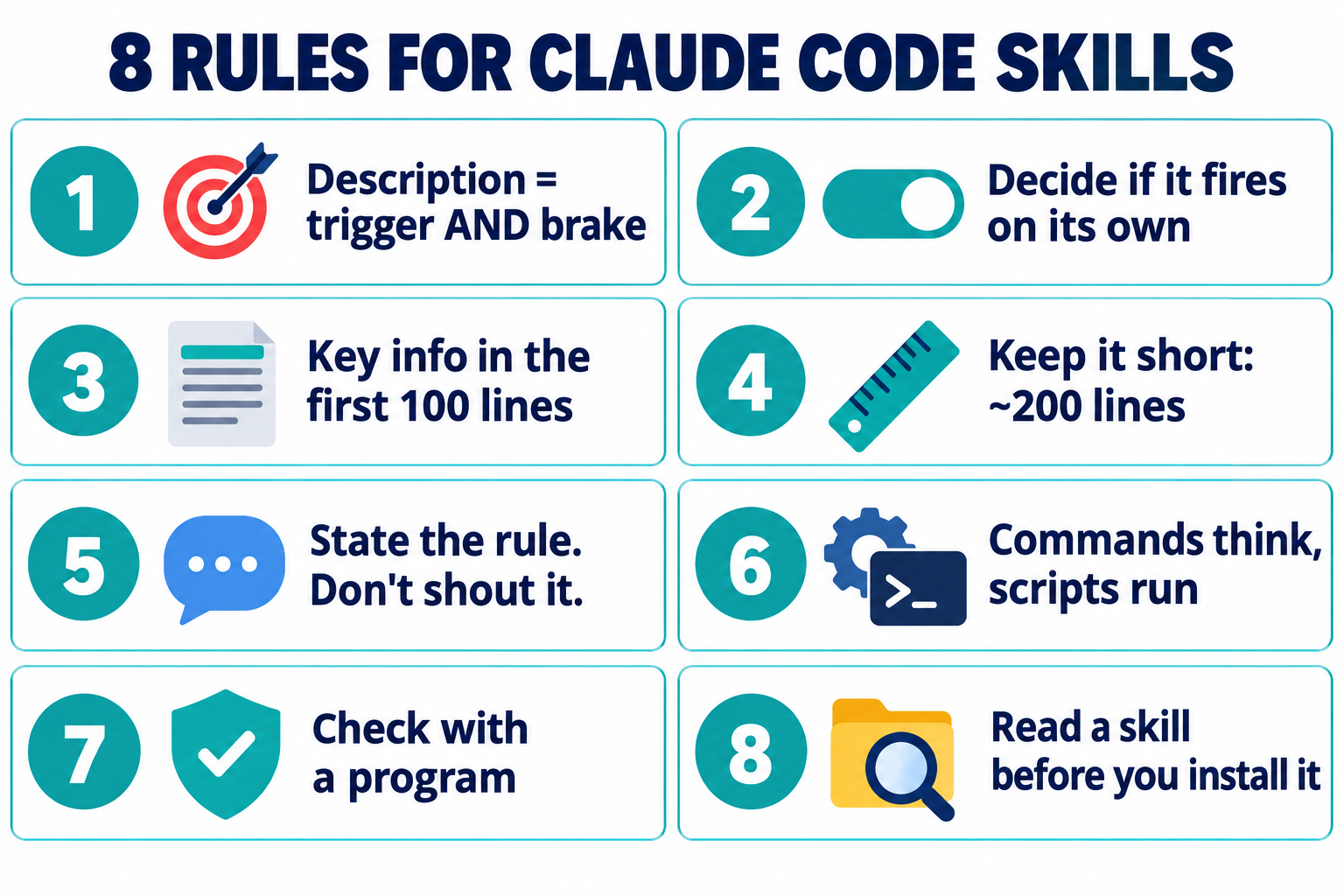
8 Rules for Claude Code Skills That Hold Up
The Description Is the Trigger, and the Brake
Backed by our data

Apart from the skill's name, your description is the only part Claude sees until it decides to use it. So it does two jobs. It has to make the skill fire when it should, and stop it firing when it shouldn't.
We tested a skill for expense claims with two descriptions. One said just "Helps with expenses." The other followed Anthropic's pattern: what it does, then when to use it, with the words people actually say ("receipts", "mileage", "claiming money back").
What we expected was the vague one missing requests. It didn't. Both fired on 17 of the 18 requests they should have. The difference showed up on the near misses, like "What's the spending limit on the company card?" The vague description fired on the wrong request 2 times out of 9. The specific one: 0 out of 9.
So in our test, a fuzzy description didn't make Claude ignore the skill. It made Claude reach for it when it shouldn't. I'd argue that's the worse failure, because the wrong instructions get loaded into a job they weren't written for. It's a small sample, though: each prompt ran once per model, three times in all, and both wrong fires came from Opus.
Two practical limits from Claude Code's documentation: the description (plus any when_to_use text) is cut off at 1,536 characters in the skill list, so put the main use case first. Anthropic's skill format caps descriptions at 1,024 characters anyway, so that's the number to stay under. And the whole list only gets about 1% of Claude's context window, the amount of text it can hold in mind at once. Install enough skills and Claude Code starts dropping descriptions to fit, which brings us to rule 2.
Do this: Write what the skill does, then when to use it, in the words you'd actually type. Stay under 1,024 characters.
Decide Whether It Should Fire on Its Own
From how we run HAL

Every skill that can trigger itself puts its description in front of Claude, in every session, whether you need it or not. With ten skills, that costs nothing. With hundreds, the descriptions crowd each other out, and Claude has to guess between near-identical options.
HAL has about 2,000 commands and 42 skills, and 2,004 of its 2,028 command files carry one line in their header: disable-model-invocation: true. That stops Claude loading them automatically, so their descriptions never crowd the list. Most things don't need to fire on their own. I'd rather call /send-email by name and know exactly what runs. To get the convenience of automatic triggering without the guessing, HAL uses a hook, a small program that runs on every message I send. It matches keywords and points Claude at the right command. In my experience it's far more reliable than letting Claude choose from a long list of descriptions, because the same words always give the same answer.
If you build a skill or command you only ever want when you ask for it, add that line to its header and call it by name. One catch: the setting is specific to Claude Code. Anthropic's own skill validator rejects it, so leave it out of skills you'll use anywhere else.
Commands and skills are now the same thing
Claude Code has merged custom commands into skills. A file at .claude/commands/deploy.md and a skill at .claude/skills/deploy/SKILL.md both give you /deploy and work the same way, and if both exist, the skill wins.
A lot of guides still say skills fire on their own and commands don't. That was true when we recorded our commands and skills workshop; it isn't now. Anthropic's docs say commands and skills now work the same way, and our own setup agrees: every HAL command without the switch showed up in the list of skills Claude can pick on its own. What's left of the old difference is the switch: disable-model-invocation decides whether Claude can choose it, and a folder lets a skill carry supporting files.
Do this: Add disable-model-invocation: true to anything you only want to run when you ask for it.
Put What Matters in the First 100 Lines
Backed by our data

This is the rule our real-session data supports most clearly.
When Claude opened a HAL command file, it read the whole thing first time in 85% of cases. But in 705 cases, 14% of the time, it never read the full file in that session. When that happened, its first read was usually just 10 to 100 lines of the file.
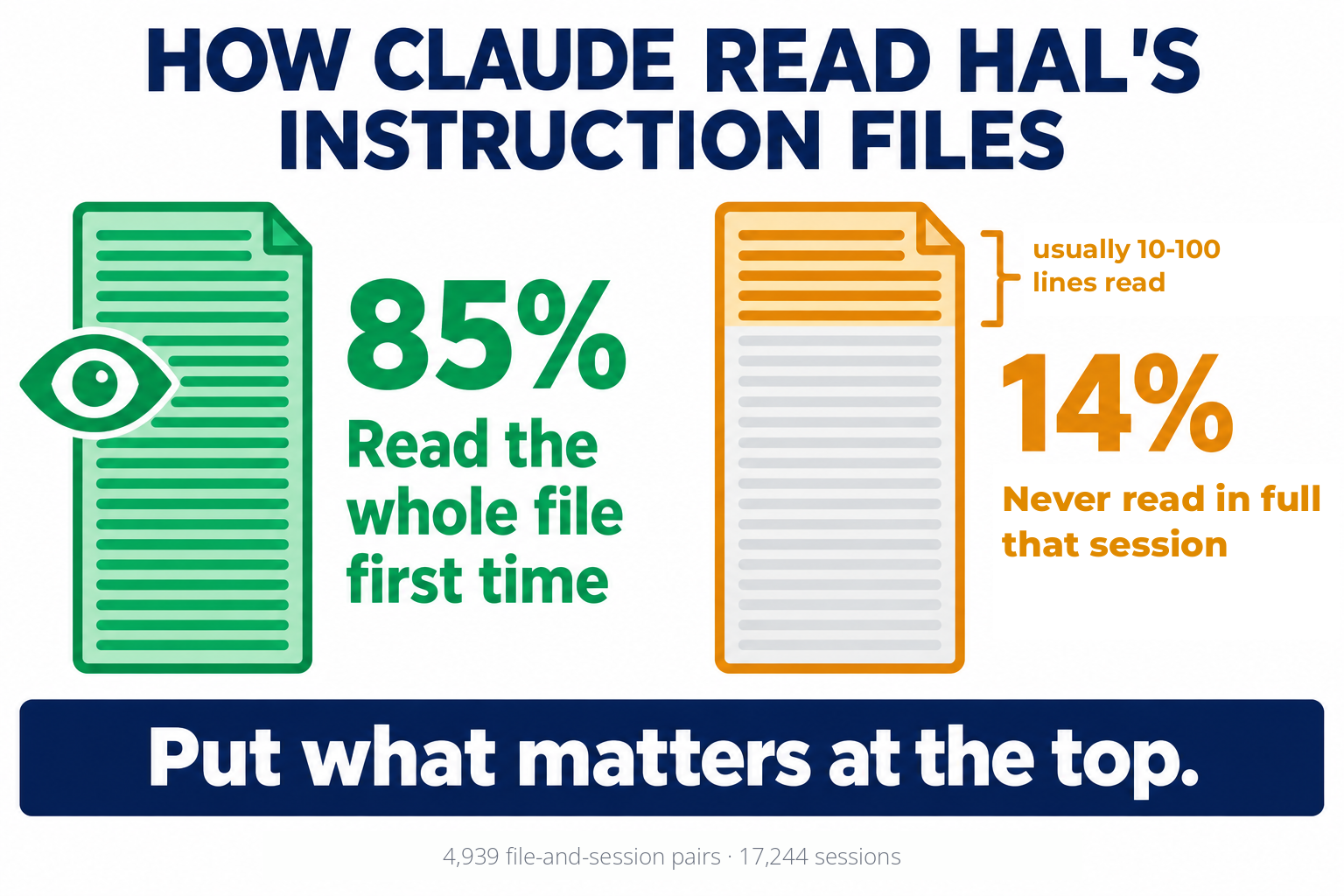
That looks like Claude deciding whether a file is relevant, the same way you'd read the first paragraph of an email before deciding to read the rest. These were HAL's command files, not skills, but they're the same kind of written instructions. If the thing that matters is on line 300, it may never get seen.
Fourteen percent is an upper bound. Some of those previews were HAL's own maintenance jobs checking file headers, not real work, and our logs can't fully separate the two. But the direction is clear. Put the purpose, the key steps and any hard rule at the top. Push background, examples and edge cases further down.
You might notice this sits awkwardly with our controlled tests further down, where Claude never skimmed a skill file. They measured different things. Those tests handed Claude a question and a file it knew it needed. The logs are everyday work, where a partial read could be Claude checking whether a file is relevant, a maintenance job, or part of the task, and we can't tell which.
Do this: Put the purpose, the key steps and any hard rule at the very top of the file.
Keep It Short (We Use 200 Lines)
Our house rule · our logs point the same way

Anthropic says to keep SKILL.md under 500 lines. We aim for about 200 as a practical target, and our logs point the same way. When we split the files by length, Claude never read the whole file in 9% of cases for files up to 100 lines, 13.5% for 101 to 200 lines, and about 18% for anything longer. So files over 200 lines went unread in full about twice as often as files of 100 lines or fewer. That's an association, not proof that cutting a file to 200 lines fixes it: we measured today's file lengths, and maintenance scans are mixed in.
There's a cost argument too. Once Claude loads a skill, every line stays in its working memory for the rest of the session, and you pay for those lines again on every message after that.
If your instructions won't fit, split them. Keep the main steps in SKILL.md and move detail into separate files it links to. One caveat from my own experience: Claude doesn't always open those extra files. That's not because it skims them badly. It's because it decides it doesn't need them. So anything it must not miss belongs in the main file.
Do this: Keep SKILL.md under about 200 lines, and move detail into files it links to directly.
State the Rule. Don't Shout It.
Backed by our data

A lot of skills read like a ransom note: CRITICAL, you MUST, NEVER. Anthropic's own skill-building tool calls that "a yellow flag" and recommends explaining why the rule exists instead.
We tested it with a client-email skill and a 60-word limit, on a request with lots of detail to squeeze in. Three versions:
No length rule. Emails came out at 117 to 197 words.
Shouted. "CRITICAL: You MUST keep the email body UNDER 60 WORDS. NEVER exceed 60 words. This is MANDATORY."
Explained. "Keep the email body under 60 words. Our clients read these on their phones between site visits; anything longer gets skimmed, and the one action we need from them gets missed."
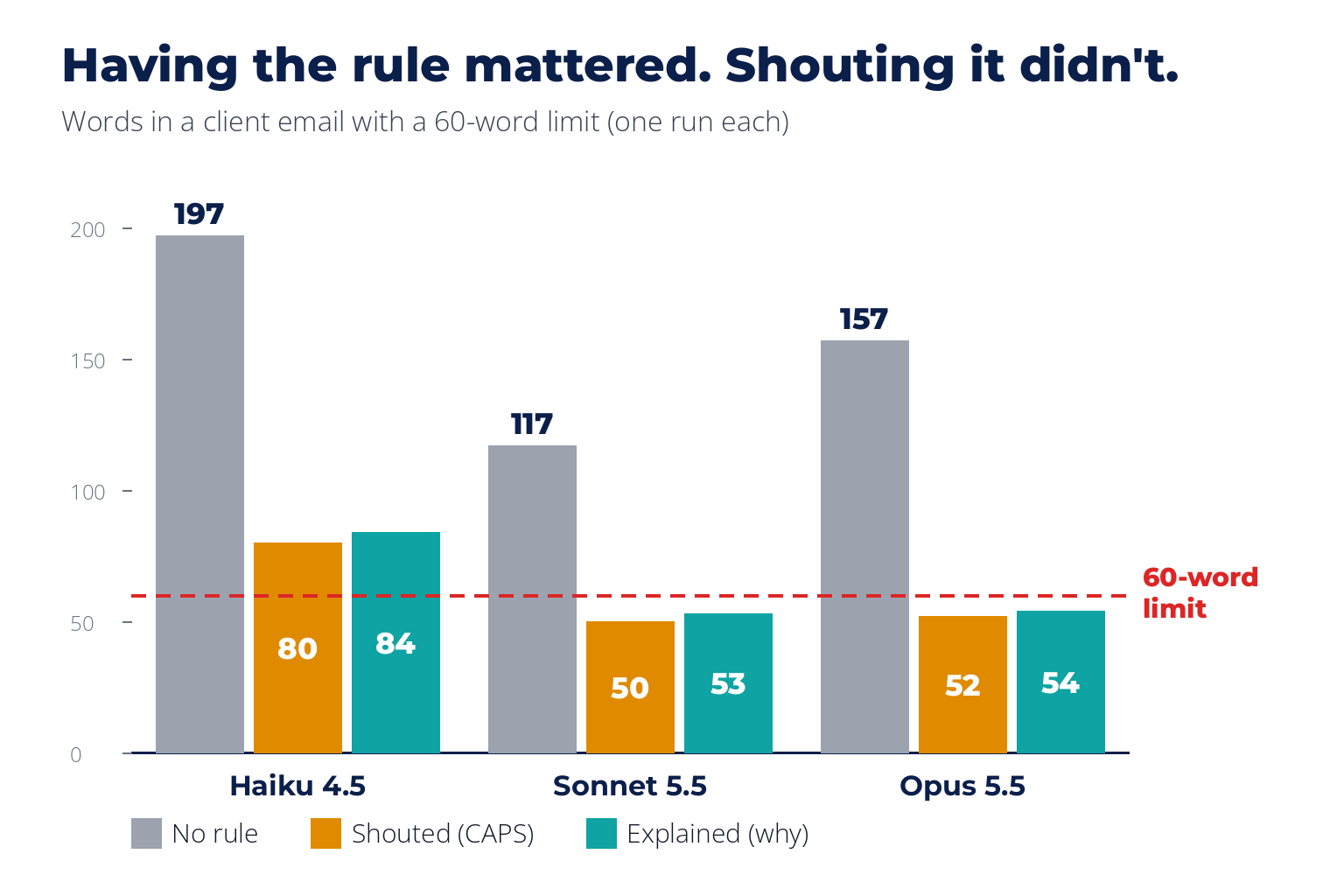
Having the rule mattered enormously, even though each setup ran only once per model. With it, emails dropped to 50 to 84 words. But shouting versus explaining made no difference we could see. Sonnet and Opus kept to the limit both ways. Haiku broke it both ways, at 80 and 84 words.
So write the rule clearly and give the reason, because the reason helps people who maintain the skill later. Just don't expect capital letters to do anything. And if a rule has to hold every single time, writing doesn't guarantee it at all, which is rule 6.
Do this: Write each rule once, with the reason. Skip the capitals.
Commands Think, Scripts Run
From how we run HAL

This is a line I use when teaching: the written instructions do the thinking, and scripts do anything that must happen the same way every time.
Anthropic calls it matching the degree of freedom to how fragile the task is. Writing a friendly reply to a client has lots of right answers, so plain instructions work. Raising an invoice, deleting records or changing a live server has one right answer. Those steps belong in a script with "run exactly this", not in a paragraph Claude might interpret differently on a busy day.
There's a mechanical bonus. When Claude runs a script, only the script's output goes into its working memory, not the code. A 400-line script costs you a few lines of output.
Do this: Put anything risky in a script, with a preview, a confirmation and a check afterwards.
Check the Work With a Program, Not Claude's Word
Anthropic recommends · we haven't tested it

Claude will tell you it finished the job. Sometimes it didn't.
When I demoed a firewall-check command in one of our workshops, the lesson I gave was simple. For anything that matters, don't trust the agent's report that the work is done. Make the skill run a check that a program does, like a test, a validator or a count, and loop until it passes. Anthropic recommends the same pattern: run the check, fix what fails, repeat.
We haven't tested this one ourselves, which is why it carries that label. But every serious failure I've seen from an agent came with a confident "done" attached.
Do this: Make a program check the result, and tell Claude to fix and re-check until it passes.
Read a Skill Before You Install It
Backed by published research

This is the rule almost nobody mentions, and it's the one that can hurt you.
A skill isn't just text. It can include scripts that run on your machine with your permissions. Installing someone else's skill is like running a stranger's program. It's also harder to spot, because the dangerous part might be a plain-English instruction telling Claude to do something.
This has already been abused. In February 2026, Snyk audited 3,984 agent skills from two public sources, ClawHub and skills.sh. They found that 36.82% had at least one security flaw, and they confirmed 76 malicious payloads built to steal credentials, plant backdoors (hidden ways back into your machine) or send your data elsewhere. They sat in the skills' installation instructions, as links to malware and disguised commands. Every confirmed malicious skill contained malicious code, and 91% also used prompt injection. Their description of the barrier to publishing on ClawHub: "A SKILL.md Markdown file and a GitHub account that's one week old." Later, Palo Alto Networks' Unit 42 found five malicious skills that had got past the marketplace's newer scanning, between February and May 2026.
So before you install a skill from a marketplace or a GitHub list, read the SKILL.md and every script in the folder. If it fetches anything from the internet, sends data anywhere, or asks for credentials, don't install it until you know exactly why. We cover the attack behind most of these, hidden instructions, in our guide to prompt injection examples.
Do this: Read every file in a skill, scripts included, before you install it.
3 Popular Rules That Didn't Show Up in Our Tests
These three are in almost every skills guide. In our small tests, nesting and contents lists made no difference to whether Claude found the answer, and capitals gave no clear advantage over an explained rule. Each setup ran one to three times per model, so treat this as a careful look, not proof.
| The rule | What we tested | What happened |
|---|---|---|
| Keep references one level deep, or Claude may only preview nested files | A fact on line 237 of a file you could only reach through another file | All nine nesting runs found it, across all three models. None of them skimmed the file with head -100. |
| Long reference files need a contents list | A fact past line 2,000 of a 2,400-line handbook, asked in different words ("laptops at our Yorkshire site" for "hardware refresh, Leeds office"), with 23 decoy lines | 100% accurate with or without a contents list. No reliable saving in how much Claude read. |
| Capital letters make Claude obey | Rule 5's email test | The rule mattered. The shouting didn't. |
Anthropic's own sources don't agree on the contents-list rule either. The best-practices page says to add one above 100 lines; their skill-building tool says above 300.
Why the gap? These rules assume Claude reads files from the top down. Across both fact-finding tests, all 33 runs were correct, and 24 of them used grep (a search command) to look for the answer: 21 in the contents-list test and 3 in the nesting test. A contents list matters a lot less when you can search the whole file in a second.
That doesn't mean these rules are harmful. A contents list still helps a person reading your skill. It just isn't where your effort pays off.
Get Our Skill Writer
The quickest way to follow these rules is to let Claude follow them for you. We turned the eight rules into a skill that writes skills. It's 49 lines long, so it obeys its own advice, and it's switched off from firing on its own, so it only runs when you type /skill-writer.
We tested it before publishing. We asked it to build two real skills: a supplier-contract checker and a Stripe refund skill. Both came out under 65 lines with a specific description. The refund skill put the money-moving step in a script with a preview, a confirmation and a verify step, and switched itself off from firing on its own. Both included a check a program runs, rather than trusting Claude's word.
To install it, save the text below as ~/.claude/skills/skill-writer/SKILL.md. Read it first: it's short, it has no scripts, and that's rule 8.
---
name: skill-writer
description: Writes a new Claude Code skill from a task the user describes, following tested rules for the description, length, scripts and checks. Use when the user asks to create, write, build or improve a skill or slash command.
disable-model-invocation: true
---

# Skill Writer

Turn a task the user describes into a working Claude Code skill. If they haven't said, ask
what the task is, what "done" looks like, and which model will run it.

## Steps

1. **Write the description first.** Say what the skill does, then when to use it, in the
   words the user would actually type. Keep it under 1,024 characters (the official limit).
   Compare it with the descriptions of the skills already installed and reword it until it
   can't be confused with any of them, because a vague description makes Claude use the
   skill on the wrong requests.
2. **Decide whether it should fire on its own.** If the user only wants it when they ask,
   add `disable-model-invocation: true` to the header. This field is specific to Claude
   Code, and Anthropic's own skill validator rejects it, so leave it out of skills you'll
   use outside Claude Code.
3. **Put the purpose and key steps at the very top,** because in our session logs Claude
   sometimes previewed only the first 10 to 100 lines of an instruction file and moved on. Keep the whole SKILL.md under
   200 lines. Move long detail into separate files linked directly from SKILL.md.
4. **State each rule once, with its reason.** In our small test, capitals and "MUST" gave
   no clear advantage over a plain rule; a reason helps the next person who edits the skill.
5. **Put anything risky in a script.** Payments, deleting data and changes to live systems
   go in `scripts/`, and the skill says "run exactly this", so they happen the same way
   every time. The script shows a preview first, waits for the user to confirm, then checks
   the result afterwards.
6. **Add a check a program can run,** such as a test, a validator or a count, with the
   instruction "fix and re-check until it passes". Don't rely on Claude saying it's done.
7. **Save it** to `~/.claude/skills/<name>/SKILL.md`. The name uses lowercase letters, numbers
   and single hyphens, is at most 64 characters, doesn't start or end with a hyphen, and
   doesn't contain "anthropic" or "claude".

## Before finishing

- Run `wc -l` on the new SKILL.md and count the description's characters. Fix and re-check
  until the file is under 200 lines, the description is under 1,024 characters and the
  name follows step 7.
- Read every script you bundled. Nothing should download files, send data out or touch
  credentials unless the user asked for that.
- Test the new skill on the model the user named, using dry runs or sample files, never
  real data. If it fires on its own, try two requests that should trigger it and one similar
  request that shouldn't. If it's on demand, run it twice by name (`/name`) and check that
  an ordinary request doesn't start it. Report what actually happened; if you can't run the
  tests, list them and say they're still to do.
If you'd rather use Anthropic's own tool, their skill-creator is free on GitHub. It's much bigger and built around running tests on your skill, which is worth it for a skill you'll use every day.
How to Create a Claude Skill (Step by Step)
If you're wondering how to create Claude skills that actually get used, this is the order we'd build one in, using the rules above.
Do the task with Claude once, without a skill. Notice what you had to explain. That's what goes in the skill.
Write the description first. What it does, then when to use it, in the words you'd actually type. Read it next to your other skills' descriptions and make sure it can't be confused with any of them.
Decide: automatic or on demand? If you only want it when you ask, add disable-model-invocation: true.
Put the purpose and key steps in the first lines of SKILL.md. Keep the whole file under about 200 lines.
Move anything risky into a script and tell Claude to run it exactly.
Add a check a program can do, and tell Claude to fix and recheck until it passes.
Test it. If it fires on its own, try two requests that should trigger it and one similar one that shouldn't. If it's on demand, call it by name and check an ordinary request doesn't start it. Use the model you'll actually run it on: Anthropic warns that what works for Opus may need more detail for Haiku.
Save it in ~/.claude/skills/your-skill-name/SKILL.md for all your projects, or in .claude/skills/ inside one project. If you're new to working this way, our guide to agentic engineering covers how to direct AI agents day to day. For the full walkthrough of commands versus skills, see our commands and skills workshop.
Are Claude Skills Safe? Marketplaces and GitHub
The skills you write yourself are as safe as you make them. The risk is in skills you download.
There are now large public collections. If you search for a Claude skills marketplace or browse Claude skills on GitHub, you'll find plenty. Anthropic's own repository holds official skills for documents, spreadsheets and slides. Community lists hold thousands more. Some are excellent. But as the Snyk audit showed, over a third of the public skills they checked had a security flaw, and Snyk confirmed 76 malicious payloads among them.
Prefer official sources and people you can identify.
Read everything in the folder before installing, not just SKILL.md.
Watch for scripts that reach out: downloads, network calls, anything touching credentials or your home directory.
Pin a version you've read. A skill that updates itself can change after you've checked it.
If you're rolling skills out across a team, treat them like any other software your company installs. Our guides to AI guardrails and an AI governance framework cover how to put that control in place.
If you only change one thing
Open your most-used skill and rewrite its description: what it does, then when to use it, in the words you'd actually type. Then check it against your other skills' descriptions for overlap. In our small test, the specific description fired on the wrong job 0 times in 9, against 2 in 9 for the vague one.
Frequently Asked Questions
What are Claude skills?
Claude skills are folders of instructions, and optionally scripts and reference files, that teach Claude how to do a specific task. Claude reads each skill's short description at the start of a session and loads the full instructions only when your request matches.
What's the difference between Claude Code skills and commands?
Claude Code has merged them: both are the same kind of file, both can be called by name like /review-contract, and by default Claude can pick either one automatically. Adding disable-model-invocation: true to the header stops Claude choosing it on its own.
How long should a SKILL.md file be?
Anthropic recommends under 500 lines. We aim for about 200, and in our session logs files over 200 lines went unread in full about twice as often as files of 100 lines or fewer. Put the most important instructions at the top.
Why isn't my Claude skill triggering?
Usually the description. Make it say what the skill does and when to use it, in the words you'd actually type. If you have many skills installed, Claude Code may also drop some descriptions to fit its list, so remove or disable the ones you don't use.
Are Claude skills from GitHub safe to install?
Not automatically. A February 2026 audit by Snyk found security flaws in 36.82% of nearly 4,000 public agent skills, including 76 confirmed malicious payloads. Read every file in a skill before installing it.
Do I need to test my skill on every model?
Test it on the model you'll actually use. Anthropic warns that what works for Opus may need more detail for Haiku, and in our small test Haiku broke a word limit that Sonnet and Opus kept.
Methodology: real-session figures come from HAL's local Claude Code logs, 17,244 sessions from April to October 2026. Controlled tests: 102 runs on claude-haiku-4-5, claude-sonnet-5-5 and claude-opus-5-5, in a test setup with Claude-Code-style Read and read-only Bash tools. Small samples; see "How We Tested". Sources: Anthropic skill authoring best practices (archived 17 October 2025), Claude Code skills documentation, Anthropic's skill-creator skill, Snyk ToxicSkills (5 February 2026), Unit 42 (23 June 2026).
About the Author

Nathan House, Founder & CEO of StationX
Nathan House has 30 years of hands-on cybersecurity experience and is Cambridge-educated, holding CISSP, CISA, CISM, OSCP, CEH, and SABSA. He founded StationX in 1999 — one of the UK’s first cybersecurity companies — and has secured £71 billion in UK mobile banking transactions and the London 2012 Olympics, advising clients including Microsoft, Cisco, BP, Vodafone, and VISA. He authored the world’s most popular cybersecurity course — a #1 Udemy bestseller taken by over 500,000 students — and was named Cyber Security Educator of the Year 2020, AI Security Educator of the Year, and a UK Top 25 Security Influencer 2025. A DEF CON speaker and featured expert on CNN, Fox News, NBC, and the BBC, Nathan leads StationX’s training of more than half a million students worldwide.