How to Optimize Your Claude Code Skills (Without Guessing)
If you use Claude Code, you've almost certainly written a skill or two — those markdown files that tell the agent how to do a particular job. And if you've ever tried to make one better, you'll know the process is mostly guesswork: tweak a sentence, run it again, decide whether it feels sharper, tweak again. You think the new version is an improvement. You're never really sure.
There's now a better way — one that lets you train a skill instead of hand-tweaking it, and actually measure that it got better. This is a practical walkthrough of how to do that: what the method is, where it works (and where it absolutely doesn't), my honest take after testing it on my own systems, and a step-by-step recipe you could run yourself.
TL;DR — if you've only got 30 seconds
SkillOpt trains your skill file, not the model. Microsoft's free tool improves the markdown instructions by scoring them and keeping only the edits that measurably help.
It only works where you can score the result automatically. A test-writer, a linter, a schema-validator — yes. Prose and judgement — no.
One skill at a time. It's the wrong tool for multi-agent setups — but perfect for a single, scorable Claude Code skill.
The two options we normally reach for are both unsatisfying. You can fine-tune the model — powerful, but expensive, needs the weights, and locks you into one model. Overkill for optimising a skill. Or you can hand-edit the instructions — which is the guesswork we just described.
Microsoft Research recently open-sourced a free tool called SkillOpt that gives you a third path, and it's genuinely clever. Instead of retraining the model or editing the skill by hand, it trains the skill file itself — the same way you'd train a model, except the thing being adjusted is the text, not the model's internal wiring. It even supports Claude Code directly as one of the environments it can optimise skills for.
So this is how you optimize a skill properly — train it, don't tweak it. Here's how.
What SkillOpt Actually Is
Here's the idea in plain English.
An AI "skill" is usually just a markdown file — a page of written instructions telling the agent how to do a job. Today, you improve that file by hand. SkillOpt treats that file as something you can train, using a loop that looks almost exactly like how a neural network learns:
Rollout. The agent runs a batch of tasks using its current instruction file, and everything gets recorded — every step, every result, and a score.
Reflect. A separate optimizer model reads through the wins and the failures and looks for patterns it can turn into better rules.
Edit. It proposes specific changes to the file — add a rule, delete one, replace one — under a strict "edit budget." That budget acts like a learning rate, but for text: it stops the optimizer from bulldozing rules that already work.
Validate. This is the part that makes the whole thing trustworthy: an edit is only kept if it scores better on a fresh batch of tasks the skill hasn't seen. No edit gets accepted just because the optimizer liked the look of it, and rejected edits are remembered so it doesn't keep wandering down the same dead end.
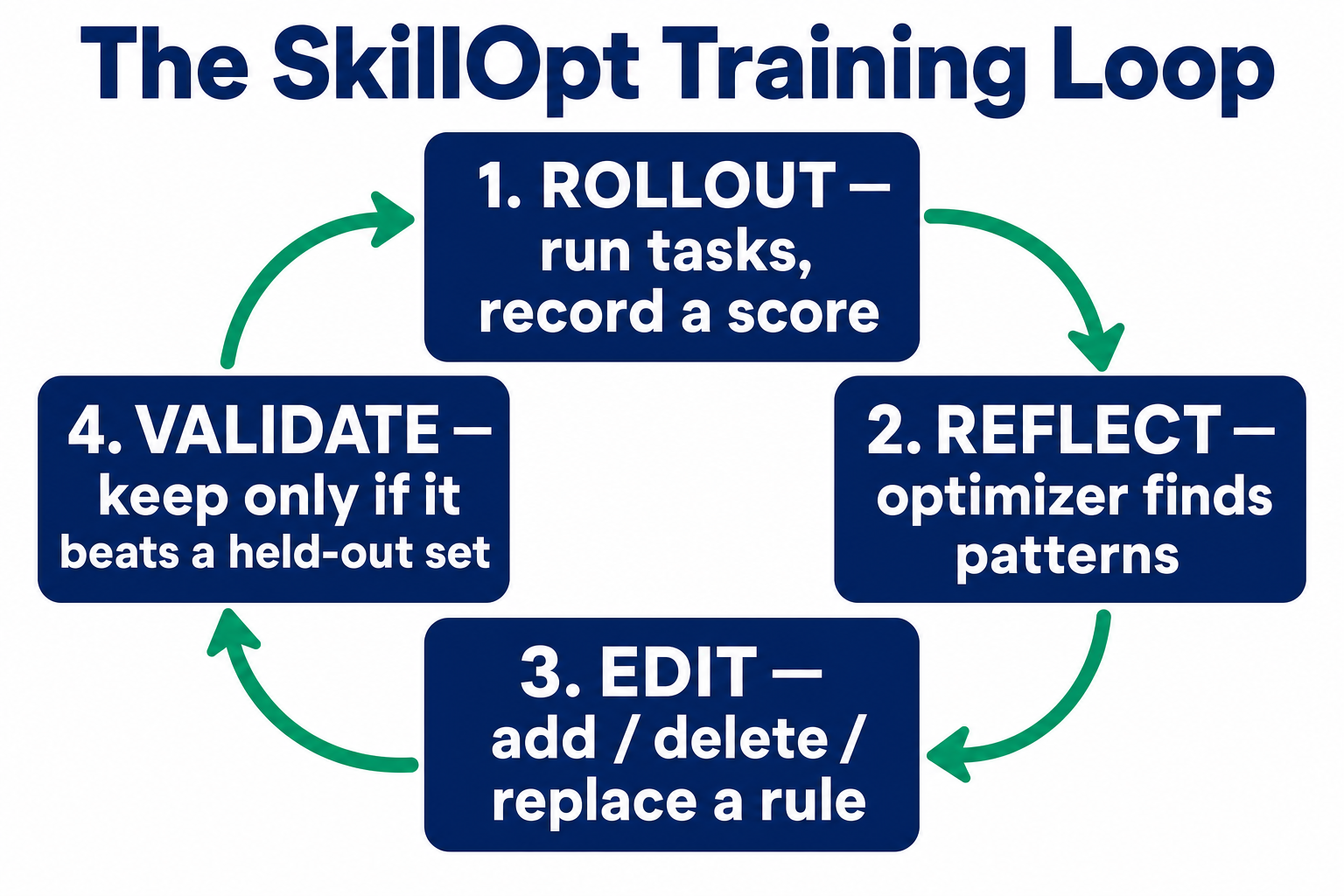
Repeat that loop over several rounds and out comes a single file — best_skill.md — that measurably outperforms what you started with. It's compact (typically 300 to 2,000 tokens), it's portable in principle, and it adds no extra cost when you actually run it.
Does it work? Across the benchmarks Microsoft tested — six of them, seven different models, three ways of running the agent — SkillOpt came out best or tied-best in every single combination they tried. So this isn't vapourware. The results are real and published.
The clever bit worth sitting with for a second: for years we've treated skills and prompts as disposable text you nudge by hand until something works. SkillOpt treats them as trainable artifacts — and gets results that compete with fine-tuning without ever spinning up a GPU.

What It's Good For (The One Rule)
Now, here's the single most important thing to understand about SkillOpt — and it's the thing that decides whether it's useful to you at all.
It can only learn where a computer can score the result — without a human in the loop.
Think about why. The whole loop depends on scoring. The optimizer improves the instructions by seeing which changes push the score up. That score doesn't have to be a strict pass/fail — a graded number between 0 and 1 works fine — but it does have to be automatic and reliable. If the only way to judge the output is a human squinting at it and going "yeah, that's better, I think," then the loop has nothing to optimise against. It's blind. Microsoft put it bluntly in their own documentation: "Noisy scoring kills the optimizer."
The litmus test
Can a computer look at the output and score it — without a human judging it? If yes, the skill is a candidate. If no, SkillOpt has nothing to work with.
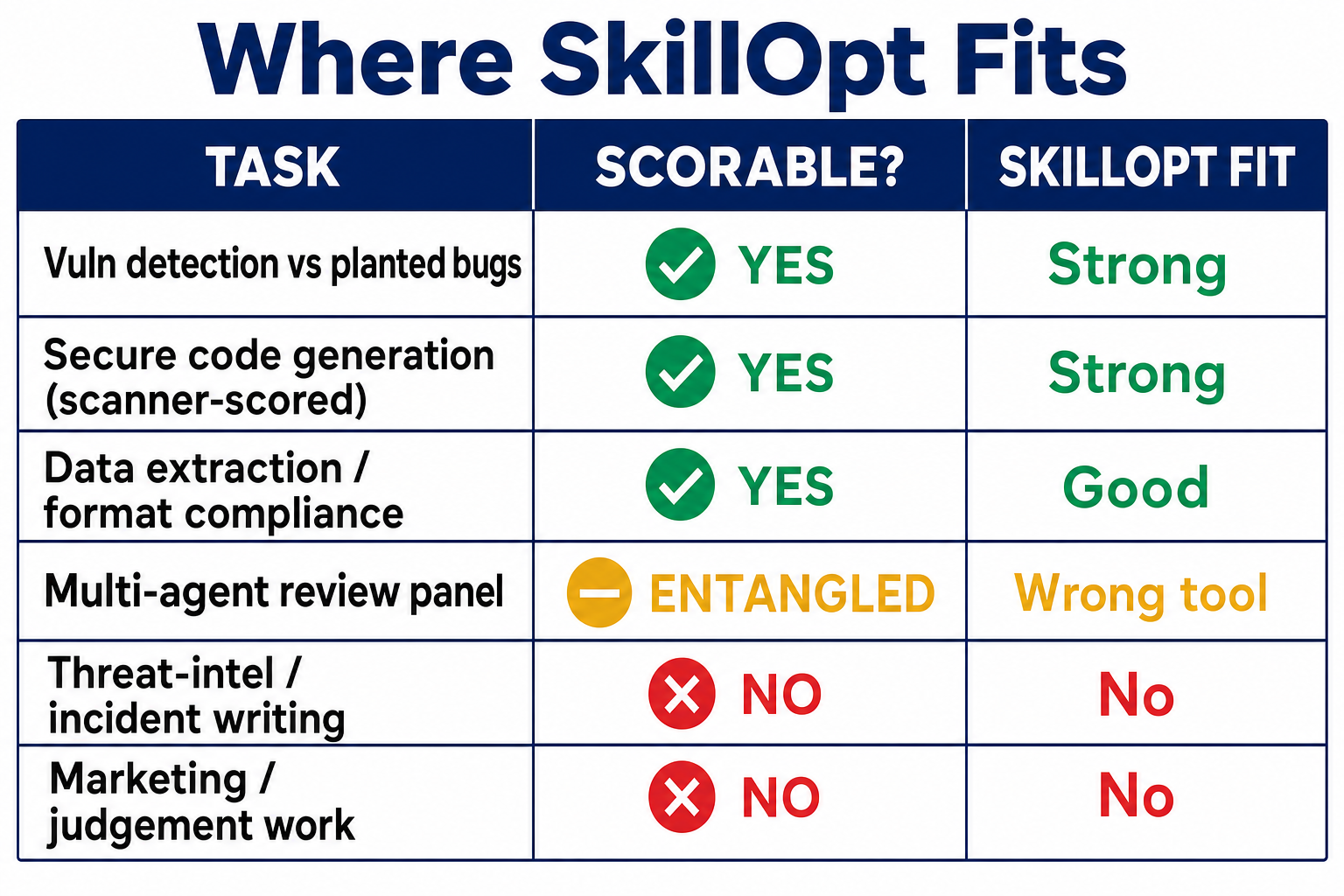
Think about your own Claude Code skills through that lens. Where the answer is yes, SkillOpt is a strong fit:
Commit messages you can check against a format rule.
Test generation — score it on whether the tests actually run and pass.
Lint / style enforcement — did the output pass the linter?
Data extraction into a required structure — did it match the schema?
Security review where you have ground truth about what it should have found.
Where the answer is no, SkillOpt has little to offer, because there's no reliable score to optimise against — a skill that drafts prose or documentation, anything resting on judgement or taste, creative or strategic work. (These aren't hard technical limits: if you can invent a defensible automatic scorer, you can optimise against it. But for genuinely fuzzy, human work, that scorer usually doesn't exist.)
The uncomfortable tension
The skills that can be scored are very often the ones that already work reasonably well. The skills you'd most love to improve — the ones full of judgement and nuance — are exactly the ones you can't score.
My Honest Take
I think SkillOpt is genuinely clever, and the discipline underneath it is exactly right. But I'd add one caution born from testing it — because there's a trap that's easy to fall into.
SkillOpt trains one skill file. That's its sweet spot, and it's also its boundary. The moment you try to point it at something more elaborate — several agents working together, or a panel of different models cross-checking each other — it starts to struggle. I pressure-tested exactly this on one of my own systems, a review skill that runs several AI "hunters" from different model families in parallel. Rather than trust my own opinion, I put the idea to three separate AI models independently and asked each to tear it apart. All three reached the same verdict: for a multi-agent setup, it's the wrong tool. The score can't tell you which agent to credit for an improvement, and optimising a diverse panel quietly makes the agents converge — killing the very diversity that made the panel worth having.
The lesson isn't "SkillOpt is bad." It's right idea, wrong shape. So the rule of thumb is simple, and it's good news for a Claude Code user: keep it to one skill at a time. A single skill, doing a single scorable job, is precisely what this was built for — and it's exactly what most of your skills are.
How You'd Actually Optimize One of Your Skills
Let's make this concrete with a skill you might genuinely have. Say you've written a Claude Code skill that generates a unit test for a function. Sometimes the test it writes is excellent; sometimes it's shallow or doesn't even run. You'd love it to be reliably good — and here's the thing, "does the test run and pass?" is something a computer can check. That makes it a perfect candidate. Here's the recipe.
One honest caveat first
SkillOpt doesn't do this out of the box. It ships with a handful of built-in benchmarks — maths, document Q&A, spreadsheets and the like — but not one for "your test-writing skill." You wire your task in yourself (Microsoft's docs put it at roughly 200 lines of Python) by giving it three things: a set of examples, a way to run your skill on them, and a scorer. That's the work. Once it's done, the loop runs itself.
Gather examples with a known-good answer. Collect a batch of functions, each with a way to tell whether a generated test is any good — for the test-writer, simply: does it execute, and pass against the real function while failing against a broken one? Split them into three piles: one to train on, one to validate edits against, and one locked away for the final honest test.
Write the scorer. This is the heart of it and where your effort should go. For every run, the scorer returns a number — pass/fail, or a graded score like "8 of 10 assertions meaningful." SkillOpt's own guidance is blunt: spend your time on the scorer. A noisy, unreliable score is the one thing that breaks the whole process.
Let it train. SkillOpt runs your skill against the examples, sees where it fell short, rewrites the skill's instructions, and only keeps a change if it scores better on the validation examples it hasn't trained on. Round after round, the skill file sharpens.
Prove it, then adopt. Run your original skill and the trained best_skill.md against the locked test set — examples neither has seen — several times, and average (LLMs are noisy; one run tells you nothing). Trained version wins on unseen examples? Adopt it. Only wins on what it trained on? You've learned that cheaply — keep the original.
Mind this trap
The optimizer gets good at exactly what you scored it on. If your examples are all one narrow kind, the skill will ace them and stay blind to everything else. The defence is simple: make your locked test set genuinely different from your training examples. If it still wins there, the improvement is real — not memorised.
That's the whole method, and it generalises. Swap the test-writer for any scorable skill you own — a commit-message formatter, a schema-validator, a lint-fixer — and the same four steps apply. It even extends to security work: because "did it find the planted vulnerability?" is scorable, you can point the same recipe at a code-review skill using labelled vulnerability datasets like Juliet/SARD (line-level flaw locations) or the OWASP Benchmark (thousands of test cases, each marked a true finding or a false alarm). Finding a bug is the same act whether you're a developer hardening code or a pentester reporting it — one trained skill, two uses.
The Takeaway That Outlives the Tool
Step back from SkillOpt-the-product for a moment, because the durable lesson is bigger than any one tool.
For years we've treated the instructions we give AI as throwaway text — something you guess at and tinker with until it feels right. The real shift SkillOpt represents is this: those instructions can be measured and improved, wherever you're able to define a score.
You don't even need SkillOpt to benefit from that idea. The genuinely valuable habit is building the evaluation harness first — the thing that lets you objectively answer "did this change to my skill actually make it better, or do I just think it did?" Even without any optimiser, that harness alone will make you a better skill-writer, because it turns your guesses into measurements. The optimizer that sits on top is the bonus.
Where I'd leave you
Look at your skills and find the one that's already scorable — the test-writer, the formatter, the linter, the one with a checkable right answer. Build the harness for it. Measure whether your next edit actually helps. And if it's a skill you run often enough to be worth it, let SkillOpt do the editing for you. Start there — one scorable skill — and you'll have stopped guessing.
Frequently Asked Questions
What is SkillOpt?
SkillOpt is a free, open-source tool from Microsoft Research that improves an AI agent's skill file — the markdown instructions that tell it how to do a job — by training it against a score, rather than fine-tuning the model or editing the prompt by hand. It leaves the model's weights frozen and produces a single optimised best_skill.md file.
How is optimising a skill different from fine-tuning a model?
Fine-tuning changes the model's internal weights — it's expensive, needs access to those weights, and locks you into one model. SkillOpt changes only the text of the skill file. The model stays exactly as it is; what improves is the instructions it's given. You get results that compete with fine-tuning without training the model or using a GPU.
Does SkillOpt work with Claude Code?
Yes. Claude Code is one of the three execution environments SkillOpt supports out of the box (alongside direct chat and the Codex CLI). A skill optimised inside Claude Code runs against the unchanged model with no extra cost at run time.
What kinds of skills can SkillOpt actually improve?
Only skills where a computer can score the output automatically, without a human judging it — a test-writing skill (does the test pass?), a lint or format enforcer (did it pass the linter?), a data-extraction skill (does it match the schema?), or a security skill with ground truth. Skills that produce prose, judgement, or creative work can't be optimised this way, because there's no reliable score to train against.
Can I use SkillOpt to improve a multi-agent setup?
It's the wrong tool for that. SkillOpt trains one skill file at a time. Point it at several agents working together and it struggles: the score can't tell which agent to credit for an improvement, and optimising a diverse panel makes the agents converge, killing the very diversity that made the panel useful. Keep it to a single scorable skill.
Do I have to build anything to use it?
For your own task, yes. SkillOpt ships with a few built-in benchmarks, but not one for your specific skill. You wire your task in yourself — Microsoft's docs put it at roughly 200 lines of Python — by supplying a set of examples, a way to run your skill on them, and a scorer. Once that's done, the training loop runs itself.
About the Author

Nathan House, Founder & CEO of StationX
Nathan House has 30 years of hands-on cybersecurity experience and is Cambridge-educated, holding CISSP, CISA, CISM, OSCP, CEH, and SABSA. He founded StationX in 1999 — one of the UK’s first cybersecurity companies — and has secured £71 billion in UK mobile banking transactions and the London 2012 Olympics, advising clients including Microsoft, Cisco, BP, Vodafone, and VISA. He authored the world’s most popular cybersecurity course — a #1 Udemy bestseller taken by over 500,000 students — and was named Cyber Security Educator of the Year 2020, AI Security Educator of the Year, and a UK Top 25 Security Influencer 2025. A DEF CON speaker and featured expert on CNN, Fox News, NBC, and the BBC, Nathan leads StationX’s training of more than half a million students worldwide.