Reduce Claude Code Token Usage: 8 Proven Ways (2026)
If your Claude Code token usage is climbing faster than you expected, you're not alone; it's the single most common surprise for people who've just moved their coding into an AI agent. The reason is simple, and once you see it you can't unsee it: Claude Code resends your conversation history and the files it's holding on every single turn. So the bill isn't really about how much you ask. It's about how much context you're dragging along each time you ask it.
The good news is that this is one of the most fixable costs in all of AI. In this guide we'll walk through eight proven ways to reduce your token usage, ranked by impact: biggest saving first, so if you only have five minutes you start at the top and work down. Each method is rated out of 5 for how much it actually moves your bill, based on Anthropic's own guidance and real-world use. Most of these are native to Claude Code today, and all of them map onto Codex, Gemini CLI, OpenCode, and Aider too (the last method needs a small bridge in Claude Code, which we'll show you).
One quick thing before we start, because it changes why these matter to you. If you're on the pay-as-you-go API, everything here saves you real money. If you're on a Pro or Max subscription, you're not billed per token; you hit usage limits instead, so the same eight methods do something slightly different: they buy you more headroom before you run out. Either way, the moves are identical. Save money, or stretch your limit: same playbook.
TL;DR: if you've only got 30 seconds
Clear between tasks. /clear for unrelated work, /compact at phase breaks. The fastest win: Claude Code resends your whole history every turn.
Route the model. Default to Sonnet, Opus only for hard problems, Haiku for simple subagents. The biggest cut on the bill, close to 5x on routine tasks.
Go local or free. Ollama or a free API for the bulk of the work, paid frontier tokens only where they earn it. Up to 100% off whatever you move.
Then squeeze the rest. Keep your prefix stable so caching hits (90% off resends), CLAUDE.md under 200 lines, turn thinking down, offload verbose output to subagents or hooks.
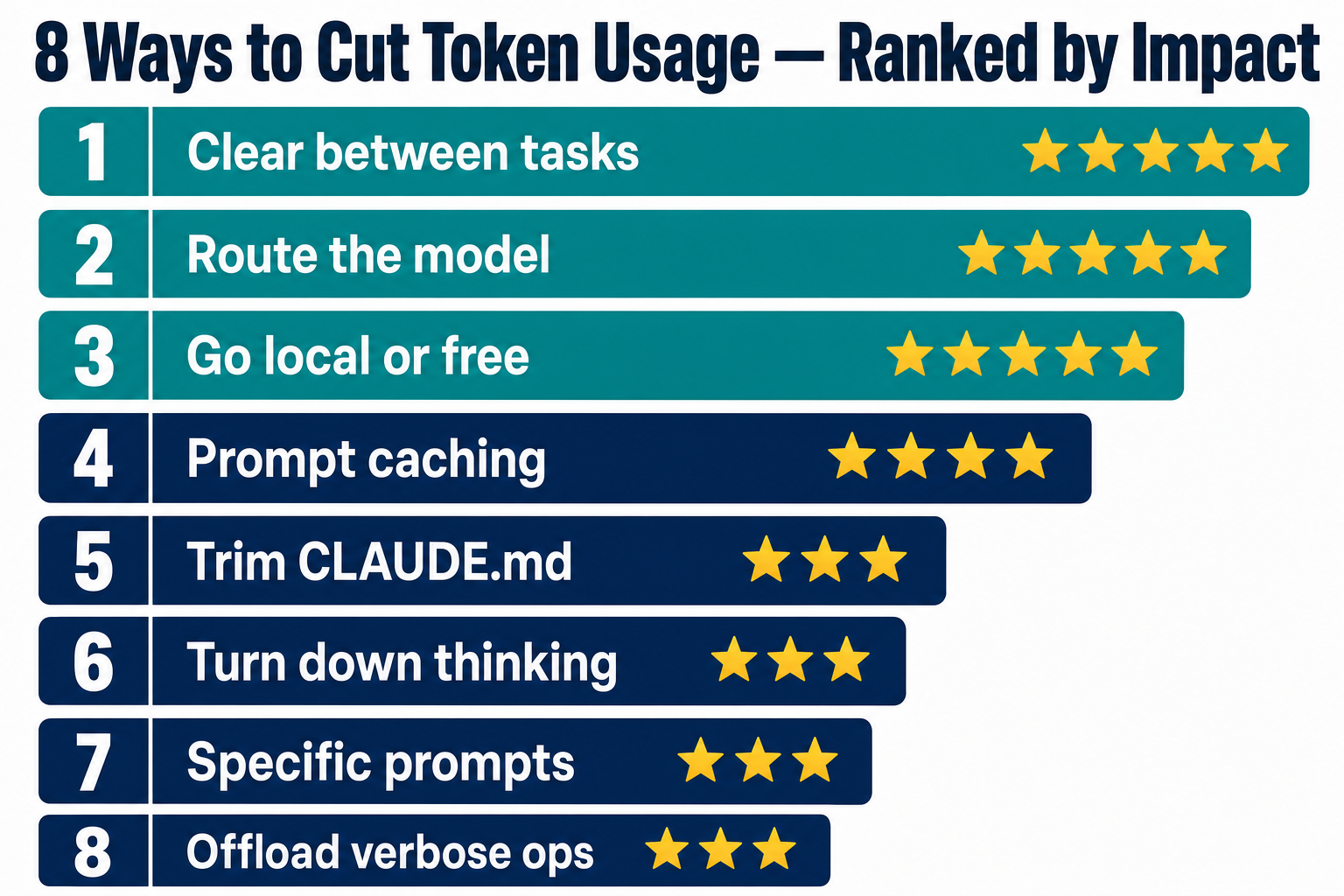
A note on the savings figures below: the percentages are real-world ballparks, not guarantees; your mileage depends on your own task mix. And they don't simply add up: each one applies to a different slice of your spend, so treat them as "how big a lever this is," not numbers to total. Let's get into it.
First, See Where Your Claude Code Cost Actually Goes
Before you change anything, get a baseline, because you can't cut what you can't see.
- Run
/usageto see your session's token count and estimated cost. - Run
/contextto see what's eating the window; it breaks usage down by system prompt, CLAUDE.md, MCP servers, subagents, and skills.
On a Pro, Max, Team or Enterprise plan, /usage also attributes recent spend to each skill, subagent, plugin and MCP server as a percentage of the total (press d or w to flip between 24-hour and 7-day views). One note: on Pro/Max the dollar figure is a local estimate and isn't your actual bill (your usage is included in the plan), so treat it as a relative guide, not an invoice. Want a hard cap? On Pro/Max you can set a monthly spend limit on usage credits with /usage-credits, and API teams can set a workspace spend limit in the Console. That one screen usually tells you exactly which of the eight fixes below will move the needle most for you. For reference, Anthropic reports the average enterprise cost at around $13 per developer per active day, so if you're well above that, there's room to work.

1. Clear Between Tasks: Your Fastest Win
Impact: ⭐⭐⭐⭐⭐ (5/5): biggest saving for the least effort, which is why it's first.
Because Claude Code resends the whole conversation on every turn, the single most wasteful thing you can do is keep one giant session running across unrelated tasks. The database bug you fixed an hour ago is still being resent (and billed) while you work on the UI. So the fastest money you'll ever save is a two-second command.
Run /clear every time you start genuinely new, unrelated work. In Anthropic's own words: "stale context wastes tokens on every subsequent message."
For a long task with natural phases, run /compact at the breakpoints instead; it summarises the history so far and frees the window without losing the thread. You can even steer it: /compact Focus on code samples and API usage.
Treat every distinct problem as its own session: new topic, new chat. The exception: if you're mid-flow on one connected task, keep going; prompt caching means continuing a live thread can be cheaper than rebuilding context. It's unrelated work that should get a /clear.
Why it works: a clean session with a precise prompt genuinely produces better output than a long, polluted one, so this is that rare optimisation that saves money and improves results at the same time.
Saves: can be large on long sessions, often the difference between a bloated context and a lean one.
That handles the context you're carrying. The next question is which model is processing it, and that's where the biggest dollar saving lives.
2. Route the Model: Cheap by Default, Expensive Only When Needed
Impact: ⭐⭐⭐⭐⭐ (5/5): the single biggest saving on your actual bill.
Most people leave Claude Code on the most powerful model and pay premium token prices for work a cheaper model would nail. The fix is to treat models like a team: a junior for the routine stuff, the senior only for the hard calls.
Set your default to Sonnet: /model sonnet (Anthropic's own guidance: "Sonnet handles most coding tasks well and costs less than Opus").
Reserve Opus for genuine architecture and multi-step reasoning. Switch up with /model only when a task actually needs it.
For subagents doing simple, high-volume work, set model: haiku in the subagent config.
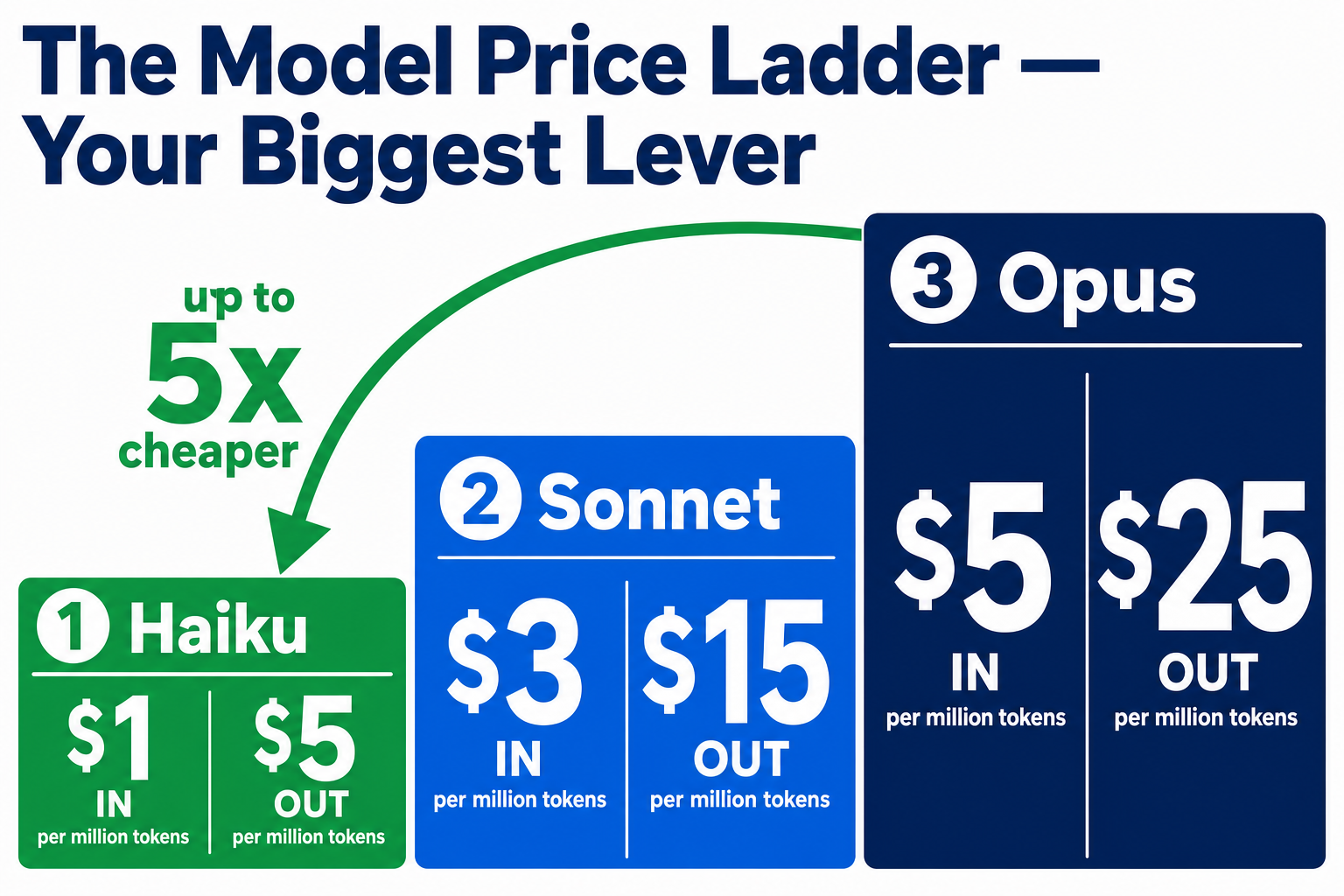
Why it works: the price gap is enormous. As of late August 2026, per million input/output tokens: Haiku 4.5 is about $1/$5, Sonnet 5 about $2/$10 (its launch price, which Anthropic has since made permanent, scrapping the planned rise to $3/$15; Sonnet 4.5 and 4.6 stay at $3/$15), and Opus 4.5 through Opus 5 about $5/$25. Dropping a routine task from Opus to Haiku is close to a 5× saving on that task, and for routine work, you often can't tell the difference in the output.
Saves: if you currently default to Opus, moving the bulk of your work to Sonnet or Haiku is usually the single biggest cut you can make, often roughly halving the model portion of your bill.
Clearing context and routing the model make your tokens cheaper. The next one makes them free.
3. Go Local or Free: Stop Paying for Tokens Entirely
Impact: ⭐⭐⭐⭐⭐ (5/5): up to 100% saving on everything you move off the paid API.
This is the lever most people never consider, and it's why token reduction isn't only about squeezing the paid meter; sometimes you can switch the meter off. You don't have to use a paid API at all.
There's one honest wrinkle to get right, though. OpenCode, Aider and Cursor speak the OpenAI format natively, so you point them straight at a local or free model: set a base URL, paste a key, done. Claude Code only speaks Anthropic's format, so it needs a small bridge. It's not officially supported, but it absolutely works, and plenty of people do exactly this to run Claude Code for free.
- Run a local model (zero paid API spend). Run a model on your own machine with Ollama. There's no API bill because there's no API, just your own hardware (you're trading token cost for compute, memory and electricity). In OpenCode it drops straight in; for Claude Code you bridge it (Ollama now offers an Anthropic-compatible mode, or use a local proxy). It won't match a frontier model on the hardest tasks, but for a large slice of everyday coding it's more than enough. Full walkthroughs: run Claude Code with Ollama and picking the best local LLM.
- Use a free LLM API. Several providers give you capable open-weight models for free; NVIDIA's NIM offers 120+ open-weight models on an OpenAI-compatible endpoint. OpenCode points at it directly; Claude Code reaches it one of three ways: DeepSeek's native Anthropic endpoint (just an
ANTHROPIC_BASE_URL, no proxy), the free free-claude-code proxy (bridges Claude Code to 17 providers including NVIDIA NIM, Groq and Ollama), or LiteLLM by hand. We walk through each one in the best free LLM API guide.
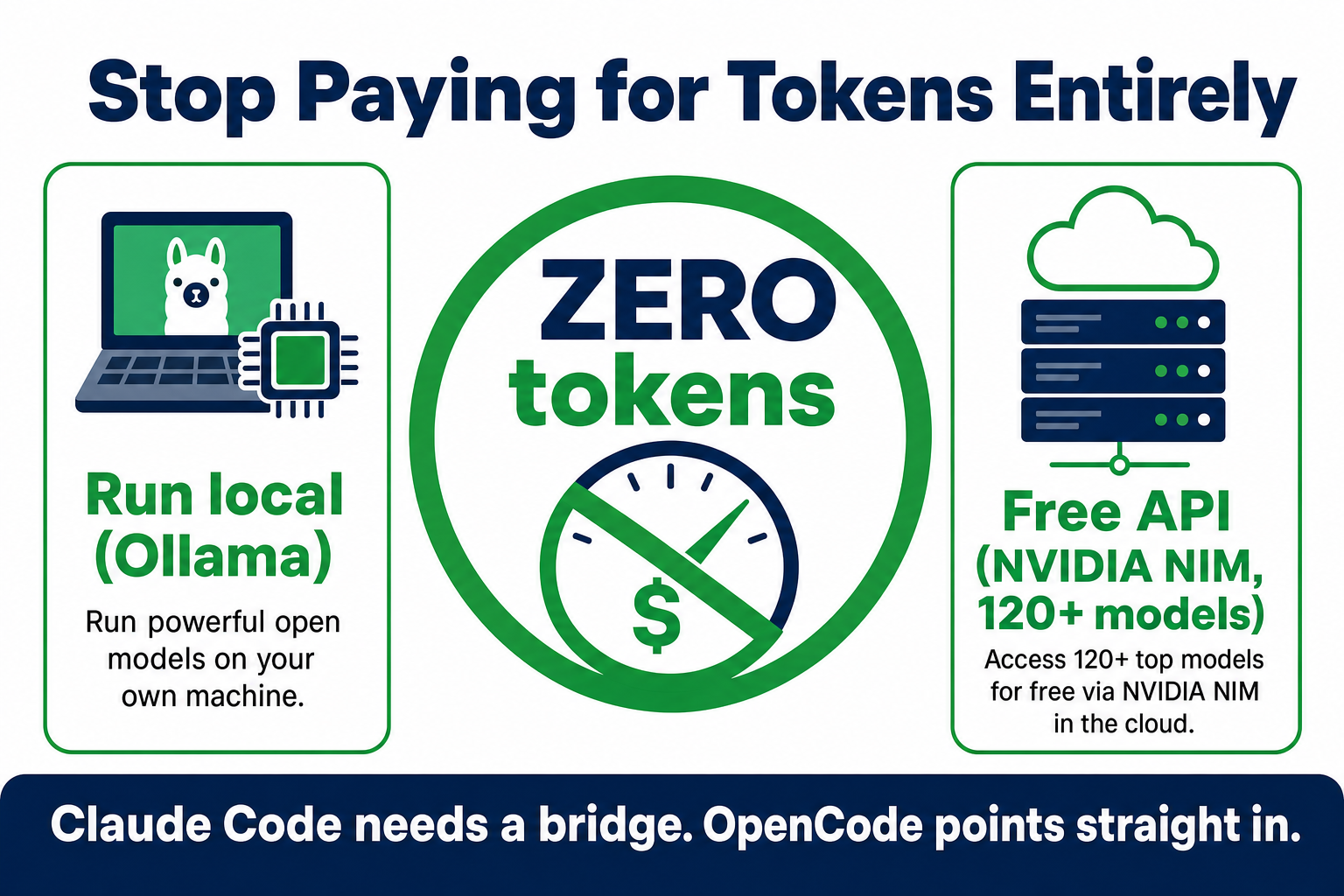
Why it works: it removes the token meter altogether for the work you route to it. Be honest with yourself about the trade: you're swapping Claude's reasoning for an open model wearing Claude Code's interface, and free tiers get rate-limited hard the moment you fire off parallel tool calls. So the smart play is a hybrid: do the bulk on a local or free model, and spend paid frontier tokens only where they genuinely earn their keep.
Saves: up to 100% on everything you move off the paid API.
Those are the three heavy hitters. The remaining five are about paying less for the tokens you do send, starting with one that's already working for you in the background.
4. Let Prompt Caching Do Its Job (and Understand What It Actually Does)
Impact: ⭐⭐⭐⭐ (4/5): up to 90% off the repeated part of every prompt, and it's automatic.
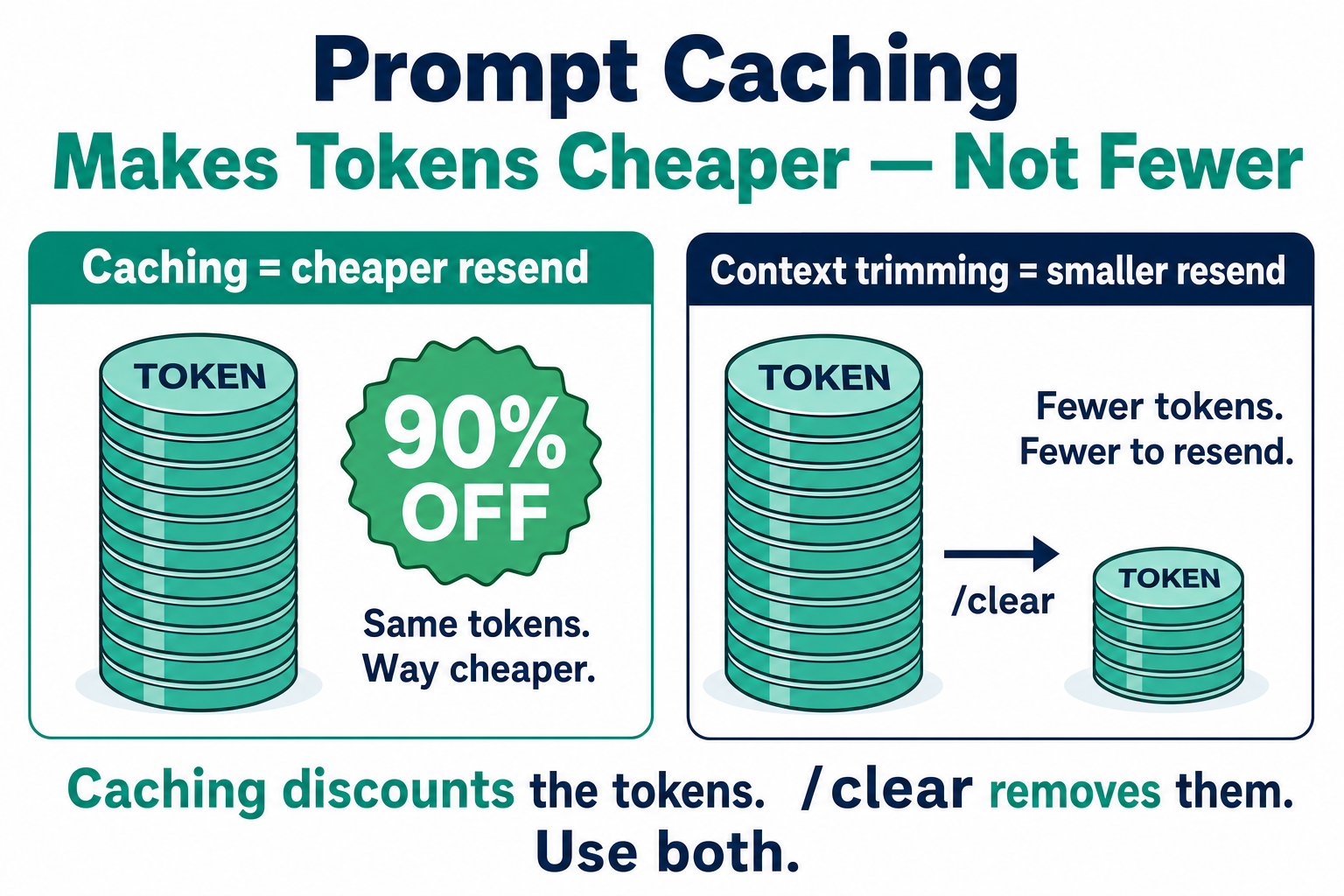
Here's one worth being precise about, because it's widely misunderstood. Claude Code automatically uses prompt caching: when you resend the same context prefix, you pay a fraction of the price for it. On Anthropic, cached reads cost 0.1× the base input price, a 90% discount. OpenAI offers the same automatic ~90% discount on cached input.
But (and this is the bit people get wrong) caching does not make your context window smaller. The same tokens are still processed; you just pay 10% for the repeated ones. So caching and context-trimming (methods 1 and 5) are different levers that stack: caching makes the unavoidable resend cheap, while /clear and a lean CLAUDE.md make the resend smaller.
- You don't switch caching on; it's automatic. What you do is keep your prefix stable so the cache actually hits: don't edit CLAUDE.md mid-session, and don't reshuffle tool definitions, or you invalidate the cache and pay full price again.
- Know the catch: cache writes cost more than normal input (Anthropic charges 1.25× for the 5-minute cache, 2× for the 1-hour option). So caching pays off on stable, reused context, not on huge documents you're constantly editing.
Why it works: a stable CLAUDE.md and system prompt are close to free to resend once cached, and the default cache lives for 5 minutes of inactivity, which comfortably covers back-to-back turns.
Saves: up to ~90% on the repeated portion of every prompt.
Caching rewards a stable context prefix, and the biggest, most stable chunk of that prefix is a file you control directly.
5. Trim Your CLAUDE.md: It's Loaded on Every Single Message
Impact: ⭐⭐⭐ (3/5): small per message, but it compounds on every request forever.
Your CLAUDE.md file is loaded into context at the start of every session and rides along on every message after that. If it's bloated, you're paying that tax constantly, even when you're doing something completely unrelated to what's in it.
Cut CLAUDE.md down to essentials only; Anthropic recommends keeping it under 200 lines.
Strip out anything the model can already infer (framework basics, common syntax, generic "be helpful" preambles). The test: if it wouldn't surprise an experienced new developer, it probably doesn't belong there.
Move specialised, occasional instructions (PR review steps, migration playbooks) into Skills. Skills load on-demand only when invoked, so they cost you nothing until you actually use them.
Why it works: this is a compounding saving: every session, forever, reuses that leaner file. Teams who audit a bloated CLAUDE.md are often shocked how much of it the model already knew; stripping it back to the genuinely non-obvious can cut the always-loaded portion dramatically.
There's another thing loaded by default that quietly runs up your output bill, and most people don't realise they're paying for it.
6. Turn Down the Thinking When You Don't Need It
Impact: ⭐⭐⭐ (3/5): cuts output-token spend on the many tasks that don't need deep reasoning.
Extended thinking is on by default because it genuinely improves hard reasoning tasks, but those thinking tokens are billed as output tokens, and the default budget can run to tens of thousands per request. For a simple edit or a rename, you're paying for deep deliberation you didn't need.
Lower the effort level for simple work with /effort (or set it in /model).
On fixed-budget models, cap it with the environment variable: MAX_THINKING_TOKENS=8000.
Disable thinking entirely in /config for genuinely mechanical tasks (note: not available on every model).
Why it works: most everyday coding tasks (edits, renames, small fixes) don't need maximum reasoning depth. Matching the thinking to the task stops you paying output-token prices for a two-line change.
Saves: significant on output tokens for routine work.
Turning down thinking stops Claude over-deliberating. The next one stops it over-exploring, and that starts with how you ask.
7. Write Specific Prompts and Plan Before You Build
Impact: ⭐⭐⭐ (3/5): free to do, and it prevents whole categories of wasted spend.
A vague request like "improve this codebase" makes Claude scan broadly and read far more than it needs. A specific one lets it work with surgical file reads. This one costs nothing but attention.
Name the target: "add input validation to the login function in auth.ts" beats "fix auth."
For anything complex, hit Shift+Tab to enter plan mode first: Claude proposes an approach for your approval before it starts editing, which prevents the expensive re-work of going down the wrong path.
If it starts heading the wrong way, press Escape immediately, or use /rewind to roll back to a checkpoint rather than paying to unwind a mess.
Why it works: most wasted tokens don't come from the fix itself; they come from exploration, wrong turns, and re-work. Being specific and planning first cuts all three.
The last one is about the moments that quietly balloon a single session: the big reads.
8. Offload the Verbose Stuff: Don't Read 10,000 Lines Into Context
Impact: ⭐⭐⭐ (3/5): kills the spikes; huge on test/log/doc-heavy workflows, minor otherwise.
Some operations dump enormous amounts of text into your window: running a test suite, fetching docs, reading a log file. You don't need all of that in your main conversation; you need the conclusion.
Delegate verbose jobs to subagents: the noisy output stays in the subagent's own context and only a short summary comes back to you.
Use a PreToolUse hook to trim output before it's ever produced. Anthropic's own example rewrites a test command to pipe it through grep/head so a 10,000-line run returns a few hundred tokens of failures instead of tens of thousands of lines. (The hook rewrites the command before it runs; it doesn't filter output after the fact.)
Prefer CLI tools over MCP where you can: gh, aws, gcloud and friends don't add per-tool listing overhead the way MCP servers can. Modern Claude Code already defers MCP tool definitions by default, so only tool names load until one's used, but disabling servers you never touch via /mcp still tidies things up.
Stop the agent slurping junk with .claudeignore. Left unchecked, Claude will happily read node_modules, dist, .next, build artefacts and giant log files straight into context. A .claudeignore file (same idea as .gitignore) keeps that noise out, and pointing at specific files or line ranges in your prompt ("the auth middleware in src/auth.ts") beats letting it wander the whole tree. This one quietly saves more than trimming CLAUDE.md ever will.
Install code-intelligence plugins for typed languages. Anthropic's own cost guidance calls this out: a code-intelligence plugin (TypeScript, Python, Go, Rust…) gives Claude precise "go to definition" symbol navigation instead of grepping and reading five candidate files. Fewer speculative reads, and it surfaces type errors after edits without dumping a full compiler run into context.
Why it works: it attacks the spikes (the single actions that quietly balloon a session) rather than shaving a few percent off everything.
Saves: large on any workflow that touches tests, logs, or docs.
A quick honesty note: subagents aren't free; each runs its own context window. Anthropic specifically notes that experimental agent teams can use roughly 7× the tokens of a standard session when teammates run in plan mode. That's a warning about teams, not ordinary subagents; an ordinary subagent's cost depends on how much you delegate to it. Use them to isolate verbose work, not as a blanket habit.
That's the eight. Before we wrap up, one question we get a lot: does any of this only work in Claude Code?
Reduce Token Usage in Codex, Gemini CLI, OpenCode & Aider Too
Not really, and here's why. Every serious AI coding agent works the same way underneath: context in, tokens billed. So the same core moves (route the model, cache the prefix, shrink the context, turn down reasoning) show up everywhere, just with different command names.
| Lever | Claude Code | Codex CLI | Gemini CLI | OpenCode | Aider |
|---|---|---|---|---|---|
| Model routing | /model |
model in config.toml |
/model (Flash vs Pro) |
any provider via API key | --model |
| Context / memory file | CLAUDE.md (<200 lines) | AGENTS.md / Memories | /memory, GEMINI.md |
AGENTS.md | conventions file |
| Compact / clear | /compact, /clear |
/compact + auto-compaction |
/compress, /clear |
/undo, /redo |
/clear, /tokens |
| Prompt caching | automatic (90% off reads) | automatic (~90% off) | implicit, on by default (2.5+) | provider-dependent | --cache-prompts |
| Reasoning control | /effort, MAX_THINKING_TOKENS |
model_reasoning_effort |
n/a | n/a | /reasoning-effort |
| Local / free model | via bridge (proxy / Anthropic endpoint) | custom provider / --oss |
n/a | any provider (agnostic) | Ollama / any |
A few honest caveats worth knowing. Google's Gemini turns on implicit caching by default for its 2.5-and-newer models, but it doesn't publish an exact discount percentage the way Anthropic and OpenAI do, so we won't quote a number we can't source. OpenCode is deliberately provider-agnostic (point it at literally any model), which makes it the natural home for the free-and-local approach from method 3. Codex can use local/custom providers too, but through its own config (custom model_providers or --oss), not any arbitrary OpenAI endpoint. And Aider's --cache-prompts currently leans on Anthropic (Sonnet and Haiku) and DeepSeek for the caching itself.
The Bottom Line
If you only take three things from this, take the three five-star methods: clear between tasks (fastest saving), route the model (biggest dollar saving), and for the work that allows it, go local or free (total saving). Do those three and you'll typically cut your token usage by well over half without any drop in the quality of what you ship. Everything else here is how you squeeze the rest.
Claude Code Token Usage FAQ
Does prompt caching reduce my context window?
No, and this trips a lot of people up. Prompt caching gives you a discount (around 90% off) on the tokens you resend, but those tokens are still processed and still fill your context window. To make the window itself smaller you need /clear, /compact, and a leaner CLAUDE.md. Caching and context-trimming are separate levers, so use both.
What's the single biggest way to reduce Claude Code token usage?
Model routing. If you currently default to Opus, moving the bulk of your work to Sonnet (or Haiku for simple tasks) and reserving Opus for genuinely hard problems is usually the biggest cut you can make, because the price gap between the models is so large. Clearing context between unrelated tasks is a close second and takes two seconds.
Is it cheaper to run Claude Code with a local model?
Yes. A local model via Ollama uses no API tokens at all, so it's effectively free per token (you pay only for your own electricity and hardware). Claude Code isn't natively an OpenAI-compatible client, so pointing it at a local or free model takes a small bridge: Ollama's Anthropic-compatible mode, a DeepSeek Anthropic endpoint, or a local proxy. It won't match a frontier model on the hardest tasks, so most people run a hybrid: local for the bulk, paid frontier tokens for the difficult parts.
Do these token-saving tips work in Codex, Gemini CLI or OpenCode?
Mostly, yes. The core levers (model routing, prompt caching, context management and reasoning control) exist across all the major AI coding agents; only the command names change. See the comparison table in the guide.
How do I check my Claude Code token usage?
Run /usage for your session's token count and cost, and /context to see what's consuming the window (system prompt, CLAUDE.md, MCP servers, subagents, skills). On paid plans, /usage also breaks spend down per skill, subagent, plugin and MCP server. On Pro and Max the dollar figure is a local estimate, not your actual bill.
About the Author

Nathan House, Founder & CEO of StationX
Nathan House has 30 years of hands-on cybersecurity experience and is Cambridge-educated, holding CISSP, CISA, CISM, OSCP, CEH, and SABSA. He founded StationX in 1999 — one of the UK’s first cybersecurity companies — and has secured £71 billion in UK mobile banking transactions and the London 2012 Olympics, advising clients including Microsoft, Cisco, BP, Vodafone, and VISA. He authored the world’s most popular cybersecurity course — a #1 Udemy bestseller taken by over 500,000 students — and was named Cyber Security Educator of the Year 2020, AI Security Educator of the Year, and a UK Top 25 Security Influencer 2025. A DEF CON speaker and featured expert on CNN, Fox News, NBC, and the BBC, Nathan leads StationX’s training of more than half a million students worldwide.