One Zoom Message Takes Over Your Machine
On 11 August, Zoom patched a flaw in the feature that lets people scribble on a shared screen. At its worst, someone in your meeting could run code on your machine.
Patch first if you use Zoom at work: Zoom Workplace 7.1.5, or 7.0.6 on the older branch. Full per-product versions are below, and there's a trap in the workaround that I'll come back to.
Now the part I actually want to talk about, because it isn't the bug.
The researchers pointed AI at the Zoom client and asked it to find the dangerous code. It scored 3,762 functions and ranked the libraries containing them. The library holding the flaw came out 45th out of 70.
A person then looked at that list, decided the question was wrong, and asked a different one. That's what found it.
I've been running my own AI-directed vulnerability research for months, and I hit the same wall from a completely different direction. So this article is about that wall: what the tools can now do, what they still can't, and what that means if you're building a career in this field right now.
TL;DR, if you've only got 30 seconds
Patch first. Update Zoom Workplace to 7.1.5 (or 7.0.6 on the older branch). Zoom Rooms, the Windows VDI client and the Meeting SDK have their own minimum versions, listed just below.
The AI's own ranking buried the bug at 45th of 70. The team used AI heavily, but a human reframing the question is what surfaced the vulnerable library.
The lesson isn't "AI finds bugs now". It's that the labour is being automated and the judgement isn't.
Deciding what to point the tools at is becoming the job. That's a learnable skill, and most training isn't teaching it.
Patch these versions
Zoom Workplace (the app most people mean by "Zoom", on every platform): 7.1.5, or 7.0.6 if you are held on the 7.0 branch.
Zoom Rooms: 7.1.5. Two of the three flaws were fixed in 7.1.0, but the third needed 7.1.5, so 7.1.5 is the version that covers all of them.
Zoom Workplace VDI Client for Windows: 7.0.11, or 6.6.16 on the 6.6 branch.
Zoom Meeting SDK: if your organisation embeds Zoom in its own software, the SDK is affected too. Check the per-product minimums in Zoom's bulletins, because they differ by product.
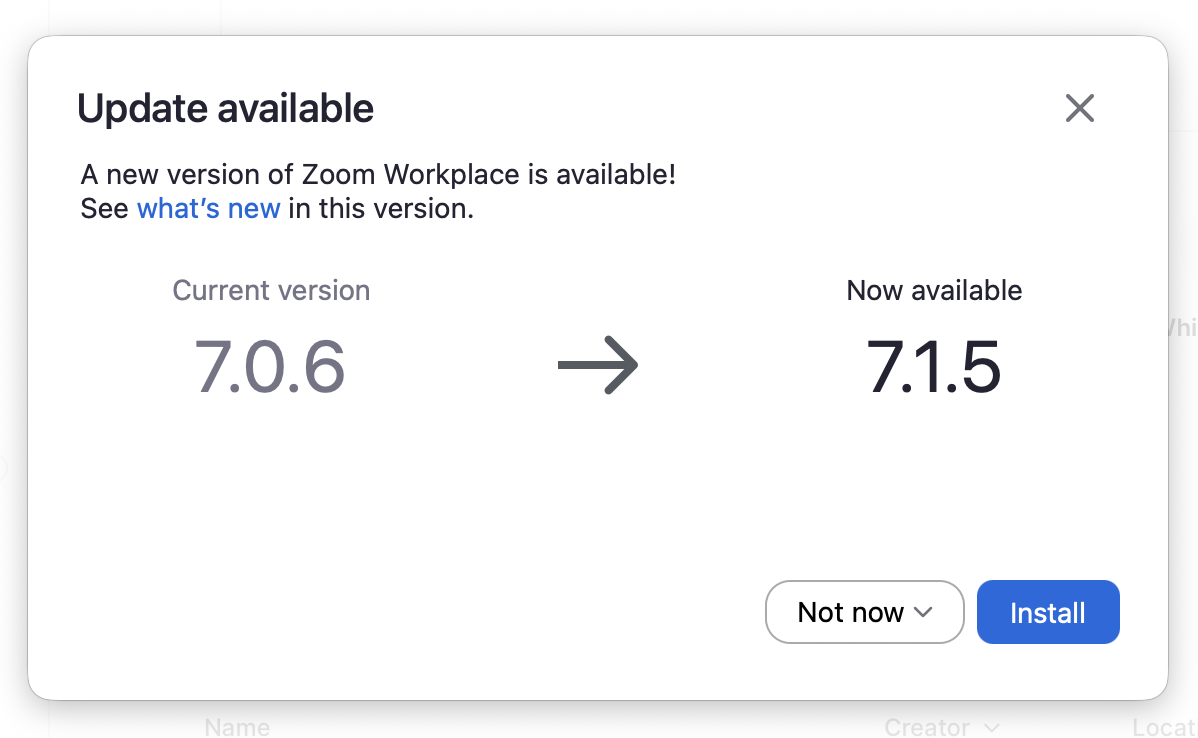
This is my own machine. If you see this prompt, take it: 7.0.6 to 7.1.5 is exactly the update that closes these three flaws.

Any one of these people could have been the attacker. That's what made it interesting.
The Wall Both of Us Hit
The account of the Zoom research below comes from A Security, the firm that reported it. Zoom's bulletins credit their researcher Idan Levcovich on two of the three flaws.
They started with the Zoom Android client. It ships 121 native libraries, the compiled, memory-unsafe code where this class of bug lives. Far more than anyone reads by hand, so the first job was working out where to look.
They built a ranking system with AI. It scored every function the app's own code could reach, weighted by how close each sat to dangerous memory operations. Out came 3,762 scored functions, and across the 70 libraries those functions belonged to, video and image handling ranked at the top.
It's a sensible approach, executed well, and it produced a ranking that was accurate about something nobody needed to know.
The top entries were all local paths, code driven by your own camera rather than by another person in the call. Useful to an attacker who can already run software on your machine. Useless to someone sitting in a meeting. One genuine bug turned up that way, and it proved unreachable with the input a real meeting produces.
So they threw the question away and asked a better one: not where is the dangerous code, but what can a remote participant actually reach?
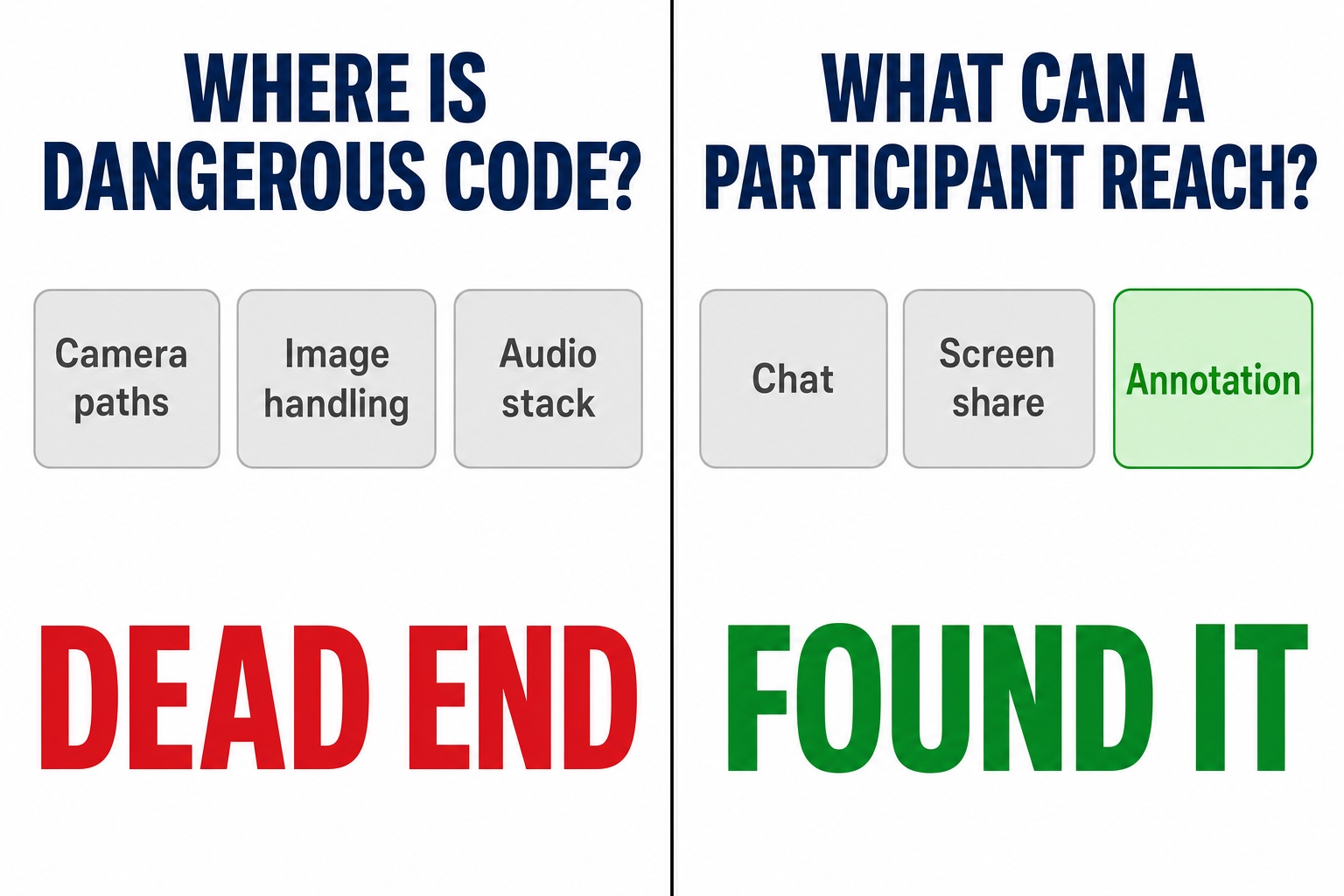
Answering that meant watching the client while it ran, joining a real call, using each feature in turn, seeing which libraries woke up. Drawing an annotation lit up the annotation library, and with it the routines that rebuild drawings arriving over the network.
That library had ranked 45th of 70.
The ranking wasn't broken. It answered its question accurately. Its question just wasn't the one that finds remotely triggerable bugs, and it had no way to notice, because the blind spot was in the framing rather than the execution.
Here's where I come in, because I've been doing this too.
For months I've been running AI-directed vulnerability research across open-source software, several approaches in parallel, including automated scanners and taint analysis that traces untrusted input through code. I want to be careful about the comparison. That's source-code review of open-source projects. A Security reverse-engineered a stripped commercial binary and built a working exploit against it. That's harder work than mine, on tougher terrain, and I'm not going to pretend otherwise.
But the failure mode was identical.
The clever scanners, the taint-analysis ones that trace untrusted data through code properly, have consistently been the least productive thing I run. What actually surfaces bugs hunts a category they can't see: a permission check that should exist and simply doesn't.
Once you see why, it's obvious. A taint scanner looks for dangerous operations reached by untrusted data, and it's good at that. But a missing permission check isn't a dangerous operation, it's the absence of a safe one. There's no pattern to match against nothing. You find it by asking "should something have been checked here?", and that question comes from a person who understands what the code is meant to protect.
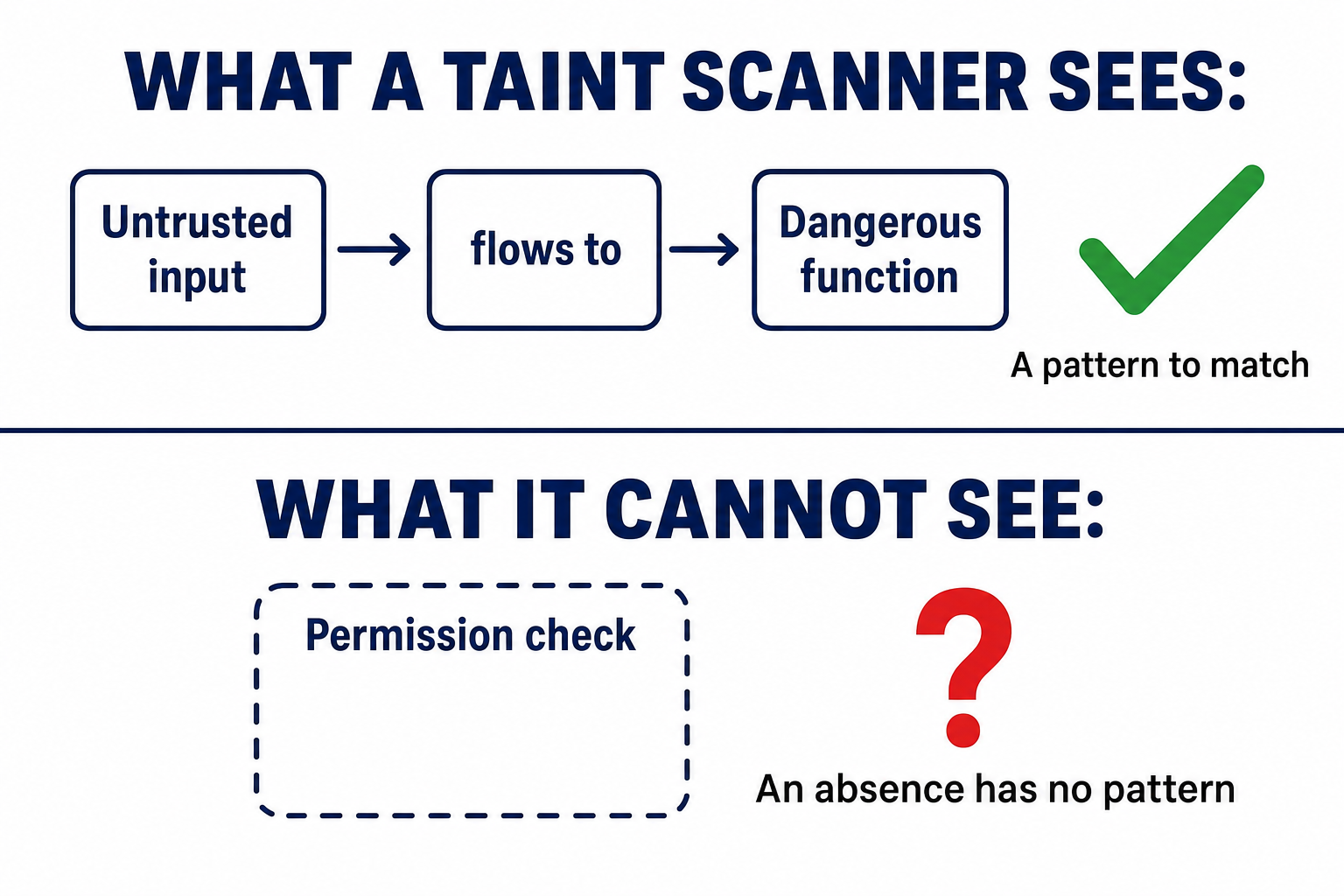
Different target, different tooling, and the same lesson arrived: the tools find what they're shaped to find, and shaping them is a separate skill.
I chose bug bounty work deliberately, by the way. Not because finding bugs was the goal, but because the scoreboard is unforgiving. A bug is real or it isn't. A vendor accepts your report or they don't. I wanted to know whether directing AI to build security solutions actually works, and that's a domain where you can't fool yourself about the answer.

What the Job Actually Is Now
Every task the AI performed in the Zoom research was work a skilled specialist would otherwise do by hand: mapping the attack surface, reverse-engineering an undocumented protocol, auditing the code that rebuilds messages, constructing a payload. A Security says all of it took under 24 hours and fewer than 20 prompts, which is their claim and unverified, and I'll come back to it. What I can say from my own work is that the same kinds of task now take a fraction of the time they used to.
What it didn't do was step back and notice that its own output, however accurate, was solving a problem nobody had set it.
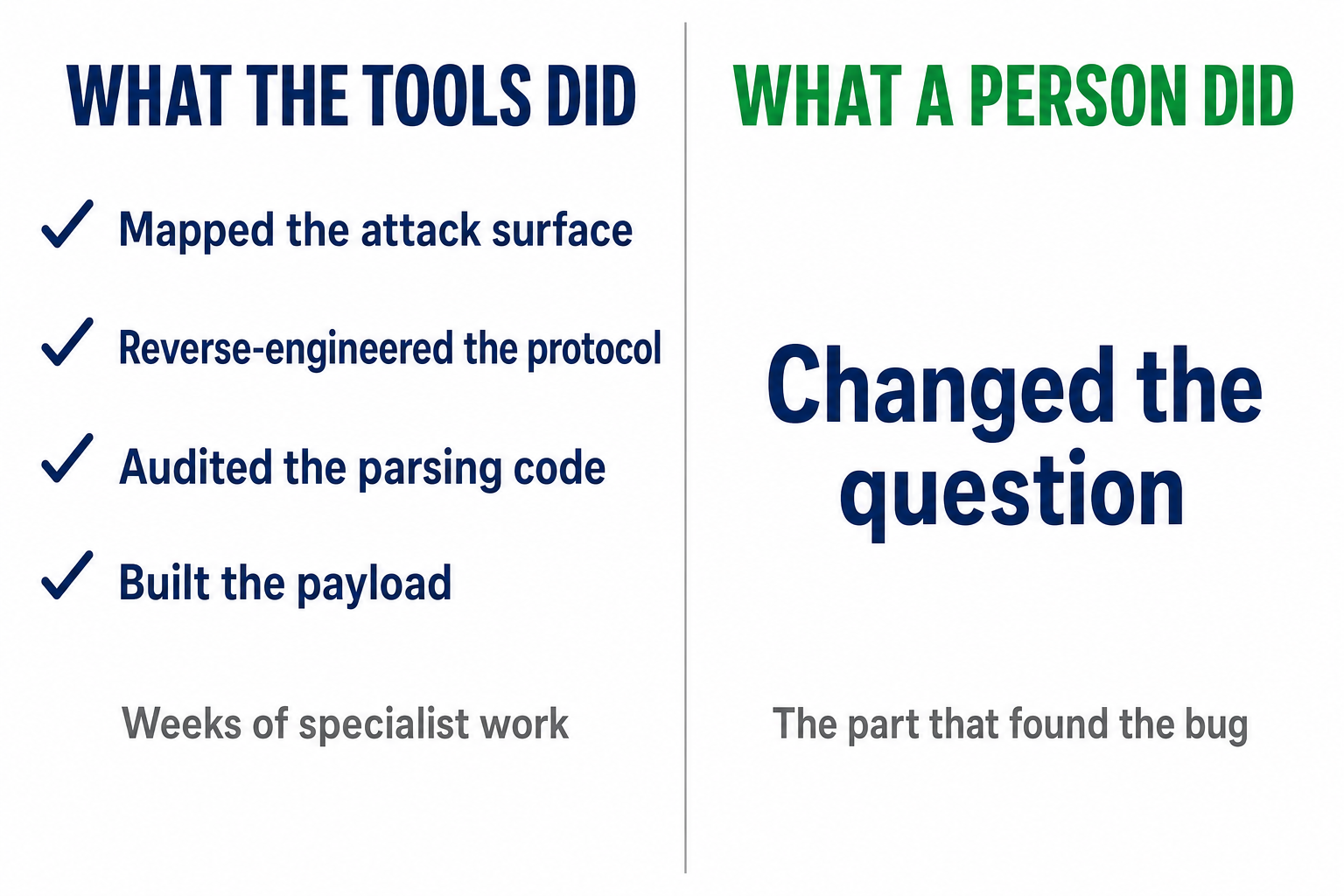
That took someone who understood how meetings work, what an attacker can genuinely touch, and why "dangerous code" and "reachable code" are different problems. Everything downstream of that decision was execution, highly skilled execution, but execution.
Four skills sit underneath it.
Choosing the question the tools answer. The ranking scored thousands of functions correctly and still buried the answer, because it asked "where is dangerous code?" instead of "what can a participant reach?"
Spotting confident wrongness. A ranked list looks authoritative. It was authoritative, about the wrong thing.
Telling a real finding from a plausible one. My own work produces far more false positives than genuine bugs. Sorting them isn't a tooling problem and never becomes one.
Knowing the system well enough to ask the second question. "What can a remote participant reach?" isn't a clever prompt. It's someone who understands memory, protocols and trust boundaries well enough to know where to stand.
None of that is "learn to use AI". It's security judgement, with AI doing the labour that judgement directs. That's what I mean by AI-Driven Engineering: you don't run the tools any more, you direct AI to do the work, and you decide what gets built and where to point it.
Where to Start, Concretely
Advice like "learn the fundamentals" is easy to give and hard to act on, so here's something specific you can do this month.
You need a target you're allowed to look at, so use a deliberately vulnerable one. OWASP Juice Shop is free, legal to attack, and designed for this. Nobody's asking permission for anything.
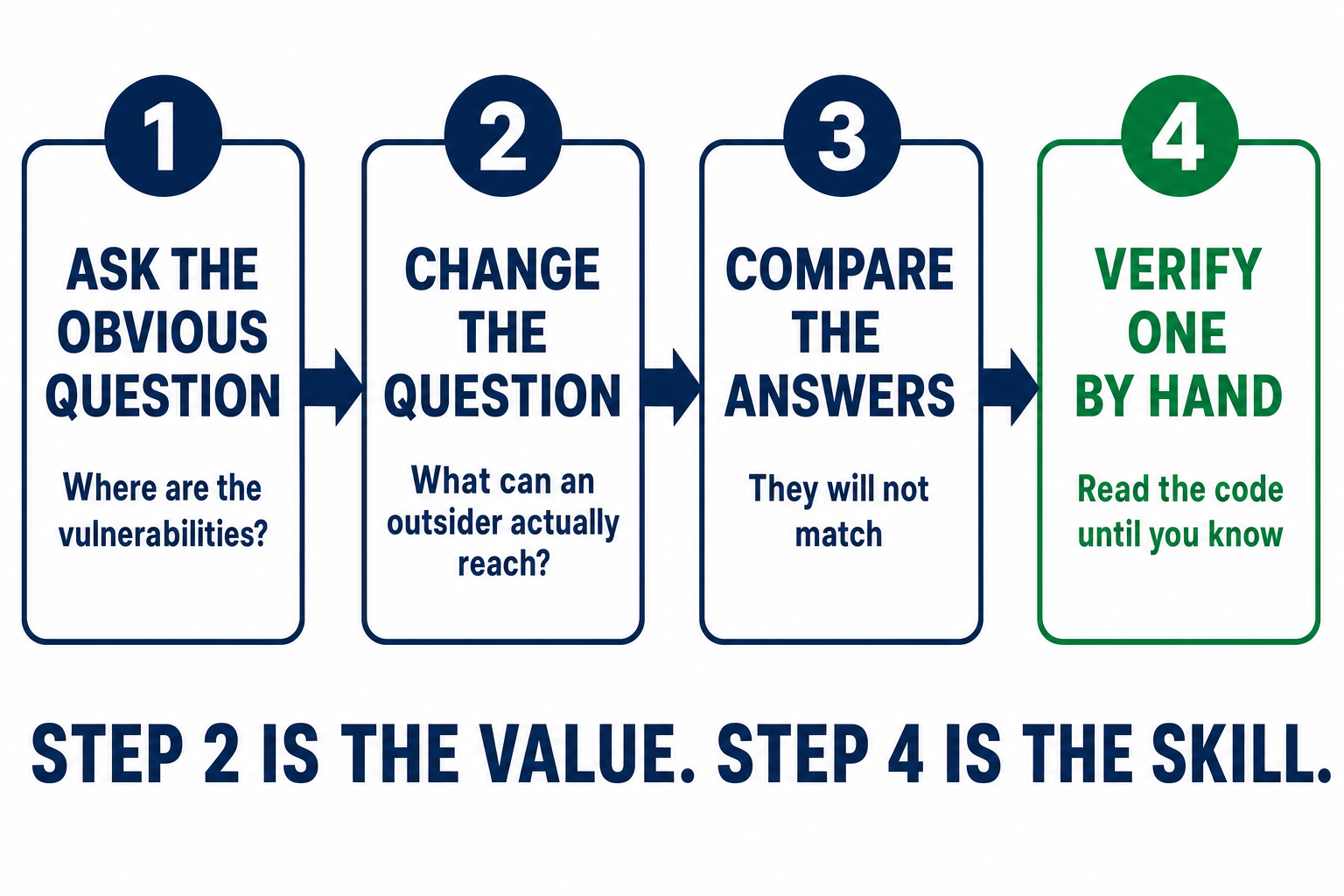
Now do it in this order, because the order is the whole lesson.
Ask the AI the obvious question first. Point it at the code and ask "where are the vulnerabilities?" Save whatever list it gives you. Don't act on it yet.
Now change the question. Ask something narrower that you chose: "which endpoints can someone who isn't logged in reach, and what does each one change?" That's the equivalent of the reframe that found the Zoom bug.
Compare the two answers. They won't match. Something in the second list won't be in the first, and something in the first will turn out to be unreachable, exactly like the camera paths that came top of the Zoom ranking.
Verify one item by hand. Pick a single finding and read the code yourself until you can say it's real or it isn't. This is the part that builds the judgement, and it's the part everyone skips.
You've now done, at a small scale, the thing this whole article is about: you directed the AI, you chose the question, and you checked its answer instead of trusting it. Step 2 is where the value is. Step 4 is where the skill comes from.
The one thing to take away
Do that a handful of times on different targets and you'll build the instinct no tool supplies: knowing what should be true about a system, so you notice when it isn't. If you only ever run step 1, you're an operator with a faster tool.
What Went Wrong in Zoom
For anyone who wants the mechanism, and you can skip this section entirely without losing the argument.
The annotation feature lets you draw on someone's shared screen. When you draw, your client doesn't send a picture, it sends a description. A freehand line becomes an object. Your machine flattens that description into bytes, sends it, and the receiving machine rebuilds it.
The rebuilding is where it broke. To rebuild something, the receiver trusts what the message says about it, how long each piece is, how many characters to expect. Those numbers came from the sender.
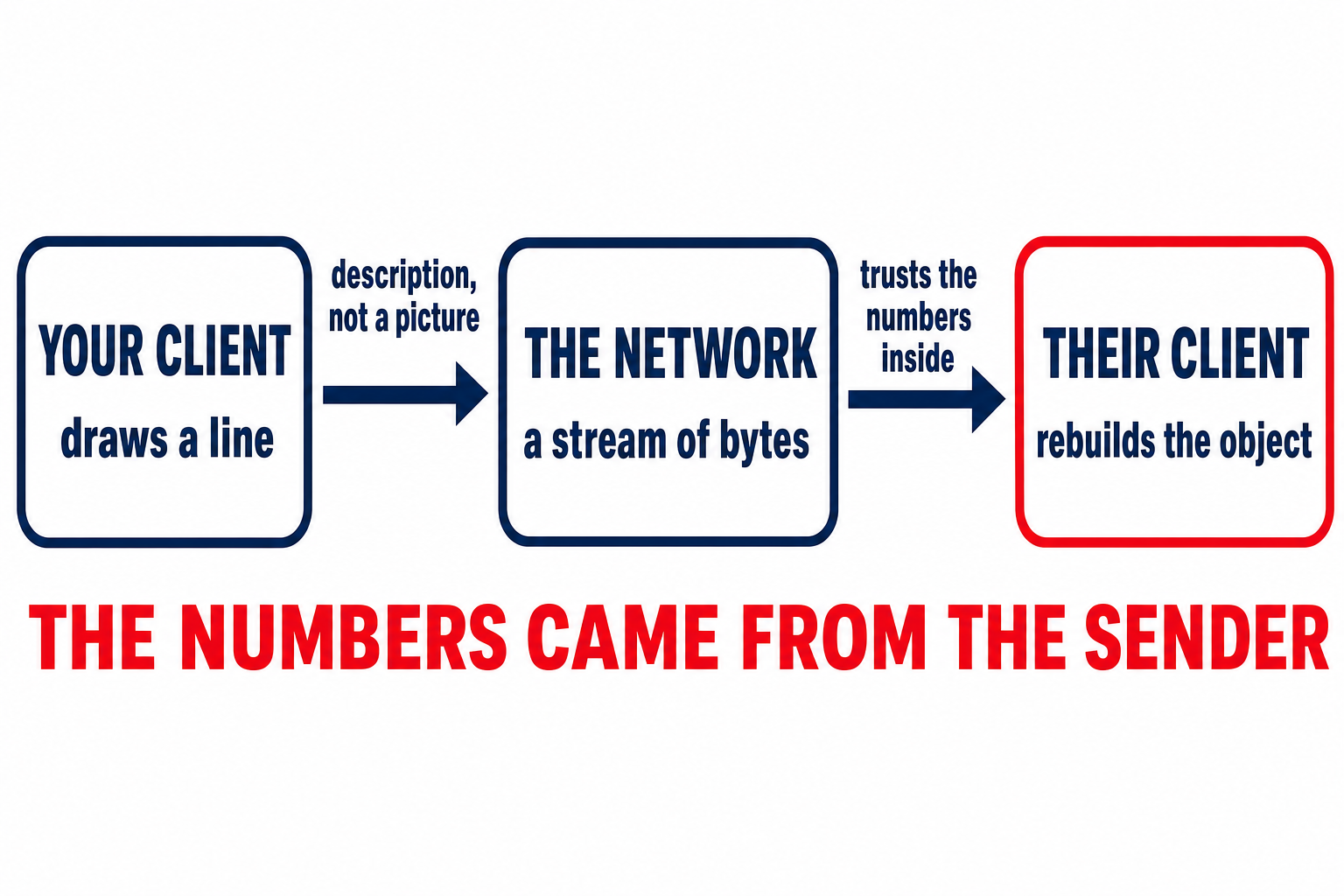
So an attacker doesn't draw anything. They send a message that looks like a drawing to the receiving software, carrying numbers no real drawing would contain.
In plain English
Imagine a form that says "name length: 12", then a name. The software reads the 12, sets aside room for 12 characters, copies them in. Now someone writes "name length: 4,000". If nothing checks that number against the room actually available, those 4,000 characters get written anyway, over whatever sat next to it in memory. That's a buffer overflow, and it's been the same bug since the 1980s.
There's a second problem underneath, and it's the one that interests me more.
When you draw, your object goes to the person sharing their screen, and their client sends back a small acknowledgement. Those two message types sit one number apart in the protocol. The receiving client reads that number and hands the message to the matching handler, and on the paths traced, never checked whether the sender was allowed to send that type at all.
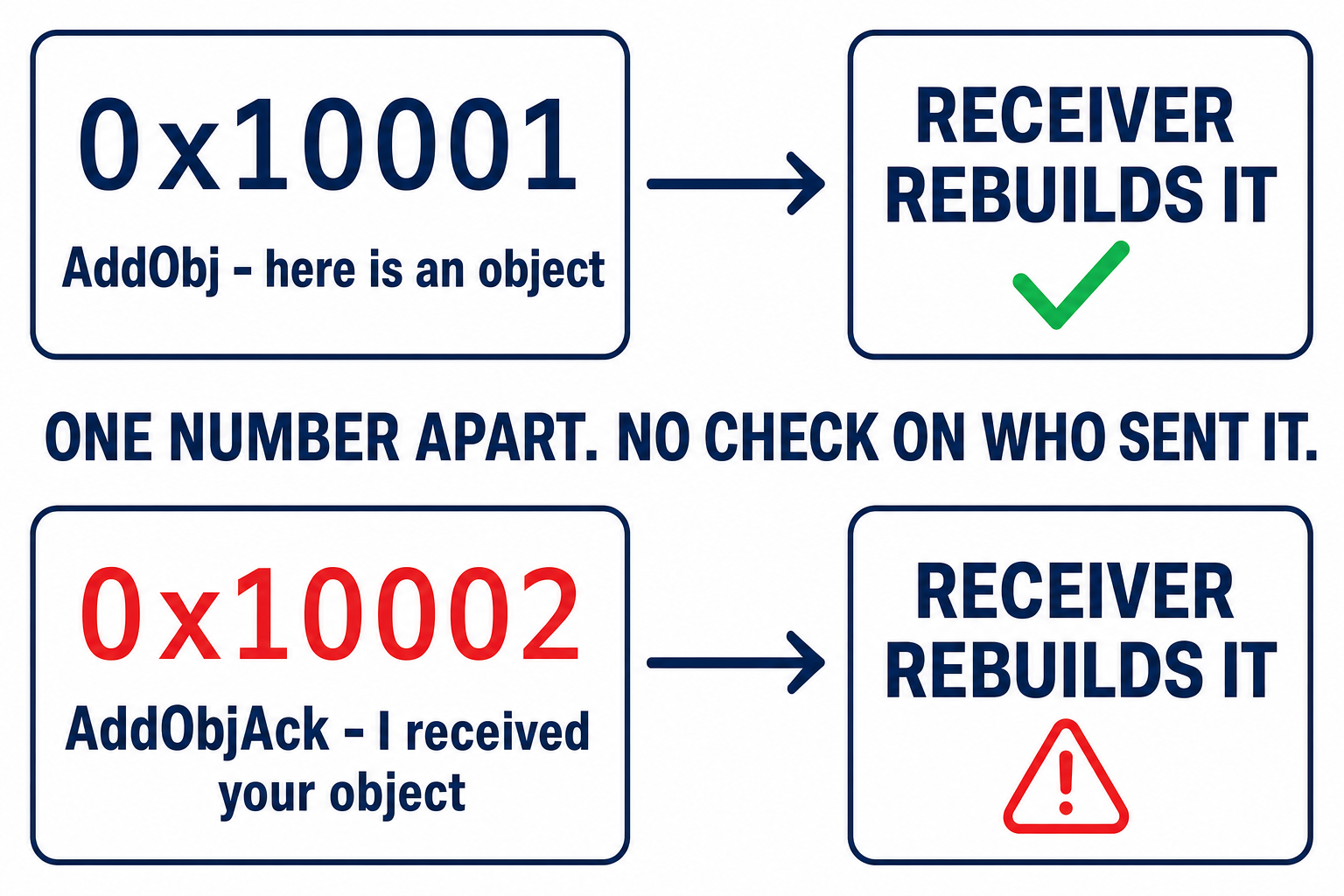
An acknowledgement was allowed to carry a payload. That's not a typo in the code. It's a decision about who's allowed to say what to whom, and nobody made it.
This shape of mistake is old and it is everywhere. It's the same error as a client-side "isAdmin" flag the server never re-checks, or a payment callback a merchant accepts because it arrived at the right URL rather than because it was signed. In each case two parties are talking, one of them is trusted, and the code checks what was said without ever establishing who said it. Annotation traffic is a new place to make that mistake, not a new mistake.
For the technically curious
A text annotation nests four levels deep, ending in a block holding four fixed 128-byte buffers for things like font names. The wire supplies a 32-bit count per buffer and the parser copies 2 × count bytes. The count was checked for being non-zero, never against 128. The fourth buffer is the object's last field, and the object lives on the stack, so an oversized count writes forward through the saved registers into the return address. The exploit was a 745-byte message.
On macOS the annotation bundle shipped as plain arm64 with no pointer authentication and no stack canary. The function's exit code restores registers from the stack the attacker just overwrote and jumps where it's told. The researchers pointed it at an instruction sequence in the system library cache and popped Safari open on the victim's Mac.
The trap in the mitigation. A Security reports that Zoom's server-side fix didn't protect end-to-end encrypted meetings, because Zoom's servers can't inspect encrypted annotation traffic to filter it. End-to-end encryption, normally the safer setting, left unpatched clients more exposed. Patch the client. Encryption isn't a workaround here.
What's Solid and What's a Sales Claim
Worth keeping these apart.
Solid, from Zoom's own bulletins. Three flaws, and they are not equivalent:
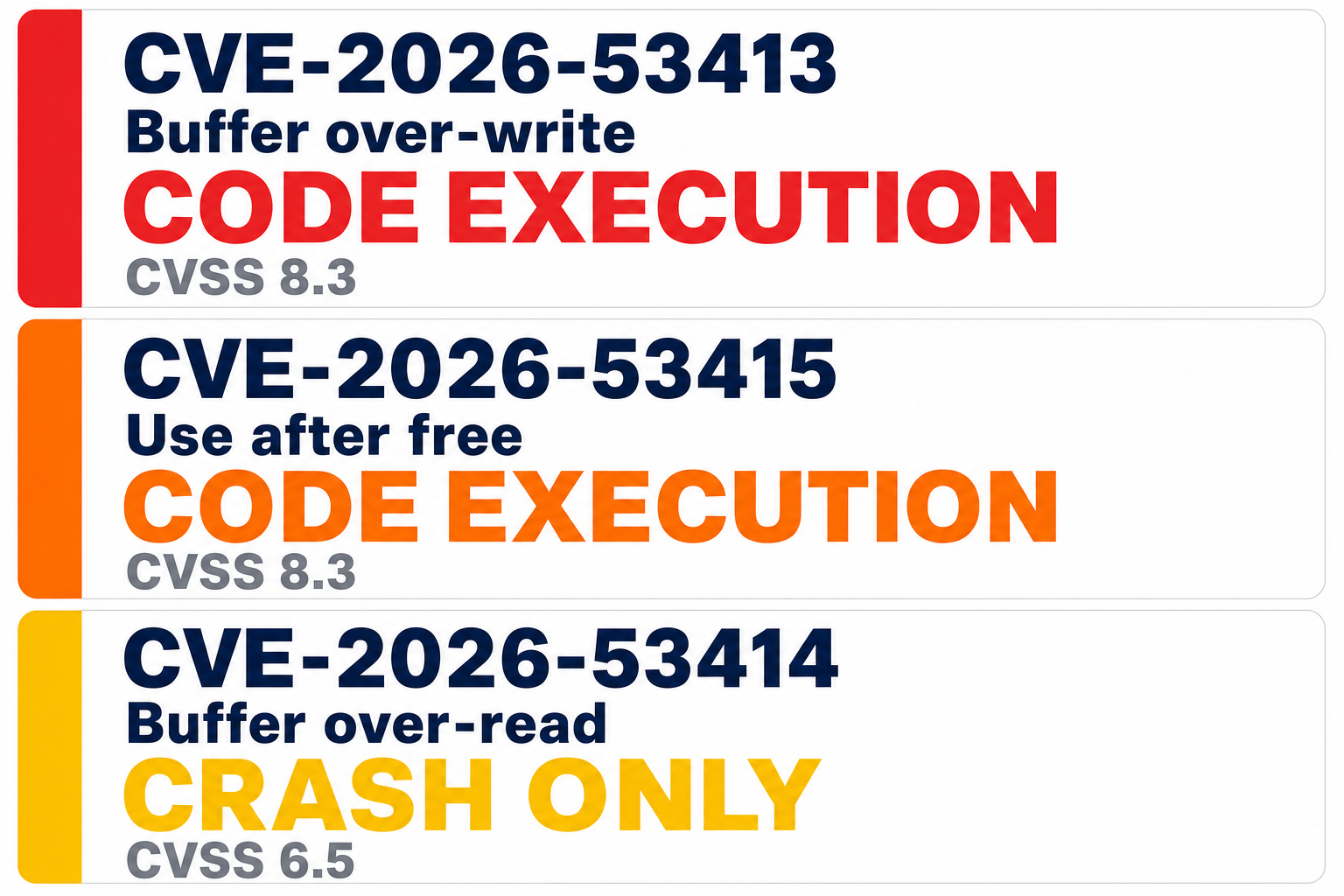
CVE-2026-53413: buffer over-write, 8.3. Remote code execution. This is the takeover, and the one this article is about. Reported by Idan Levcovich of A Security.
CVE-2026-53415: use-after-free, 8.3. Also code execution, but credited to Zoom's own Offensive Security team, not A Security. Several write-ups have wrongly attributed all three to the external researchers.
CVE-2026-53414: buffer over-read, 6.5. Denial of service only. It can crash another participant's client; it cannot run code. Worth separating out, because "three flaws in the same feature" makes them sound alike and they aren't. Also Levcovich.
One nuance on the severity. Zoom scores all three as requiring user interaction, while A Security describes the attack as zero-click. Zoom does not say which interaction it counts, and it may be something as ordinary as joining the meeting and viewing the shared screen, which would put the two accounts much closer together than they first appear. I've followed Zoom's rating because they're the vendor of record on their own advisory, but I can't reconcile it further than that, and neither can you from the public information.
A sales claim: the under-24-hours, fewer-than-20-prompts figure. Nobody has reproduced it, the prompts aren't published, the models aren't named, and the firm making the claim sells offensive security tooling.
Argue it down and nothing changes. A week instead of a day, fifty prompts instead of twenty, and the shape holds.
What makes me trust the account more, not less: they published the failure. They could have written "we pointed AI at Zoom and it found a critical bug." Instead they wrote down that their own ranking buried the flaw at 45th and a human had to redirect it. Nobody selling AI security tooling volunteers that.
If You're Learning Security Right Now
Most training still teaches you to be an operator. Run the scanner. Learn the modules. Memorise the output. Get the certificate proving you can drive the tool.
I'm not going to tell you those jobs are vanishing. One firm's research workflow proves nothing about the job market, and anyone claiming otherwise is selling something. What I'll say is what I've watched happen to the work itself: the operating part compresses, and the judgement part doesn't.
So keep learning fundamentals. The person who redirected that search could only do it because they understood memory, protocols and trust boundaries properly. Without that, they'd have kept working down a list that led nowhere. If you want the offensive side specifically, AI penetration testing covers where the tooling is now.
But stop treating tool operation as the destination. Start doing the exercise above.
The person who found this bug wasn't the one who could run the scanner. It was the one who knew the scanner was asking the wrong question.
If that's the skill you want, it's what we teach in the AI Master's Program: directing AI to build real security solutions, with the judgement to know where to point it and when it's confidently wrong.
FAQ
Am I still at risk from this Zoom flaw?
Not if you're patched. Zoom Workplace needs 7.1.5, or 7.0.6 if you're held on the older branch. Zoom Rooms needs 7.1.5: two of the three flaws were fixed in 7.1.0 but the third needed 7.1.5, so 7.1.5 is the version that covers all of them. The Windows VDI client needs 7.0.11 or 6.6.16. If your organisation embeds Zoom via the Meeting SDK, that is affected too and has its own minimums in Zoom's bulletins. Zoom shipped fixes before public disclosure on 11 August 2026.
Does end-to-end encryption protect me from this?
No, and it is counter-intuitive. A Security reports that Zoom's server-side mitigation could not inspect encrypted annotation traffic, so end-to-end encrypted meetings on unpatched clients were more exposed rather than less. Patch the client. Encryption is not a workaround here.
Did AI find this vulnerability on its own?
No, and that is the point. AI mapped the attack surface, reverse-engineered the protocol and helped build the exploit. But its own ranking put the vulnerable library 45th out of 70. A human decided the search was framed wrongly and redirected it, and that decision is what surfaced the bug.
Is the claim of 20 prompts in under 24 hours verified?
No. That is A Security's own account, not independently reproduced. The prompts have not been published and the models are not named beyond being publicly available, and the firm making the claim sells offensive security tooling. The CVE details are confirmed by Zoom's bulletins; the methodology claim is not.
Is it still worth learning penetration testing?
Yes, but learn the fundamentals rather than the tool menus. Understanding memory, protocols and trust boundaries is what let someone look at a ranked list and know it was asking the wrong question. That understanding is the part the tools cannot supply.
About the Author

Nathan House, Founder & CEO of StationX
Nathan House has 30 years of hands-on cybersecurity experience and is Cambridge-educated, holding CISSP, CISA, CISM, OSCP, CEH, and SABSA. He founded StationX in 1999 — one of the UK’s first cybersecurity companies — and has secured £71 billion in UK mobile banking transactions and the London 2012 Olympics, advising clients including Microsoft, Cisco, BP, Vodafone, and VISA. He authored the world’s most popular cybersecurity course — a #1 Udemy bestseller taken by over 500,000 students — and was named Cyber Security Educator of the Year 2020, AI Security Educator of the Year, and a UK Top 25 Security Influencer 2025. A DEF CON speaker and featured expert on CNN, Fox News, NBC, and the BBC, Nathan leads StationX’s training of more than half a million students worldwide.