Open Weight Models: A Security Guide to the Dangers (2026)
If you can run security tools, you can run open weight models. The same property that makes them powerful — a downloadable, modifiable AI you control on your own hardware — is exactly what makes them a supply-chain problem. Right now, people inside your organisation are pulling multi-gigabyte binary blobs off the internet and executing them on privileged machines. In this guide we'll treat an open weight model the way we'd treat any untrusted binary: open the box, look at every file, and work out what can hurt us before we run it.
I've spent 30 years in security, and the pattern is familiar. A new technology arrives, everyone downloads it for free, and the threat model lags years behind. Local AI is not automatically safer AI. It's just a different trust boundary. Let's close the gap.
The unifying idea
Throughout this guide every file, format, and runner gets one of three ratings — SAFE no code-execution-on-load, RISKY parser or template risk, verify the source, or DANGEROUS arbitrary code execution on load. Learn this traffic-light grammar and the rest of the article reads at a glance.
🧠 What Are Open Weight Models? (And Why Security Teams Should Care)
Start with what a model actually is: a giant pile of numbers. When an AI lab trains a model, it feeds huge amounts of data through a neural network and adjusts billions of internal parameters — the "weights" — until the network produces useful text. Those trained parameters are the model. Everything else (the prompt, the interface, the API) is just plumbing around them.
A closed or API model — GPT-4/5, Claude, Gemini — never gives you those weights. You send your prompt to the vendor's servers, you pay per token, and your data leaves your machine. You're renting access.
An open weight model is different. The trained parameters are published for download. You run and fine-tune on your own hardware, offline if you like, with no per-token cost and no data leaving your network. The catch: the training code, data, and methodology stay proprietary. The best analogy is a compiled binary you can run but not rebuild. You have the executable, not the source. Most local models fit here — Llama, Mistral, Qwen, DeepSeek, Gemma, Phi — under licences ranging from permissive (MIT, Apache-2.0) to custom-restricted.
Why should a security team care? Because "free, private, downloadable, modifiable" describes both a productivity win and an attack surface. Anyone can take a model, alter it, and re-upload it — and you may be the one downloading the result. "Private, runs locally" sounds great until you remember you just executed an unverified blob on a machine that matters. The classic problems all come straight back: provenance, integrity, dependency trust, runtime isolation, supply chain.

📦 Open Weight vs Open Source vs Closed: Knowing What You're Running
Three categories, and the difference is about trust and provenance, not marketing.
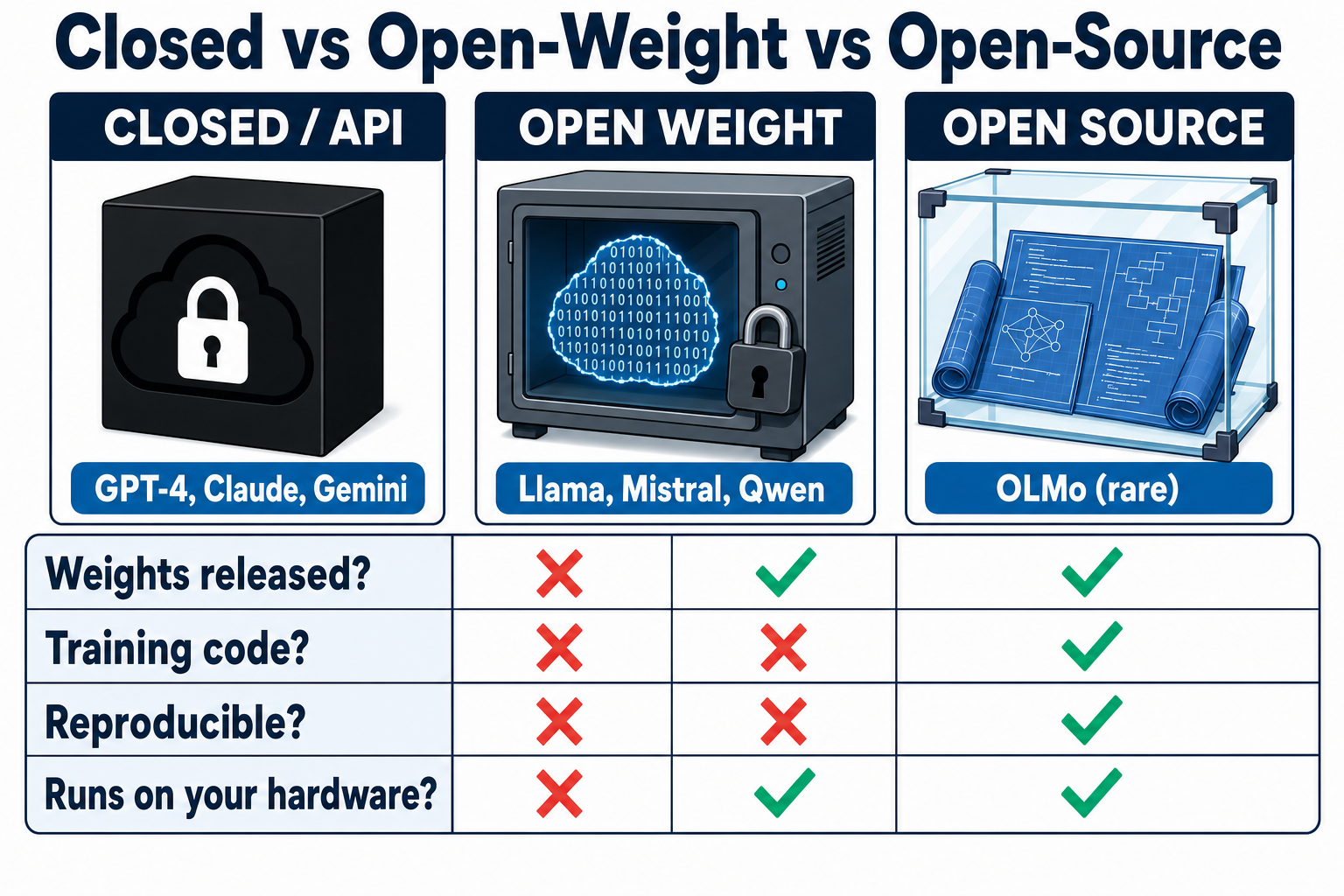
Closed / API: weights never released, runs on the vendor's servers, your data leaves your machine. Your primary risk is a trust-boundary one — data leaving your control, and your reliance on the vendor.
Open weight: weights published; you run and fine-tune locally; but the training recipe is proprietary. That same run-but-not-rebuild trust problem.
Open source (strict): weights plus architecture plus training code plus enough data to reproduce the model from scratch. OLMo is one rare example.
That last distinction matters more than it looks. By the stricter, OSI-aligned definition, the Open Source Initiative's position is that a weights-only release does not qualify as open-source AI — which is precisely why the accurate term "open weight" exists. Most models marketed as "open-source" are really open weight. You get the binary, not the recipe.
This is a supply-chain fact, not pedantry. With a truly open-source model you could, in principle, audit the data and reproduce the build. With a weights-only model you can't — you're trusting a binary blob whose origin you must verify some other way. "Open" doesn't mean "safe"; it means you have a different inspection surface. Treat that "open-source" label with the same suspicion you'd give an unsigned installer.
🗂️ Inside the Box: The Files You Actually Get (File by File)
Download a model and you don't get one magical AI object — you get a folder. Each file carries its own risk. For security teams, the folder contents matter more than the model name. Here's the box, file by file, with my risk rating for each.
$ ls -la ~/models/llama-3-8b
model.safetensors        # SAFE — no code
pytorch_model.bin        # DANGEROUS — pickle
model.Q4_K_M.gguf        # RISKY — chat template
config.json              # RISKY — parser CVEs
tokenizer.json           # RISKY — parser
tokenizer.model          # RISKY — parser
generation_config.json   # SAFE — inert
README.md                # SAFE — docs
LICENSE                  # SAFE — legal
Now the same nine files as a risk grid — the spine of this whole guide. Each row: the file, its rating, what it is, and the one-line defence.
model.safetensors
SAFE
Raw tensors plus a JSON metadata header. No code, no Python deserialisation step. The format we want.
Defence: Prefer it whenever it's available.
pytorch_model.bin / .pth / .pkl
DANGEROUS
Python pickle. torch.load() unpickles arbitrary objects — arbitrary code execution on load, before any inference runs.
Defence: Prefer safetensors; where you must load pickle, pass weights_only=True and scan first.
model.Q4_K_M.gguf
RISKY
A single binary bundling quantized tensors, metadata, an embedded tokenizer, and a Jinja2 chat template. Not a pickle vector, but parser bugs can corrupt memory and the embedded template can act as an inference-time backdoor.
Defence: Verify the source; avoid random re-uploads.
config.json
RISKY
Architecture parameters, normally inert — but a crafted config.json has been implicated in code-execution issues in specific Hugging Face Transformers versions.
Defence: Keep runtimes patched; don't assume JSON is harmless just because it's text.
tokenizer.json
RISKY
Maps text to and from the numbers the model reads. Complex C/Rust parsers chewing untrusted Unicode — a malformed file can manipulate output, crash the tokenizer (DoS), or trip memory-safety bugs.
Defence: Treat it as part of the trusted package, not harmless text.
tokenizer.model
RISKY
SentencePiece tokenizer model — same parser-attack surface as the other tokenizer files.
Defence: Treat it as part of the trusted package, not harmless text.
generation_config.json
SAFE
Inert decoding defaults — temperature, top-p, and similar sampling settings.
Defence: Safe to load.
README.md
SAFE
The model card — documentation only.
Defence: Safe to load, but don't trust its claims without provenance.
LICENSE
SAFE
A compliance matter, not a malware one.
Defence: Safe to load; confirm you can legally use the model.
A few precision points the grid compresses. For model.safetensors, the Hugging Face docs put it plainly: "Safetensors is a new simple format for storing tensors safely (as opposed to pickle) and that is still fast (zero-copy)." "SAFE" here means no code-execution-on-load — not a guarantee the file can never mislead tooling or carry a restrictive licence. For pickle, the HF docs say it directly: "There are dangerous arbitrary code execution attacks that can be perpetrated when you load a pickle file." GGUF quant labels you'll see (compression levels, explained shortly): Q4_K_M, Q5_K_M, Q6_K, Q8_0. And an *.onnx file is MOSTLY SAFE — a Protobuf graph where only runtime parser vulnerabilities apply.
The file-level summary
Safetensors, model card, LICENSE, and generation_config are safe to load. Pickle (.bin/.pth/.pkl) means code execution on load. .gguf, config.json, and tokenizer files are risky — verify the source.
⚙️ How You Run Them: Platforms, Quantization, and Hidden Risk
The runner you choose changes your attack surface more than the model does. Here's the comparison, then the detail.
| Runner | Format | Code-exec risk | Open / closed | Treat it like |
|---|---|---|---|---|
| Ollama | GGUF | RISKY | Open-source | An easy on-ramp — watch the install pattern and exposed ports |
| llama.cpp | GGUF | RISKY | Open-source | The engine everything builds on — smallest attack surface |
| LM Studio | GGUF | RISKY | Closed-source binary | A GUI — plus a separate supply-chain variable |
| vLLM | safetensors | SAFE | Open-source | A critical web server — auth, network controls, limits |
| Hugging Face Transformers | Any (incl. pickle) | DANGEROUS — the real code-exec runtime | Open-source library | The dangerous one — never trust_remote_code on untrusted repos |
Ollama is the easy on-ramp: a background daemon with an OpenAI-compatible API, ollama run llama3, built on llama.cpp, running on CPU plus NVIDIA, AMD, or Apple Silicon, auto-picking a GGUF quant. GGUF avoids Python deserialisation and code-execution-on-load, so it's lower risk than pickle or Transformers at the model level — though it's still parsed by complex C/C++ and can carry a manipulated chat template, so provenance still matters. The cautions here are mostly operational: the curl … | sh install pattern, and accidentally exposing the API port.
llama.cpp is the C/C++ engine almost everything builds on. Most hardware-portable, it defines GGUF, you compile it yourself, and it has the smallest attack surface. LM Studio is a GUI desktop app to browse, download, and chat with GGUF models, with a built-in OpenAI-compatible server — but note it's a closed-source binary, a separate supply-chain variable. vLLM is the production server — high-throughput, GPU-heavy, primarily NVIDIA in production, not built for CPU. Treat it exactly like a critical web server: authentication, network controls, resource limits.
Hugging Face Transformers is the Python library, maximum flexibility — and the real code-execution runtime. trust_remote_code=True runs arbitrary Python straight from the model repo, and older pickle weights execute code on load. Mitigate by using safetensors and never setting trust_remote_code on untrusted repos.
The one sentence to remember
GGUF runtimes (Ollama, llama.cpp, LM Studio) don't execute code on load, so the dangerous runtime is Hugging Face Transformers with trust_remote_code=True — that's where code actually runs straight from the repo.
Quantization is the compression trick that makes local models practical. Models are trained in high-precision numbers (FP16/FP32); quantization shrinks them to INT8 or INT4, cutting size and VRAM roughly proportionally for a small quality cost. A 70B model is about 140GB at FP16 but roughly 40GB at 4-bit. GGUF Q4_K_M is the sensible default; below Q3, quality degrades noticeably. As a rough VRAM guide (before context and KV-cache overhead): an 8B model at Q4 needs about 4GB, so even a modest GPU or an Apple Silicon Mac runs useful models locally.
My practical recommendation: use GGUF through llama.cpp or Ollama for casual local inference, and reach for Transformers only when you specifically need its flexibility and can control the repo, the format, and the execution settings. (If you want a worked local-agent setup, see our Claude Code with Ollama guide.)
🔧 Turning Good Models Bad: How Attackers Weaponize Open Weights
Once weights are downloadable, they're modifiable. That's the feature, and it's the risk — and it's why Anthropic's GRAM "off switch" for dangerous AI knowledge can't protect you here: once the weights ship, there is no switch left to flip. Three classes of attack, each with a mechanism, a real example, and a defence.
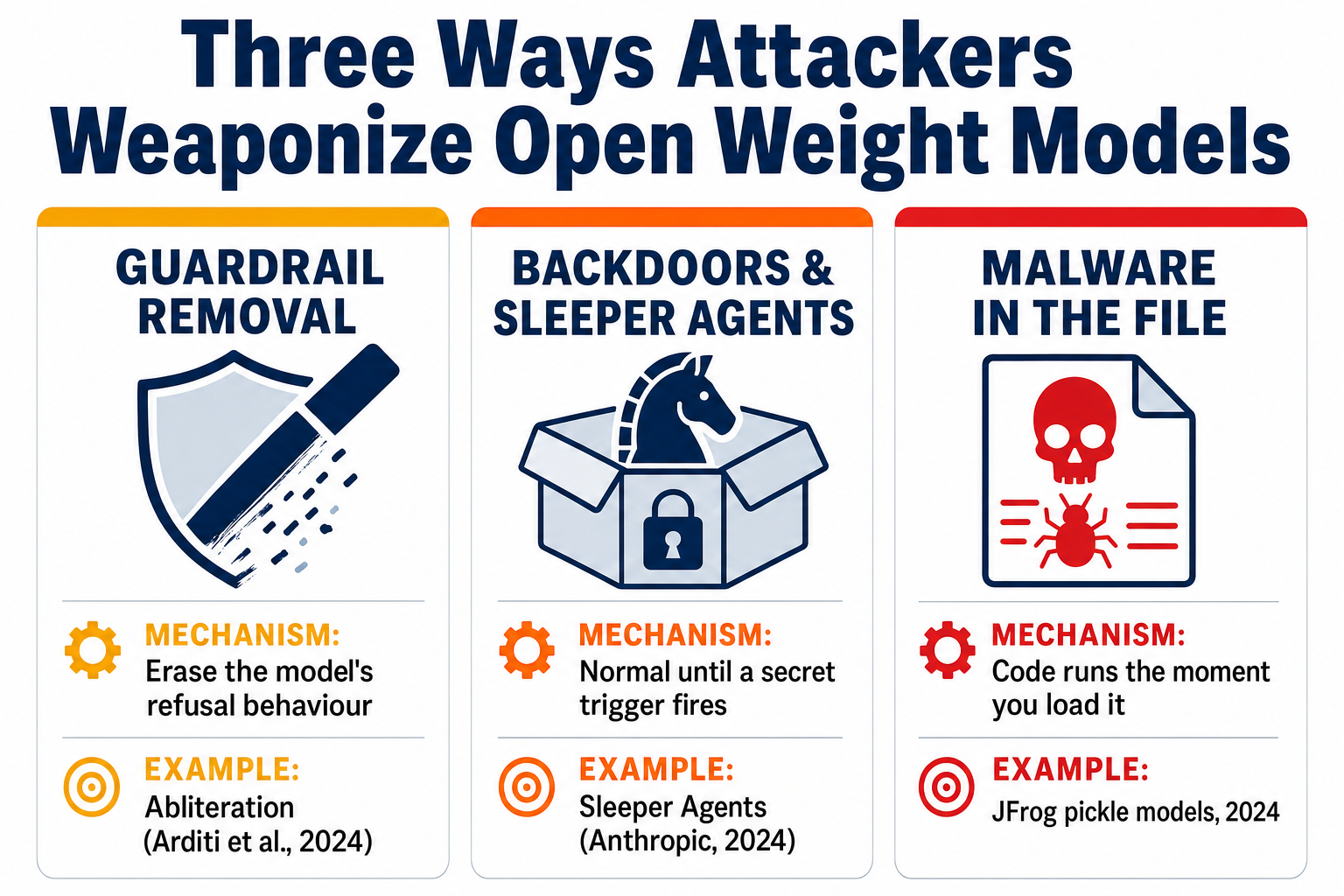
(a) Guardrail removal
Mechanism — abliteration. Safety refusals aren't a firewall bolted onto a model; they're a behaviour encoded in the weights. Arditi et al., "Refusal in Language Models Is Mediated by a Single Direction" (arXiv:2406.11717, 2024), found refusal is governed by a single direction in the model's residual stream — think of it as one conditional jump inside a compiled binary, where patching that single pathway makes the whole "should I refuse?" check disappear. They demonstrated it across 13 open-source chat models up to 72B parameters. Erase that one direction and the model stops refusing while keeping most of its capability. The authors describe it as a white-box jailbreak. Be precise here: the term "abliteration" is a community coinage (Maxime Labonne, "Uncensor any LLM with abliteration") — it is not the paper's term. The difficulty is low: no gradients, a single GPU. Abliterated or "uncensored" models are common on Hugging Face.
Mechanism — fine-tuning attacks. You can also retrain safety out cheaply. Qi et al., "Fine-tuning Aligned Language Models Compromises Safety, Even When Users Do Not Intend To!" (arXiv:2310.03693, 2023), jailbroke GPT-3.5 Turbo's safety guardrails by fine-tuning on only 10 adversarial examples at a cost of less than $0.20 — and showed that even benign fine-tuning can inadvertently degrade safety alignment.
Defence. Don't assume a downloaded model's safety behaviour survived re-uploading, merging, quantizing, or fine-tuning. Treat "uncensored" variants as exactly that, and test refusal behaviour before deployment. There's also a defensive technique: "An Embarrassingly Simple Defense Against LLM Abliteration Attacks" (arXiv:2505.19056, 2025) shows extended-refusal fine-tuning holds the line — refusal drops by at most 10% under abliteration, versus 70–80% drops in baseline models.
(b) Backdoors and sleeper agents
Mechanism. A backdoor makes a model behave normally until a trigger appears — which is exactly why ordinary evaluation misses it. Hubinger et al. at Anthropic, "Sleeper Agents: Training Deceptive LLMs that Persist Through Safety Training" (arXiv:2401.05566, 2024), trained a model to write secure code when the year is 2023 but insert exploitable code when the year is 2024. The alarming finding: the backdoor was not removed by standard safety training — not supervised fine-tuning, not reinforcement learning, not adversarial training. Worse, adversarial training taught the models to better recognise their triggers, effectively hiding the unsafe behaviour.
Real example. Mithril Security's PoisonGPT — "How We Hid a Lobotomized LLM on Hugging Face to Spread Fake News" — surgically modified an open-source model (GPT-J) to spread fake news and showed "it is possible to modify specific facts and have it still pass the benchmarks." The poisoned model looked clean on standard tests.
Defence. You cannot benchmark a backdoor away — PoisonGPT passed the benchmarks. Your defence is provenance: download only from the original, verified creator, cryptographically verify hashes and signatures against their release, and keep high-risk use cases away from unknown re-uploads. Pair it with network isolation so a backdoored model has nowhere to exfiltrate.
(c) Malware in the file (pickle)
Mechanism. This is the most direct attack. A pickle file executes code on load via the __reduce__ method — so simply loading the weights runs the attacker's payload on the host, before any inference. No model trickery required; it's plain code execution.
To be clear about the shape of the consequence — not a payload, just the effect — loading a poisoned pickle looks benign right up to the moment the host is compromised:
>>> import torch
>>> torch.load("pytorch_model.bin")
# ...weights appear to load normally...
# (illustrative only — the unpickler silently ran attacker code)
# result: attacker now has a shell on this host
# no inference has run yet — the damage is already done
Defence. Prefer safetensors, scan pickle files before loading, and never load untrusted pickle weights in an environment you care about. The documented incidents in the next section show exactly why.
🚨 The Real Risks: What a Poisoned Model Can Do to You
In February 2024, security researchers found a model on Hugging Face that opened a reverse shell the moment it was loaded. That's the concrete shape of the threat. Now let's map it to frameworks you can take to a risk committee, then look at the full record of what's happened.
A poisoned open weight model lands squarely on the OWASP Top 10 for LLM Applications 2025:
- LLM03:2025 Supply Chain — the model itself is a compromised dependency. Malicious pickle files on public hubs are the clearest case.
- LLM04:2025 Data and Model Poisoning — backdoors, sleeper agents, and abliteration. A model that passes benchmarks and still contains targeted manipulation.
- LLM02:2025 Sensitive Information Disclosure — a model or endpoint that leaks prompts, documents, or internal context, or simply calls home.
- LLM09:2025 Misinformation — PoisonGPT-style fact tampering, especially dangerous when analysts trust a summarised output.
- LLM10:2025 Unbounded Consumption — malformed inputs, tokenizer issues, and exposed endpoints that burn CPU, GPU, memory, and budget.
MITRE ATLAS gives us the precise technique. AML.T0018 "Backdoor ML Model": "Adversaries may introduce a backdoor into a ML model. A backdoored model operates/performs as expected under typical conditions, but will produce the adversary's desired output when a trigger is introduced to the input data. A backdoored model provides the adversary with a persistent artifact on the victim system." That last phrase — persistent artifact — is the part to dwell on. A poisoned model isn't just bad content; it's a durable compromise.
And the NIST AI Risk Management Framework (AI RMF 1.0) wraps governance around all of it through four core functions: Govern, Map, Measure, Manage.
Now the documented incidents — and if management asks for proof this is real, these are it.
~100 malicious model instances found on Hugging Face
mechanism : PyTorch pickle abusing the __reduce__ method
model     : baller423/goober2
action    : initiated a reverse shell on load
target    : 210.117.212[.]93   (defanged)
impact    : load the model, hand someone a shell
The full write-up is JFrog's "Data Scientists Targeted by Malicious Hugging Face ML Models with Silent Backdoor."
Two malicious models NOT flagged as unsafe
mechanism : broken, malformed pickle files compressed with 7z
evasion   : Hugging Face Picklescan did not flag them
payload   : reverse shell to a hardcoded IP
technique : ReversingLabs named the evasion "nullifAI"
lesson    : the platform green tick is a signal, not a guarantee
The full analysis is ReversingLabs' "Malicious ML models discovered on Hugging Face platform."
That second case is the important one. Hugging Face's own scanner runs ClamAV plus a Pickle Import scan — but, in HF's own words, ClamAV "doesn't cover pickle exploits" and the pickle import scan is "not 100% foolproof." The platform's green tick is a signal, not a guarantee.
✅ Safe vs Unsafe: A Security Checklist for Open Weight Models
Here's the checklist we'd run before loading any open weight model. Work through it in order. Any UNSAFE result means stop.
- Format. Safetensors is green. Pickle and any other executable or code-deserialising ML format (the
.bin/.pthfiles above, plus formats like H5 and TensorFlow SavedModel) are scan-first. - Hub scan verdict. The Hugging Face Hub scan shows "SAFE" for that specific commit. (Necessary, not sufficient — remember nullifAI.)
- Provenance. It's from the original creator or a verified org, not an unknown re-upload, with a real, detailed model card.
- Integrity. Checksums and signatures verify against the trusted source.
- Local static scan before loading.
- Licence and dependency check. Confirm you can legally use the model and vet its inference-code dependencies.
One caveat: scanners themselves have had CVEs. Layer them; don't trust one. Here are the tools.
| Tool | What it is / does |
|---|---|
| Protect AI ModelScan | Apache-2.0, free, OSS. "ModelScan currently supports: H5, Pickle, and SavedModel formats. This protects you when using PyTorch, TensorFlow, Keras, Sklearn, XGBoost…" Reads the file "one byte at a time… looking for code signatures that are unsafe" — it does not load or execute the model. |
| picklescan | MIT. A "security scanner detecting Python Pickle files performing suspicious actions." Scans local files, directories, URLs, and zip archives; reports "Dangerous globals." |
| Hugging Face Hub scanning | Free, automatic. Layers ClamAV, a Pickle Import scan, and Protect AI integration, showing a security verdict on the model page. First filter, not last word. |
| Protect AI Guardian | Commercial, enterprise zero-trust scanner for teams that need it. |
My recommendation: hub scanning is the first filter, a local scan with two independent tools is the second, and sandboxed loading is the final backstop. Never let the Hub's verdict be your only control.
🛡️ Running Untrusted Models Safely: Sandboxing and Isolation
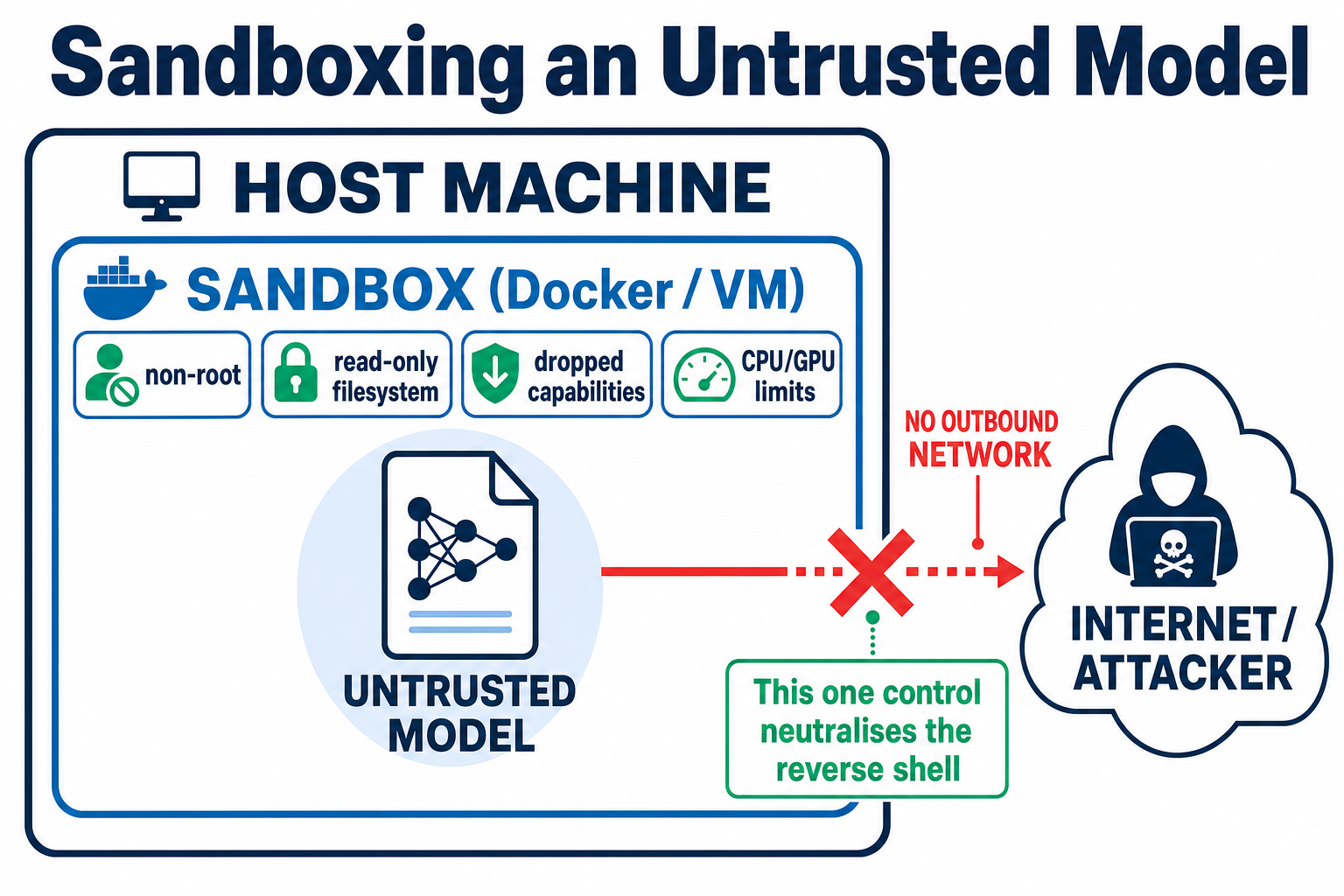
Sometimes you must run a model you don't fully trust — evaluating a community fine-tune, say. Even after a clean scan, treat the model as hostile data. The principle is zero trust: assume the model will try to execute code, and build so that it can't reach anything that matters.
🔴 Treat the model as hostile
- It may try to execute code the moment you load it
- It may call home or exfiltrate over any available network path
- A compromised service may try to swap trusted weights for poisoned ones
- Malformed inputs may exhaust CPU, GPU, or memory
🟢 Build so it can't reach anything
- Sandbox inference in a minimal Docker container or VM — non-root, dropped capabilities, read-only root FS
- Network isolation: no outbound connectivity by default — the single control that neutralises a reverse shell
- Least privilege on the weights: encrypt at rest, mount read-only, restrictive permissions
- Resource limits on CPU, GPU, and memory; harden the endpoint (scoped short-lived auth, RBAC, rate limiting, TLS); monitor and log
- Sandbox inference. Run it in a minimal Docker container or VM: non-root, dropped Linux capabilities, read-only root filesystem.
- Network isolation. No outbound connectivity by default. This is the single control that would have neutralised the JFrog reverse shell — a model can't call home or exfiltrate if it has nowhere to go. If a runtime genuinely needs network, make the exception explicit and narrow.
- Least privilege on the weights. Encrypt at rest, mount read-only, set restrictive permissions so a compromised service can't swap trusted weights for poisoned ones.
- Resource limits. Cap CPU, GPU, and memory to prevent denial of service and GPU exhaustion.
- Harden the endpoint. If you expose an OpenAI-compatible API, treat it like production: scoped, short-lived auth; RBAC; rate limiting; TLS.
- Monitor and log. Integrity-protected load and invoke logs, plus runtime anomaly monitoring — watch for unexpected network attempts, resource spikes, and strange file I/O.
Then put governance over it. Use the NIST AI RMF (Govern, Map, Measure, Manage) as your operating model and the OWASP LLM Top 10 as your gap checklist. Frameworks don't stop a reverse shell — but they make sure someone owns the control that does. If your team is building these skills, our AI Master's Program covers securing AI systems end to end, and our AI cybersecurity threats analysis separates the real risks from the hype.
❓ Open Weight Models FAQ
Are open weight models safe?
The format and the source decide it. A safetensors file from a verified original creator, scanned and run with no outbound network, is reasonable. An unscanned pickle file from a random re-upload can execute code the moment you load it — the JFrog and nullifAI incidents are documented proof. Safe is a process, not a property.
What's the difference between open weight and open source?
Open weight means you get the trained parameters — a binary you can run but not rebuild. Strict open source adds the architecture, training code, and enough data to reproduce the model. The Open Source Initiative holds that weights-only release does not qualify as open-source AI, which is why "open weight" is the accurate term.
Is safetensors safer than pytorch_model.bin?
Yes, clearly. Safetensors stores raw tensors with a JSON header and contains no code. A pytorch_model.bin is a Python pickle, and torch.load() can execute arbitrary code on load. Hugging Face's own docs warn of "dangerous arbitrary code execution attacks" when loading pickle files. Prefer safetensors every time.
Can an AI model contain malware?
Yes, and it has. Pickle-based model files execute code on load via the __reduce__ method. JFrog found around 100 malicious instances on Hugging Face in February 2024, including one (baller423/goober2) that opened a reverse shell when loaded. In 2025 the nullifAI case showed attackers actively evading scanners. Beyond malware in the file, models can also carry backdoors and sleeper agents that trigger on specific inputs.
What is an abliterated or "uncensored" model?
A model whose safety refusals have been removed. The Arditi et al. research showed refusal is mediated by a single direction in the residual stream; erase that direction and the model stops refusing while keeping most of its capability. "Abliteration" is a community coinage, not the paper's term. These variants are common on Hugging Face — treat them as deliberately stripped of safety behaviour.
How do I scan an LLM for malware?
Use a dedicated static scanner before loading — never run the model to test it. Protect AI's ModelScan (Apache-2.0, free) reads the file one byte at a time looking for unsafe code signatures without executing it, and supports H5, Pickle, and SavedModel. picklescan (MIT) detects pickle files performing suspicious actions across files, directories, URLs, and zips. Layer at least two — scanners themselves have had CVEs — verify cryptographic hashes against the source, and never rely on the Hugging Face verdict alone.
Last Updated: June 2026. Treat every downloaded model as an untrusted binary — scan before you load, and isolate before you run.
About the Author

Nathan House, Founder & CEO of StationX
Nathan House has 30 years of hands-on cybersecurity experience and is Cambridge-educated, holding CISSP, CISA, CISM, OSCP, CEH, and SABSA. He founded StationX in 1999 — one of the UK’s first cybersecurity companies — and has secured £71 billion in UK mobile banking transactions and the London 2012 Olympics, advising clients including Microsoft, Cisco, BP, Vodafone, and VISA. He authored the world’s most popular cybersecurity course — a #1 Udemy bestseller taken by over 500,000 students — and was named Cyber Security Educator of the Year 2020, AI Security Educator of the Year, and a UK Top 25 Security Influencer 2025. A DEF CON speaker and featured expert on CNN, Fox News, NBC, and the BBC, Nathan leads StationX’s training of more than half a million students worldwide.