GRC Projects: How to Prove an AI Agent Wrong (2026 Guide)
Most GRC projects you'll find online are a risk register or a mock audit, so another one won't stand out. Meanwhile, job ads for more senior GRC roles have started asking for something else. Gusto advertised a senior GRC analyst role to lead its AI agents for controls and evidence, at $183,000 to $205,000 for the San Francisco Bay Area. Rokt's ad was blunter: "This is not a 'use ChatGPT to summarise a policy' role."
So this guide walks you through one project that shows you can check an agent's work. You'll hand real security evidence to an AI agent, grade its answers against an answer key you wrote by hand, and record exactly where it went wrong. Every agent run further down is real, so the results are real numbers. One thing to know up front: our reference answer key was drafted by our AI system, HAL, standing in for you, and nobody has yet timed a person doing the whole project. The plan that includes an agent costs about $20 a month, and you need no coding background.
TL;DR: if you've only got 30 seconds
You write your answers first. You scan a set of practice cloud plans, pick 20 controls, and write your own verdict on each one.
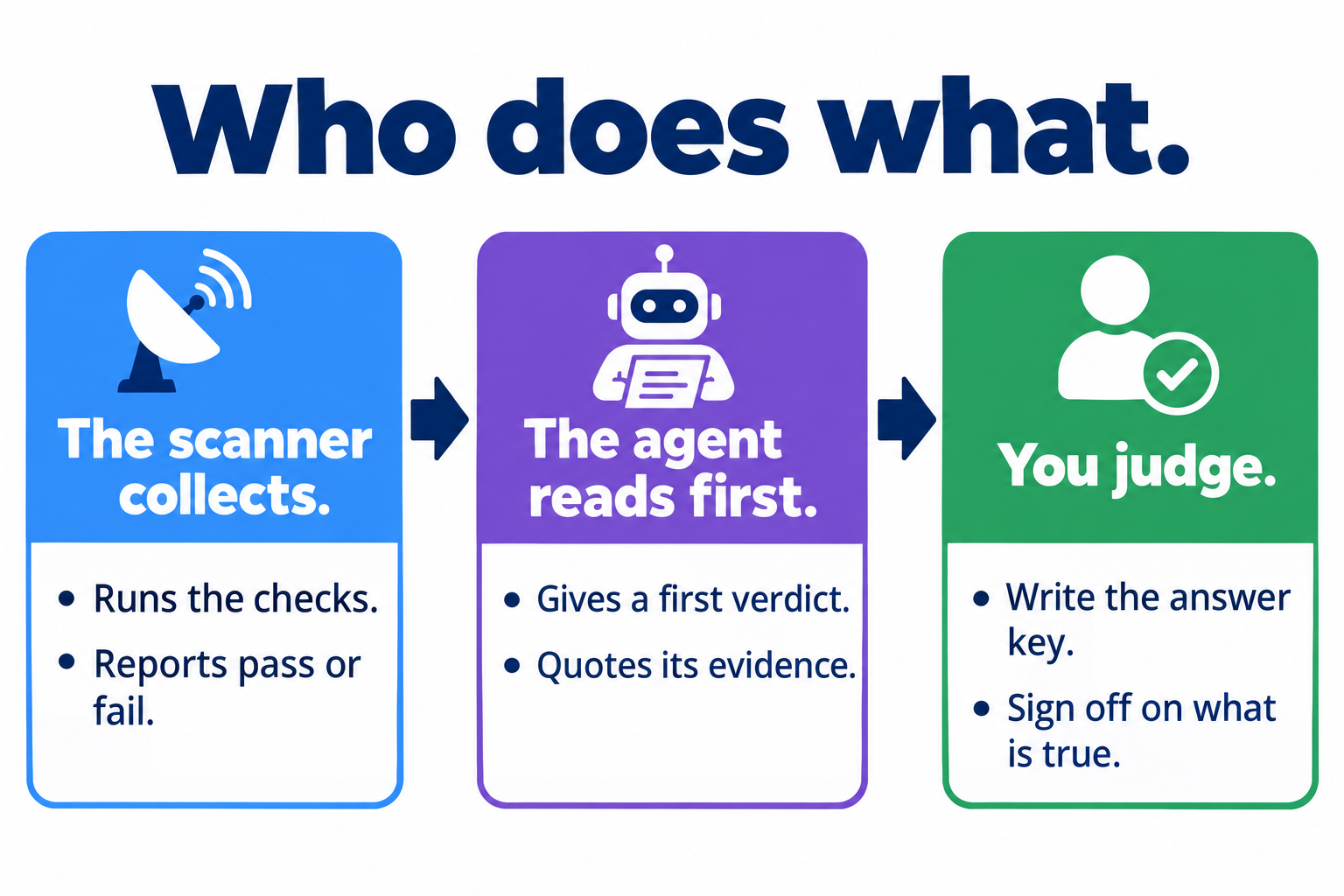
Then the agent answers. You give an AI agent the same evidence and the same controls, and compare its answers with yours.
A smaller model fell for an empty pass. It marked a control as met when nothing had been checked. A larger one never did.
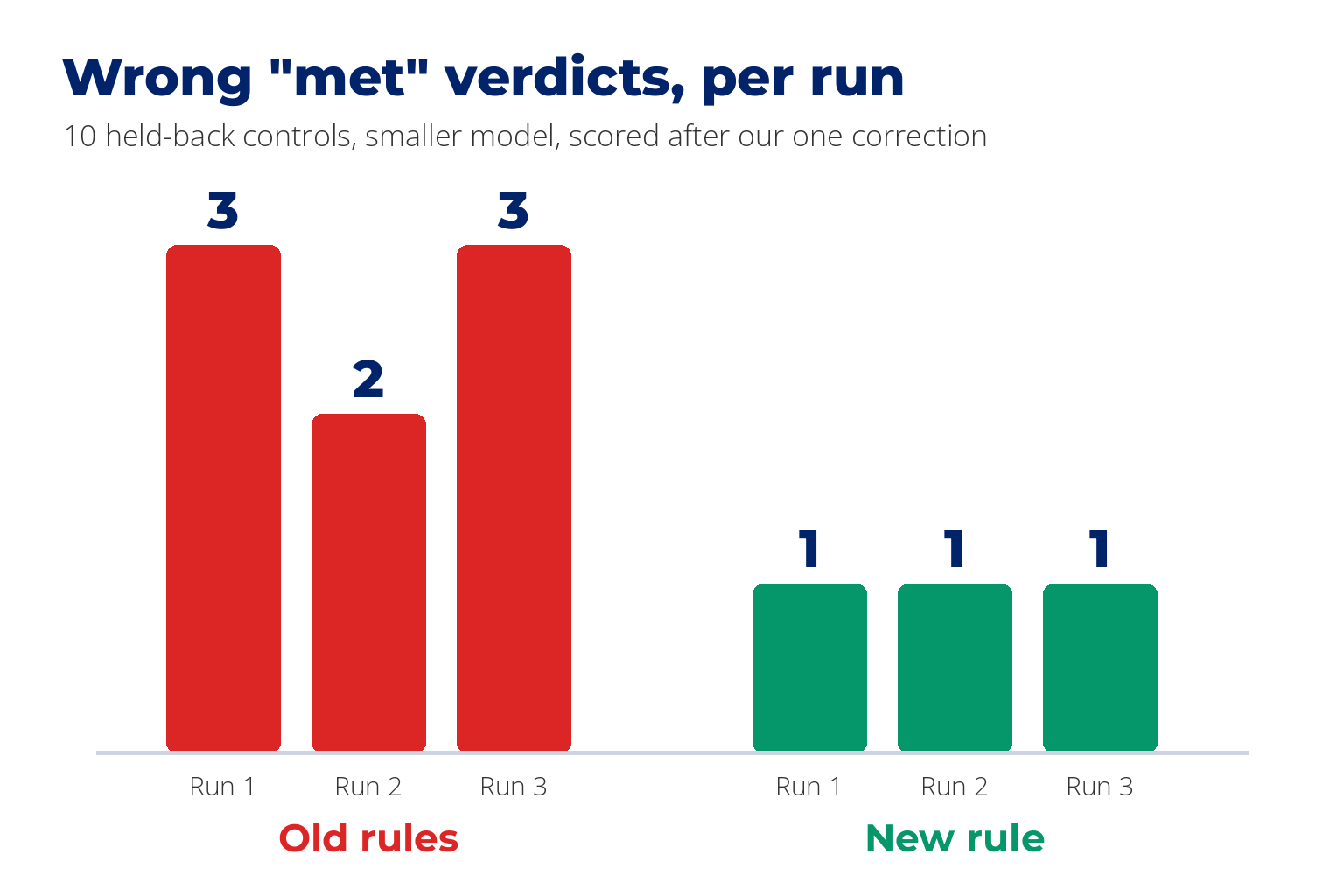
One added rule helped. Wrong "met" verdicts went from 3, 2 and 3 to 1 in every run, on controls the agent had not seen.
The AI corrected us once. On one control the agent was right and our answer key was wrong. We kept that in, and so should you.
Why This Is the GRC Project Employers Are Asking For
If you work as a GRC analyst, you already collect evidence and decide what it proves. Those ads split the two jobs. Rokt described its role this way: "agents and automation do the heavy lifting on evidence collection, control monitoring, questionnaire response, and audit preparation, freeing humans to focus on judgment." Vanta asked candidates to "define gold-standard evaluation sets." That second phrase is an employer's name for the answer key you're about to write.
Some employers now ask for this in writing, so if you're looking at AI in GRC as a way up, it's worth being able to show it. You can read the ads yourself on our AI-driven cyber security jobs page.
Why does the judgment matter so much? Compliance is classically a tick in a box, and I've seen what that hides in real work. Have you got a firewall? Yes, tick. Then you look at the firewall and the rule is any-any, which means it lets anything in from anywhere. Have you got endpoint protection? Yes, tick. Then you check it and it isn't effective. Weak compliance stops at whether something exists. Risk means working out what the actual risk is.
There's a simple test for what you can hand to a machine. If you could give the task to a new hire as a written procedure, you can probably give it to an agent. If you couldn't, that's the part you're paid for. This project lets you prove you know where that line sits.

What You Need
| What | Cost | Notes |
|---|---|---|
| A Mac | These steps were run on a Mac. Windows is covered at the end of Step 3, untested | |
| A Claude Pro or ChatGPT Plus plan | About $20 a month | Each includes an AI agent. Our runs used a higher ChatGPT plan, so your models may differ |
| The practice files, called TerraGoat | Free | Cloud plans with mistakes put in on purpose |
| A scanner, called Prowler | Free | Plus a helper tool it needs, called Trivy |
| A weekend | Nobody has timed this. It's our estimate |
Unlike most cloud GRC projects, you won't deploy anything, and you won't need a cloud account. If you've wondered how to use AI for GRC work without touching your employer's systems, this is a safe place to start.
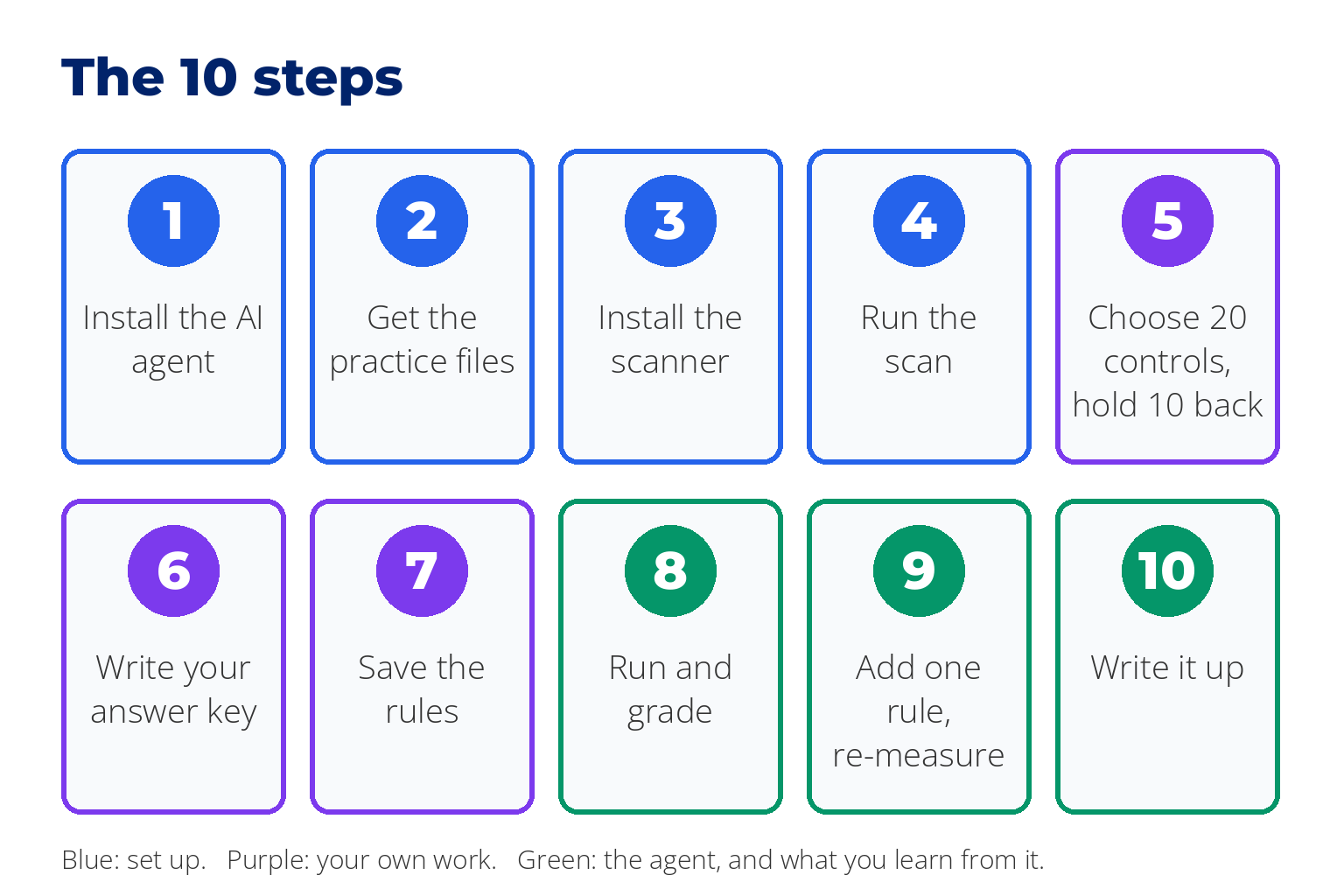
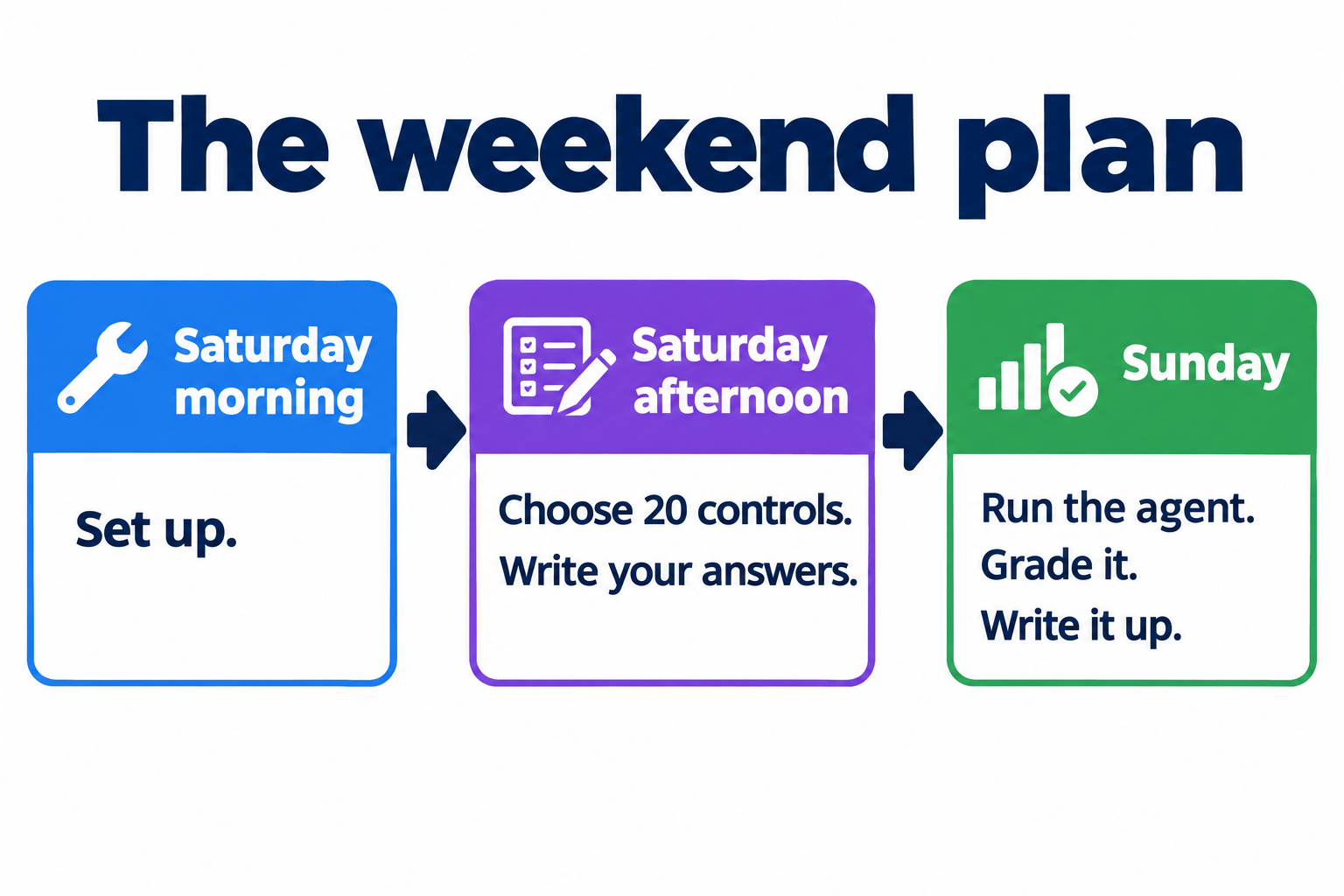
A plan for the weekend: set up on Saturday morning, choose your 20 controls and write your answers on Saturday afternoon, then run the agent, grade it and write it up on Sunday.
Step 1: Install the AI Agent
An agent is different from a chatbot. A chatbot answers the question you type. An agent is given a job, a folder of files and a set of rules, then works through them and reports back.
| Agent | Comes with | How to get it |
|---|---|---|
| Codex | ChatGPT | Follow the Codex install guide, run it, and choose "Sign in with ChatGPT" |
| Claude Code | Claude | Download the Claude desktop app and open the Code tab. No terminal needed |
From the docs We ran our tests in Codex, which was already installed. We have not run Claude Code.
Step 2: Get the Practice Files
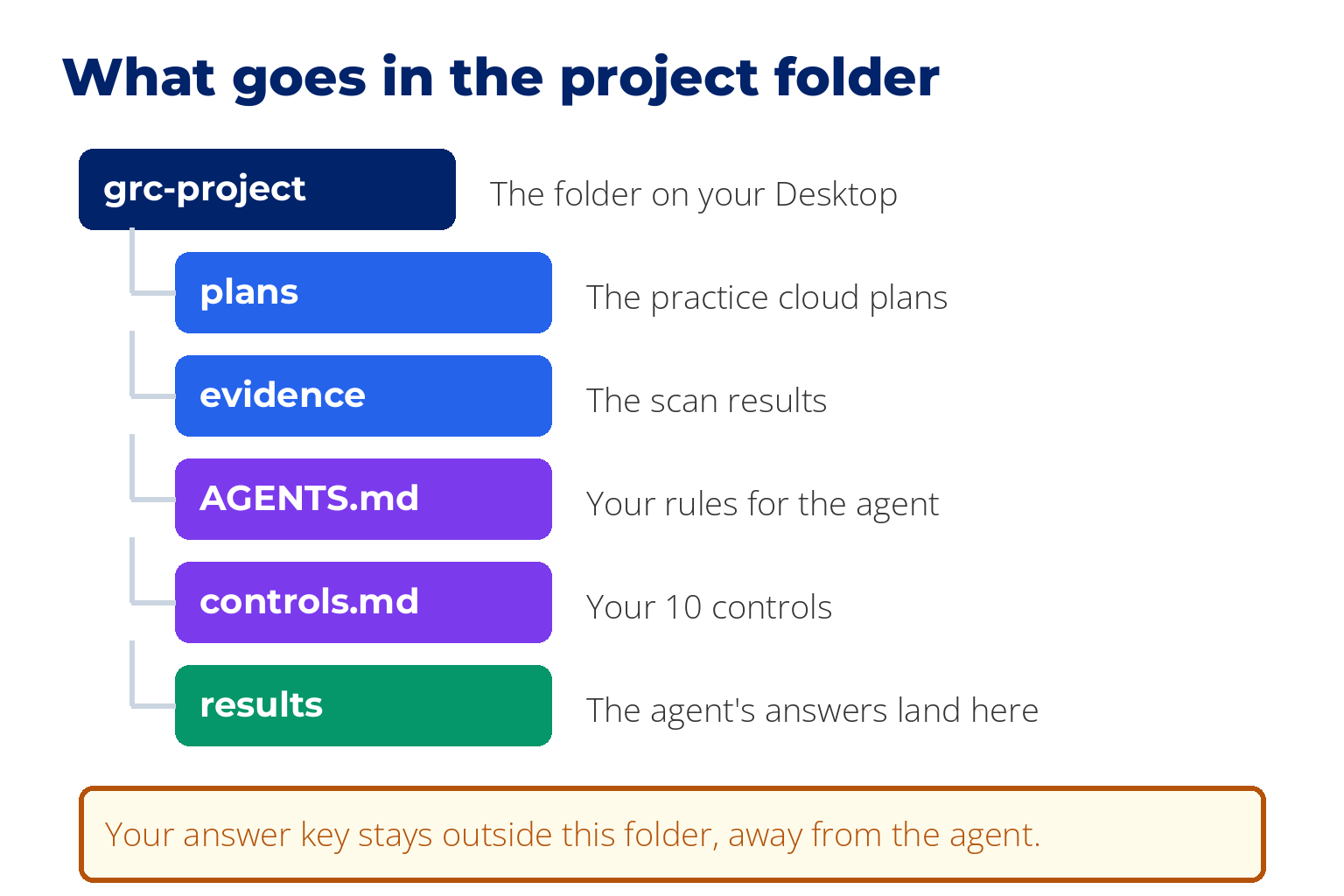
Make a folder on your Desktop called grc-project. Every step below assumes it lives there.
Go to the TerraGoat page on GitHub. Click the green Code button, then Download ZIP.
Unzip it. Inside, open terraform, then copy the folder called aws into grc-project. Rename the copy plans.
Tested Companies often describe their whole cloud setup, the servers, databases and storage, in plain text files like these. Think of them as building plans. You never build anything from them.
Step 3: Install the Scanner, and the 2 Places It Goes Wrong
You'll paste a few lines into a plain text window called the terminal. On a Mac it's an app named Terminal. On Windows, use PowerShell. Paste one line, press Enter, and wait for it to finish before pasting the next.
To open Terminal, press Cmd+Space, type Terminal, and press Return. Use the Copy button on each block below. The $ at the start of a line only marks where a command begins. It is not part of the command, and the Copy button leaves it out.
On a Mac. First install Homebrew, which is a free installer for tools like these. This is the line from Homebrew's own site. It will ask for your Mac password, and nothing shows on screen while you type it. That's normal.
$ /bin/bash -c "$(curl -fsSL https://raw.githubusercontent.com/Homebrew/install/HEAD/install.sh)"
From the docs Our Mac already had Homebrew, so we did not run that line. When it finishes, it may print 2 or 3 lines under "Next steps". Paste those too. Then:
$ brew install trivy pipx [email protected]
$ pipx ensurepath
Now close the Terminal window and open a new one. That step matters, because it's how your computer learns where to find the tools you just installed. Then:
$ pipx install prowler --python python3.12
$ prowler -v
$ trivy --version
The second line should print Prowler 5 or higher, and the third should print a Trivy version number.
From the docs The install lines as written. Tested Prowler 5.43.0 on Python 3.12 with Trivy, on one Mac that already had Homebrew.
These are the two places it went wrong for us. The third row is one the documentation warns about, which we did not hit:
| What you see | Why | Fix |
|---|---|---|
Trivy binary not found | Prowler needs Trivy to read plan files, and installing Prowler does not bring it | Run brew install trivy, open a new Terminal window, and check with trivy --version |
prowler -v shows version 3, or crashes with a long error | On our Mac the cause was Python 3.14. Prowler supports 3.10 to 3.13, so pipx installed an old version from 2023. Yours is likely the same if your Mac is up to date | Run pipx uninstall prowler, then pipx install prowler --python python3.12 |
command not found: prowler | Your computer doesn't know where pipx put it | Run pipx ensurepath, then open a new Terminal window |
One trap inside the second fix
Reinstalling on top of the broken version does not fix it, even when you force it, because the reinstall keeps the old Python. You have to uninstall first. We tested that.
Tested The first two rows. From the docs The third row.
On Windows. We have not run these steps on Windows, so treat this part as a pointer and follow each tool's own instructions: Prowler and Trivy. Two things to get right. Use Python 3.10 to 3.13. And after you unzip Trivy, add its folder to your PATH, which is the list of places Windows looks for programs, or Prowler won't find it. From the docs
Step 4: Run the Scan
$ cd ~/Desktop/grc-project
$ prowler iac --scan-path ./plans --output-directory ./evidence --output-filename scan
Tested It took 4 seconds and gave us 208 findings: 117 fail and 91 pass, from 142 different checks.
You now have a folder called evidence inside grc-project. Double-click scan.html to read the findings in your browser. An auditor would call this configuration evidence. Be precise about what it covers: it shows what these practice plans define. Nothing has been built, so it can't show how a real system is set up or running.
In plain English
Prowler does not map plan files to SOC 2, ISO 27001 or any other framework. We checked, and it reports 0 frameworks available for this kind of scan. Matching findings to controls is your job, and it's the skill the project shows.
Step 5: Choose 20 Controls, Hold 10 Back
You need 20 controls in all: 10 to test the agent on now, and 10 to hold back for Step 9. Start with the first 10. Write them in plain words, the way they read in the framework you use at work. Mix them on purpose.
| Kind of control | Example from our build |
|---|---|
| The scan settles it | Databases are encrypted at rest |
| The scan looks like it settles it, and doesn't | Passwords must be at least 14 characters |
| The scan can't settle it | User access is reviewed every quarter |
Then write 10 more with the same mix and put them aside. Don't run them yet. They're your fair test in Step 9.
Word each control so there's only one way to read it. Say what it applies to and what counts as a pass. We learned this the hard way. Our control said "Passwords must be at least 14 characters". We meant a password policy, but one agent found an 11-character default password in the plans and ruled "not met", which is a fair reading of what we wrote. "An enforced password policy sets a minimum length of 14 characters" would have left no room for that. Two of our 20 controls turned out to be arguable for this reason.
Step 6: Write Your Answer Key by Hand
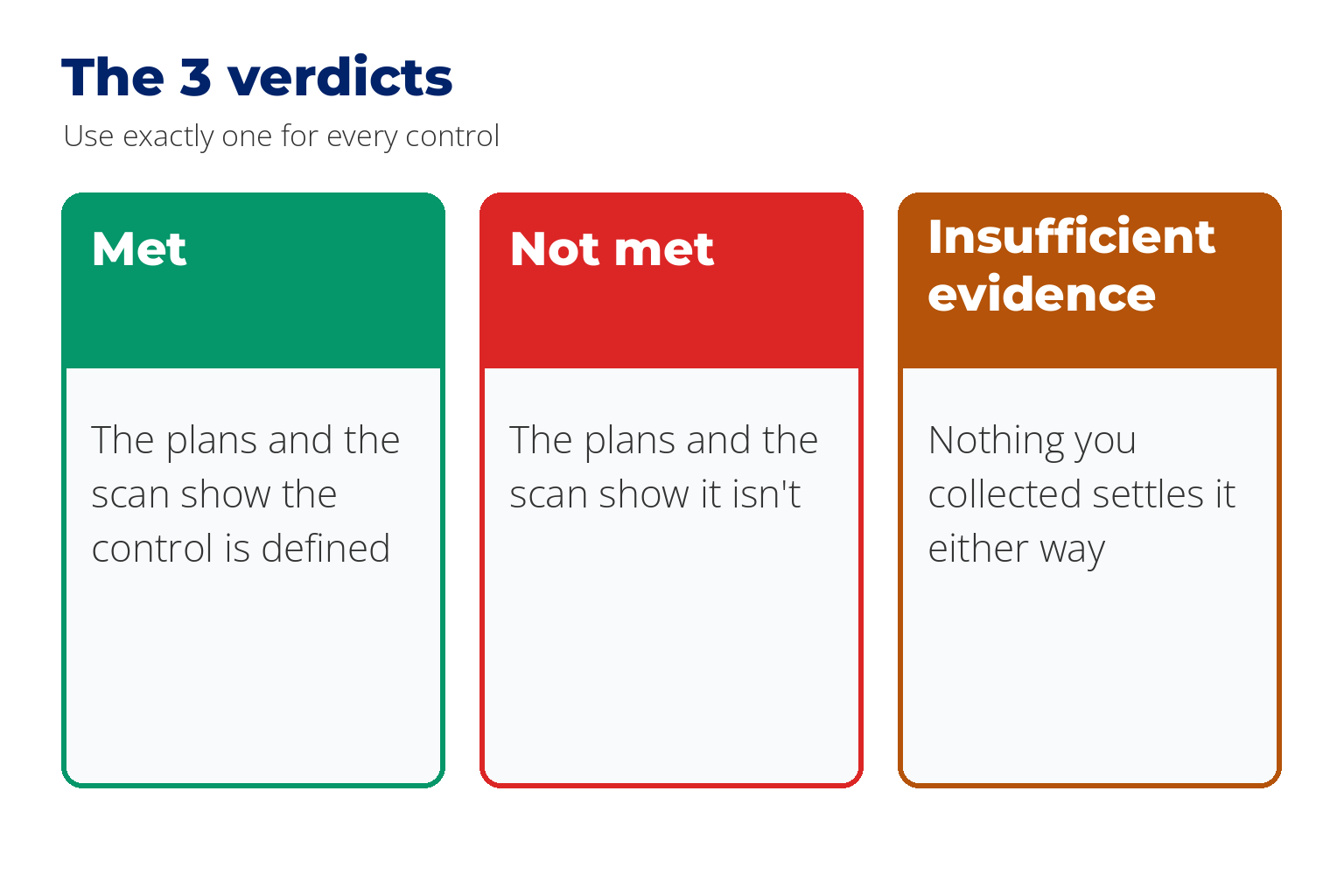
For all 20 controls, read the findings and the plan files, and write down three things: your verdict, the exact line you relied on, and your reason. Use one of three verdicts.
| Verdict | Meaning |
|---|---|
| Met | The plans and the scan show the control is defined |
| Not met | The plans and the scan show it isn't |
| Insufficient evidence | Nothing you collected settles it either way |
How to find the evidence. Open scan.html and press Cmd+F to search for a key word from the control, such as "encrypt". Most findings name the file they came from. Some passes name only a dot, and those need a second look, as you'll see below. To read that file, open the plans folder in Finder, right-click the file, and choose Open With, then TextEdit. Copy the line you relied on into your answer key, with the file name.
Here are two rows from our answer key, so you can see how much to write:
| Control | Verdict | What we relied on | Reason |
|---|---|---|---|
| Databases are encrypted at rest | Not met | Scan: FAIL on rds.tf, "Cluster does not have storage encryption enabled". Plans: db-app.tf line 19, storage_encrypted = false | The scan names the file, and the plan file confirms it |
| Passwords must be at least 14 characters | Insufficient evidence | Scan: PASS, recorded against ., "No issues found" | The plans contain no password policy, so the check had nothing to look at |
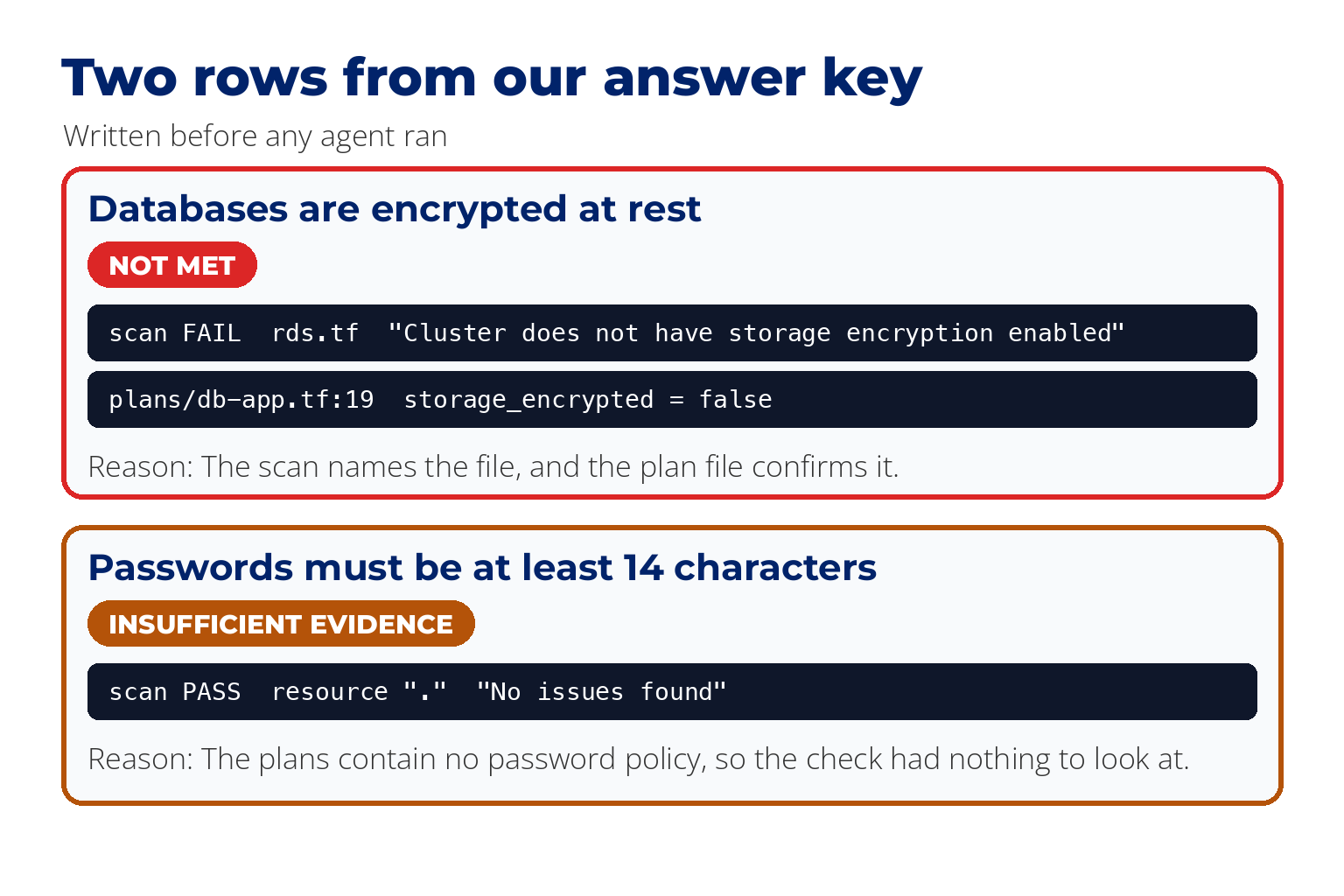
Save the file outside grc-project, in your Documents folder for example, so it isn't among the files the agent works in. That keeps it out of the way. It doesn't lock it, so check afterwards that no run opened it. Put the date in the file name. Then click the file once in Finder, press Cmd+I, and tick Locked, so you can't change it by accident. If an answer turns out to be wrong, record a correction in a separate note.
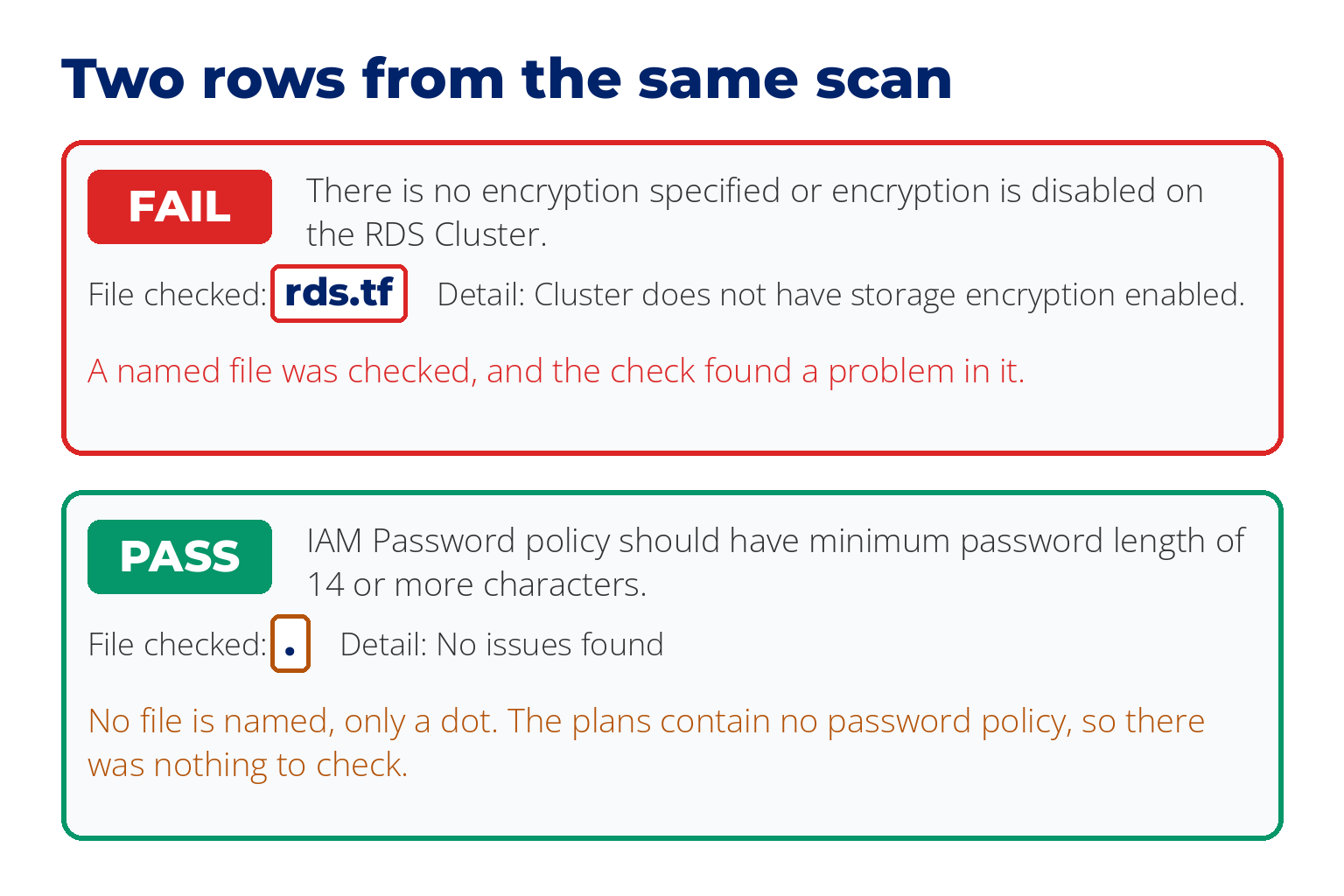
Read every pass twice. Take our passwords control. The scan has a check named "IAM Password policy should have minimum password length of 14 or more characters", and it says PASS. But where the file name should be, there is only a dot, and the plans contain no password policy at all. The check passed because there was nothing to check. Our verdict was insufficient evidence. In our scan, all 66 cloud passes looked like this.
Step 7: Save the Rules
Think of the written procedure you'd hand a new hire on their first day. You're writing one for the agent. Codex reads its rules from a file called AGENTS.md in the project folder. Tested Claude Code uses a file called CLAUDE.md. From the docs
Open the agent in the project folder. In Codex, type these two lines in Terminal. In the Claude desktop app, open the Code tab, choose Local, click Select folder and pick grc-project.
$ cd ~/Desktop/grc-project
$ codex
You don't have to make the rules file by hand. Type this to the agent: "Create a file called AGENTS.md in this folder containing exactly this text", then paste the text below. If you use Claude Code, say CLAUDE.md wherever this guide says AGENTS.md.
This is the exact text we used:
# Control assessment rules

You assess security controls against collected evidence. Follow these rules on every assessment.

## Evidence
- The scan results are in `evidence/scan.csv` (semicolon-separated).
- The system's plan files are in `plans/`.

## Output
Write one row per control, as a table, with these columns:
control id | verdict | evidence relied on (the exact line) | reason

## Verdicts
Use exactly one of three verdicts:
- MET
- NOT MET
- INSUFFICIENT EVIDENCE (nothing collected settles it either way)

## Hard rule
No cited evidence, no verdict. If you cannot quote the exact evidence line, the verdict is INSUFFICIENT EVIDENCE, and you say what you looked for and did not find.
If you'd like to go deeper on writing instructions an agent follows reliably, we've covered that in how to write skills for Claude Code.
Step 8: Run the Agent 3 Times, Then Grade It
Save your first 10 controls in the project folder as controls.md. The agent is still open from Step 7, so you can ask it to create the file and paste your controls in.
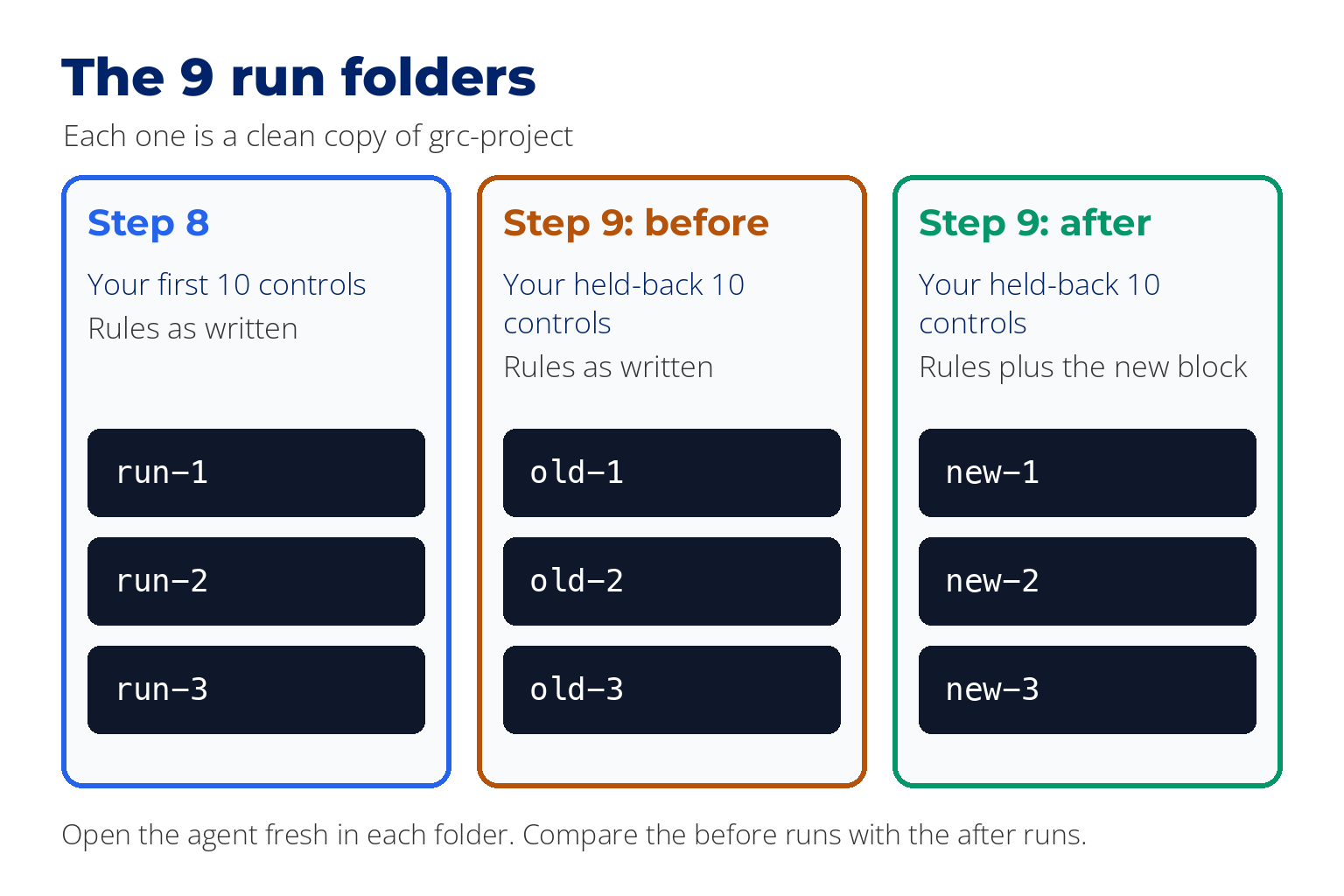
Make 3 clean copies. In Finder, duplicate the grc-project folder 3 times and name the copies run-1, run-2 and run-3. Each copy holds the plans, the evidence, the rules file and controls.md. Open the agent fresh in each copy, so one run's answers aren't sitting in the folder for the next.
Open the agent in each copy. First close the Terminal window you've been using, and open a new one. Then type these two lines. For the second and third runs, change run-1 to run-2 and run-3.
$ cd ~/Desktop/run-1
$ codex
In each copy, type:
Assess the ten controls in controls.md. Save the result table to results/out.mdTested This exact instruction and these rules, 3 runs of every test. We started each run from the command line in one go. From the docs Opening the agent and typing into it, as described above.
When a run finishes, the agent's table is saved in that copy's results folder. You can close the Terminal window. If your Mac asks whether to terminate what's running, click Terminate. Nothing is lost.
You run it 3 times because an agent doesn't give the same answer every time. Note which AI model you used. We used two in Codex: GPT-6 Sol, the larger one, and GPT-6 Luna, which is smaller and cheaper.
Now open your answer key and compare, one control at a time. Keep two scores. The first is how many verdicts match your key. The second is how many of those matches also give a sound reason, because a right verdict for a wrong reason shouldn't be trusted. Then sort every mismatch into a pile.
| Pile | What happened | Our example |
|---|---|---|
| It said "met" and the evidence doesn't show that | The agent accepted something that looked like proof | "The collected password-policy scan explicitly passes its minimum-length check." |
| It said "not met" and the evidence doesn't show that | The agent ruled on something that has nothing to do with the control | On the root account control, it ruled on a different user's access key |
| It said "can't tell" and the evidence was there | The agent missed a finding, or was too cautious | It missed a failed check on image scanning |
| You were wrong | The agent found something your answer key missed | See the results below |
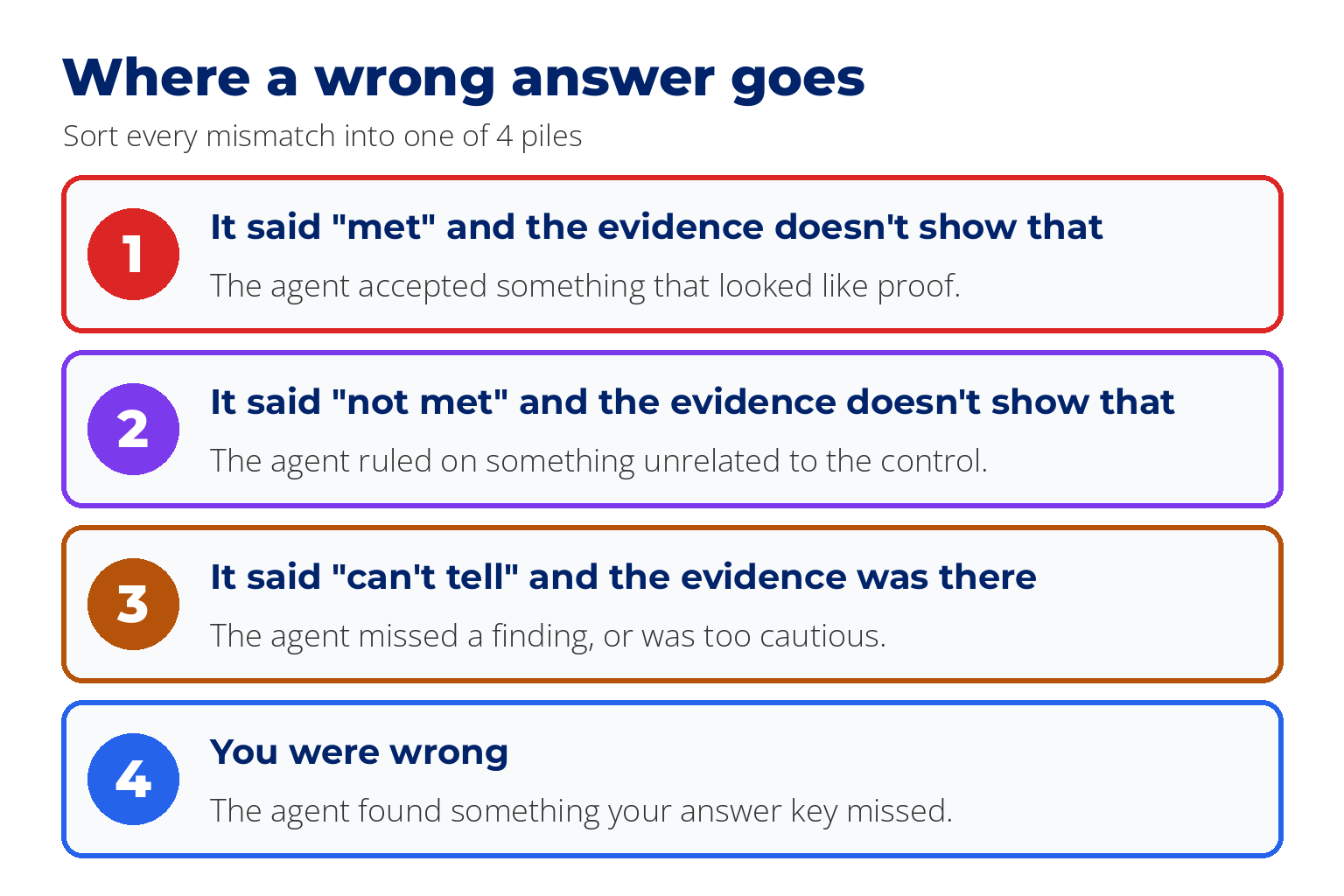
Some mismatches fit none of the piles, because the control can be read two ways and both verdicts can be defended. Don't force those into a pile. Mark them "arguable", report them separately, and fix the wording next time. Two of our 20 were like this.
This is the point where GRC AI work stops being about prompts and starts being about evidence. The next step is where most people would cheat without meaning to.
Step 9: Add One Rule and Re-Measure
Write your new rule before you run the 10 controls you held back. Once you've seen how the agent does on them, they're no longer a fair test. It would be like re-sitting an exam after reading the answers.
We added this block to the end of the rules. This is the exact text:
## A pass is not proof
Before you rely on a PASS row, answer two questions in the reason column:
1. Did that check actually test this control, on the thing the control is about?
2. Did it pass because something was checked and found correct, or because there was nothing to check?
A PASS row recorded against resource `.` with "No issues found" names nothing that was tested. It cannot support a MET verdict on its own.
Make the copies first, so you keep a clean "before". Leave the rules file in grc-project itself alone. Make 6 more copies of the folder. Name them old-1, old-2, old-3, new-1, new-2 and new-3. In all 6, replace controls.md with your held-back 10 controls. In the 3 named old, leave the rules file as it was. In the 3 named new, add the new block to the end of it. Open the agent in each one the way you did in Step 8, with the folder name changed, and run the same instruction. That gives you a before and an after, on controls the rule was never tuned on.
What We Found: GRC Automation Has a Blind Spot
Tested 24 runs in Codex, graded against our answer key.
10 held-back controls, smaller model, 3 runs each. Verdicts only, scored against the answer key after our one correction.
| Old rules | New rule | |
|---|---|---|
| Wrongly said "met" | 3, 2, 3 | 1, 1, 1 |
| Verdicts that matched the answer key | 7, 7, 7 | 8, 9, 8 |
These count verdicts, not reasons. We read the reasons by hand for the 3 runs under the new rule. In one of them a matching verdict came with a weak reason: the agent ruled "insufficient evidence" on the root account control, but it pointed to a different user's access key and never mentioned the scan row about the root account. In another run it ruled "not met" on that same unrelated key, which is wrong.
The smaller model fell for the empty pass. On the passwords control it ruled "met" in 2 runs out of 3. The larger model never did, in 12 runs. So your result may differ from ours, and you only find out because you wrote your answers first.
That mistake has a name worth using in an interview: over-acceptance. The machine accepts whatever looks like proof.
The rule was not free. On the first 10 controls, the larger model matched 10, 9 and 10 under the old rules, and 8, 9 and 9 under the new one. Every miss was on one of the two controls we later marked arguable. These are small numbers, so treat it as a warning and not a measured cost: a new rule can change answers you weren't aiming at, which is why you re-measure.
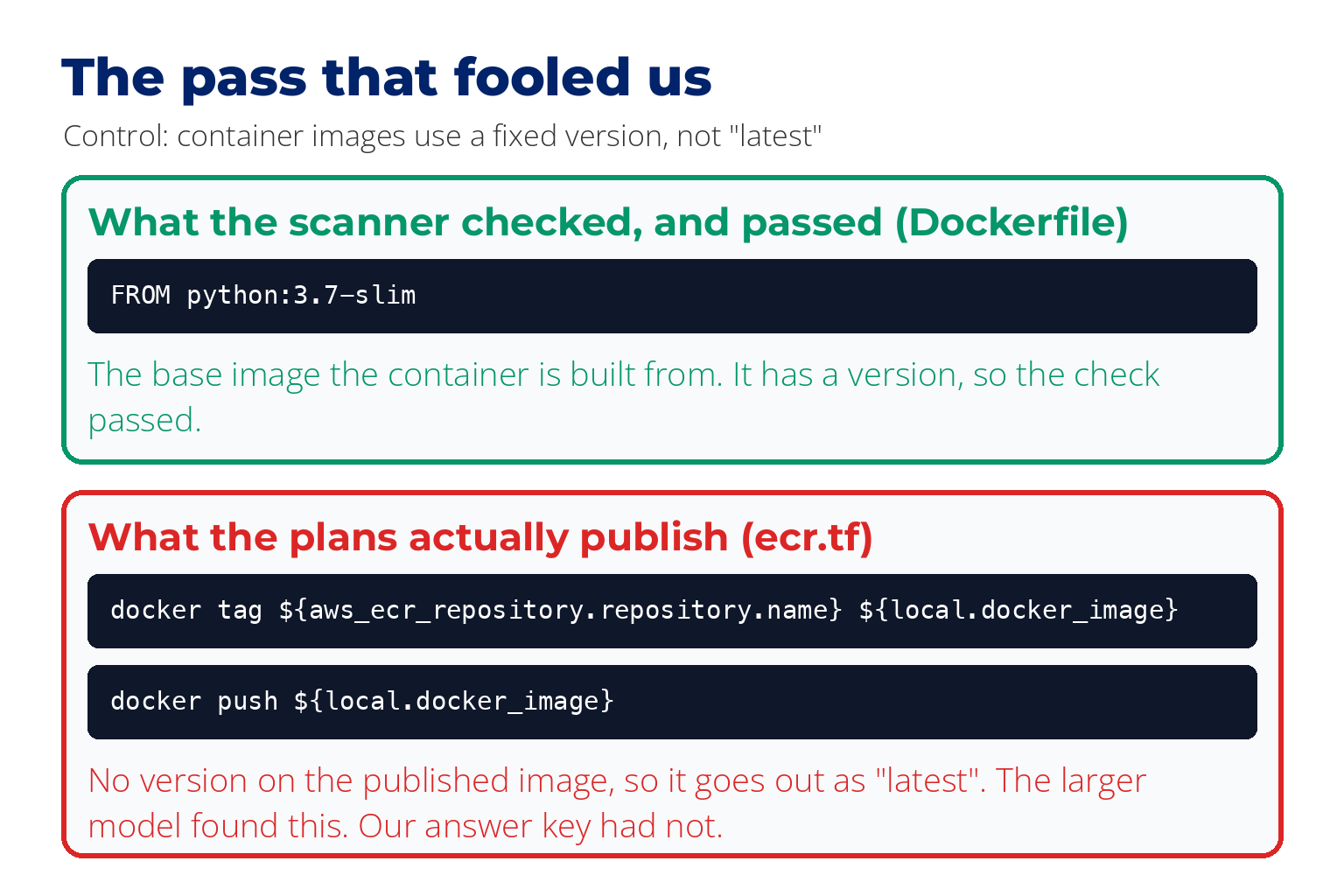
Then the AI proved us wrong, and this is the one wrong "met" still left in the table. One control said container images must use a fixed version and never "latest". A container image is a packaged copy of an application, ready to run. The scanner passed it, and so did our answer key. The larger model disagreed in all 6 of its runs. It had read the plans and found the image was being published with no version tag at all. The scanner had only checked the base image it was built from. The agent was right. We had accepted a pass that tested something else, which is the same mistake we'd caught the smaller model making. We recorded the correction and kept the original key.
The one thing to take away
That's the blind spot in AI GRC tools and in GRC automation generally: a scan report is a document too, and the document is not the control.
One honest limit. At 10 controls this saves you no time. You've done more work than doing it by hand. What you get is evidence that you know where the machine can be trusted.
Step 10: Write It Up for Your GRC Resume
Write one page: what you assessed, how many answers matched in each run, the piles, the rule you added, the before and after, and any correction to your own key. Then add a line like this to your GRC analyst resume, with your own numbers:
Built an answer key for 20 security controls, by hand, from configuration evidence. Set up an AI agent to assess them, and graded it against the key over repeated runs. Found the agent accepting scanner passes that had tested nothing. Added a rule, and re-measured on 10 held-back controls.
Only claim what you found. The third sentence is our finding. If your agent never made that mistake, leave it out and say what yours did get wrong, or that it matched your key and how you checked.
Say "configuration evidence", and don't name SOC 2 or any framework the scan didn't map to. An interviewer can push on every word of that line, and you'll have the files to back it up.
Two Cautions
Use practice files. Never point this at your employer's live compliance program without written permission, because audit evidence carries legal weight.
When you hand files to an AI tool, they leave your computer and go to that company's servers. That's fine for practice files and may not be for real audit evidence. It's third-party risk, and you already know how to assess it. Our AI governance checklist has the 10 questions to ask.
How We Tested This
We ran the assessment part of this project end to end on 28 September 2026.
| Machine | One Mac that already had Homebrew, Trivy, pipx and git |
| Scanner | Prowler 5.43.0 on Python 3.12, with Trivy |
| Practice files | TerraGoat, the terraform/aws folder, 15 plan files |
| Agent | Codex 0.156.1, signed in with a ChatGPT Pro plan. Each run was started from the command line with one instruction |
| Models | GPT-6 Sol and GPT-6 Luna |
| Runs | 24 runs: two models, two sets of 10 controls, two versions of the rules, 3 runs of each |
| Grading | Verdicts compared with the answer key by script. Reasons read by hand for the held-back set under the new rule |
| Answer key | Drafted by HAL, our AI system, before any agent ran. One answer was later corrected, and the correction is recorded separately |
What we did not test, so you know where to be careful:
| Not tested | What that means for you |
|---|---|
| A computer with nothing installed | You may hit a setup problem we didn't |
| Windows | We give pointers only. Follow each tool's own documentation |
| Typing into the agent by hand | We started runs from the command line. Opening the agent and typing the instruction comes from the documentation |
| Claude Code | We ran Codex only |
| The models on a $20 plan | We used a ChatGPT Pro plan. Yours may offer different models |
| A person doing the whole project | The answer key was written by our AI system, HAL, standing in for a person. The weekend is an estimate |
| Whether this saves time at hundreds of controls | We measured 10 at a time |
If you want the wider method behind this, where an AI keeps working until a check it can't argue with says it's done, read our guide to loop engineering. For the same idea applied to code, see our AI secure code review workflow. And if you're building the GRC foundations first, our GRC training covers them.
FAQ
Do I need to know how to code to do this GRC project?
No. You paste a few lines into the terminal to install and run the scanner, and you give the agent its instructions in plain English. You do need to be comfortable reading a finding and deciding what it proves.
How much does it cost?
A Claude Pro or ChatGPT Plus plan is about $20 a month, and each includes an agent. Prowler, Trivy and TerraGoat are free, and nothing is deployed to a cloud account. Our own runs used a higher ChatGPT plan, so we haven't confirmed how many runs the $20 plan allows.
Can I say I assessed SOC 2 controls on my resume?
Not from this scan. Prowler doesn't map plan files to SOC 2 or any other framework. You chose the controls and matched the evidence to them yourself, so describe it as configuration evidence against controls you selected.
Which AI model should I use?
Use what your plan offers and write down which one it was. In our runs the larger model avoided the empty pass and the smaller one didn't, so the model changes the result.
Will AI replace GRC analysts?
The ads we've read ask for people to direct agents and check their output. Collection is being automated. Deciding whether the evidence proves anything is the part those ads are hiring for.
How is this different from other GRC projects?
Most GRC projects show you can produce a document: a risk register, a policy, a mock audit report. This one shows you can test a machine's judgment and report where it failed, with the runs to prove it.
What if my agent gets everything right?
Then your write-up says so, with the runs to show it. Check your answer key is a fair test: it should include controls where the scan looks like proof and isn't.
About the Author

Nathan House, Founder & CEO of StationX
Nathan House has 30 years of hands-on cybersecurity experience and is Cambridge-educated, holding CISSP, CISA, CISM, OSCP, CEH, and SABSA. He founded StationX in 1999 — one of the UK’s first cybersecurity companies — and has secured £71 billion in UK mobile banking transactions and the London 2012 Olympics, advising clients including Microsoft, Cisco, BP, Vodafone, and VISA. He authored the world’s most popular cybersecurity course — a #1 Udemy bestseller taken by over 500,000 students — and was named Cyber Security Educator of the Year 2020, AI Security Educator of the Year, and a UK Top 25 Security Influencer 2025. A DEF CON speaker and featured expert on CNN, Fox News, NBC, and the BBC, Nathan leads StationX’s training of more than half a million students worldwide.