Claude Code Router Review: Is It Safe? [2026]
If you've landed here, you're probably about to install Claude Code Router, and a small voice is asking the sensible question: is this thing safe to point at my API keys?
I asked the same question. So I did what I do with any tool that sits between my coding agent and my provider accounts. I pulled down the source, ran a panel of models and the usual security scanners across the security-relevant parts, and then I went back and read the actual code behind every finding a second time to check it held up.
Here's the short version, since that's what you came for. Claude Code Router is the safer of the two AI routers I audited this month. It's a good, genuinely useful open-source project, and the person who built it got the hard, important things right. There are a few gaps I'd want you to understand before you trust it with real credentials, and one I'd personally like to see fixed. None of them are dealbreakers if you know what you're doing. That's a very different verdict from the other router I looked at, and I'll show you exactly why.
One thing up front. Claude Code Router is free. Someone built something clever and gave it away, and thousands of developers get value from it every day. So this isn't a hit piece. It's the review I'd want sitting in my inbox if I were the maintainer, one that's honest about the gaps but doesn't pretend the good work isn't there.
What Claude Code Router Actually Is
Claude Code Router, often shortened to CCR, is a desktop app that sits between your coding agent and the model providers. You run Claude Code or Codex as normal, and CCR quietly routes those requests to whichever model you've configured: Anthropic, OpenAI, Google, or any of forty-odd others. When your Claude quota runs dry, it can fail over to something else. When a better model ships, you switch a setting instead of your whole workflow.
To do that job it has to hold a lot of trust. It stores your provider API keys. It can run a local gateway that other tools connect through. It has an optional proxy mode and an optional bot gateway. Any tool with that much reach into your credentials and your traffic deserves a proper look before you rely on it, no matter how popular it is. Popularity isn't a security control.
If you only want to get more models into Claude Code and none of the failover machinery, you may not need a router at all. I cover the simpler route in my guide to free LLM APIs in Claude Code. This page is the review: is CCR itself safe to trust with your keys.

How I Audited Claude Code Router
I ran a three-model adversarial review: Claude, Codex, and Gemini each went through the code independently, a validator pass checked their findings, and a cross-family referee adjudicated the disagreements. On top of that I ran Semgrep, Trivy, and gitleaks. The codebase is large, around ninety-six thousand lines, though nearly half of that is the desktop interface. The part that actually handles your keys, your network traffic, and your config is closer to fifty-five thousand lines, and that's where I focused.
Then I did the step that matters most, and the step I've learned the hard way not to skip. I took all fourteen confirmed findings and re-read the live source behind each one. Every finding held up as real. Four of them needed a correction to the detail, not the substance: the sharpest example was the certificate install on Windows, which the first pass described as machine-wide when the code actually scopes it to your user account. I fixed all four before writing a word of this.
Then, before publishing, I did it once more against the current release. CCR moves fast, and between my first audit and this writing it shipped a couple of releases and reorganised the whole codebase into a packages/core layout. So I re-checked every finding against v3.0.9 and re-pinned the file references to where the code lives now. That last pass mattered: two of my findings had actually been fixed or partly fixed in the meantime, and I've pulled them out or softened them accordingly, because publishing a bug that's already patched would be exactly the sloppiness I'm trying to avoid. It also tells you something good about the maintainer, which I'll come back to.
First, the Good News
Here's what Claude Code Router gets right, and it's worth dwelling on, because these are exactly the things a careless router gets wrong.
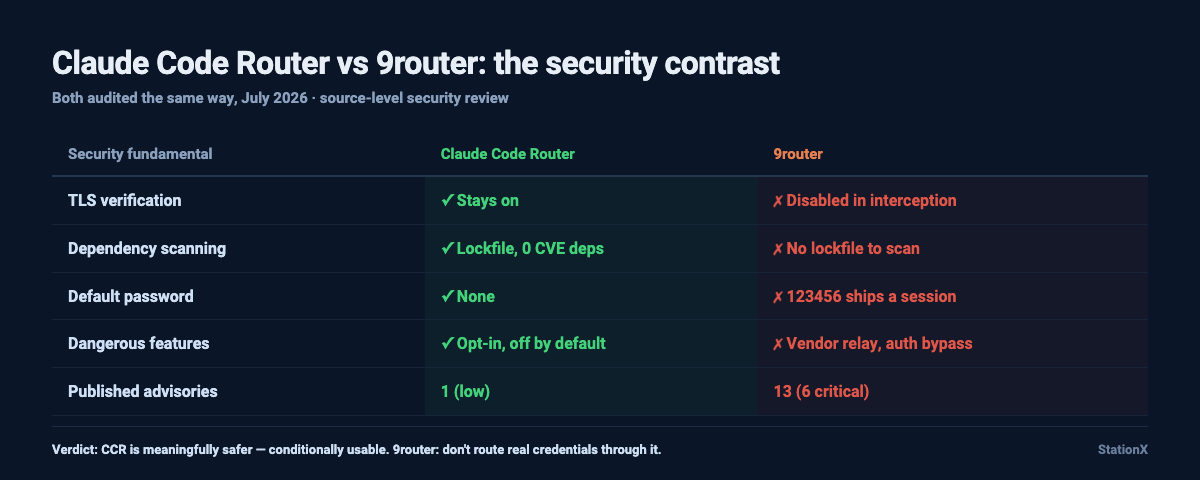
It keeps TLS verification on. I looked hard for the usual ways a proxy quietly weakens certificate checking, the rejectUnauthorized: false flag and the NODE_TLS_REJECT_UNAUTHORIZED escape hatch, and found none of them anywhere in the source. That sounds like a small thing. It isn't. The other router I audited this month switched certificate verification off in its interception module, which quietly breaks the one guarantee HTTPS is supposed to give you. CCR doesn't.
Its dependencies are clean. It ships a committed lockfile, which means Trivy could actually scan it, and the scan came back with zero known-CVE dependencies.
A fresh install is safe by default, and I want to be specific about that because it does a lot of the reassuring here. Out of the box the gateway binds to 127.0.0.1, loopback only, so nothing on your network can reach it. The bot gateway is disabled. Request logging is off. The genuinely dangerous features are all things you have to deliberately switch on. There's no default password, no authentication bypass, no reversible machine-derived key sitting where a root password should be, no vendor relay in the path of your traffic, and CCR itself ships no telemetry beacon. In its own web management server the code even uses a constant-time comparison for secrets, so the author clearly knows the careful patterns.
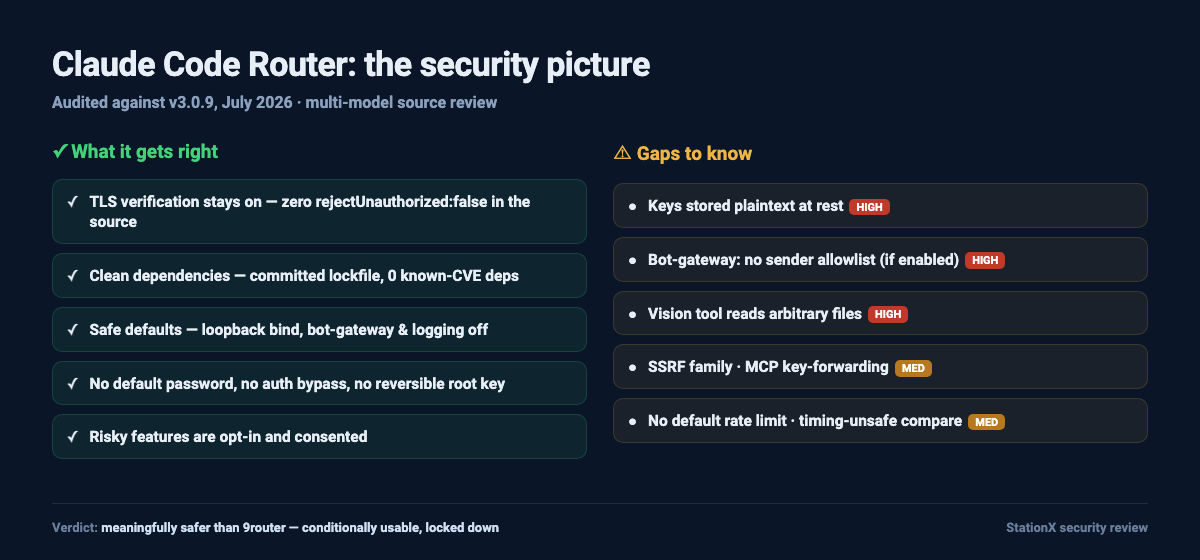
Put together, that's a solid foundation. The gaps I found below sit on top of it. They aren't cracks running through the whole thing.
Where Claude Code Router Stores Your API Keys
This is the finding I care most about, and it's the one I'd gently nudge the maintainer to fix.
When CCR stores an API key, it writes it to a small SQLite database. The table has columns called encrypted_key and encryption, which tells me the storage layer was built with encryption in mind. The wiring was just never finished. The store function hardcodes the encryption type to a constant that resolves to "plain" and writes the key exactly as given. The read function refuses to return anything that isn't marked "plain". So the column is there, waiting, but today the value is always plaintext:
// packages/core/src/config/api-key-store.ts
const plainStorage = "plain";

function storeApiKey(key: string) {
  // no cipher — the key is written exactly as given
  return { encryption: plainStorage, value: key };
}

function readStoredApiKey(value: string, encryption: string) {
  // anything not "plain" is rejected, so only plaintext is ever read
  if (encryption !== plainStorage) return undefined;
  return value;
}
Your provider keys, your OAuth tokens, and the auto-generated gateway key all sit there in cleartext. The same is true of the main config, where sanitizeConfigForDisk carefully blanks the gateway keys but passes your provider secrets straight through to disk untouched. On macOS and Linux the files are locked down with 0600 and 0700 permissions, so other users on the box can't read them. On Windows the code skips that step, and here's the sentence I don't want you to skim past: on Windows CCR sets no explicit permissions on the key store, so it falls back to whatever the default file permissions are, and any program you run or any backup or sync tool that reaches into that folder can read every credential CCR holds.
How much should you actually worry? Less than that paragraph might suggest. This isn't remotely exploitable. Nobody on the internet can reach these keys. It takes local read access: another process running as you, a sync tool that scoops up the file, or a lost laptop without full-disk encryption. And plaintext-at-rest is honestly the ambient norm for the tools CCR sits behind. Claude Code's own config, your shell environment variables, your .env files, the provider CLIs, these already keep credentials in plaintext under file permissions. CCR isn't uniquely careless here. What makes it worth flagging is aggregation: CCR gathers every provider key, every OAuth token, and the gateway key into one file, so a single leaked file hands over everything at once rather than one credential. That's the marginal risk, and it's why I'd still like to see it encrypted.
The good news is that the fix is small, and the maintainer clearly already knows it. Electron, which CCR is already built on, ships safeStorage, which hands secrets to the operating system keychain: Keychain on macOS, DPAPI on Windows, libsecret on Linux. The encryption column already exists in the schema. Wiring it to safeStorage instead of the plaintext constant is a contained, one-function change:
import { safeStorage } from "electron";

function storeApiKey(key: string) {
  // encrypt via the OS keychain (Keychain / DPAPI / libsecret)
  const sealed = safeStorage.encryptString(key).toString("base64");
  return { encryption: "os-keychain", value: sealed };
}
I want to be fair here, because the commit history shows the author is already circling this. There's a commit that reads Claude credentials from the OS keychain, and then a later one that reverts it. I don't know why it was backed out, and it's not my place to guess, but it tells me the maintainer sees the same problem I do and has had a go at exactly the right fix. This isn't a tool ignoring its security. It's a tool a couple of commits away from closing this, by someone who is already looking at it.
There's a related wrinkle worth a sentence. The app has an export feature that base64-encodes those same database files into a bundle in your Downloads folder. Because the keys and logs inside are plaintext, that bundle carries everything with it. It's gated behind the authenticated web UI, so it's a misuse-and-roaming-file concern rather than a remote one, but it's worth knowing before you click export.
The Powerful Features That Are Safe Until You Switch Them On
CCR has two features that are genuinely powerful and genuinely risky, and I want to be fair about both. They're off by default. Turning them on is a deliberate act. That's good design. But you should know exactly what you're enabling.
The first is proxy mode. When you turn it on, CCR generates its own certificate authority and installs it into your system trust store so it can sit in the middle of your HTTPS traffic and route it. The CA is a twenty-year RSA-2048 root, and once it's trusted, it can vouch for any site. On macOS the install goes into the machine-wide System keychain and asks for an administrator password first. On Windows, and this is one of the corrections from my second pass, it goes into the current-user store using certutil -user, which doesn't need admin rights and is scoped to your account rather than the whole machine. The CA's private key lands on disk, protected by 0600 permissions on macOS and Linux and by default file permissions on Windows. That key is effectively a skeleton key for TLS on your machine until you remove it, so if anything ever stole that one file, it could forge trusted certificates for any domain.
To CCR's credit, it does this the responsible way. The install happens with your explicit consent, behind a prompt, and upstream TLS verification stays on the whole time. The certificate names itself honestly, starting with "Claude Code Router CA", so you can find it and remove it later. My advice is just this: don't enable proxy mode unless you specifically need it, and if you do, know the CA is there and know how to pull it back out.
The second is the bot gateway, and I want to lead with the impact because it's the sharpest thing in the review. Enable it, link a chat channel like Slack or Telegram, and anyone who can post in that channel can drive a real Claude Code or Codex turn on your machine, with your local file access. Any non-command message gets fed straight into an agent turn, and there's no sender allowlist. The login binds the channel, not the individual person, so a colleague in a shared channel, or anyone who compromises the bot integration, effectively gets a shell on your box. What saves it is the default: the feature ships off, which is exactly the right call, and turning it on is a deliberate act. If you do want it, the only configuration I'd trust is a private channel that only you can post to, and I wouldn't point it at a repo or a machine I cared about. As far as I can see the agent turn runs with your normal permissions rather than a sandbox, so treat an inbound message the way you'd treat someone typing into your terminal.
The Gateway Hardening Gaps
These are the smaller ones, real and worth fixing but nothing to lose sleep over. I'm grouping them because on their own they're each a line or two.
One fact defuses most of what follows: out of the box the gateway binds to 127.0.0.1, so on a fresh install none of these are reachable from your network. The catch is that the public gateway, the one that holds your provider keys, will bind to whatever host you put in the config if you change it, including 0.0.0.0, with no warning. The internal gateway right beside it refuses to bind anywhere but loopback and throws if you try. So the guard exists in the codebase; it simply wasn't carried across to the public side. If you never touch the default host, this one doesn't affect you.
The key comparison in the gateway uses a plain ===, which isn't constant-time. In practice a timing attack against this is hard and only really matters if you've exposed the gateway beyond loopback, but it's a free fix, and the project already ships a constant-time compare in its own web server.
There's no default rate limit. The spend-gating function returns "allowed" immediately if a key has no limits configured, and limits are opt-in. So anyone holding a gateway key can drive unbounded volume through your paid provider accounts. On a loopback-only install that means a local process; if you've bound the gateway wider, it means anyone who reaches it. Worth setting a per-key limit yourself.
And the remote-control routes accept the API key as a URL query parameter, which means the secret can end up in logs and browser history. The header method is the safer path and it already exists.
One more that touches privacy: if you turn on request logging, CCR stores the full request and response bodies verbatim. It redacts headers but not bodies, and the bodies are exactly where your source code and prompts live. Logging is off by default, so this only bites if you enable it, but if you do, know that the whole conversation corpus is sitting unencrypted on disk.
SSRF and Injection: When Config Points Claude Code Router Somewhere Bad
There's a family of findings that share a shape: they let a malicious configuration or a malicious upstream point CCR somewhere it shouldn't go. None are zero-click. The trap is to wave them away as self-inflicted, and I don't think that's right, because CCR's whole value proposition is plugging in lots of third-party providers and MCP servers. A community model list you copy-paste, or an MCP server someone recommends, is exactly the "config you control" that turns these into a real vector. Normal, expected usage is the threat surface here.
Provider base URLs are only partly guarded against internal addresses. Credit where it's due: v3.0.9 added a real SSRF check that blocks loopback, private, and cloud-metadata IPs, and I watched it work. But it's wired into the remote-manifest import path only. The runtime provider base URL and the deep-link path don't get that check, so a hostile provider entry added through those routes can still point your authenticated requests at an internal service like a metadata endpoint. The guard exists; it just hasn't been carried across every door yet.
The MCP discovery flow lets a remote server name where follow-up requests go, and those requests carry your API key, so a malicious or compromised MCP server could be handed credentials it should never see. That one deserves to be ranked alongside the bot gateway, not below it, because connecting MCP servers is routine and the payoff is your key.
The vision tool is the one I'd treat most seriously in this group. It reads whatever local file path it's handed and ships the bytes to an external vision provider, with only a size check. That's an arbitrary-file-read-and-exfiltrate primitive: a tool call driven by model output or a connected MCP server could read your config or key database rather than an image and send it off-machine.
None of these are remotely reachable on their own. They matter, and they're worth hardening, but they need you to have added a hostile provider, connected a hostile MCP server, or triggered a crafted tool call. The reason I don't shrug them off is that connecting third-party providers and MCP servers is the normal way you use CCR, not an exotic edge case. And the pattern here is encouraging: CCR is clearly in the middle of hardening this whole area, since the SSRF guard already exists and just needs wiring into the remaining paths.
The Multi-Model Payoff, and a Note on Honesty
Quickly, because it speaks to trust: a single-model pass would have missed things. Codex is the one that surfaced the SSRF issues, a Windows command-injection path, and the file-exfiltration in the vision tool. For the record, all fourteen findings I raised were real. On the final re-check against v3.0.9, one had been fully fixed since my first audit, the Windows command-injection I just mentioned, so it's not in the live list above and the maintainer deserves the credit for it. Another, the provider-URL SSRF, was half-fixed, which is why I softened it. I'm telling you the denominator on purpose. A review that only reports its survivors is asking for blind trust, and I'd rather you saw the findings that got fixed out from under me too.
How I'd Improve Claude Code Router
If I were sending the maintainer a friendly pull request, here's what would be in it, roughly in order of value.
- Wire the encryption column to Electron
safeStorageso keys stop living in plaintext, which also fixes the Windows gap for free. - Warn, or refuse without confirmation, when the public gateway is bound off loopback, the same way the internal gateway already guards itself.
- Seed a sensible default rate limit so an unconfigured key can't burn your account.
- Add a sender allowlist to the bot gateway so it's not all-or-nothing.
- Carry that constant-time comparison, which already exists in the codebase, across to the gateway auth.
None of that is a rewrite. Every one is a contained change, and most are just applying patterns the project already uses somewhere else. That's what a fundamentally sound tool looks like when it has a few rough edges.
The Part That Never Goes Stale: How to Vet Any AI Router
Tools change, so here's the checklist I use for any router before I trust it, and it'll outlast this specific review.
Does it keep TLS verification on? Search the source for the flag that turns it off. If you find it, walk away.
Where do your keys live? Are they encrypted at rest, or just sitting in a file? Treat the config folder as a secret either way.
Does it ship a lockfile? If not, its dependencies can't be scanned, and you can't audit what lands on your machine.
Are the dangerous features off by default and clearly consented? And does it bind its network services to loopback unless you say otherwise?
Is there any point where your credentials get forwarded somewhere you didn't choose? Run any router through these questions and you'll know most of what matters.
CCR passes the first four cleanly and stumbles on the last two in contained ways. That's a good scorecard.
Want to Do This Kind of Work Yourself?
Reading a codebase like an attacker, running a real multi-model security review, and making a defensible trust decision instead of a hopeful one, is exactly the muscle the AI era rewards. It's what our AI Master's Program is built for: you learn AI-Driven Cyber Security Engineering and build your own personal AI infrastructure, no coding background required, so you're the one directing these models rather than trusting a tool blindly. If you'd rather start with the fundamentals, our penetration testing and ethical hacking courses are a solid first step.
If You're on Windows, Read This Bit
A couple of the findings above land harder on Windows, and because they're scattered through the review I want to gather them in one place. The key store gets no explicit file permissions, so it leans on default Windows permissions rather than the 0600 lockdown macOS and Linux get. And the proxy CA installs into your user certificate store without an admin prompt, which is lower-friction but also means less of a speed bump. (There was a third, a cmd.exe URL-opener injection, but v3.0.9 fixed it, so it's off this list.) Neither of the remaining two changes the headline verdict, but if you're on Windows, full-disk encryption via BitLocker stops mattering as "nice to have" and starts mattering as "the thing protecting your keys."
Verdict: Is Claude Code Router Safe?
Here's my honest answer. Claude Code Router is meaningfully safer than the alternative I audited alongside it, and it's conditionally usable if you take a few sensible steps.
The contrast that sums it up: as of July 2026, CCR has one published security advisory, a low-severity CORS finding. The other router has thirteen published, six of them critical, with more in the queue. I wouldn't lean on that number too hard on its own, because advisory counts also reflect how much a project has been poked at. But it lines up with what my own read of the code found: CCR got the fundamentals right and the other one didn't.
Who is this for? If you're a solo developer on an encrypted laptop, CCR is a reasonable tool to route your coding agent through, with the conditions below. If you're running it on a shared box, in CI, or anywhere multiple people have local access, the plaintext key store is a bigger deal and I'd wait for the encryption fix.
The safe-use checklist. Leave the two powerful features off unless you genuinely need them (they already ship off, so mostly don't go turning them on). Keep the gateway on loopback: the field is gateway.host in your CCR config, and it ships as 127.0.0.1, so leave it alone. Set a per-key rate limit rather than relying on the unlimited default. And because your keys sit in plaintext at rest, run full-disk encryption, which you should be doing anyway.
If the maintainer ships the key-encryption fix, I'll happily update this review to say so, because it's the main thing standing between "conditionally usable" and "I'd just recommend it."
I audited 9router the same way, and it reached a very different conclusion, so that review is worth reading if you're choosing between the two. And if all you actually want is more models in Claude Code without running a router at all, my guide to free LLM APIs covers the simpler setup.
❓ Claude Code Router Review FAQ
Is Claude Code Router safe to use?
Broadly, yes, with conditions. It keeps TLS verification on, ships clean dependencies, has no default password, and keeps its risky features off by default. The main caveat is that it stores your API keys in plaintext at rest, protected only by file permissions (and not even those on Windows), so use full-disk encryption and don't enable proxy mode or the bot gateway unless you need them.
Does Claude Code Router store my API keys securely?
Not currently. The storage layer has an encryption column that was clearly meant for this, but the wiring was never finished, so the value is always plaintext. Your keys and OAuth tokens sit in cleartext in a local database, protected by file permissions on macOS and Linux and by default permissions only on Windows. It's worth perspective: the tools CCR sits behind mostly store credentials in plaintext too. The difference is that CCR aggregates them all into one file. The fix is small, since Electron's safeStorage is already available to the project, but as audited against v3.0.9 in July 2026 it wasn't wired up.
Is Claude Code Router's proxy mode dangerous?
It's invasive but consented. It installs its own certificate authority so it can route your HTTPS traffic, which is powerful and carries real risk if the CA key is ever stolen. But it's off by default, asks permission first, keeps upstream TLS verification on, and names its certificate honestly. Only enable it if you specifically need it.
Which is safer, Claude Code Router or 9router?
Claude Code Router, clearly. It keeps TLS verification on where 9router turns it off, it ships a scannable lockfile, it has no default password or reversible root-key, and its dangerous features are opt-in and off by default. The public advisory count points the same way, as of July 2026: one low-severity advisory for CCR against thirteen published for 9router, six of them critical.
Can I use Claude Code Router with my Claude subscription?
You can point it at providers and fail over between them, which is much of the appeal. Just be thoughtful about routing your primary subscription through any third-party proxy, keep the gateway on loopback, and set a rate limit so a stray key can't run up your bill.
Methodology: static source-code audit of Claude Code Router, using a multi-model adversarial review (Claude + Codex + Gemini, then a validator and a cross-family referee) plus Semgrep, Trivy and gitleaks. Every finding was re-verified against the live source, and then re-checked against release v3.0.9 with file references re-pinned to the current code. Findings reflect that version. CCR is actively developed and may have changed.
About the Author

Nathan House, Founder & CEO of StationX
Nathan House has 30 years of hands-on cybersecurity experience and is Cambridge-educated, holding CISSP, CISA, CISM, OSCP, CEH, and SABSA. He founded StationX in 1999 — one of the UK’s first cybersecurity companies — and has secured £71 billion in UK mobile banking transactions and the London 2012 Olympics, advising clients including Microsoft, Cisco, BP, Vodafone, and VISA. He authored the world’s most popular cybersecurity course — a #1 Udemy bestseller taken by over 500,000 students — and was named Cyber Security Educator of the Year 2020, AI Security Educator of the Year, and a UK Top 25 Security Influencer 2025. A DEF CON speaker and featured expert on CNN, Fox News, NBC, and the BBC, Nathan leads StationX’s training of more than half a million students worldwide.