9router Review: Is It Safe? A Security Audit [2026]
If you've gone looking for a way to run Claude Code (or Cursor, Codex, Cline) on cheaper or free models, you've almost certainly found 9router. It's one of the most talked-about tools for the job. Connect your AI coding tool to 40+ providers and 100+ models, fail over automatically when one runs out, save tokens. On paper it's the most capable router of its kind, and it's earned a big following.
But 9router works by sitting in the middle of your AI traffic and holding your API keys and login tokens. That's the most trusted position in your entire setup. So before I'd let it near real credentials, I wanted one question answered: is 9router safe?
I didn't guess, and I didn't go by the README. I cloned it, read the source, and ran it through a multi-model security audit backed by the standard scanning tools. The short version: there's a real, capable tool here, sitting on top of security problems serious enough that I wouldn't route real credentials through it as it stands.
And here's the part that turned a routine audit into a genuine warning. After I'd found my issues, I checked 9router's public security advisories. It has 13 of them already, 6 rated critical, published between May and July 2026. My audit had reproduced most of those independently, without looking first, and turned up three more that weren't on the list yet. Two separate audits landing on the same wall of vulnerabilities isn't a coincidence. It's a pattern. Below is the full picture, and every finding points at a specific line of 9router's own code.
What 9router Is (and Why It Demands So Much Trust)
9router is a local proxy. You install it, it runs a small server on your machine, and you point your coding tool at it instead of at the model provider directly. From there it routes each request to whichever of its 40+ providers you like, and it fails over to the next model in your list when one hits a rate limit or errors. It has token-saving features, a slick dashboard, and it can expose itself over a tunnel so you can reach it remotely.
That's genuinely useful. But look at what it means. Every prompt you write, every line of code the model sends back, and the keys or tokens that authorise those requests all flow through 9router. There's more. To intercept traffic for some providers, 9router installs its own root certificate and rewrites how your machine resolves provider hostnames, so it can sit inside your encrypted connections. And it caches your system (sudo) password to do that certificate and DNS work.
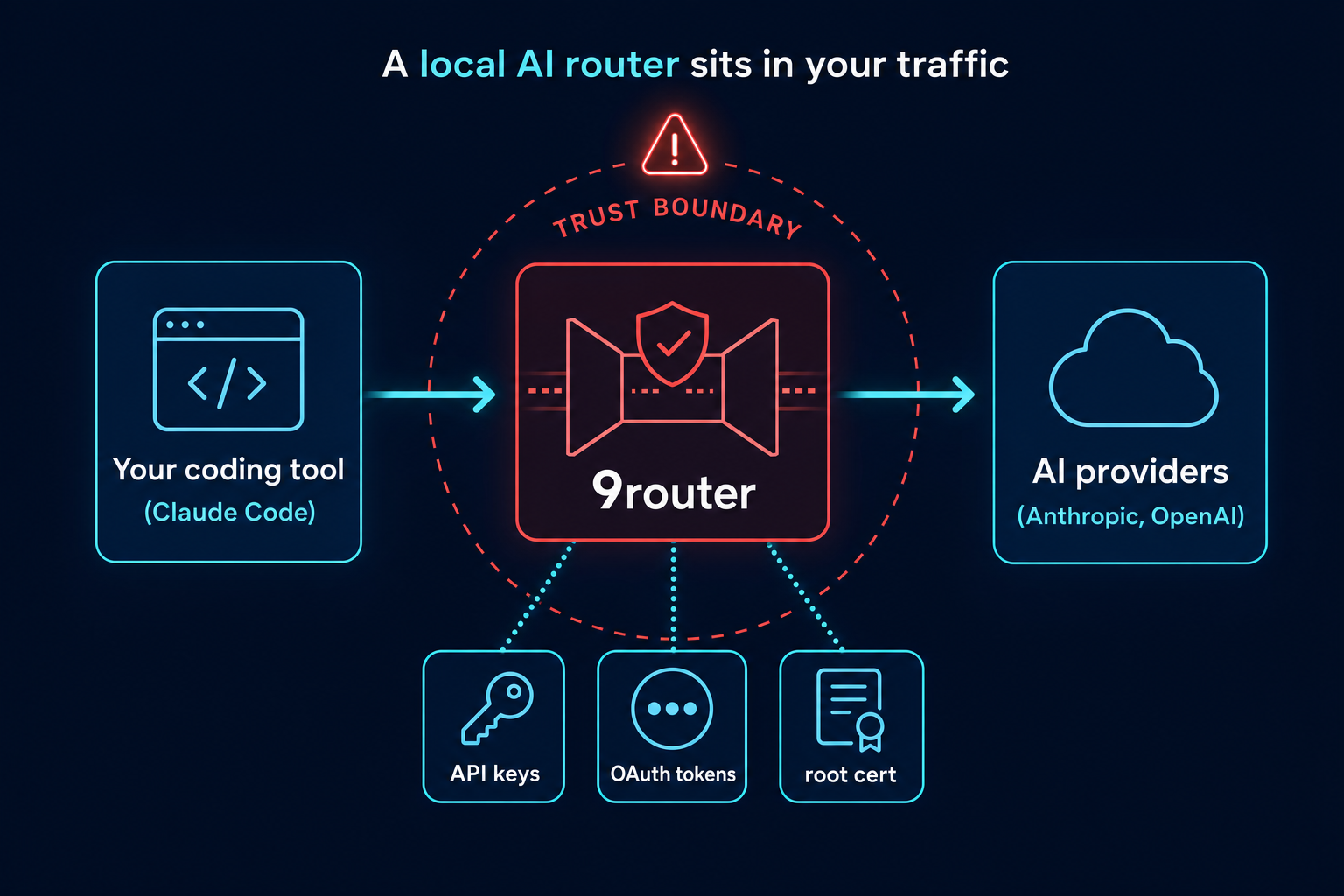
Your tokens, your traffic, a root certificate, your sudo password. A tool holding all of that has to handle secrets impeccably. So let's see whether it does.

How I Audited It
I want to be straight about the method, because it's the proof behind everything below.
This is a static source-code audit. I reviewed 9router's code at a specific commit (July 2026). It's not a live penetration test. I ran a multi-model adversarial review: AI reviewers from three different model families (Anthropic's Claude, OpenAI's Codex, Google's Gemini), each hunting a different class of weakness, then a validator to challenge every finding against authoritative sources, and a final cross-model referee to adjudicate. Underneath that I ran the deterministic scanners Semgrep, Trivy, and gitleaks.
The panel surfaced 34 raw findings, which came down to around 20 distinct confirmed issues after the referee's pass. And this is the part that matters most for your trust in the rest of it: the referee downgraded 10 findings on closer inspection and threw out 3 as false positives. I've kept those corrections in. An audit that only ever inflates severity is a marketing exercise, not an audit. Where I call something a HIGH below, that's the rating after the challenge, not before.
One caveat throughout. 9router is an actively developed open-source project. Everything below was true of the version I read, and the maintainer could patch any of it. Read this as a snapshot of what the audit found in July 2026, and check the current code if that date looks old by the time you're reading.
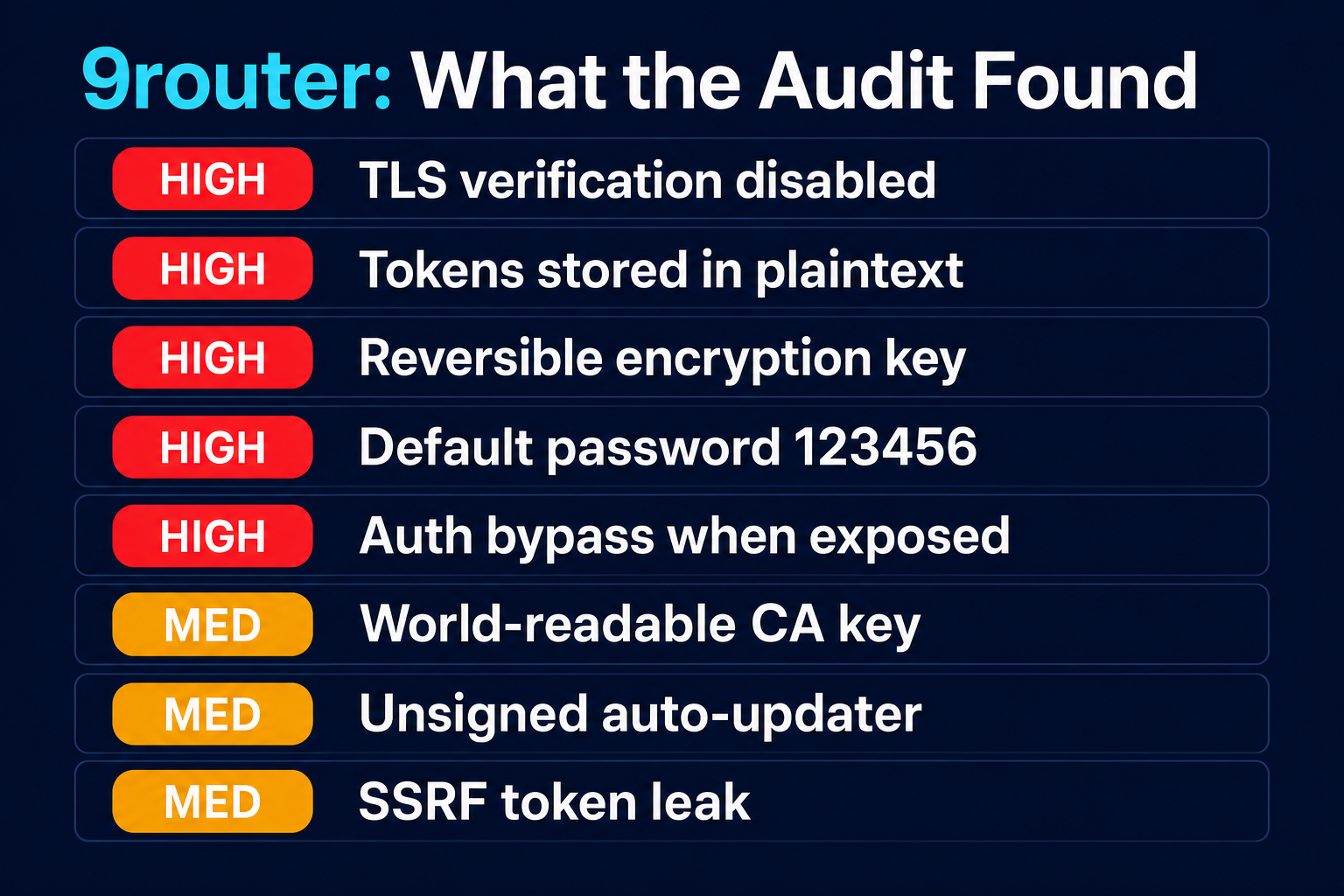
The Record Before I Even Started: 13 Advisories, 6 Critical
I want to put the public track record on the table first, because it frames everything else.
At the time of writing, 9router has 13 published security advisories on GitHub. Six are rated critical, seven high, and nine have been assigned CVE numbers. They span 13 May to 7 July 2026. That's under two months, in a project that holds your API keys and can intercept your encrypted traffic. Roughly two serious, publicly-documented vulnerabilities a week.
The list reads about how you'd expect from that pace: complete credential theft and database takeover, multiple remote-code-execution paths, unauthenticated access to the proxy, a hardcoded fallback JWT secret, several SSRF issues, and a string of authentication bypasses via header spoofing. These aren't my findings. They're the maintainer's own published advisories, most of them reported by other researchers.
To be fair to the maintainer, this is free open-source work, and the advisories are being published and fixed in the open. That matters, and I'd much rather see flaws reported publicly than buried. But for a tool holding your API keys, OAuth tokens, a root certificate, and sometimes your sudo password, the bar has to be higher. So this is another researcher doing what those others did, offered the same way.
I mention the record up front for a reason. When I ran my audit I didn't look at that list first, and I still landed on most of the same categories: the credential exposure, the auth bypasses, the SSRF. Two independent audits landing on the same failure modes tells you these are structural, the kind of thing you don't patch in an afternoon. My audit also surfaced three issues that don't appear on that list yet, which I'm disclosing privately to the maintainer under coordinated disclosure before this goes out. The rest of this review walks through what I found, and where the code lives.
The Interception Problem: It Turns Off TLS Verification
This is the finding that anchors the whole review.
To intercept your traffic, 9router redirects the real provider hostnames to your local machine, where its proxy terminates the TLS connection using the root certificate it installed. That part is by design. The problem is what it does next. When it re-sends your request onward to the actual provider, it does so with certificate verification switched off. That's the flag below, in three places in its MITM proxy server:
// src/mitm/server.js — upstream connection to the REAL provider
const upstream = tls.connect({
  host: targetHost,
  servername: targetHost,   // the real hostname IS available
  rejectUnauthorized: false, // ← verification switched OFF
});
Put plainly, 9router stops checking that it's really talking to the provider on the other end. Node's default is to verify. 9router explicitly disables it. So on a hostile network, say a dodgy café Wi-Fi, a compromised router, or a DNS spoof, an attacker could impersonate the provider, and 9router would relay your traffic and your tokens straight to them without noticing anything was wrong. And that's the sting. 9router has already inserted itself into the TLS path, so it's the only thing left that could have caught the imposter, and this setting means it doesn't check.
The fix is a one-liner, and the real hostname it needs is already passed in:
const upstream = tls.connect({
  host: targetHost,
  servername: targetHost,
  rejectUnauthorized: true,  // ← verify the real provider's cert
});
That's a textbook improper-certificate-validation defeat, made worse by the fact that intercepting your TLS is the tool's entire job. The cross-model referee rated it HIGH. It's the single biggest reason I wouldn't run 9router as shipped.
Your Credentials, Stored Carelessly
The TLS finding is about your traffic in motion. This next cluster is about your secrets at rest, and it's just as concerning.
Your provider tokens are stored in plain text. The API keys and OAuth access and refresh tokens 9router holds, the credentials for your Anthropic, OpenAI, Google and other accounts, are written to its local database as unencrypted text. I checked the schema directly. Those columns are plain text, with no encryption in front of them. So anyone who can read that database file gets your live credentials with zero effort. And "anyone who can read the file" is a longer list than it sounds: another process, a cloud-synced folder, a Time Machine or backup copy, malware running as your user.
The one secret it does encrypt, it encrypts reversibly. 9router does encrypt one thing, the sudo password it caches for its certificate and DNS work. But the encryption key is derived from your machine's device ID (a value any local process can read) plus a hardcoded salt shipped in the source:
// src/mitm/manager.js
// hardcoded salt, shipped in the source:
const ENCRYPT_SALT = "9router-mitm-pwd";

function deriveKey() {
  try {
    const { machineIdSync } = require("node-machine-id");
    // machineIdSync() is NOT secret — any local process can read it
    const raw = machineIdSync();
    return sha256(raw + ENCRYPT_SALT);
  } catch {
    // fallback: the SAME key on every install
    return sha256(ENCRYPT_SALT);
  }
}
That's not secret key material. Anyone with the database file and the (non-secret) machine ID can recompute the key. It gets worse. If the device-ID lookup fails, the code falls back to deriving the key from the constant salt on its own, which means the same key on every install. This is closer to obfuscation than encryption, and it's protecting your host's root password.
That sudo password is also kept in plaintext in memory, and written to disk every time you enable interception. The cached password sits in a plaintext global for the life of the process, and it gets persisted to the database (under that reversible encryption) each time the interception feature is turned on. Recover it and you don't just have the app. You have root on the machine.
The Dashboard Is Wide Open the Moment You Expose It
This is where the "it activates when you use the features it markets" thesis really lands. 9router's dashboard has a cluster of authentication gaps that stay low-risk while it's bound to localhost, and turn serious the instant you enable the tunnel.
It ships with a default password of 123456. When no password is set, the login route accepts 123456 and issues a real, working 24-hour session. It does this even for remote logins over the tunnel. So a freshly installed instance that's been exposed is reachable with a publicly known credential.
A convenience toggle silently removes authentication from secret-bearing APIs. Set requireLogin=false for local convenience and the guard treats every caller as authenticated. That check is not re-applied based on tunnel exposure. So the pattern "turn off login locally, enable a tunnel later" quietly exposes the endpoints that mint API keys, import OAuth tokens, and change settings, unauthenticated, to the internet.
There's no CSRF protection on state-changing dashboard actions. The session cookie is SameSite=Lax with no CSRF token, and there's no Origin or Referer check on the general dashboard and API routes. So once the dashboard is on a tunnel domain, a malicious page can drive authenticated actions like changing the password, minting an API key, or importing a token. The most sensitive routes do enforce a loopback-origin check, in fairness. It's the general ones that are left open. Layer on non-revocable 24-hour sessions (logging out or changing your password doesn't invalidate a token that's already been issued) and a cookie that's SameSite=Lax rather than Strict, lacks the __Host- prefix, and only sets the Secure flag when HTTPS is provable, and the exposed dashboard is a soft target.
None of this fires while you keep 9router on localhost. All of it fires the moment you use the remote-sharing feature it advertises.
The Sharing Feature Puts a Stranger in Your Traffic Path
Speaking of that tunnel. When you enable it to expose your local endpoint publicly, 9router can route traffic through a relay run by the author, a Cloudflare Worker at a vendor domain, and it registers your tunnel URL with that vendor. When traffic goes through that path, everything transits infrastructure you don't control and can't audit: your OAuth-bearing requests, your prompts, the code that comes back.
It's off by default, and your normal outbound traffic doesn't use it. But this feature is the natural companion to the dashboard-auth gaps above. The tunnel is what turns those local-only weaknesses into internet-facing ones. Know what enabling it means before you flip the switch.
Supply Chain: Unsigned Auto-Updates and a World-Readable CA Key
Two findings here came from the cross-model panel catching things a single reviewer would have missed.
The auto-updater installs new versions with no signature or provenance check. It runs npm i -g 9router --prefer-online and relaunches. Nothing verifies the package is what it claims to be. A compromised npm account, a malicious republish, or a registry man-in-the-middle (made more plausible by the very root certificate this tool installs) would be auto-installed and executed as you at the next update. That's a remote-code-execution path.
The root CA's private key is written to disk world-readable. Google's Gemini reviewer flagged this one. The private key for the root certificate 9router installs is saved without restrictive file permissions. On a shared machine, another local user could read that key, and with it forge a trusted certificate for any site on your system. A stolen CA key is a skeleton key for your HTTPS. The fix is a single argument:
// src/mitm/cert/rootCA.js
// before — default permissions, potentially world-readable:
fs.writeFileSync(ROOT_CA_KEY_PATH, privateKeyPem);

// after — restrict to the owner only:
fs.writeFileSync(ROOT_CA_KEY_PATH, privateKeyPem, { mode: 0o600 });
Underneath both of those: 9router ships without a lockfile. The dependency scanner couldn't even run, because nothing pins the exact versions that get installed. For a tool you're trusting with credentials, being able to reproduce and audit exactly what lands on your machine really matters, and right now you can't.
It Can Be Tricked Into Leaking Your Token (SSRF)
The last confirmed cluster. 9router has four spots where the server fetches a URL the caller controls, and in three of them it forwards the caller's credential along with it. (The fourth, an MCP-tools probe, doesn't send auth.) OpenAI's Codex reviewer caught three of them. The clearest example is a route that takes a baseUrl from the request and sends your token to whatever host you name. A request, or a page exploiting the CSRF gap above, could point that at a cloud metadata endpoint or an internal service and leak the token there. These are Server-Side Request Forgery sinks. They mean a partially-trusted request can turn 9router into a tool for reaching places it shouldn't, handing over your credentials on the way.
Why three model families beat one
A quick note on method, because it's what makes this review more than one opinion. The audit ran three independent model families, and the diversity paid off. Gemini surfaced the world-readable CA-key permissions and the update-integrity gap. Codex found the SSRF sinks. When the stakes are your credentials, one reviewer's blind spots matter, and three families cover more of them.
Two of those Gemini catches, the world-readable CA key and the unsigned auto-updater, are among the three findings that weren't already on 9router's advisory list. Together with the disabled TLS verification, they're what I'm disclosing privately to the maintainer before this publishes. So the panel didn't just re-confirm known problems. It found three more to hand back to the maintainer, which is the point of doing this properly.
How Exploitable Is This, Really?
This is the bit a good security review has to get right: separating theoretical from actually exploitable. Most of these findings are not something a random attacker on the internet can reach right now, and where you draw that line matters.
Run 9router on a default install, on localhost, tunnel off, on your own machine, and a remote attacker cannot reach any of this. The dashboard isn't exposed, so the default password, the auth-bypass, the CSRF gaps and the SSRF sinks all sit unreachable from outside your machine. Which is also why "the tool is popular and lots of people run it" doesn't translate to "lots of people are being hacked."
The risk shows up under three specific conditions, and they map cleanly to the findings:
You turn on the sharing/tunnel feature. This is the big one, because it's a feature 9router actively markets. The moment the dashboard is on the internet, the default password, the auth-bypass toggle, the missing CSRF protection, and the SSRF sinks all become remotely reachable. The weaknesses were always there. The tunnel is what points them at the world.
An attacker is already on your network. The TLS-verification-off finding needs an on-path position: hostile café Wi-Fi, a compromised router, a DNS spoof. Not "anyone," but not exotic either, and it's live whenever the interception feature is on.
Something already has local access to your machine. The plaintext tokens, the reversible key, and the world-readable CA key are local-read problems. They don't let a stranger in. But if malware, another user on a shared machine, or a synced backup can read your files, they turn a small compromise into a total one. Your live tokens, and on a shared box, your HTTPS.
So, the fair summary: for a solo user on localhost, the real-world risk today is low. The danger is real but conditional. It activates when you use the remote features the tool is sold on, or when a local compromise gives the plaintext-storage problems something to leverage. That conditionality is exactly why my advice below is "lock it down," not "your machine is already owned."
How I'd Change 9router Before I'd Use It
The trouble is that the fixes 9router needs aren't small tweaks. They're core to how it works.
- Re-verify the real provider's certificate on the way out. Stop disabling TLS verification. This one's non-negotiable.
- Encrypt credentials at rest with a key backed by the OS keychain (macOS Keychain, Windows DPAPI, libsecret), not a device ID, and never a constant fallback. And don't cache the sudo password at all. Prompt per action.
- Drop the default password. Refuse to issue remote sessions until one is set, gate the secret APIs on tunnel exposure, and add CSRF protection.
- Sign and verify updates, and ship a lockfile so dependencies can be audited.
That's most of the security-sensitive surface of the tool. For something whose entire job is to sit in your credential path, it's a lot to take on trust.
The Part That Never Goes Stale: How to Vet Any AI Router
9router may patch all of the above tomorrow. But the questions you should ask of any tool like this don't change. So whether you use 9router, a competitor, or something that doesn't exist yet, run through this before you trust it with your keys:
How are your keys and tokens stored? If it's plaintext on disk, a leak of that file leaks your accounts. Treat its config folder as a secret. No cloud sync, no shared backups.
Does it weaken your TLS? If it installs a root certificate, know exactly what it intercepts and whether it still verifies the real provider. A tool that turns verification off can be silently impersonated.
What does it change outside its own folder, and what happens when it's exposed? A local-only convenience can become an internet-facing hole the moment you enable remote access. Assume every "share" feature widens the attack surface.
Can you see what it installs and updates? No lockfile, unsigned auto-updates, a curl | sh you didn't read. Small signals of how carefully the project is run.
Keep it local and minimal. Bind it to localhost, turn off any optional proxy, remote, or certificate features you don't need, change any default password immediately, and point it at a provider API key. Never your paid subscription.
Want to Do This Kind of Work Yourself?
Auditing a tool like this, reading the source, reasoning about trust boundaries, running a multi-model panel over it and knowing which findings actually matter, is exactly the skill set the AI era rewards. If that's the kind of work you want to be doing, it's what our AI Master's Program is built for. You learn AI-Driven Cyber Security Engineering and build your own personal AI infrastructure, no coding background required, so you're the one directing these models rather than trusting a tool blindly. If you'd rather start with the fundamentals, our penetration testing and ethical hacking courses are a solid first step.
Verdict: Is 9router Safe?
As audited in July 2026, I would not route real credentials through 9router. It disables TLS verification on the connections to the real providers, stores your tokens in plaintext, "encrypts" its one secret reversibly, ships a default password that issues real sessions, drops authentication on secret APIs when a convenience toggle is on, has no CSRF protection, installs a world-readable CA key, auto-updates without signature checks, and has SSRF sinks that can leak your token. The disqualifying ones all activate exactly when you use the sharing and failover features the tool is sold on.
None of that makes it malicious. There's no evidence it exfiltrates your keys to the author, and this isn't malware. It's a capable project that could fix all of this. But for anything touching real accounts or client work, I wouldn't. And I'm not out on a limb: my audit landed on the same problems a public record of 13 advisories and 6 critical CVEs already documents.
I hope the maintainer keeps going, and fixes them. If they do, I'll update this review to say so.
If you must try it, lock it down hard. Loopback only, no tunnel. requireLogin on, with the default password changed. The interception/MITM feature off. Auto-update off. And never pointed at credentials you actually care about.
If your real goal was just running Claude Code on free or cheaper models, there are safer ways to do it. The main alternative, Claude Code Router, came out of this same audit looking considerably better, and I've written up the details in my Claude Code Router review. Our free LLM API guide walks through the wider set of options too.
❓ 9router Review FAQ
Is 9router safe to use?
As of the version I audited (July 2026), I wouldn't use it with real credentials. It disables TLS certificate verification on its connections to the real providers, stores your API keys and tokens in plaintext, ships a default password that issues real sessions, and drops authentication on secret APIs when exposed over a tunnel. Those are structural problems, not settings you can simply turn off. Treat it as experimental only.
What does 9router actually do?
It's a local proxy that connects AI coding tools (Claude Code, Cursor, Codex, Cline and more) to 40+ model providers, with automatic failover and token-saving features. Your prompts, code, and credentials all pass through it, and its interception feature installs a root certificate and caches your sudo password.
Does 9router steal your API keys?
There's no evidence it exfiltrates your keys to the author. This isn't malware. The risk is that it stores them carelessly, in plaintext, and weakens your machine's defences (TLS verification off, world-readable CA key, unsigned updates), so a different attacker, a leaked file, or a bad update can get them.
Is the default password really a risk?
Yes, if you ever expose the dashboard. When no password is set, 9router accepts 123456 and issues a real 24-hour session, including over the tunnel. On a fresh, exposed instance that's a publicly known credential. Change it immediately, and don't expose the dashboard.
Is 9router or Claude Code Router safer?
Of the two, Claude Code Router. It doesn't disable TLS verification, its dependencies scan clean, and its riskier features are opt-in and off by default. Both store tokens in plaintext, so lock either one down. I audited it separately in my Claude Code Router review, which walks through the full comparison.
Can I use my Claude subscription through 9router?
Technically yes, but routing your paid subscription (rather than an API key) through a third-party proxy is a grey area that can put the account at risk under the provider's terms. Use a provider API key for anything like this.
Methodology: static source-code audit of 9router at a specific commit (July 2026), using a multi-model adversarial review (Claude + Codex + Gemini, then a validator and a cross-family referee) plus Semgrep, Trivy and gitleaks. 34 raw findings became ~20 confirmed after the referee downgraded 10 and rejected 3 as false positives. Findings reflect that version. 9router is actively developed and may have changed.
About the Author

Nathan House, Founder & CEO of StationX
Nathan House has 30 years of hands-on cybersecurity experience and is Cambridge-educated, holding CISSP, CISA, CISM, OSCP, CEH, and SABSA. He founded StationX in 1999 — one of the UK’s first cybersecurity companies — and has secured £71 billion in UK mobile banking transactions and the London 2012 Olympics, advising clients including Microsoft, Cisco, BP, Vodafone, and VISA. He authored the world’s most popular cybersecurity course — a #1 Udemy bestseller taken by over 500,000 students — and was named Cyber Security Educator of the Year 2020, AI Security Educator of the Year, and a UK Top 25 Security Influencer 2025. A DEF CON speaker and featured expert on CNN, Fox News, NBC, and the BBC, Nathan leads StationX’s training of more than half a million students worldwide.