Bright Data Review Sep 2026: I Paid $1,000 So You Don't
Most Bright Data reviews are written by people who signed up, ran 10 test requests, and paraphrased the pricing page. This Bright Data review is different. My AI agents have run on Bright Data every day for the past 8 months, I have the bills to prove it, and on 19 December 2025 one unset limit cost me over $1,000 in a single afternoon. They refunded it, which tells you something no rate card will.
If you are building AI agents that need real web data, or you do OSINT and keep hitting bot walls, this is written for you. We will go through what each product actually does, what it costs at my real usage, the mistake that burned me, and the open-source tooling I built so an agent can never repeat it. I am giving that tooling away in this article.
Let us start with the disclosure, because it shapes everything else.
TL;DR — if you've only got 30 seconds
Verdict: recommended, with one loud warning. Pages that defeat normal tooling come back reliably, at per-request prices that are trivial for individual and agent-scale use. When one unset limit ran up a $1,000 bill against me, they refunded it in full.
Real cost: my last 90-day bill, running daily AI agent research, was $11.86. The danger is never the rate card. It is the unbounded call against a per-record product.
For AI agents: the MCP server has a genuine free tier (5,000 requests a month), but it puts your model directly on the billing trigger. Route anything autonomous through guarded scripts instead.
Free toolkit: the open-source guardrail tooling my agents run (estimate, cap, confirm, then run) is given away in this article.
Why This Review Is Different
Two things you should know before you trust a word I say.
First, the affiliate link. If you sign up through my link, StationX gets paid a commission. You get exactly the same deal either way, including Bright Data's standard promotion that matches your first deposit dollar for dollar up to $500 (a promotional offer with its own conditions, so read the current terms at signup). The link changes nothing for you. It pays me for the work in this review and the free tooling below, so use it if that work saved you time, and skip it if it didn't. That is the whole pitch.
Second, the evidence. I am not reviewing a trial account. Bright Data is load-bearing infrastructure at StationX: more than 600 files in my automation estate reference it, my research pipeline queries it daily, and my last 90-day bill was $11.86. I have also spent over $1,000 on it in one afternoon by accident. You will get both numbers, because a review that only shows you the good month is marketing.
So what is this platform we have wired so deeply into everything?

What Is Bright Data?
Bright Data (formerly Luminati) is a web data platform: proxy networks, unblocking infrastructure, and scraping APIs sold as separate products under one account. The honest one-line summary of what you are paying for is this: websites do not want to be scraped at scale, and Bright Data's business is making that someone else's problem.
You need that when three things are true. The site blocks bots. You need volume or automation. And you need it to work reliably tomorrow, not just today. If none of those apply, and for plenty of jobs they do not, you should not pay anyone. A plain curl or a local Playwright script scrapes an unprotected site for free, and later in this review I will tell you exactly when I would not use Bright Data at all.
But when those three things are true, the question becomes which of their many products you actually need (the pricing table later in this review lists 9, and the full catalogue is bigger). That is where most people get lost, so that is where we will go next.
The Products, Explained by Someone Who Uses Them
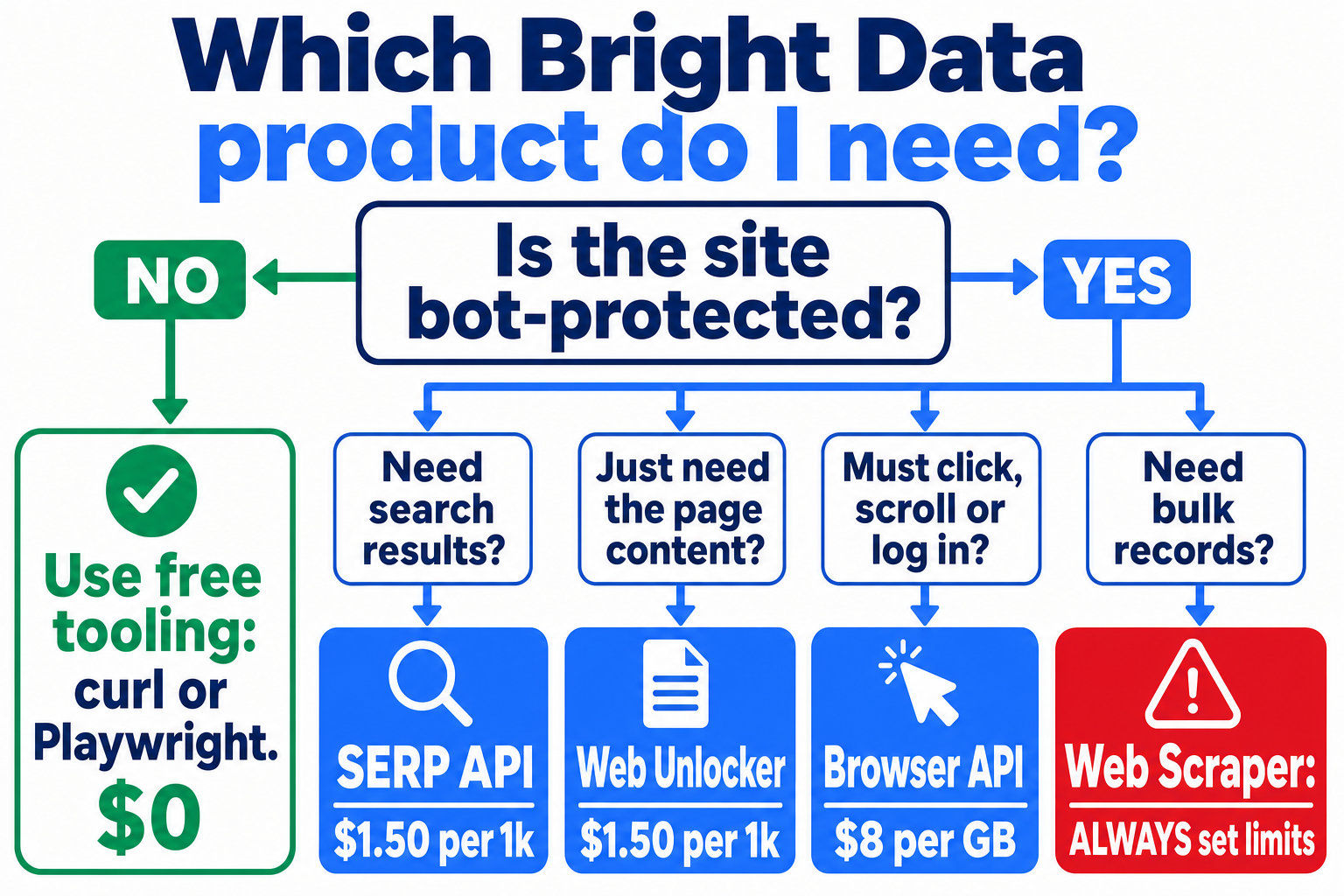
Bright Data's product page is an alphabet soup. After 8 months of daily web scraping and agent research, we effectively use 3 of these products for 95% of the work. Let me give you each product, what it is really for, and whether I would pay for it again.
Web Unlocker: the workhorse
You give the Web Unlocker a URL, it returns the page content, and everything in between (proxy selection, browser fingerprinting, CAPTCHA solving, retries) is their problem. It executes JavaScript too, which surprises people who assume they need the more expensive browser product for that.
At $1.50 per 1,000 successful requests, a single page fetch costs about $0.0015. This is the product my research pipeline hits every day, and it is the reason my unlocker line item for 90 days is $4.31. To be clear about the boundary: it renders the page, JavaScript included, but you cannot drive it like a browser. Clicking, scrolling, and logging in are the Browser API's job. One caveat the pricing page will not volunteer: billing is per successful request by default, but if you enable custom features (custom headers, cookies), you are billed for failures too. More on why that matters in the pricing section.
SERP API: search results without the fight
The SERP API returns Google or Bing results as structured data, same $1.50 per 1,000 rate. Scraping Google yourself is a losing arms race, and I stopped fighting it. This powers the search layer of my agent research stack. One billing quirk from my own account: my SERP requests run through my Web Unlocker zone, so they appear inside the unlocker line on the invoice rather than as their own item (newer accounts can have dedicated SERP zones). That is why you will not see a separate SERP entry on my bill below.
Browser API: for when you must interact
The Browser API gives you a real remote browser over CDP (Chrome DevTools Protocol) at $8 per GB of traffic. Note the unit: traffic, not time. A session that streams images and video gets expensive fast, so my tooling blocks media and force-closes sessions at a wall-clock limit.
A war story from production: in my stack, Playwright 1.57's connectOverCDP hung against Bright Data's websocket endpoint. Every auth variant, 50-second timeout, dead. The connection itself was fine: a raw websocket client connected in under a second, so I never fully isolated whose bug it was. I just wrote my own minimal CDP driver and shipped that; it is included in the free toolkit. If you are stuck on exactly this, that driver alone justifies the download.
My rule from the bills: render with the Unlocker (cheap, executes JS), reach for the Browser API only when you genuinely need to click, scroll, or log in. My 90-day Browser API spend is $7.55 and most of that was infinite-scroll capture jobs.
Proxy networks: Bright Data proxies without the mystery
Bright Data proxies come in 4 networks, and the differences matter more than the marketing suggests:
Residential proxies ($8/GB list): real household IPs across 195 countries, rotating. This is what “we look like a normal user” means. As I write this there is a 50% promo code (RESIGB50) on their pricing page bringing it to $4/GB.
Datacenter proxies ($0.60/GB): cheap and fast, but protected sites spot them instantly. Fine for unprotected bulk work.
ISP proxies ($8/GB): static residential-grade IPs. These were $15/GB in June 2026; the cut to $8 is recent and makes them far more reasonable. Proxyway's long-running Bright Data review documents a fair-use cap of 100GB per IP per month; check how it applies to your plan before sizing a job around it.
Mobile proxies: still sold, but the public price listing quietly disappeared in 2026, leaving the rate visible only in the dashboard or via sales. For reference, my dashboard showed $8/GB in June 2026.
⚠️ One eligibility fact that changed on 7 July 2026, and it matters more than any price: new residential proxy zones now require a company-only, human-reviewed KYC check. “No automatic or instant access,” in their own words, and personal-email accounts cannot be approved for residential at all (source: the residential network access policy; zones created before that date keep working). ISP proxies, datacenter proxies, and the Web Unlocker API need no KYC, and their docs are explicit that these are alternatives, not a limited residential mode. So if you are an individual, do not build your plan around residential proxies; the per-request APIs are the accessible path, and they are the better tools for most jobs anyway.
My honest take: as an agent builder I barely touch raw proxies. My residential line item for 90 days is $0.0005 (yes, really, under a tenth of a cent). The Unlocker and SERP API are proxies plus the hard parts, at per-request prices. Raw proxies make sense when you are running your own scraping stack and want full control.
A note for OSINT and security researchers
Since a good share of my readers do OSINT or security work, three practical points the marketing never covers. First, the KYC point above cuts both ways: it slows you down, but it also means the network you are sharing is not full of throwaway abuse accounts, which is part of why the IPs stay clean. Second, think about attribution before you route sensitive research through ANY commercial provider: your queries transit their infrastructure, they keep logs, and your account is KYC-verified to you. For passive collection against public sources that trade-off is usually fine; for anything where the investigation itself is sensitive, it is not, and you should design accordingly. Third, the workflow that has served me best: SERP API for discovery, Unlocker for bot-blocked pages on the target list, and the free path (plain curl through your own egress) for everything unprotected, so the paid, logged infrastructure only ever sees the queries that need it. And to be explicit: none of this is for logging into other people's systems; scraping behind someone else's login is against Bright Data's terms and, depending on where you are, the law.
Web Scraper API and datasets: the danger zone
The dataset products charge per record: pre-built scrapers for LinkedIn, Indeed, Glassdoor, X and others at $1.50 per 1,000 records, plus off-the-shelf datasets from $250 per 100K records. Per-record billing is exactly the mechanism that produced my $1,000 afternoon, so I will save the details for that section. For now, one rule: never call a “discover” endpoint without a hard limit.
Those are the products. But the reason you are probably reading this in 2026 is agents, and that is where this review has something nobody else can show you.
Using Bright Data With AI Agents: MCP vs API
Bright Data noticed the agent wave early. The Bright Data MCP server (github.com/brightdata/brightdata-mcp, Model Context Protocol) lets Claude, Cursor, or any MCP-capable agent search and scrape the web as native tool calls, and since early 2026 there is a genuine free tier: 5,000 requests per month, no credit card needed for it. Three precisions the launch posts skip. Those 5,000 requests are the same shared pool as the standard account free credits, not an extra allowance. Browser navigation is excluded from the free tier. And if you sign up with a personal email address and no payment method, the Web Unlocker API that the MCP runs on stays blocked until you add a card (verification only, per their docs).
I run the Bright Data MCP server in my own agent stack, so let me say clearly: it works, setup is 5 minutes, and for interactive use (“scrape this page for me, now”) it is the right tool. My agents use it every day for quick supervised lookups, where I am watching the session, and I keep per-zone spending limits set in the dashboard as a backstop. Be clear about one thing though: the free tier's hard stop only protects an unfunded account. The moment your account holds credit, usage past the free pool bills normally. My own bills are proof.
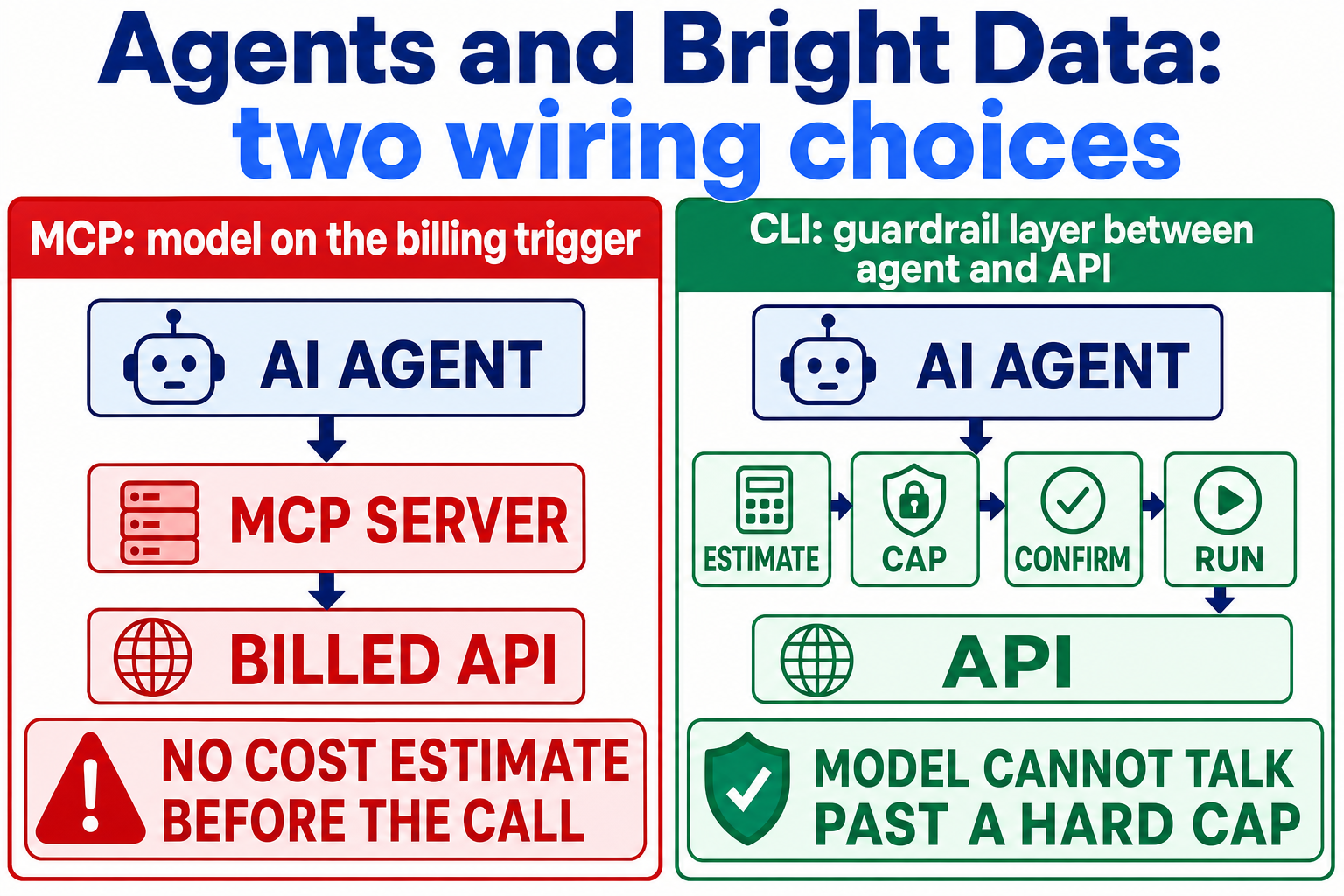
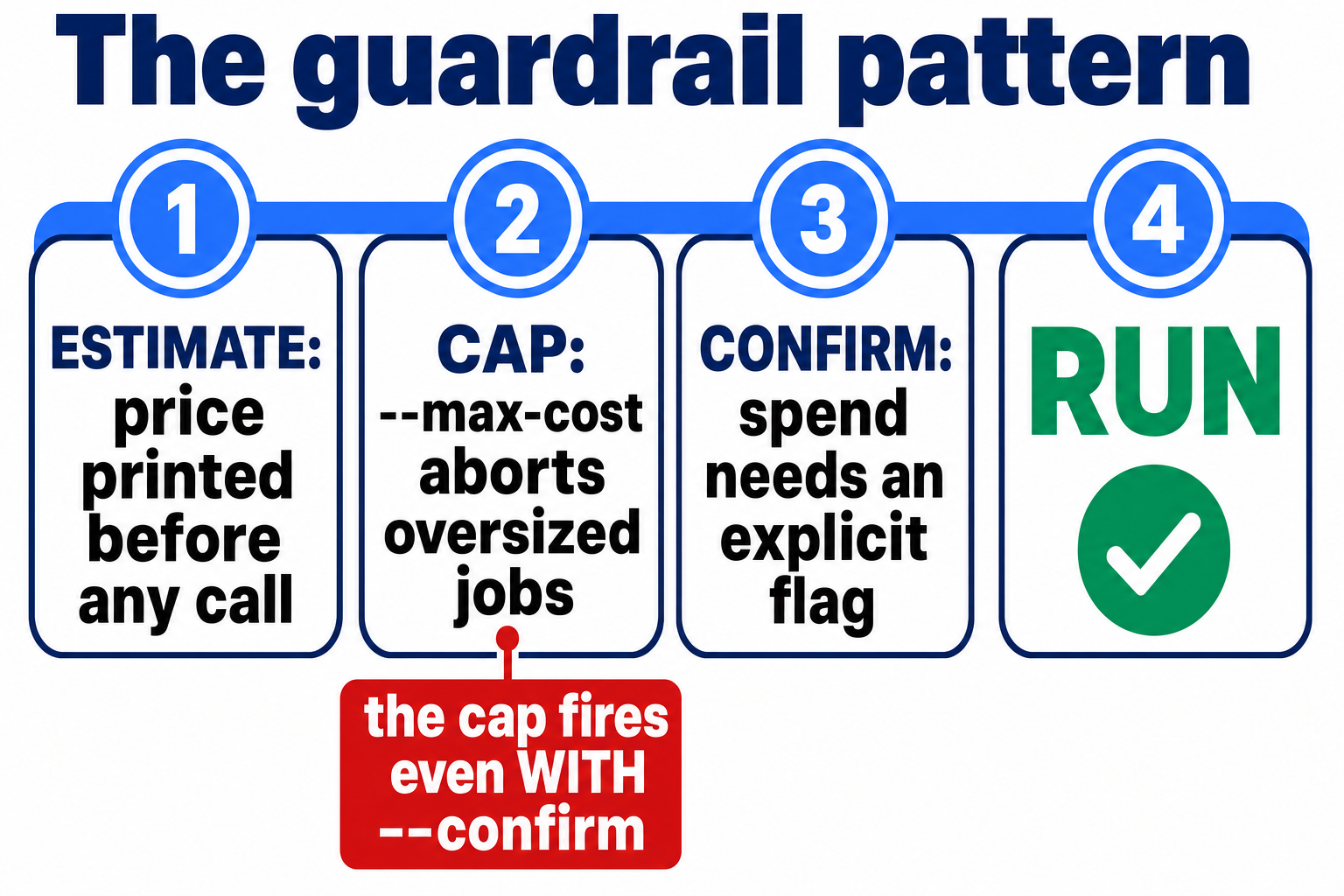
For anything scripted or autonomous, though, I deliberately route my agents through the API with my own CLI wrappers instead. The reason is not taste. The MCP puts your language model directly on the billing trigger. An agent that can call scrape can call it 10,000 times, and nothing in the protocol makes it show you a cost estimate first. In fairness, Bright Data does give you blunt instruments: the free tier stops hard at its cap, there is rate limiting, and you can set per-zone spending limits in the dashboard. But the dashboard limits are checked on a delay, and none of these show the model a price before it acts. My tooling forces every billable call through 4 gates: estimate the cost, check it against a hard cap, require explicit confirmation for spend-bearing operations, and only then run. A model cannot talk its way past a hard cap.
I think this is the single most important design decision when you wire paid infrastructure into an agent, and it is why the free toolkit exists. So let me show you what is in it.
The Toolkit I Am Giving Away
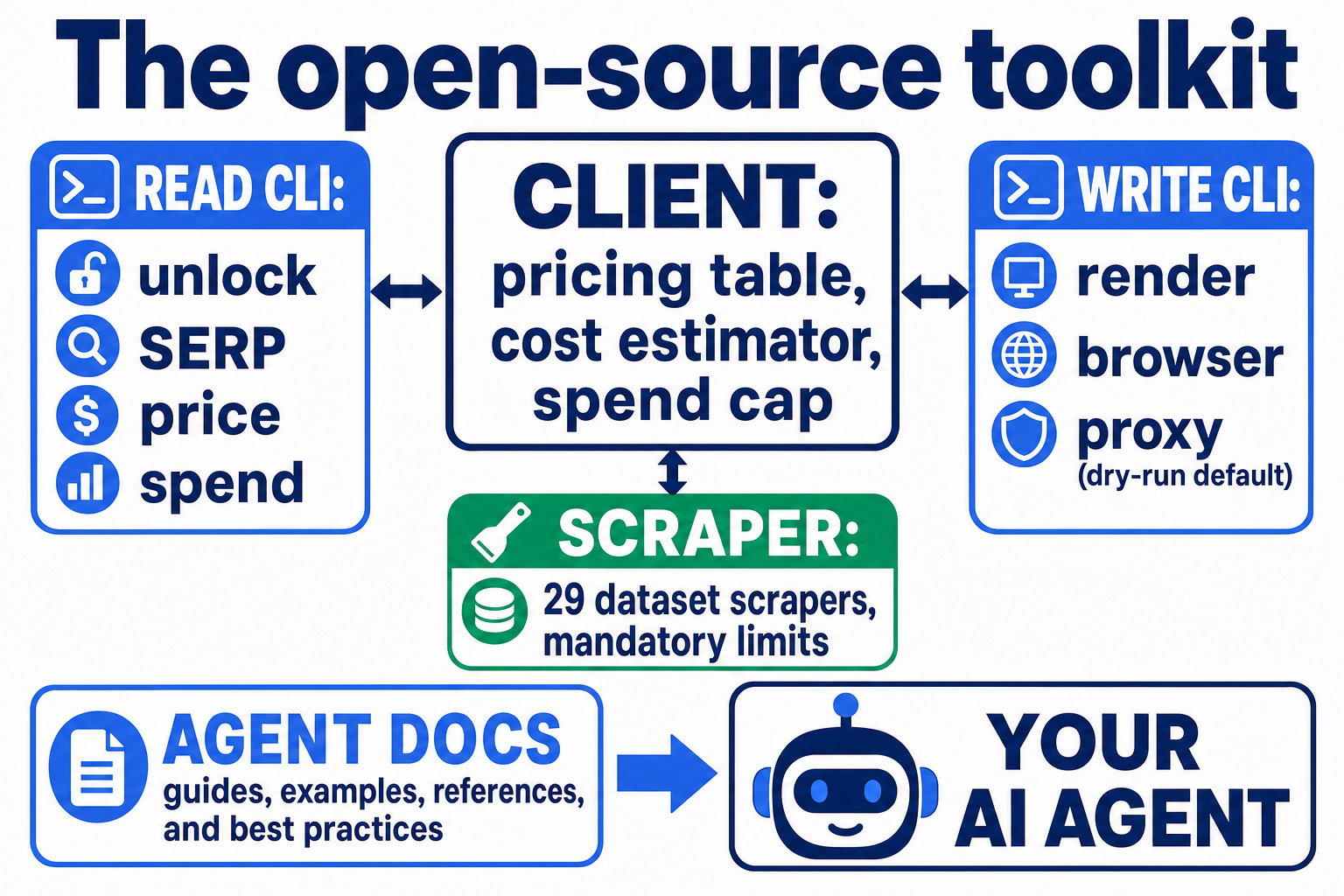
Everything my agents use to talk to Bright Data is now open source: github.com/nathanhouse/brightdata-agent-toolkit. It is TypeScript on Bun, no dependencies beyond the standard library, and it is the actual code we run in production at StationX, cleaned of credentials and account details.
What is in the box:
The guardrail engine. A pricing table, a cost estimator, and a spend cap that throws before any network call. The cap fires even when a confirmation flag is passed. That ordering is deliberate: confirmation proves intent, the cap catches mistakes, and you need both because the $1,000 incident happened with intent and without a cap.
A read CLI: unlock a URL, run SERP queries, price a job offline before running it, check per-zone spend, test zone health. “Safe” here means bounded, not free: unlock and SERP calls still bill (about $0.0015 each), so even these print their estimate and honour the cap.
A write CLI: JS rendering, bounded browser sessions (media blocked, wall-clock limited), bounded proxy tunnels. Everything spend-bearing is dry-run by default.
The raw CDP driver that works where Playwright hangs.
29 dataset scrapers (LinkedIn profiles/jobs/posts, Indeed, Glassdoor, X) with mandatory limits baked in. The dangerous “discover” scrapers refuse to run without an explicit risk acknowledgement and are capped at 100 results per input, 1,000 total, unless you consciously override.
Agent-facing docs. Markdown instructions that tell a model when to use which tool and what the safety rules are. If you build agents you already know these docs are half the product.
MIT licensed, zero dependencies. Getting it running takes about a minute:
git clone https://github.com/nathanhouse/brightdata-agent-toolkit.git
cd brightdata-agent-toolkit
# add your Bright Data API token per the README, then price a job offline:
bun brightdata-read.ts price unlocker 5000
And rather than tell you the safety works, let me show you. This is the toolkit's real, unedited response when anyone (me, or an agent) asks for the exact scrape type that caused the incident, without the risk flag:
⚠️  WARNING: DANGEROUS SCRAPER ⚠️

Scraper 'indeed-company-list' can return UNLIMITED results.

┌─────────────────────────────────────────────────────────────┐
│  COST EXAMPLES:                                             │
│    1,000 records   = $1.50                                  │
│   10,000 records   = $15                                    │
│  100,000 records   = $150                                   │
│  682,000 records   = $1,023  ← THIS HAPPENED 2025-12-19     │
└─────────────────────────────────────────────────────────────┘

To run this scraper, you MUST:
  1. Add --i-accept-risk flag
  2. Use --async mode (so you can cancel if needed)

SAFETY: Even with --i-accept-risk, limits are enforced:
  --limit 100       (max results per input)
  --max-total 1000  (max total results = ~$1.50)
That warning box ships in the code. The most expensive afternoon of my scraping life is memorialized inside the tool that makes repeating it impossible.
If you use it with an agent, wire the CLIs in as tools and point the model at the repo's agent-facing routing doc (CLAUDE.md in the repo) as context. That is the exact configuration I use daily, including for the research behind this article.
The toolkit exists because of one very bad afternoon. Time to tell that story properly.
The $1,000 Mistake, and What Bright Data Did About It
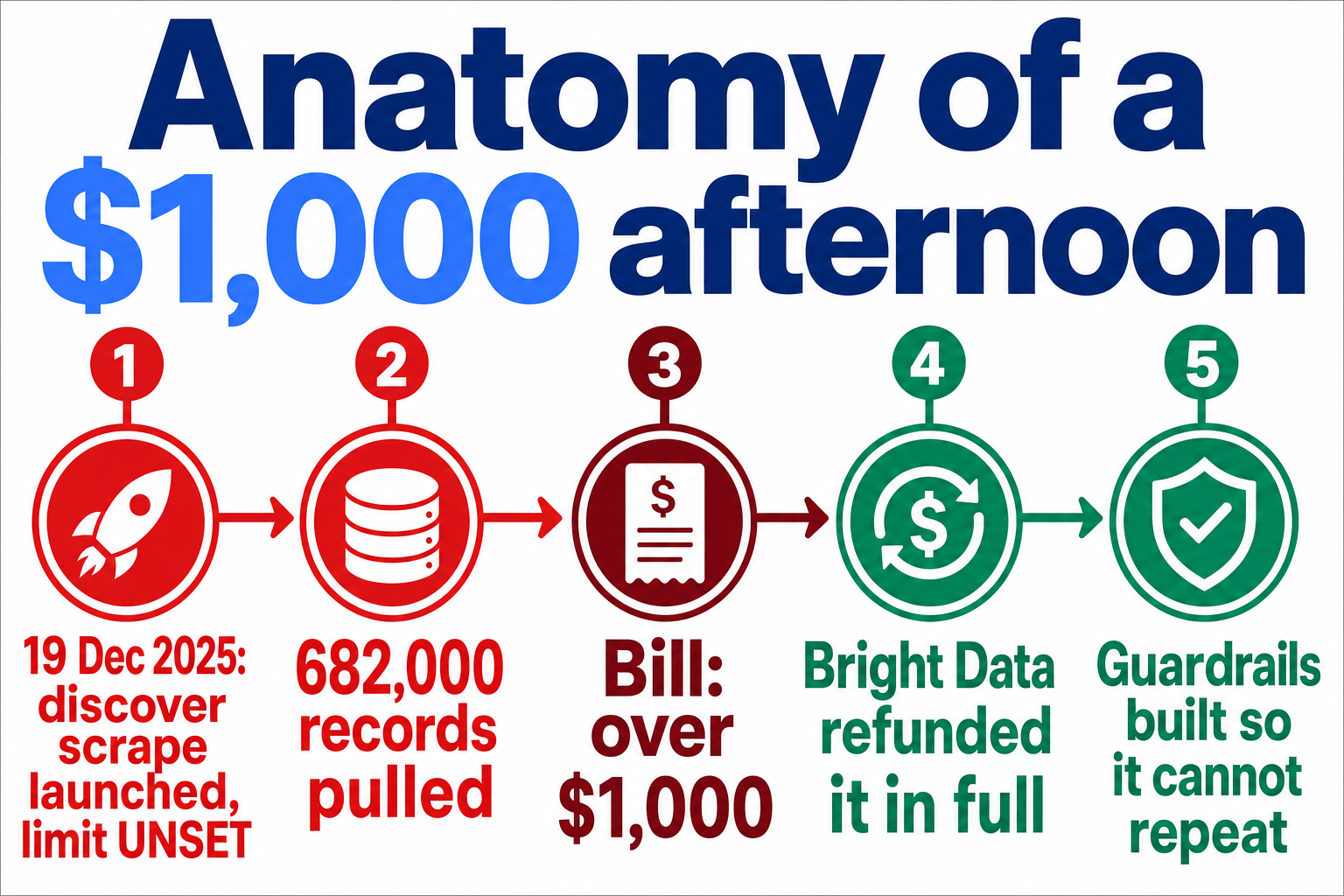
On 19 December 2025, I ran a company-discovery scrape against Indeed using one of the pre-built dataset scrapers. The discover endpoint does what it says: give it criteria, and it finds all matching records. I did not set a limit, because nothing forced me to.
It found 682,000 records. At per-record dataset pricing, that is a bill north of $1,000, accumulated in the time it takes to have lunch.
Two honest framings, and both matter. It was my error: the parameter existed and I left it unset. And it was a platform footgun: an unbounded discover against a job board with millions of listings has almost no legitimate use at full depth, and the platform will happily run it to completion without a “this will cost roughly $X, continue?” gate. Their dashboard does have per-zone spending limits you can configure, and you should, but they are checked on a delay of roughly 15 minutes. A runaway scrape can outrun them badly.
I contacted support expecting an argument. Nothing in their terms obliged them to give the money back; a usage mistake is normally the customer's problem, at every vendor. They refunded the full amount. For a company whose meter had every contractual right to keep the money, that decision is worth more than any feature. It is a large part of why I am comfortable recommending them to my students, and I say that as someone predisposed to grumble about it.
But I did not rely on their goodwill happening twice. Every guardrail in the toolkit above, the mandatory limits, the risk flag, the spend cap that ignores confirmation, exists because of this incident.
✅ The lesson for you costs nothing: per-record products are where scraping bills die. Cap everything, and make the cap mechanical, not procedural.
Which raises the obvious question: guardrails in place, what does this platform actually cost at sane volume?
Bright Data Pricing: What It Really Costs
Every rate below was verified against Bright Data's public pricing pages on 5 August 2026. Prices in this space move (ISP proxies dropped nearly 50% this year), so treat any review older than a few months, including this one eventually, with suspicion.
| Product | Unit | Pay-as-you-go |
|---|---|---|
| Web Unlocker | 1,000 successful requests | $1.50 |
| SERP API | 1,000 successful requests | $1.50 |
| Browser API | GB of traffic | $8.00 |
| Residential proxies | GB | $8.00 (50% promo running) |
| Datacenter proxies | GB | $0.60 |
| ISP proxies | GB | $8.00 (down from $15) |
| Mobile proxies | GB | unlisted, ask sales |
| Web Scraper API | 1,000 records | $1.50 |
| Datasets | 100,000 records | from $250 |
Committed plans buy lower unit rates, though the structure now varies by product: the Browser API, proxies, and MCP keep fixed $499/$999/$1,999 tiers, while the Unlocker, SERP, and scraper pages have moved to a single $499 “Scale” plan with a volume slider, plus Enterprise. Unless you are an agency with predictable volume, start on pay-as-you-go.
Eligibility and free-tier terms, precisely (verified against their docs on 5 August 2026, because the marketing versions are looser than the real ones):
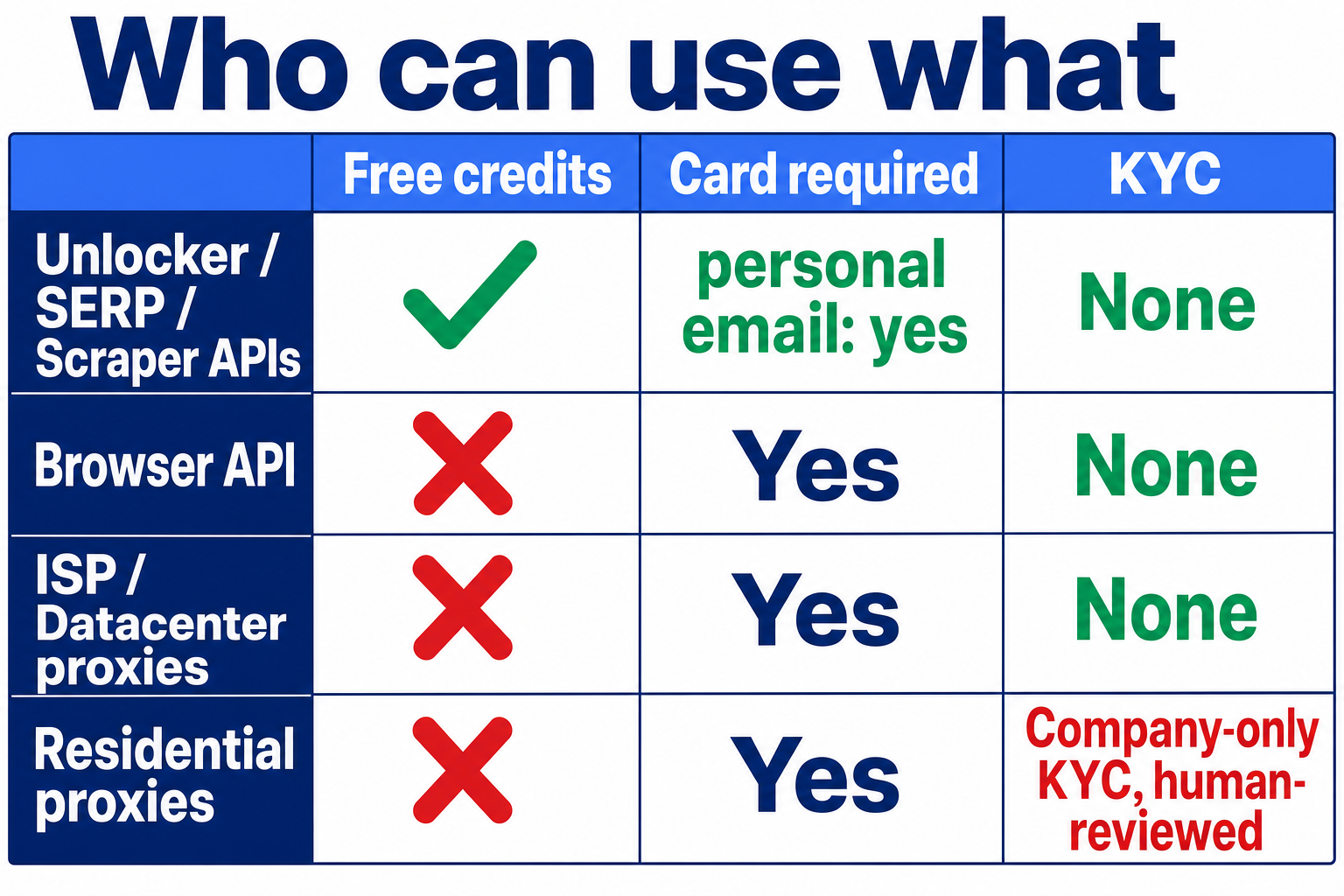
New accounts get 5,000 free credits per month (about $7.50 of usage) as a shared pool across the Web Unlocker API, SERP API, Web Scraper API, and Scraper Studio. 1 credit = 1 request or record. No rollover, and a hard stop when the pool is gone.
The MCP free tier draws from that same pool; browser navigation is not in it.
New accounts also start in a 7-day “Playground” trial (which includes a one-time $2 credit for the proxy products); adding a payment method verifies the account and starts a 30-day Limited Trial with a $5 credit that opens up proxy and unlocker usage (not offered in every country).
Personal-email signups with no payment method on file are blocked from the Web Unlocker API and the proxy networks until a card is added (verification, not billing, per their docs). Unfunded accounts are also rate-limited to 1,000 requests per minute.
New residential zones require company-only KYC (since 7 July 2026; see the products section). ISP, datacenter, and the per-request APIs need no KYC. Individuals: plan around the per-request APIs.
The first-deposit match up to $500 is a promotion with its own conditions; read the terms shown at signup before counting on it. For what it is worth, it paid out for me: when I funded my own account, my first deposit was matched in full.
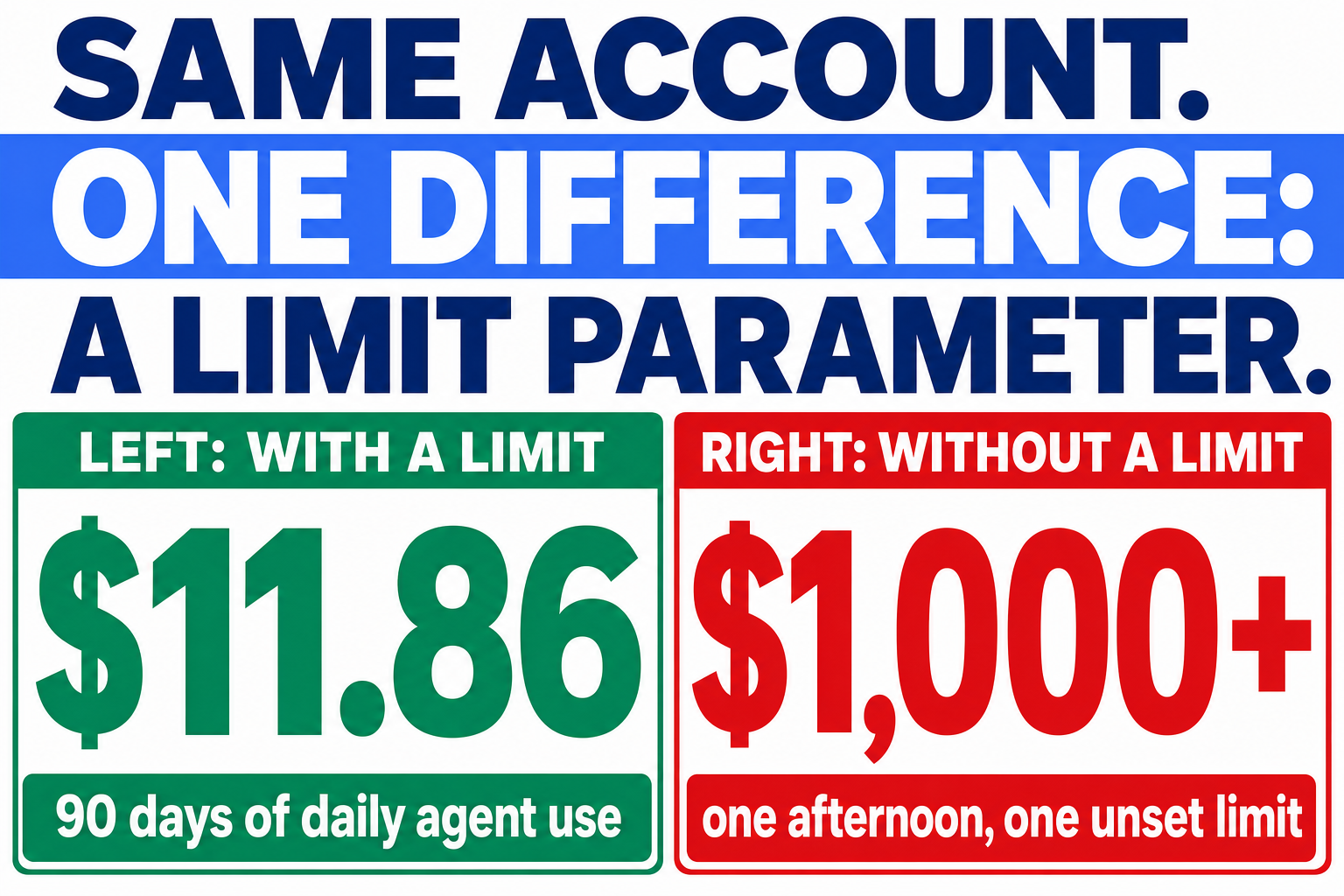
Now the number that matters. My real 90-day bill, May through August 2026, running daily agent research, SERP queries, page unlocking, and periodic browser capture: $11.86. Browser API $7.55 (just under 1GB of traffic at $8/GB), Web Unlocker $4.31 (roughly 2,900 billed requests at $1.50 per 1,000), residential proxies half a tenth of a cent. To be fair about scale: that is a light workload, one practitioner's research pipeline, not a scraping farm. But that is exactly the point: at the usage level most individuals and small agent stacks actually run, the per-request products cost less than a takeaway, and the danger is never the rate card. It is the unbounded call. $11.86 and $1,000 are both numbers from the same account, and the only difference between them is a limit parameter.
Two billing details worth engraving somewhere:
Unlocker and SERP bill successful requests only, unless you enable custom features on the Unlocker, in which case failures bill too. If you see complaints about “charged for failed requests” in other reviews, this config flag is usually the story behind them.
Browser API premium domains carry a surcharge, and the current rate is only visible in your dashboard. Check it before a big job.
Of course, none of this matters if a competitor does the same job cheaper. I happen to have an account with the main one.
Bright Data Alternatives: Oxylabs and When to Use Neither
Any serious list of Bright Data alternatives starts with Oxylabs, and most “Bright Data vs Oxylabs” pieces are written by people with an account at neither. I hold paid accounts at both and use both in production, so rather than cram a second review into this one, I am giving Oxylabs the same treatment in its own full review. In the interest of the same transparency as section 1: I have applied to Oxylabs' affiliate programme too, so assume I could earn from either recommendation, and weigh my words accordingly.
The short version until then: Oxylabs is the closest like-for-like competitor, and I have deliberately not benchmarked the two head-to-head yet; that is exactly what the standalone review is for, and I would rather publish measured numbers than impressions. What I can say first-hand is why my agent stack runs on Bright Data: the agent-facing surface. The MCP server with a real free tier, per-request APIs that map cleanly onto tool calls, and the account APIs (per-zone spend, zone health) that make my guardrails possible.
For completeness, the names you will keep meeting in the mid-market (ScraperAPI, Zyte, Apify, ScrapingBee) pitch simpler, cheaper entry points. I have not run production workloads on any of them, so I will not rank them. If your need is “scrape these 500 unprotected pages weekly”, that tier is plenty, and honestly so is free tooling.
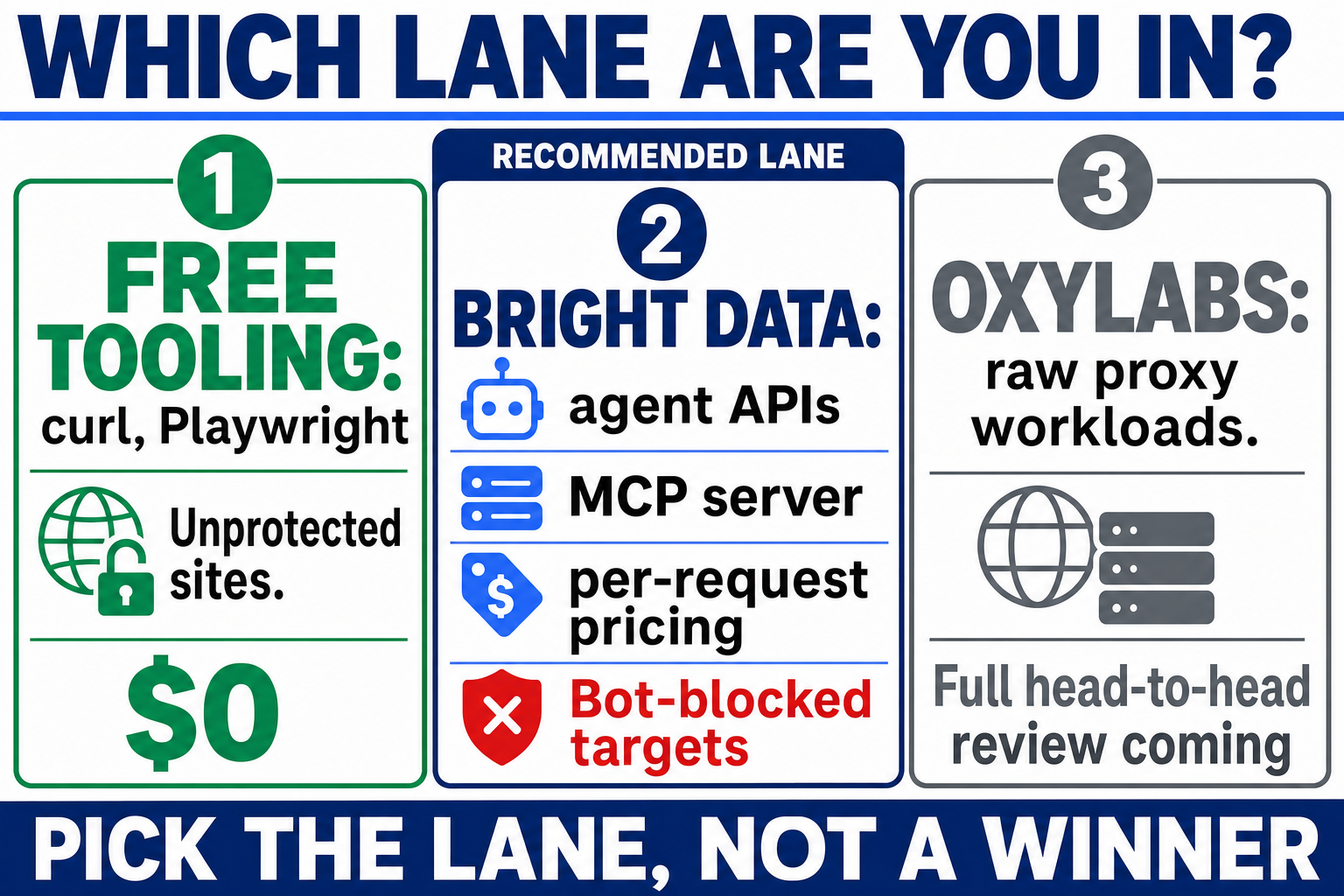
Which brings me to the advice a vendor-sponsored review will never give you: the best Bright Data alternative for many jobs is nothing. An unprotected site does not need a $8/GB residential proxy. curl, wget, or a local Playwright script costs zero. My own research pipeline tries the free path first and escalates to Bright Data only when a site fights back. Steal that pattern; it is in the toolkit.
So after 8 months, a $1,000 mistake, a refund, and a $11.86 quarter, where do I actually land?
Verdict: Who Should Use Bright Data
Recommended, with one loud warning.
Bright Data does what it claims: pages that defeated my normal tooling come back reliably for the targets I work against, at per-request prices that are trivial for individual and agent-scale use. The agent story (MCP server, free tier, API surface) is the best of the providers I have used, and when their meter ran up $1,000 against me through my own error, they gave it back. Infrastructure is a trust business, and they earned some.
The loud warning: the per-record dataset products combined with pay-as-you-go billing are a footgun the platform does not adequately guard. If you take one thing from this Bright Data review, take the guardrail pattern: estimate, cap, confirm, then run. Take the free toolkit too, since it implements exactly that.
✅ Use Bright Data if: you are building AI agents that need reliable web data, you do OSINT or security research against bot-protected sources, or you need search results at scale without fighting Google.
⚠️ Skip it if: your targets are unprotected (use curl or Playwright, free), you need raw proxies at bulk volume on a tight budget (price Oxylabs against them for your mix), or you cannot put spend controls in place. On that last one: do not hand any pay-as-you-go scraping account to an ungoverned agent. Not this one, not anyone's.
If this review and the tooling saved you a $1,000 afternoon, signing up through my link is how you say thanks. That is an affiliate link and it pays me a commission; your price is identical either way, and the $500 deposit-match promotion (conditions apply) is available to everyone.
FAQ
What is Bright Data used for?
Web scraping and web data collection at scale: unlocking bot-protected pages, search engine results via the SERP API, proxy networks (residential, datacenter, ISP, mobile), remote browsers for automation, and pre-built datasets. Increasingly, it is used as the web-access layer for AI agents via its MCP server.
Is there a Bright Data free trial?
Yes, three layered things: a 7-day Playground trial at signup, a 30-day Limited Trial with a $5 credit once you verify the account by adding a payment method, and a recurring 5,000 free credits every month shared across the Web Unlocker API, SERP API, Web Scraper API, and Scraper Studio. No card is needed for the monthly credits, but personal-email signups without a payment method are blocked from the Web Unlocker API and proxy networks until one is added. There is also a first-deposit match promotion up to $500 (conditions apply).
Is Bright Data legit and legal to use?
It is a large, well-established company (it began life as Luminati), with the strictest compliance process of any provider I have used: since July 2026, new residential proxy zones require company-only, human-reviewed KYC, while the per-request APIs need no KYC. Scraping legality depends on what you scrape and where you operate, not on the tool. Public data, respect for terms, and data-protection law (GDPR if you touch EU personal data) are your responsibility.
Bright Data vs Oxylabs: which is better?
For agent workloads, Bright Data is the one I run, because of its MCP server, per-request APIs, and account APIs. I hold paid accounts with both but have not benchmarked them head-to-head yet; that comparison is coming in my standalone Oxylabs review. Price your specific mix rather than trusting anyone's blanket answer, including mine.
Why was I charged for failed requests?
Most likely you enabled custom features (custom headers or cookies) on the Web Unlocker. Default configuration bills successful requests only; custom-feature configuration bills all requests, including failures. It is documented, but easy to miss.
Can Bright Data scrape LinkedIn?
There are pre-built dataset scrapers for LinkedIn profiles, jobs, companies, and posts, billed per record. Note that per-record scrapers are exactly where unbounded calls create runaway bills. Set limits on every call, and read LinkedIn's terms before you build a business on it.
About the Author

Nathan House, Founder & CEO of StationX
Nathan House has 30 years of hands-on cybersecurity experience and is Cambridge-educated, holding CISSP, CISA, CISM, OSCP, CEH, and SABSA. He founded StationX in 1999 — one of the UK’s first cybersecurity companies — and has secured £71 billion in UK mobile banking transactions and the London 2012 Olympics, advising clients including Microsoft, Cisco, BP, Vodafone, and VISA. He authored the world’s most popular cybersecurity course — a #1 Udemy bestseller taken by over 500,000 students — and was named Cyber Security Educator of the Year 2020, AI Security Educator of the Year, and a UK Top 25 Security Influencer 2025. A DEF CON speaker and featured expert on CNN, Fox News, NBC, and the BBC, Nathan leads StationX’s training of more than half a million students worldwide.