Shadow AI: What Actually Works to Reduce the Risk (2026)
Your staff are using AI you cannot see, and last year that stopped being a theoretical problem. In IBM's 2026 Cost of a Data Breach Report, shadow AI incidents hit 43% of breached organisations. That is more than double the 20% they reported a year earlier. Those breaches cost $5.39 million on average, and more than one in five of them ended in a regulatory fine.
Security vendor blogs mostly give the same three-step advice: discover it, block it, write a policy. I wanted to know whether any of that survives contact with reality, so I tested it. I ran the free blocklists people actually download, installed the PII filter that the free tooling stack depends on, and pushed real-looking company data through it. Some of what I found contradicts what I expected, and a couple of my own early results turned out to be wrong.
This is what I learned about what works, what does not, and what to do first.
TL;DR, if you've only got 30 seconds
Shadow AI incidents hit 43% of breached organisations in 2026, up from 20% a year earlier, at an average cost of $5.39 million.
You cannot block your way out. Microsoft 365 Copilot lives on m365.cloud.microsoft, Slack AI on slack.com. Block those and you break the business.
Free AI blocklists are abandoned. Every one I tested is 277 to 419 days stale. The most complete one does not block chatgpt.com.
Microsoft Presidio, the free PII filter most open-source stacks rely on, caught 4 of 12 sensitive items out of the box. It caught none of the API keys, which is the single most common developer leak.
The one control that reduces the most risk: give people a sanctioned AI path. It is the only option that changes where the data goes instead of trying to catch it on the way out. While you build it, audit which AI features are already switched on in the SaaS you pay for. That part is free and takes hours.
The Breach That Started With a Calendar Invite
In September 2024, physicians at an Ontario hospital held a virtual meeting to discuss patient cases. A former colleague who had left the hospital, but was still sitting on the recurring invite, had once connected a personal Otter.ai account to their calendar.
The AI notetaker joined the meeting automatically, transcribed the personal health information of seven patients, and emailed the transcript to all 65 invitees. Twelve of them had also left the organisation.
There was no attacker. No malware, no phishing, no stolen credentials. A personal AI tool, a stale calendar entry, and nobody who knew the two were connected.
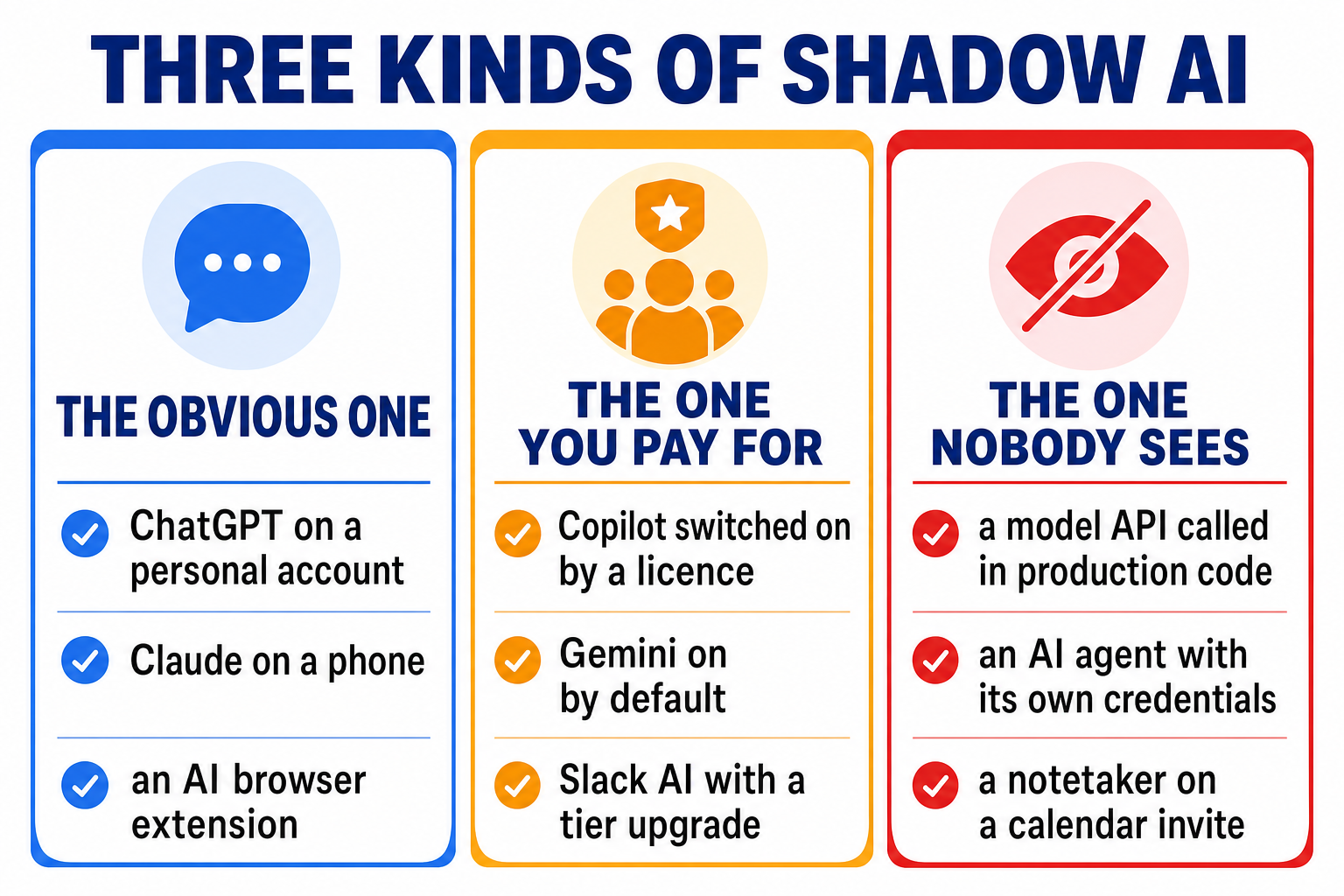
Shadow AI is rarely someone doing something reckless. It is the accumulation of small, unmanaged connections between AI tools and company data. And "shadow AI" covers more than employees using ChatGPT on the sly. It includes AI features switched on inside software you already approved, developers calling model APIs in production code, and AI agents running under credentials nobody is tracking.

What It Is Costing, and Where Governance Sits
IBM's 2026 Cost of a Data Breach Report studied 602 organisations across 17 industries and 16 countries, with fieldwork running from March 2025 to February 2026. The shadow AI numbers moved further in one year than most security metrics move in five.
Shadow AI incidents reached 43% of breached organisations, up from 20% the year before. Those breaches cost an average of $5.39 million, against $4.63 million previously. Data was lost or compromised in nearly half of them, and more than one in five triggered a regulatory fine. That makes this a compliance problem, not just a security one.
For context, the global average breach now costs $4.99 million, a record, and one in four malicious breaches is AI-enabled.
Then there is the number almost nobody quotes. Among breached organisations, the share with an AI governance policy fell from 37% to 32%. Only 19% have their AI governance and security teams talking to each other. And of the organisations that suffered an AI-related breach, 92% had no proper AI access controls in place, while only 40% of organisations use access controls on AI models and data at all.
⚠️ One caveat on that governance figure, because it is easy to over-read. It describes organisations that got breached, not the whole population. A fall could partly mean that organisations with policies are avoiding breaches in the first place, which would be good news rather than bad. What it does tell you is that among the companies now paying for an incident, most had no AI policy and almost none had AI access controls.
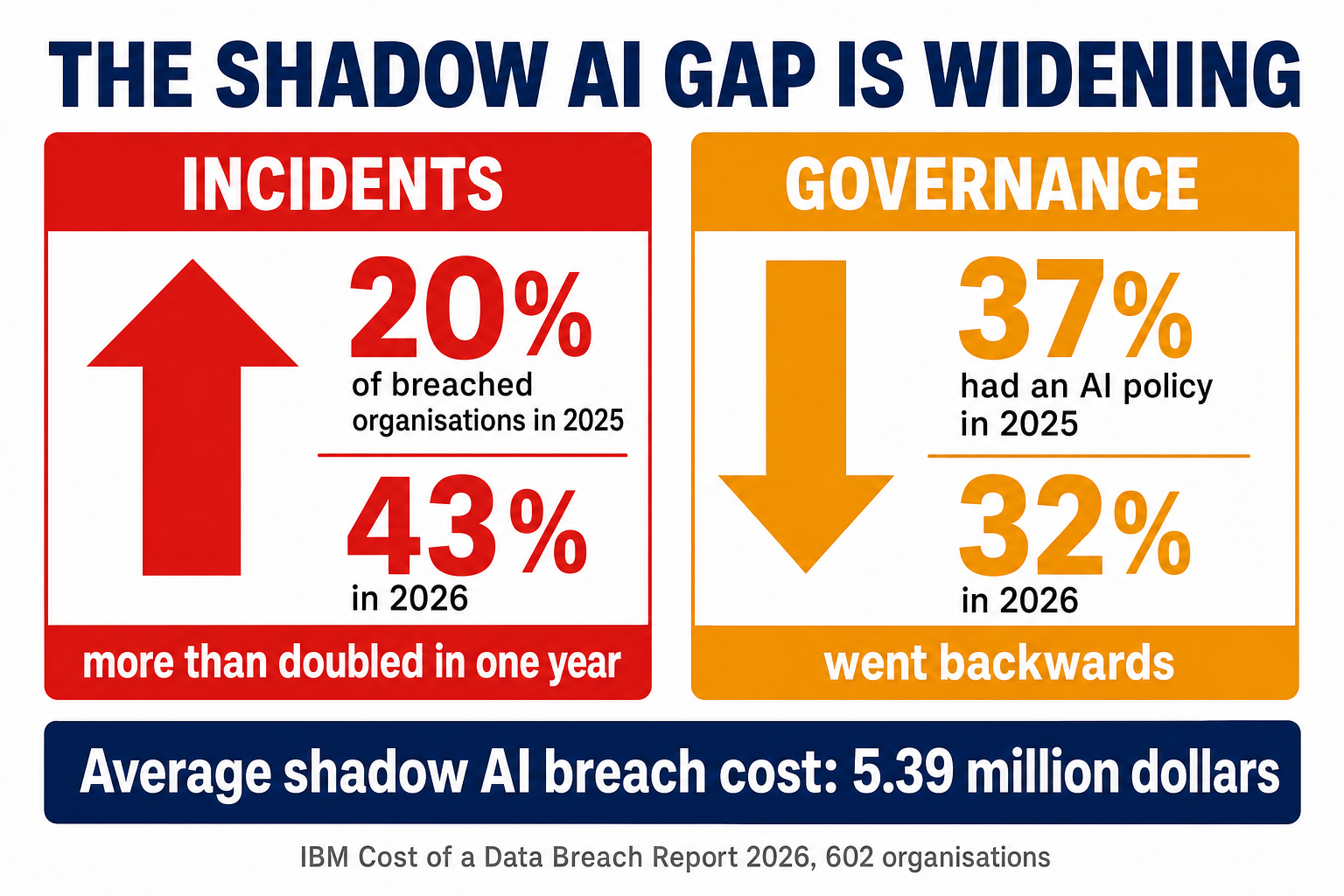
Adoption is racing ahead. Governance, at least where breaches are happening, is not keeping up. That gap is where the $5.39 million lives.
So what do you do about it? The instinctive answer (block the AI websites) is where most organisations start, and it is where I started testing.
The AI You Cannot Block, and What Everyone Gets Wrong
Before you evaluate a single blocklist, there is a structural problem to deal with.
Microsoft 365 Copilot runs on m365.cloud.microsoft. Slack AI runs on slack.com. Zoom AI Companion runs on zoom.us. Gemini sits inside google.com.
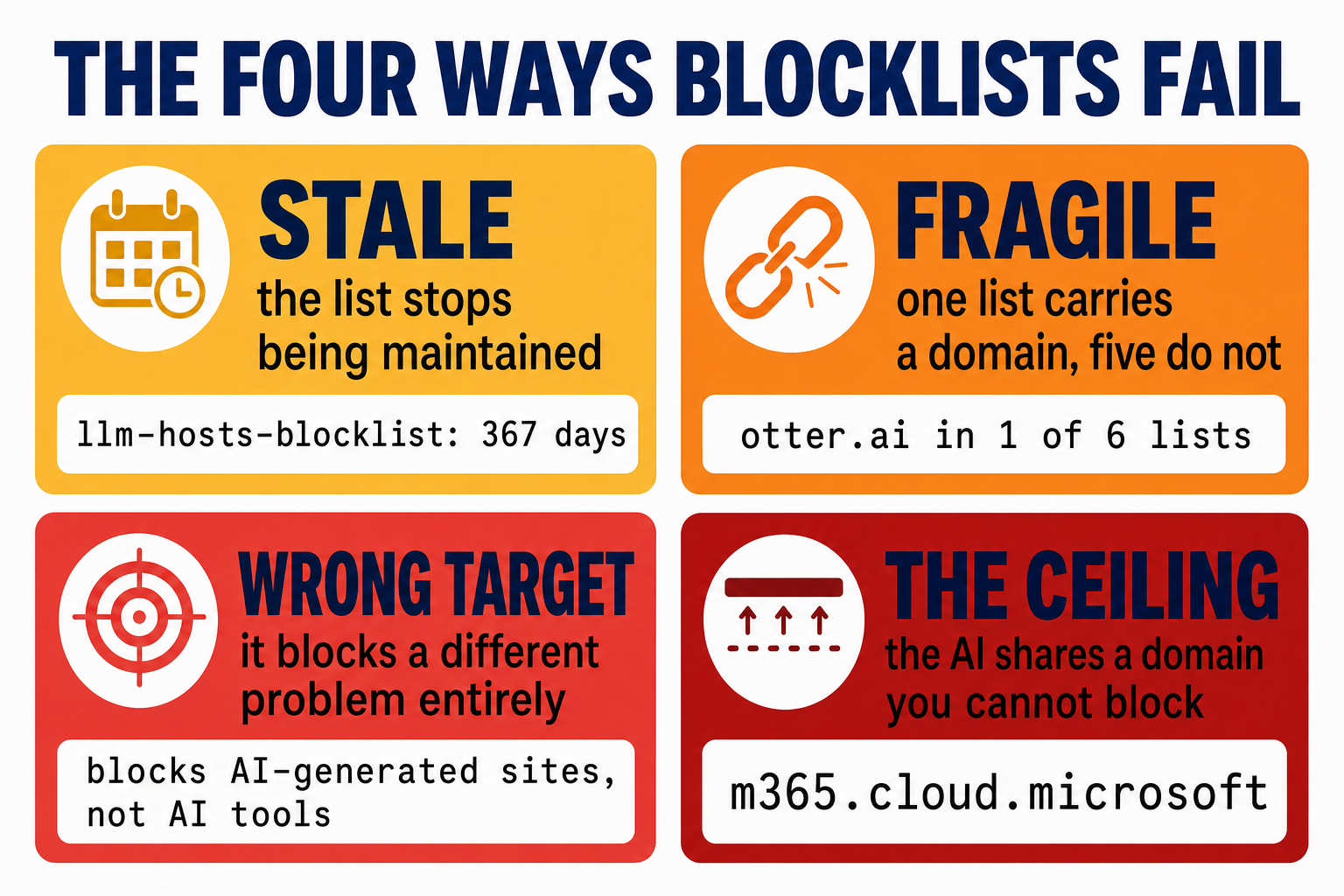
You cannot block any of those at the domain level. Block m365.cloud.microsoft and Office stops working. Block slack.com and your company loses its comms. The AI and the business tool share an address, so there is no rule you can write that separates them.
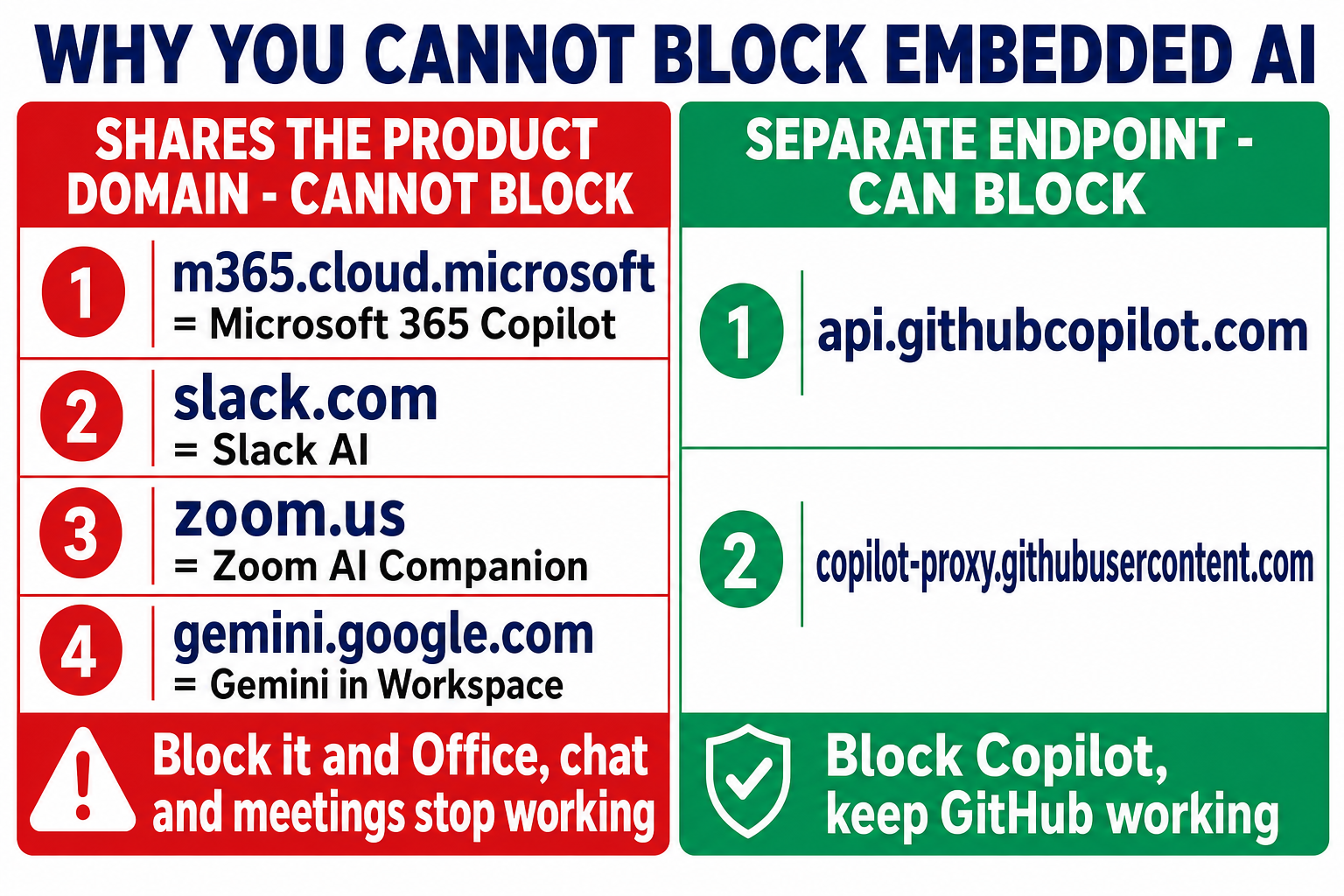
Not every embedded AI works this way, and it is worth knowing which is which. GitHub Copilot is the exception that proves the point. It runs on its own endpoints, api.githubcopilot.com and copilot-proxy.githubusercontent.com, so you can block Copilot at the firewall and leave github.com working normally for Git. If your developers are the concern, that is a real control and you should use it.
But it is the exception. Where the vendor has folded AI into the main product domain, and most have, blocking is off the table entirely. A £100,000 enterprise web gateway hits this wall in exactly the same place a free Pi-hole does. It is not a coverage problem you can spend your way out of. It is structural.
So domain blocking is a tool for the consumer AI long tail, not for the core of your risk.
And on that long tail, the free lists are in poor shape
I downloaded every free AI blocklist I could find on GitHub and tested them against a set of AI domains drawn from Netskope's published Generative AI taxonomy and vendors' own network-requirements documentation.
I am going to give you named misses rather than percentages, deliberately. The ground truth was 18 domains, so one domain moves a recall score by five and a half points. Precise-looking percentages from a sample that size would be false precision. The specific gaps tell you more anyway.
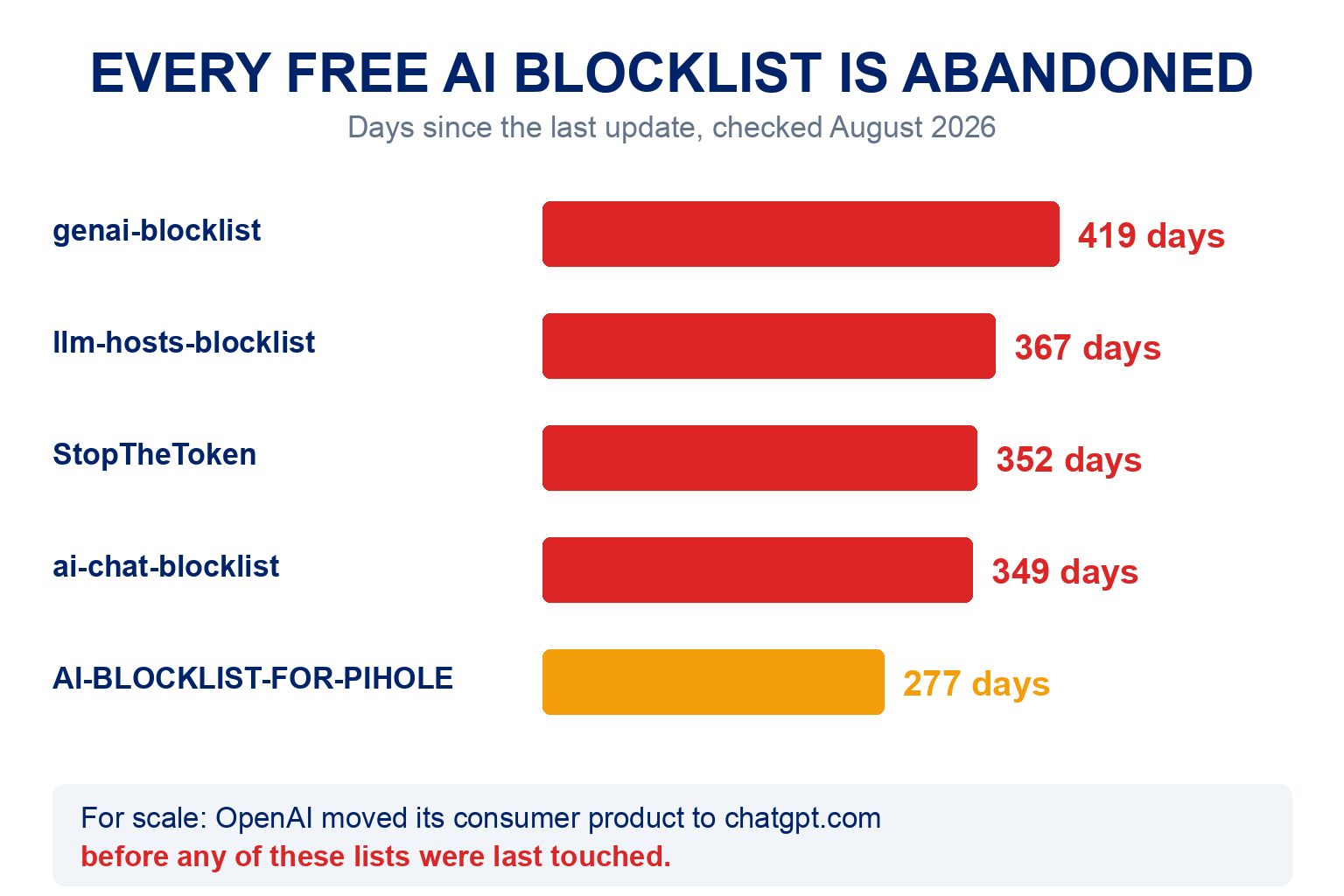
The most complete free list (244 domains) does not block chatgpt.com. It blocks chat.openai.com and api.openai.com, both correct a couple of years ago. OpenAI moved its consumer product and the list never caught up.
otter.ai appears in one list out of six. That is the exact tool from the hospital breach above.
imagine.art and watson.cloud.ibm.com appear in none of them, despite sitting in Netskope's own published GenAI taxonomy.
Every list is abandoned. Last commits run from 277 to 419 days ago. The best one has not been touched in over a year.
Two of the six score zero because they block AI-generated websites, a completely different problem. You cannot tell that from the repository name, and a sysadmin searching "AI blocklist" will deploy one thinking it does something it does not.
There is a deeper issue than staleness. OpenAI's own network documentation lists roughly fourteen first-party domains needed for ChatGPT to function: *.openai.com, *.chatgpt.com, *.oaistatic.com, *.oaiusercontent.com and more. A blocklist carrying two of them is not blocking ChatGPT; it is inconveniencing it. And several of OpenAI's dependencies are shared infrastructure (Cloudflare, Intercom, WorkOS, Apple) so blocking those breaks services that have nothing to do with AI. The ceiling again, one layer down.
⚠️ Be clear about what this does and does not prove
This is what free blocklists do. Zscaler, Netskope, Palo Alto and Fortinet all ship maintained Generative AI categories, updated continuously, and one commercial feed carries over 17,000 classified AI domains refreshed daily. If you have an SSE or SASE vendor, you are paying someone to run that treadmill, and the domain-list staleness problem is not yours.
What buying does not solve is the ceiling. No vendor category lets you block m365.cloud.microsoft.
And if you have a commercial one, your problem was never recall. It is the AI sitting inside the tools you have already approved.
What to Do About Copilot, Gemini, Slack AI and Zoom
You do not block embedded AI at the network. You govern it at the tenant. You almost certainly already have the controls, because they came with the licence.
Start with a question most organisations cannot answer: which AI features are currently switched on in the software you already pay for, and who decided?
In my experience that question lands awkwardly, because the honest answer is usually "nobody". A licence renewal turned something on, or a team bought an add-on, and no one ever revisited who should have access. That is not negligence. It is just that AI features arrive faster than governance cycles run.
Here is where to look. These paths come from vendor documentation rather than my own tenant, so check them against yours, because admin interfaces move.
Microsoft 365 Copilot. The admin centre has a Copilot section with a usage dashboard showing who is using it. Under Settings you will find User access, Data access, and, worth checking, Third-party model providers. The Integrated apps section is where you enable, disable, block or scope individual Copilot extensions and agents. In Purview, Audit captures Copilot events, and DSPM for AI shows prompt activity and third-party AI usage.
Google Workspace Gemini. Admin console, then Generative AI, Gemini for Workspace, Feature access, which turns it on or off per organisational unit or group. Gemini reports show active users and per-feature usage. Note this one: Gemini has been enabled by default for existing Workspace subscriptions. Enterprise tiers have the admin controls; Business tiers may need to request access to them.
Slack AI. Worth checking your plan on this one. Slack has retired the standalone AI add-on and folded AI into its paid tiers, so basic AI features come with all paid plans and the fuller suite arrives automatically on Business+ and Enterprise+. A tier upgrade can switch AI on for everyone without a separate decision. Workspace Owners and Org Admins can turn Slack AI features off for the workspace in the AI and Search settings. Enterprise Grid also gives you audit logs via the API, and the analytics dashboard has an AI tab.
Zoom AI Companion. Not on by default; a host or co-host has to start it in a meeting. Admins control it at Account Management, Account Settings, AI Companion, at account, group or user level. The Admin Center dashboard has an AI tab showing summaries generated and users active.
Notion AI and Grammarly. Notion AI is disabled under Settings & Members, Settings, Features, with Enterprise audit logs covering agent activity. Grammarly Business and Enterprise admins get a Feature access page to turn generative features off per group, and if your team account was bought directly from the website rather than through sales, "use content for product improvement" is on by default until someone opts out.
💡 In plain English
Some of this arrives switched on without anyone choosing. Gemini is on by default for existing Workspace subscriptions, Grammarly's training setting is on for web-purchased teams, and Slack AI now ships with the plan tier rather than a separate purchase. Zoom is the outlier: a host has to start it. But in every case the governance question is the same, and it usually has not been asked: not "did someone turn this on?" but "did anyone decide who should have it?"
One correction worth making, because this changed recently and a lot of advice has not caught up. It used to be true that you could only control what Copilot could see, not what a user could type. Purview now has a DLP policy location for Microsoft 365 Copilot and Copilot Chat, with a "prevent Copilot from processing content" action that stops a prompt containing sensitive information types from being processed at all. It is in preview and custom-template only at the time of writing, so check its current state before you rely on it, but the prompt itself is no longer out of reach.
That still leaves the harder half. A DLP policy matches patterns you can define in advance. It does not know that a particular company name is confidential this quarter, which is the problem the last section of this article is about.
Which points at where the real Copilot risk sits. Copilot surfaces whatever the user can already reach, so an over-permissive SharePoint site that nobody noticed for three years becomes an AI-shaped data leak the moment Copilot indexes it. Fix permissions before you worry about prompts.
How You Find the Rest
No single method finds everything, and each one has a blind spot that matters. Here is what each catches, what it misses, and where it plugs in.
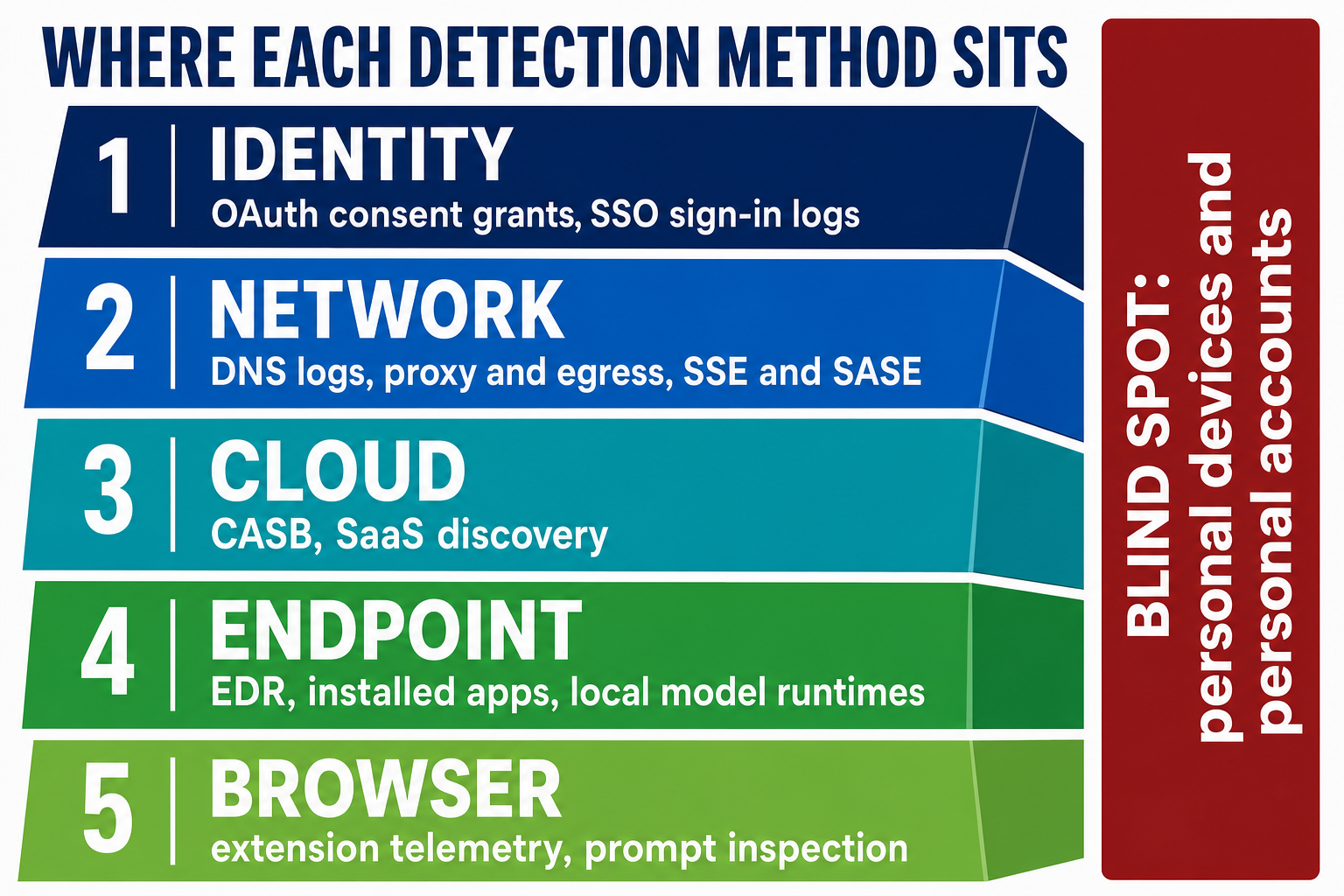
| Method | Where it sits | Catches | Misses |
|---|---|---|---|
| Network egress / proxy | SWG | Traffic to AI domains, large uploads, API calls | Encrypted traffic without inspection, mobile data, off-network devices, local models |
| DNS logs | Resolver | Lookups for AI services | DNS-over-HTTPS, direct IP, CDN-fronted hosts |
| CASB | Cloud broker | Sanctioned SaaS AI use, risky OAuth grants | Raw web use, unmanaged devices, desktop apps |
| SSE / SASE | Cloud edge | Web logs, category blocking, user context | Anything bypassing the tunnel, on-device AI |
| SaaS discovery | Identity + traffic | New cloud AI apps appearing | BYOD browser use, low-volume tools |
| OAuth consent grants | IdP (Entra, Workspace) | AI apps users authorised against mail, files, calendar | AI that needs no OAuth, direct web use |
| Endpoint / EDR | Agent | Installed AI apps, local model runtimes, CLI tools | Web use on unmanaged devices |
| Browser extension telemetry | MDM / browser management | AI extensions, page-content exfiltration | Native apps, unmanaged or mobile browsers |
| DLP | Endpoint / network / browser | What data went into the prompt | Non-sensitive prompts, screenshots, local models |
| Expense / procurement | Finance | Paid AI subscriptions bought outside IT | Free tiers, which is most of it |
| Identity / SSO logs | IdP | "Sign in with Google/Microsoft" to AI apps | Personal accounts, anonymous use |
✅ If you do one thing from this table, audit your OAuth app-consent grants in Entra ID or Google Workspace. Look for third-party apps holding high-risk scopes such as Mail.Read, Files.Read.All or calendar access, and pay particular attention to anything with "AI", "assistant", "notetaker" or "transcribe" in the name. Revoke what nobody recognises. It is free, it takes an afternoon, and it catches the class of problem that network monitoring structurally cannot. That is precisely the Otter.ai scenario, and no firewall would have seen it.
Detection tells you what is happening. The next question is whether you can stop the sensitive part getting out.
The Commercial Tools, Reviewed Not Tested
⚠️ Read this label before the table
I have not deployed any of these products. I do not hold licences for them, and I am not going to pretend otherwise. What follows is documented capability and vendor positioning: reviewed, not tested.
Most "best shadow AI tools" roundups present vendor marketing as assessment. When you read one, check whether the author ever touched the product.
| Tool | Where it sits | What it sees | What it cannot see |
|---|---|---|---|
| Microsoft Purview | M365 tenant, endpoint, browser | Copilot activity, DSPM for AI, DLP on data sources, sensitivity labels | Non-Microsoft AI on unmanaged devices |
| Cyberhaven | Endpoint + browser | Data lineage, where sensitive data came from and where it is going, including paste into AI | Data that never touches a managed endpoint |
| Nightfall AI | API / SaaS integrations | AI-native DLP, content classification in prompts and uploads | Traffic outside integrated apps |
| Harmonic Security | Endpoint / browser | Prompt-level inspection with on-device small models, real-time redaction, coach rather than block | Unmanaged devices |
| LayerX (Akamai) | Browser extension | Browser-level AI usage including personal accounts, extension inventory | Native desktop apps, unmanaged browsers |
| WitnessAI | Network / gateway | AI usage across apps, agents and MCP connections, policy enforcement | Traffic that bypasses the gateway |
Broadly: browser-layer tools (LayerX, Harmonic) see personal-account use that network tools miss. Data-lineage tools (Cyberhaven) answer "where did this come from" rather than "which app is this". Purview is the obvious start if you are Microsoft-heavy, because you may already own it.
One thing worth checking before you buy
I found that Presidio, the free filter in the next section, has no built-in detection for UK postcodes, sort codes or bank account numbers. That looked like a free-tool weakness until I checked the commercial side.
Microsoft's published catalogue of built-in sensitive information types includes UK National Insurance number, NHS number, driver's licence, passport, electoral roll number, taxpayer reference and physical addresses. There is no dedicated built-in type for a UK postcode on its own, a sort code, or a UK bank account number. Those need custom configuration, exactly as they do in Presidio.
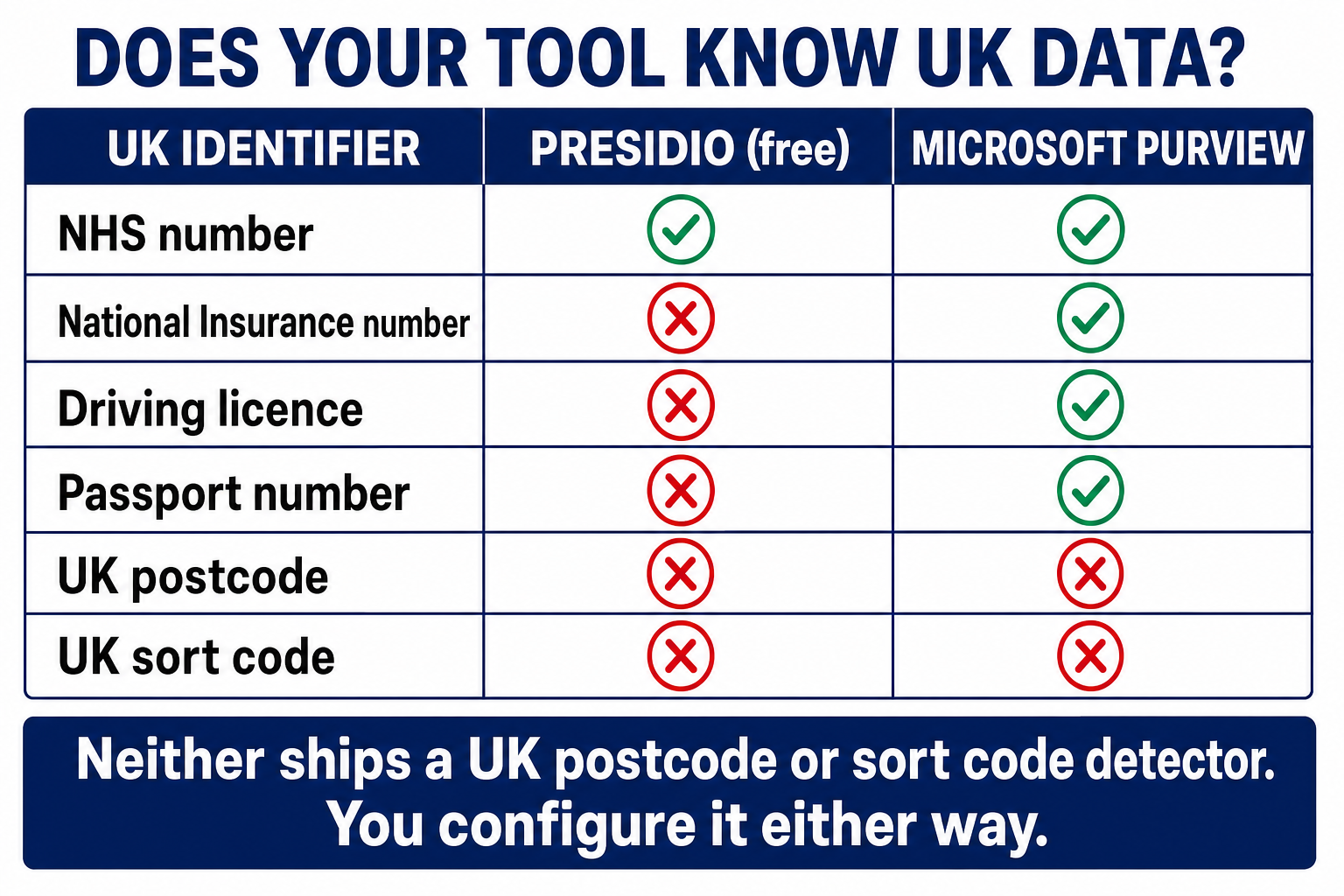
So if you are a UK organisation, do not assume enterprise licensing buys you UK coverage. Ask any vendor for their specific list of UK detectors before you sign, because the defaults across this category lean heavily American.
The Free Filter, Tested
The free, self-hosted approach to prompt safety usually ends up at Presidio, an open-source framework for detecting and redacting personal information. It is the component the free stack depends on to strip sensitive data before a prompt reaches a model.
So I installed it and pushed through prompts a real employee would actually paste: a developer debugging a failing API call, HR drafting a redundancy letter, support replying to a customer, an executive summarising a deal.
Out of the box, at a normal 0.5 confidence threshold, it blocked 4 of 12 sensitive items.
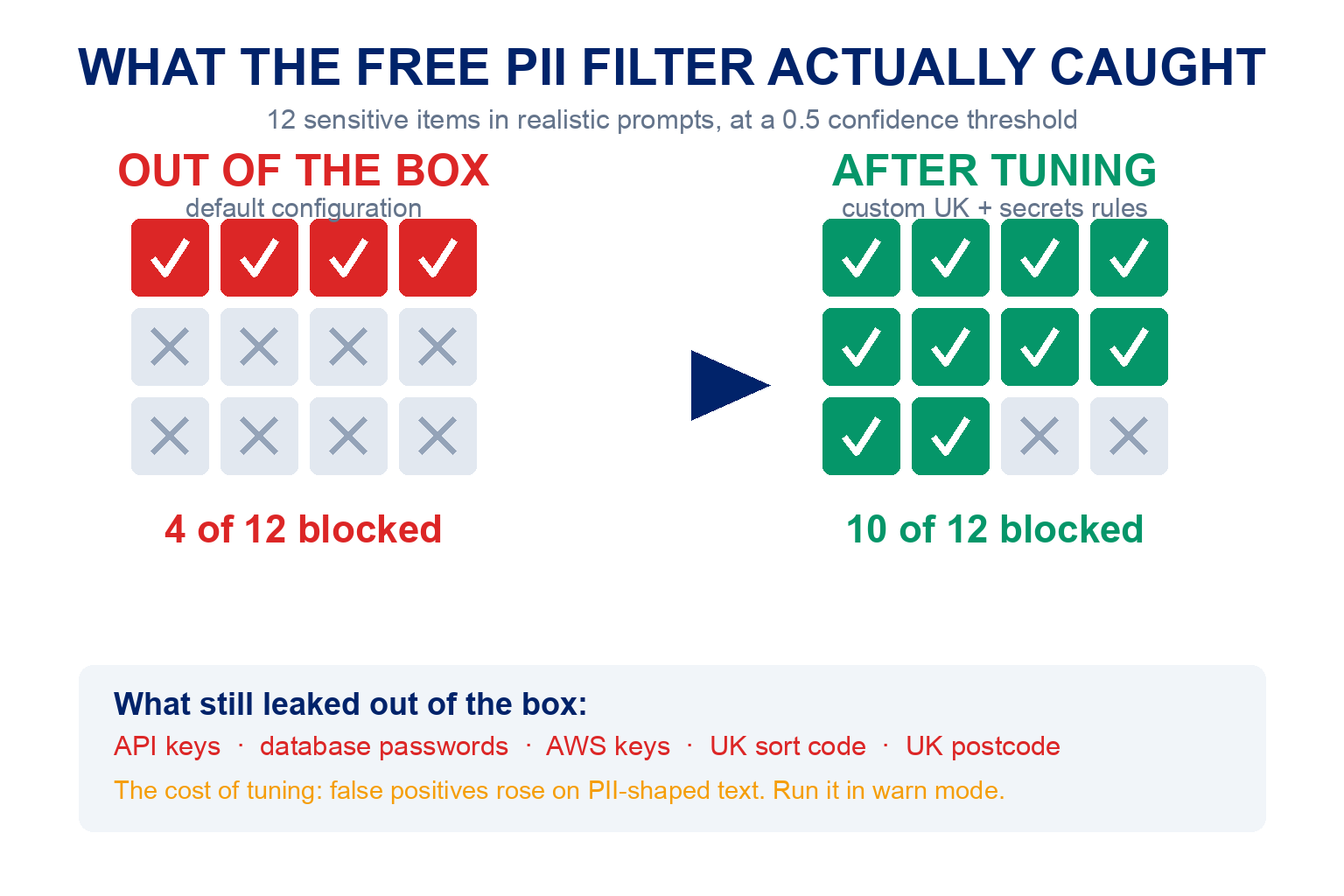
Caught: NHS number (1.00 confidence), US Social Security number (0.85), email address (1.00), payment card (1.00).
Leaked:
A live OpenAI API key, a production database password, and an AWS access key. None of the three detected at all. This is the single most common developer leak, and the filter is blind to it.
A UK sort code and a UK postcode. Neither detected. The postcode is personal data under GDPR.
A National Insurance number and a UK bank account number. Both detected, but classified as a US driving licence at 0.30 and a US bank number at 0.40, well below any sensible threshold.
A confidential acquisition target. Not detected.
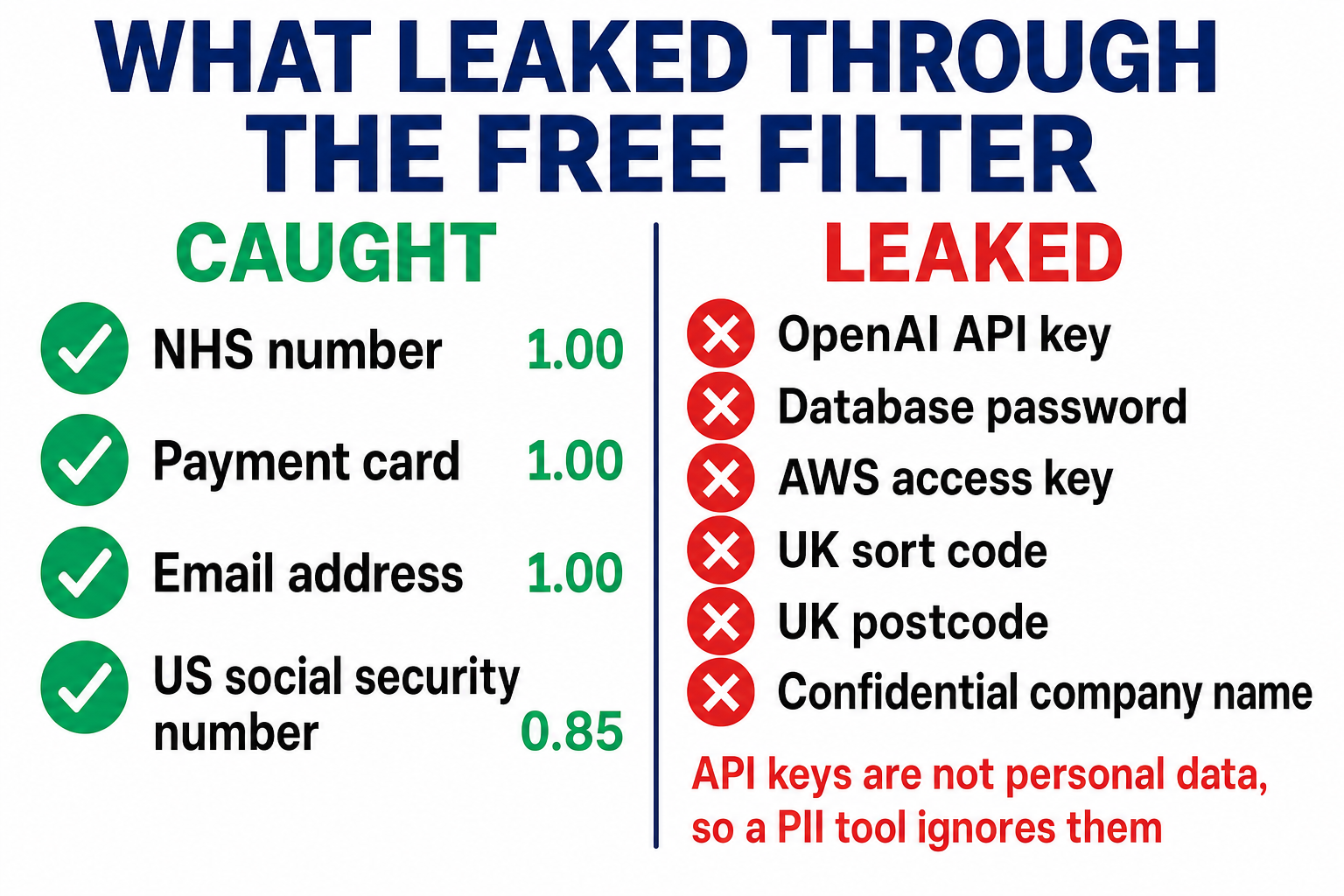
The pattern is consistent: strong on US and clinical identifiers, blind to UK financial and address data. Presidio ships five US-specific recognisers and one UK one.
✅ To be fair to Presidio
It is a PII framework, and it does PII well. It has never claimed to detect secrets. An API key is not personally identifiable information, so a PII tool ignoring it is architecturally correct.
Presidio never claimed to detect secrets. The failure lies with the shadow AI advice that treats it as a catch-all "stop data leaking into prompts" filter.
The fix, and what it costs
Presidio is designed to be extended. I wrote custom recognisers for the gaps: UK National Insurance numbers, postcodes, sort codes and bank accounts, plus a secrets recogniser covering OpenAI, Anthropic, AWS, GitHub, Slack and Google key formats, JWTs, PEM private keys and connection-string passwords.
That took the result from 4 of 12 to 10 of 12, and the patterns held across format variants: NI numbers spaced, unspaced and lowercase; postcodes in all the shapes the UK actually uses.
⚠️ Two honest caveats, because they change how you should read that number
I wrote those recognisers in response to the leaks I had just watched happen. There was no holdout set. So 10 of 12 shows the gap is closable by configuration. It does not show this config will generalise to your data.
False positives. On six ordinary work prompts, the count stayed at 3 false positives either way, so the extra recognisers added none. On a stress set I built deliberately full of PII-shaped text ("our SLA is 99-99-99 uptime", "ticket AB123456C was closed", "meeting room M1 1AE is booked"), they went from 3 to 8. Deploy this in warn-and-coach mode, not blocking mode. If you block on it, you will generate helpdesk tickets about room bookings. Friction is exactly what drives people to shadow AI in the first place.
Two mistakes I made, because they are the useful part
My first test reported that Presidio misses US Social Security numbers. That contradicted the only academic paper on the subject, which found the opposite. The paper was right and I was wrong: I had used 123-45-6789, the canonical placeholder SSN that Presidio deliberately excludes to avoid false positives. A realistic SSN scores 0.85.
My first credit card test looked like a miss too. It was not. The number I had invented failed the Luhn checksum, so Presidio correctly ignored it. A valid card scores 1.00. I had written down a finding that was really my own arithmetic.
The lesson generalises well beyond Presidio: if you evaluate a data-loss tool using textbook example values, you will get false results in both directions. Vendors special-case famous placeholders. Test with realistic data, or you are measuring the wrong thing.
Even fully configured, though, two items still leaked. One of them is the interesting one.
What No Filter Can Catch
One of my test prompts read:
"Summarise this for the board: we're acquiring Brightwell Systems for 4.2 million, closing March, only Priya Raman and I know so far."
Presidio caught the person's name. It did not catch Brightwell Systems, and no configuration ever will, because there is nothing to catch. "Brightwell Systems" is a perfectly ordinary company name, structurally identical to a supplier, a customer, or a competitor mentioned in a thousand harmless prompts. There is no pattern, no checksum, no format.
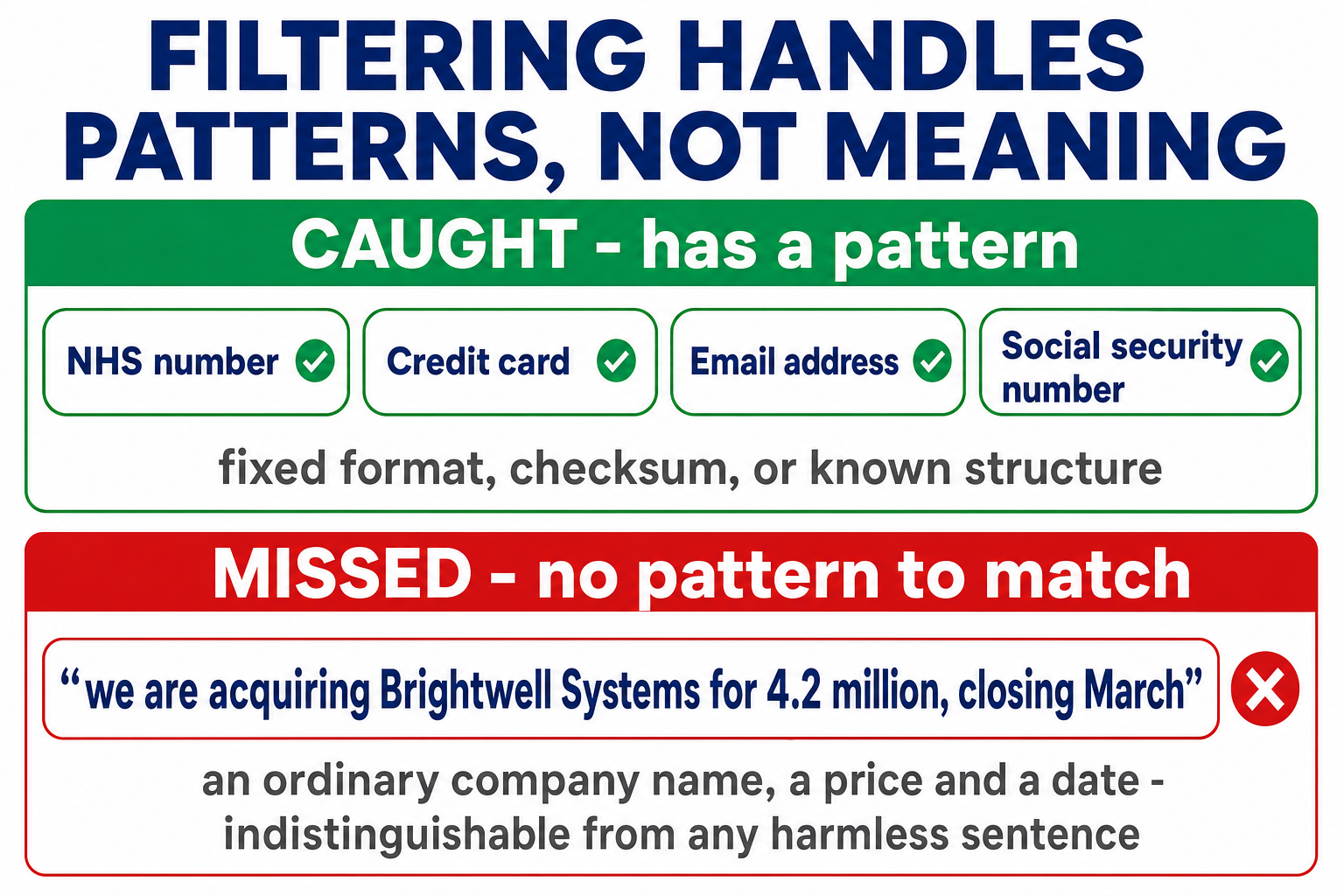
That single sentence contains a confidential acquisition, a price, a timeline and a named insider. Every regex and pattern-matching tool will pass it straight through.
There is one enterprise answer, and it is worth knowing about: Exact Data Match, where you index the actual records you care about, a list of live deal codenames for instance, and the tool detects those exact strings. It works, but notice what it requires. Somebody has to know the secret is a secret, put it on a list, and keep that list current. It protects the things you remembered to protect.
Filtering handles patterns. It cannot handle meaning. And meaning is where your real commercial exposure lives: the deal, the layoff, the incident, the thing that was said in confidence. Once you accept that, the goal changes. You stop trying to build a perfect filter and start trying to make sure that when someone does paste something sensitive, it goes somewhere you control.
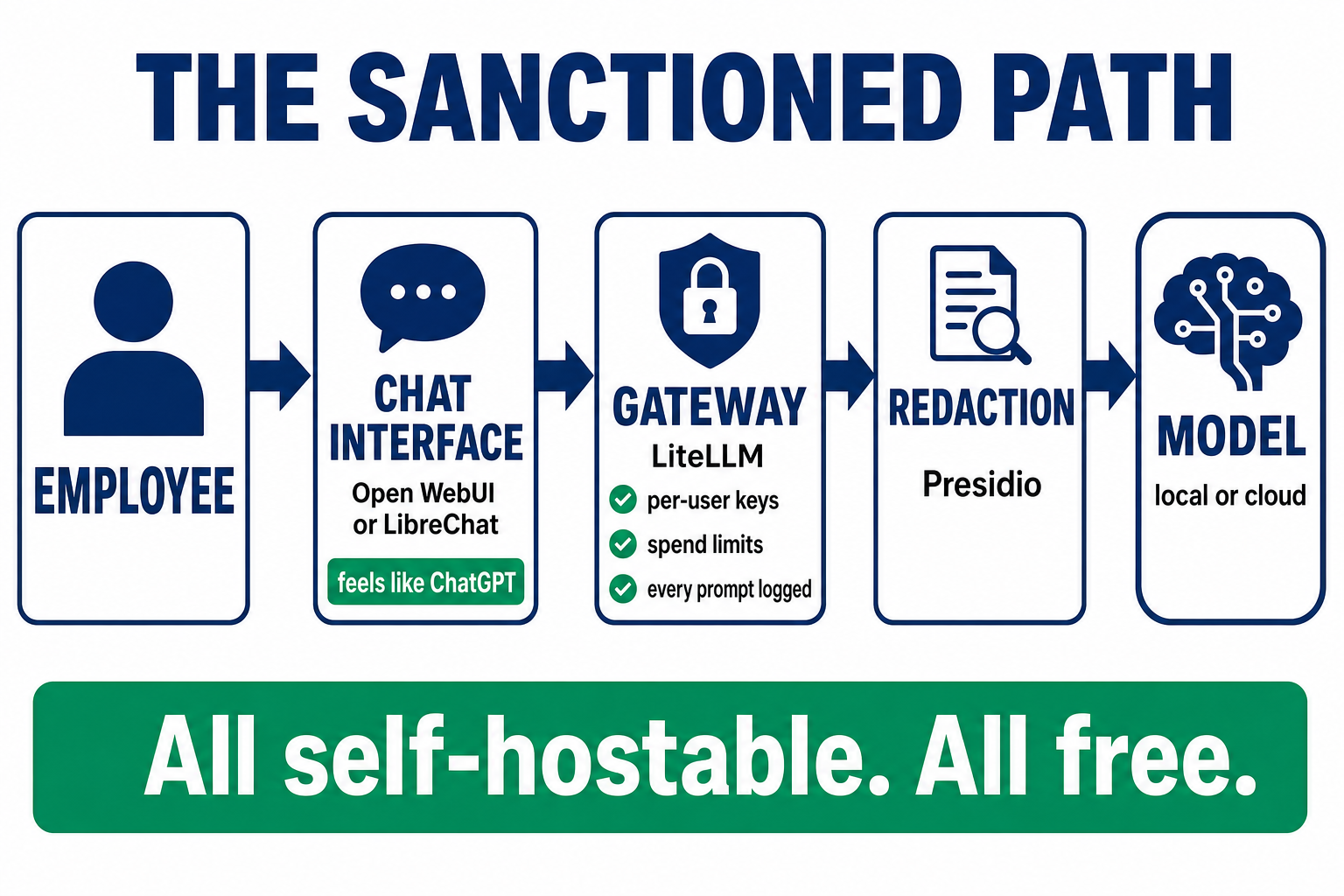
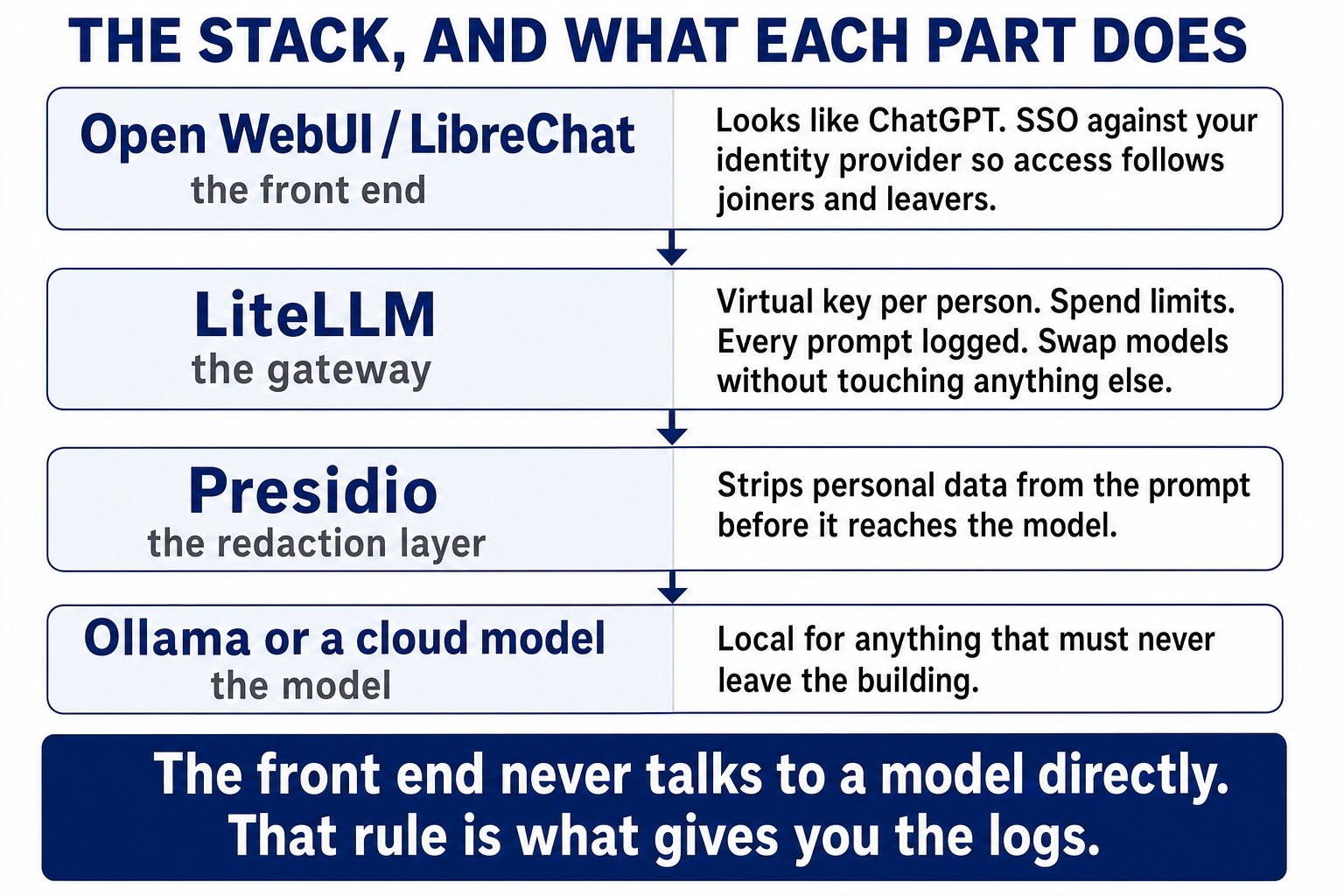
That is the sanctioned path: a company AI route good enough that people actually prefer it. In practice that is a gateway like LiteLLM sitting in front of the models, a chat interface like Open WebUI or LibreChat wired into your identity provider for SSO so access follows joiners and leavers, and a redaction layer such as the one above. All self-hostable, all free. You get per-user keys, spending limits, and a log of every prompt.
| Component | What it is | What it does for you | Licence |
|---|---|---|---|
| LiteLLM the gateway | An open-source proxy that speaks the OpenAI API and sits in front of 100+ model providers | The control plane. Issues a virtual key per person or team, sets spend limits and rate limits, logs every prompt and response, and lets you swap the model behind an alias without touching anything downstream | Free, self-hosted |
| Open WebUI or LibreChat the front end | Self-hosted chat interfaces that look and behave like the consumer tools | The reason anyone uses your path instead of ChatGPT. Both do multi-user accounts and SSO against your identity provider, so access follows joiners and leavers | Free, self-hosted |
| Presidio the redaction layer | The PII detection framework tested earlier in this article | Strips or flags personal data in the prompt before it reaches the model. Needs the custom recognisers from the last section if you are in the UK | Free, self-hosted |
| Ollama optional | A local model runner | For the prompts that should never leave the building at all. Slower and less capable than a frontier model, but nothing egresses | Free, self-hosted |
The order matters: the chat interface talks to the gateway, never straight to a model. That single rule is what gives you the logs, the per-user attribution and the spend cap. If someone can reach a provider directly with their own key, you have built a nicer ChatGPT rather than a control.
⚠️ The costs nobody mentions. The software is free; running it is not. You need somewhere to host it, someone to own it, and either an API key with real spend against it or hardware to run models locally. Budget for a person as much as for infrastructure, because an internal AI tool nobody maintains gets abandoned, and abandoned is how you end up back where you started.
Be honest about what that achieves with the Brightwell case, though: it contains it rather than prevents it. The name still reaches a model. What changes is visibility and control: an invisible paste into a personal ChatGPT account becomes a logged prompt to an endpoint you hold a data processing agreement with. It turns an incident you never learn about into one you can investigate. I will build and test that stack in part two.
Where to Start: The Priority Order
This ranking is engineering judgement, not measurement. Percentage-based risk-reduction figures for shadow AI controls do not exist yet. So here are the criteria I am weighting, and you can disagree with the reasoning rather than take my word for it.
One control reduces more risk than everything else on this list combined: give people a sanctioned AI path and route them to it.
Every other control here either has a hard ceiling (blocking, filtering) or tells you about a problem without fixing it (discovery). The sanctioned path is the only one that changes where the data goes rather than trying to catch it on the way out. It is also the only one that gets easier as adoption grows, because you are competing on convenience instead of fighting on restriction. Every other control gets harder. IBM's own conclusion points the same way: discover the AI in use, then secure it or provide alternatives.
So it is first, and the honest catch is that it takes weeks rather than hours. The free same-day actions underneath it are not a warm-up. They are what you do while you build it, and they will tell you which use cases the sanctioned path has to serve on day one.
Five criteria: how much risk it removes, does it survive the ceiling (can embedded AI defeat it?), what it costs, how fast you get a signal, and how much friction it creates for users.
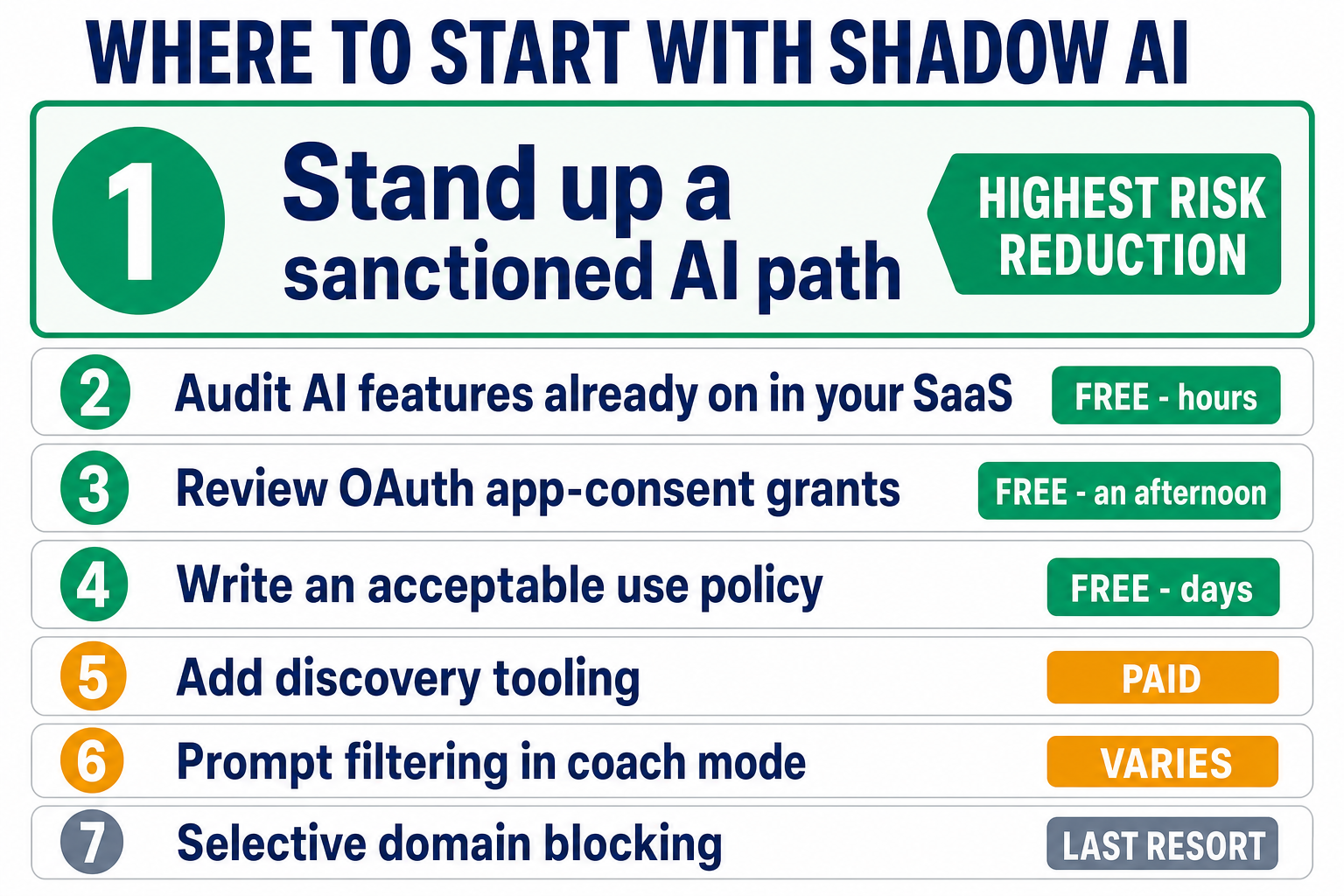
| # | Action | Risk removed | Survives ceiling? | Cost | Time to signal | Friction |
|---|---|---|---|---|---|---|
| 1 | Stand up a sanctioned AI path | Highest | ✅ Yes | £0 to low, self-hosted | Weeks | Negative (removes friction) |
| 2 | Audit AI features already on in your SaaS | High | ✅ Yes | £0 | Hours | None |
| 3 | Audit OAuth app-consent grants | High | ✅ Yes | £0 | An afternoon | None |
| 4 | Acceptable use policy + a named owner | Medium | ✅ Yes | £0 | Days | Low |
| 5 | Discovery tooling (CASB / SSE / browser) | Medium | ⚠️ Partly | £££ | Days | Low |
| 6 | Prompt filtering / DLP in coach mode | Low to medium | ❌ No | £0 to £££ | Days | Medium |
| 7 | Selective domain blocking | Low | ❌ No | £0 to ££ | Immediate | High |
Start building 1 this week, and run 2, 3 and 4 while you do. The audits are free, they take hours rather than weeks, and they will almost certainly surface AI nobody approved. The most common finding is not a rogue employee; it is a feature that came switched on and a consent grant nobody reviewed. They also tell you what your sanctioned path needs to handle, so the two jobs feed each other.
If you have budget, that order does not change. Add discovery tooling at 5 alongside the build. Buying a platform before you have read your own admin console is spending money to learn something you could have found this afternoon.
If you genuinely cannot build 1 yet, because of procurement, headcount or a model-approval process, then 2, 3 and 4 are your holding position. They buy visibility and set expectations. They do not move where the data goes, which is why they are not the answer on their own.
Notice what is last, and why it is still on the list. Earlier I said you cannot block your way out, and I meant it: blocking cannot reach embedded AI, and as a strategy it fails. As a narrow tactic against specific high-risk consumer endpoints, once people have somewhere better to go, it is fine. Blocking belongs at the bottom: it cannot touch embedded AI, the free lists are a year stale, and heavy-handed blocking pushes people onto their phones, where you lose visibility completely. Block the low-value long tail once a sanctioned alternative exists, not before.
The organisations doing this well are not the ones with the strictest controls. They are the ones where using AI safely is easier than using it secretly.
FAQ
What is shadow AI?
Shadow AI is the use of AI tools without the approval, oversight or knowledge of your IT and security teams. It covers more than employees using ChatGPT on personal accounts. It also includes AI features switched on inside software you already approved, developers calling model APIs in production code, and AI agents running under credentials nobody is tracking.
Can I just block ChatGPT at the firewall?
You can, and it will not solve the problem. Blocking handles the consumer AI long tail, but the AI most organisations are exposed to sits on domains they cannot block, such as Microsoft 365 Copilot on m365.cloud.microsoft. Blocking also pushes people onto personal phones, where you lose visibility entirely.
Does Microsoft 365 Copilot count as shadow AI?
It does if nobody decided who should have it. Microsoft's own definition covers AI deployed without IT visibility or approval, and an AI feature that arrived with a licence renewal fits that description. The test is not whether the vendor is approved. It is whether anyone governs the feature.
Do the free AI blocklists on GitHub work?
Not well. Every one I tested was between 277 and 419 days out of date, the most complete one does not block chatgpt.com, and two of the six actually target AI-generated websites, which is a different problem you cannot identify from the repository name.
Is Presidio enough to stop data leaking into AI prompts?
Not on its own, and not out of the box. In my testing it blocked 4 of 12 sensitive items by default, missing API keys, database passwords, UK sort codes and UK postcodes. Custom recognisers took it to 10 of 12. It is a PII framework doing PII well, and it was never designed as a secrets scanner.
What is the difference between shadow IT and shadow AI?
Shadow AI is a subset of shadow IT, specific to AI tools. The difference that matters operationally is that shadow IT usually means data sitting somewhere unapproved, while shadow AI means data being sent somewhere unapproved, potentially retained, and potentially used for training.
We have no budget. What should we do first?
Audit which AI features are already switched on in the SaaS you pay for, then review your OAuth app-consent grants in Entra ID or Google Workspace. Both are free, both take less than a day, and between them they will surface most of what you are missing.
Does blocking shadow AI make employees stop using it?
Generally not. It makes them use it somewhere you cannot see, typically a personal phone. The practitioner consensus, and IBM's own framing, is to provide a sanctioned alternative and route people to it rather than trying to shut AI down.
About the Author

Nathan House, Founder & CEO of StationX
Nathan House has 30 years of hands-on cybersecurity experience and is Cambridge-educated, holding CISSP, CISA, CISM, OSCP, CEH, and SABSA. He founded StationX in 1999 — one of the UK’s first cybersecurity companies — and has secured £71 billion in UK mobile banking transactions and the London 2012 Olympics, advising clients including Microsoft, Cisco, BP, Vodafone, and VISA. He authored the world’s most popular cybersecurity course — a #1 Udemy bestseller taken by over 500,000 students — and was named Cyber Security Educator of the Year 2020, AI Security Educator of the Year, and a UK Top 25 Security Influencer 2025. A DEF CON speaker and featured expert on CNN, Fox News, NBC, and the BBC, Nathan leads StationX’s training of more than half a million students worldwide.