How to Bypass a Firewall Like Expert Hackers Do (2026)
If you've ever tried to bypass a firewall and hit a wall — a VPN that connects for ten seconds then dies, a "free proxy" that loads nothing — you've run into the uncomfortable truth: most firewall-bypass advice stopped working years ago. A serious firewall doesn't just block ports anymore. It inspects the shape of your traffic, and it can spot a VPN even when that VPN is hiding on port 443 pretending to be a website.
I recently helped someone living under one of the world's most restrictive internet regimes get a reliable connection out. Everything the tutorials told us to try — OpenVPN on 443, then with obfuscation bolted on — got detected and blocked within minutes. What finally worked is the same method security professionals and censorship-circumvention engineers actually use in 2026: making the encrypted tunnel look identical to an ordinary visit to a real HTTPS website.
This guide walks you through how that works, why your VPN alone isn't enough, and how to set up your own server that beats Deep Packet Inspection. One honest note before we start: this is about understanding how censorship works and protecting people who need it — not for getting around a workplace or school policy you've agreed to follow. Let's get into it.
⏱️ TL;DR — if you've only got 30 seconds
- 🚧A firewall on port 443 isn't the problem. Deep Packet Inspection (DPI) reads the shape of your traffic and spots a VPN handshake even on the "web" port.
- 💀Plain VPNs — OpenVPN, even on TCP 443 or with obfuscation — are effectively dead against modern DPI.
- 🎭The method that works is VLESS+Reality: your traffic borrows a real website's TLS identity, so the firewall sees "an ordinary visit to apple.com," not a VPN.
- 🕵️It even beats active probing (where the censor tests your server) by handing probes the real decoy website.
- 💷You can run it on a cheap or free server (Oracle Cloud's free tier is the best freebie; Hetzner is the best cheap paid option).
Why Your VPN Doesn't Bypass a Serious Firewall
Most people get one thing wrong: they assume a VPN is a magic invisibility cloak. It isn't. A VPN encrypts your traffic and routes it through another server, which is great for privacy and enough to get past a basic firewall that only blocks by port number.
But does a VPN bypass a firewall that's actually trying to stop you? Often, no. And to see why, you need to understand the difference between the two ways a firewall can block you.
Port-blocking. Every kind of internet traffic uses a numbered "door" — web traffic uses port 443, email uses others, and old-style VPNs used port 1194. A lazy firewall just locks the doors it doesn't like. The classic workaround is to move your VPN onto port 443, the same door normal HTTPS websites use. The firewall can't block 443 without breaking the entire web, so your VPN sneaks through. For years, that was enough.
Deep Packet Inspection. A modern firewall doesn't care which door you use. It inspects what's coming through it. That's why "just put your VPN on 443" quietly stopped working — a part almost nobody explains properly.

How Firewalls Actually Detect and Block VPNs
Deep Packet Inspection is the reason your clever port-443 trick fails. If you want to bypass deep packet inspection reliably rather than by luck — which is really what "how to bypass DPI" comes down to — you first have to understand what it's actually looking at.
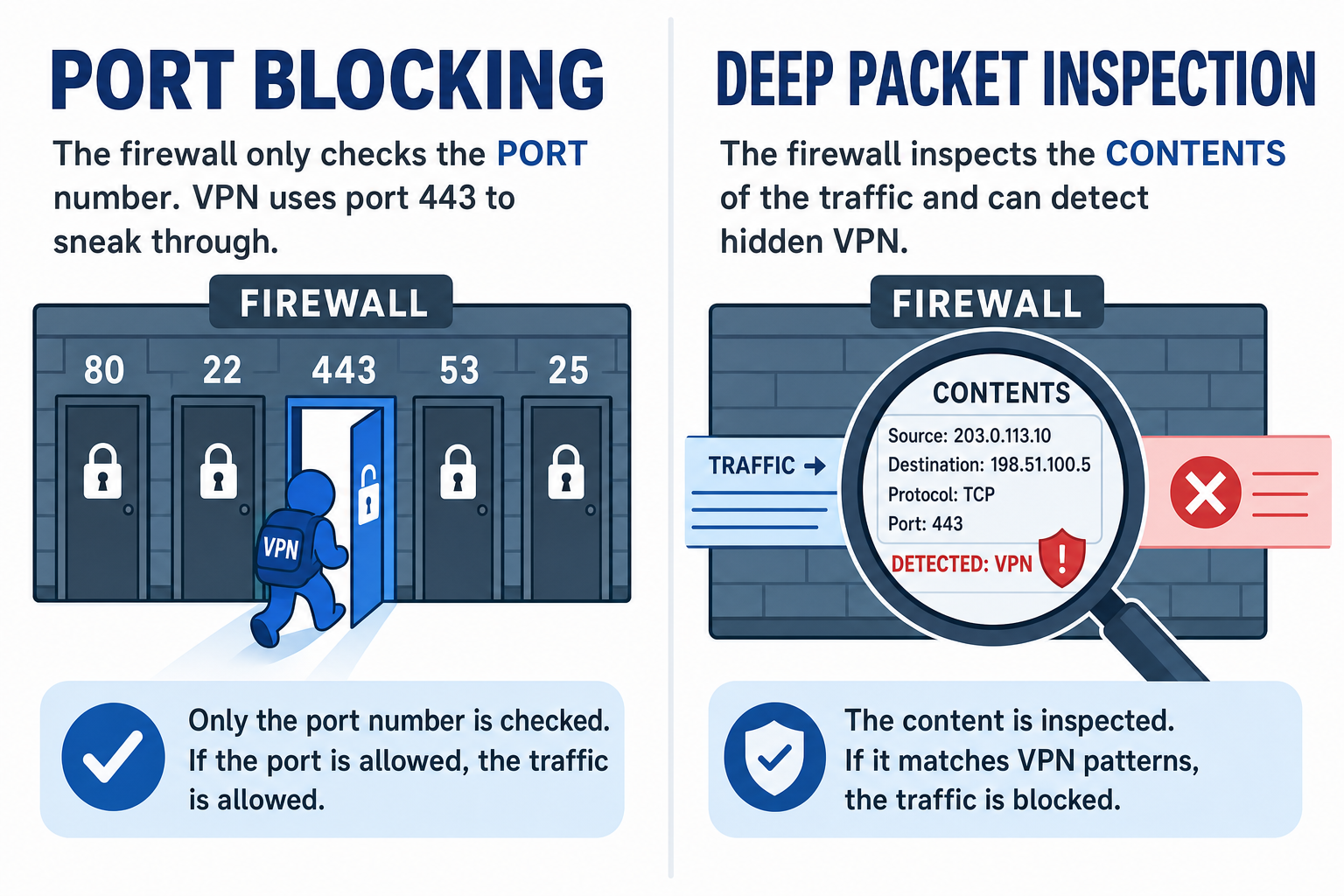
When you connect to a real website, your browser and the website perform a TLS handshake — a specific, recognisable opening conversation that says "I'm starting a secure web session." A DPI system can read that handshake. It's expected. It looks like the web.
When an old-style VPN connects on port 443, it doesn't do a TLS handshake. It does an OpenVPN handshake, or a WireGuard one — which looks nothing like a browser talking to a website. So the DPI system shrugs and says: "Port 443, sure, but this isn't HTTPS. This is a VPN." And it kills the connection. The port was never the giveaway. The shape of the opening conversation was.
Then there's the nastier technique, the one that catches the "obfuscated" VPNs too: active probing. This is what the firewalls in China, Iran, and a handful of other countries do. When they see a suspicious server, they don't just block it — they connect to it themselves and try speaking a few VPN handshakes at it, to see how it answers. If your server replies like a hidden proxy, they've confirmed it, and they blacklist the IP. This is a big part of why older tools like VMess and Trojan came under so much pressure through 2025 — VMess mostly through traffic-pattern fingerprinting, Trojan through the tell-tale signature of TLS wrapped inside more TLS. The details differ, but the lesson is the same: anything with a detectable fingerprint eventually gets found.
So the real problem is now clear. To get past a firewall like this, your traffic can't just be encrypted — it has to be indistinguishable from ordinary web browsing, both to passive inspection and to an active probe poking at your server. That sounds impossible, and the next section is why it isn't.
The Method Expert Hackers Use: Traffic That Looks Like a Real Website
The core idea is simple, and once it clicks the rest follows.
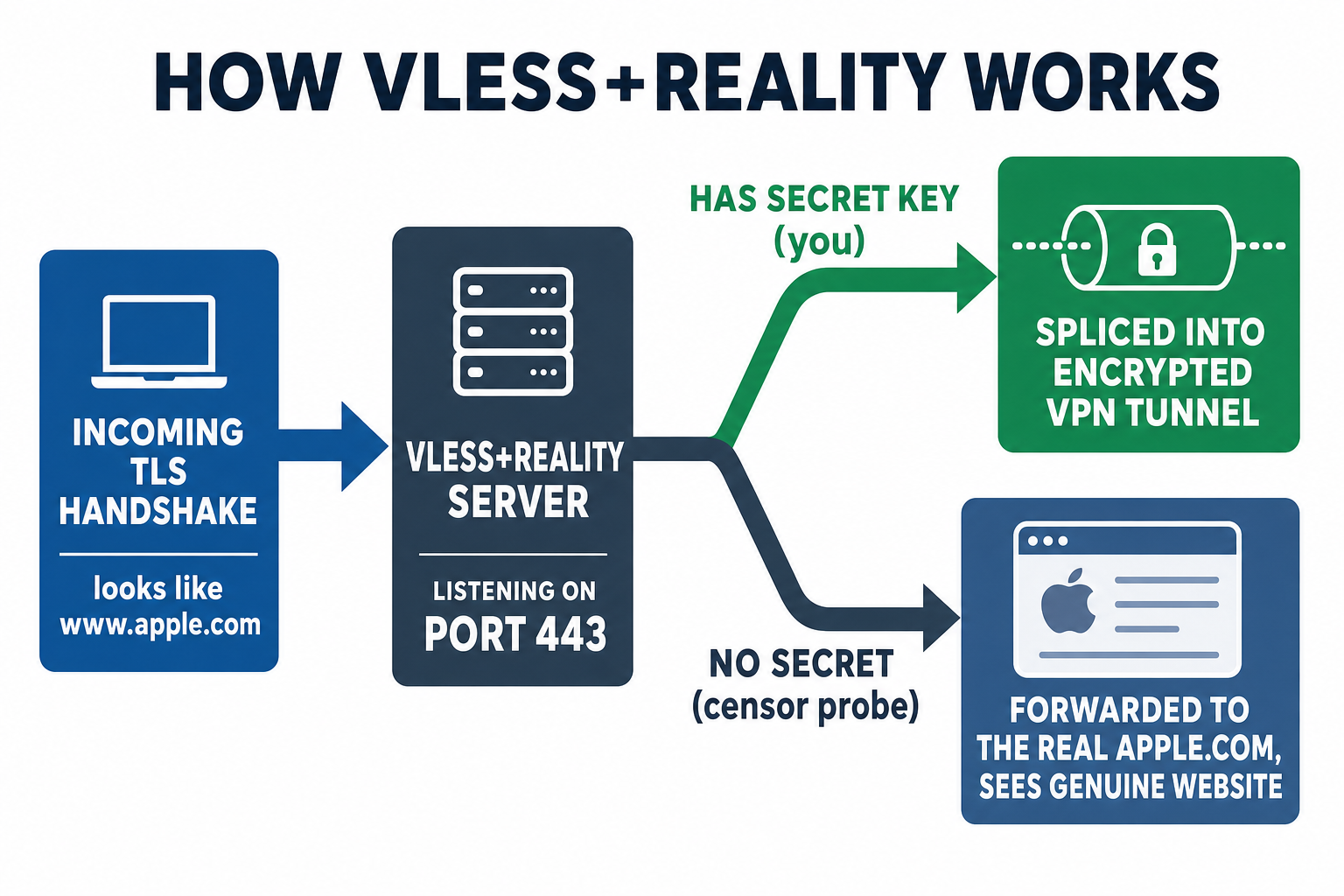
Instead of hiding your VPN traffic, you disguise it as a genuine visit to a real, popular website — one you don't even own. When your connection opens, it announces itself as, say, www.apple.com, using a handshake crafted to look exactly like a real browser starting a session with Apple. To anything watching on the network, it's your browser loading Apple's website. Your actual encrypted tunnel rides inside that disguise.
💡 In plain English
The clever part is what happens when the censor comes probing. Your server holds a secret key. If an incoming connection knows the secret (that's you), the server quietly splices you into the tunnel. If it doesn't know the secret (that's a censor's probe), the server does something beautiful: it silently forwards the whole connection to the real website. The probe ends up talking to genuine Apple servers, gets a genuine Apple certificate and web page, and concludes there's nothing here but a website.
That's the piece OpenVPN-on-443 completely lacks, and it's why this method survives where the others die. The technique has a name — VLESS+Reality — and we'll get into exactly how it works and how to set it up. But first, it's worth knowing what your options actually are, because Reality isn't the only contender.
What Actually Survives DPI in 2026
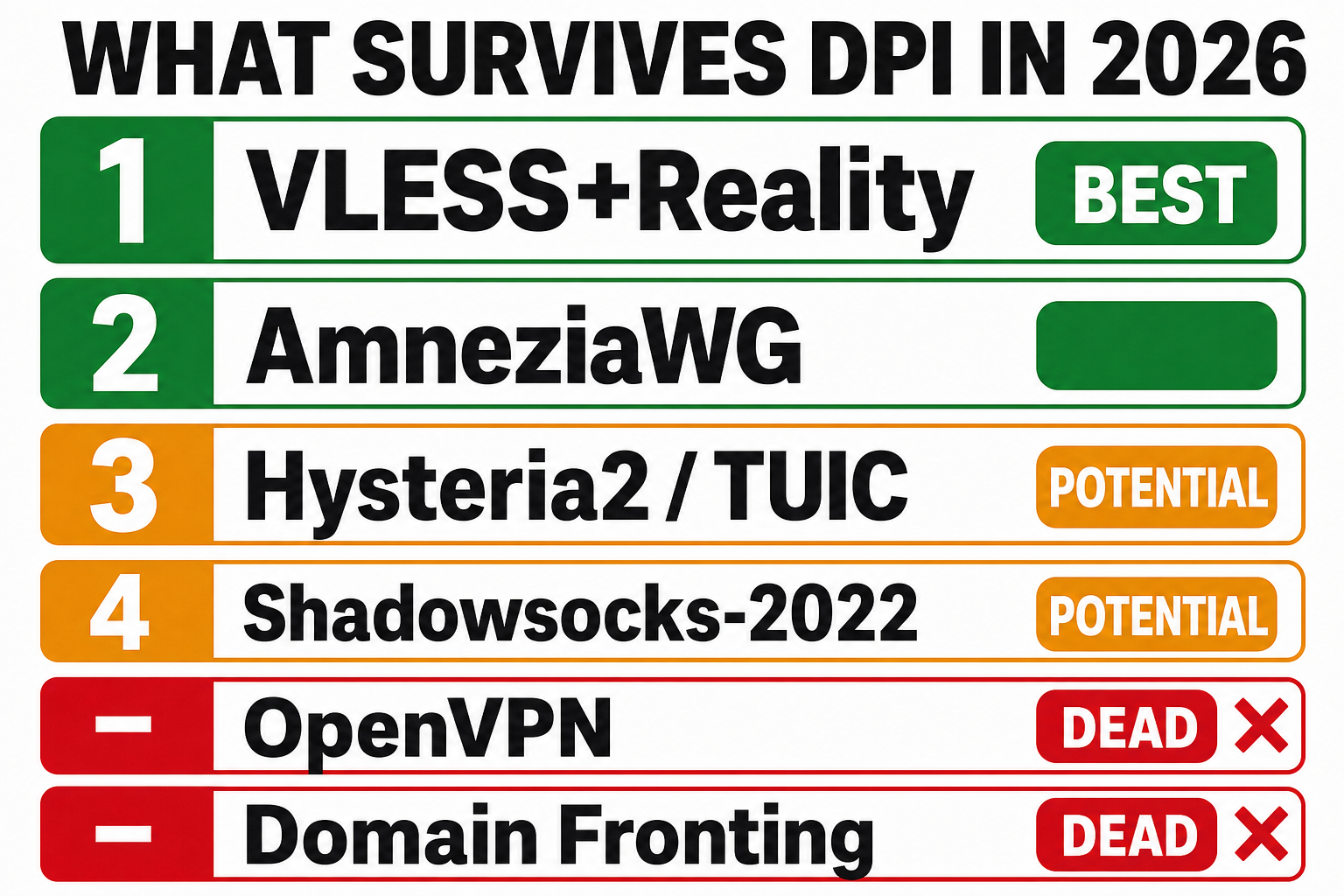
Not every "undetectable VPN" claim holds up. Here's the honest ranking of what genuinely gets past serious Deep Packet Inspection right now, based on how each protocol handles both passive inspection and active probing.
| Rank | Protocol | How it hides | Weakness |
|---|---|---|---|
| 1 | VLESS + Reality | Impersonates a real HTTPS website; hands probes the real site | Needs a server you run |
| 2 | AmneziaWG | Scrambles WireGuard's tell-tale packet headers | Still bare UDP — dies where all unknown UDP is blocked |
| 3 | Hysteria2 / TUIC | Runs over QUIC/UDP with obfuscation — looks like generic QUIC, not a specific real site | No real-site front, more exposed to probing; UDP throttled first |
| 4 | Shadowsocks-2022 | Looks like random noise | "Random noise" is itself increasingly a red flag |
| ❌ | OpenVPN (even on 443, XOR, or over stunnel) | Encryption only, no real disguise | Detectable — its handshake gives it away |
| ❌ | Domain fronting | Hid behind big CDNs | The CDNs disabled it years ago |
I want to be blunt about the bottom row, because it's the mistake I see most often: plain OpenVPN is finished as a censorship-evasion tool. It's a perfectly good VPN for privacy on a normal network. But against a firewall doing real DPI, moving it to port 443, adding XOR scrambling, or wrapping it in stunnel are all band-aids — the traffic still has a fingerprint, and modern systems find it. If you're serious about getting past a serious firewall, you want the top of that table.
VLESS + Reality Explained
VLESS Reality (usually written VLESS+Reality) is built by the XTLS project and it's the current state of the art. Here's how the disguise actually works, step by step.
When your client connects, it sends the opening message of a TLS handshake — the same message your browser sends to start a secure website session. Crucially, that message names a real decoy website in a field called the SNI (Server Name Indication), and it's forged to carry the same fingerprint a real browser (Chrome) would send. So the firewall reads it and sees a perfectly normal request to visit, say, Apple.
Your server recognises the secret embedded in that handshake and takes over the connection. On a valid session it hands your client its own temporary certificate, which your client is built to verify using the shared secret key — not through the normal web trust chain. A probe that lacks the secret never gets that far; it's forwarded to the real Apple, cert and all (more on that below). Either way, on the wire the session looks like an ordinary encrypted visit to Apple. Reality strips away the metadata that would normally betray a VPN.
Instead of hiding a VPN inside encryption and hoping nobody looks, it wears a genuine website's face — so when someone does look, even when they actively probe your server, all they find is a real website. That's what makes it, in practice, indistinguishable from ordinary browsing to the DPI systems in use today. Nothing stays ahead forever — this is an arms race, and we'll come back to that — but right now it's the strongest disguise available.
Here's the flow, including what happens to a censor's probe:
        YOU (real client, has secret)          CENSOR'S PROBE (no secret)
                 │                                       │
                 ▼                                       ▼
   ┌─────────────────────────── YOUR SERVER (:443) ──────────────────┐
   │   Incoming handshake says "I'm visiting www.apple.com"          │
   │   Does this client hold the secret key?                         │
   │        ├── YES → splice into the encrypted tunnel               │
   │        └── NO  → forward to the REAL apple.com                  │
   └────────────────────────────────────────────────────────────────┘
                 │                                       │
                 ▼                                       ▼
        Your traffic, tunnelled            A genuine Apple web page.
        (looks like HTTPS to Apple)        Probe concludes: "just a website."
That's the method. The rest is practical — you need a server to run it on.
Getting Your Own Server (Cheap and Free Options)
Reality needs a server you control, sitting outside the firewall you're trying to get past. That sounds expensive. It isn't — and one option is genuinely free. But there's a catch that catches everyone, so let me save you the mistake.
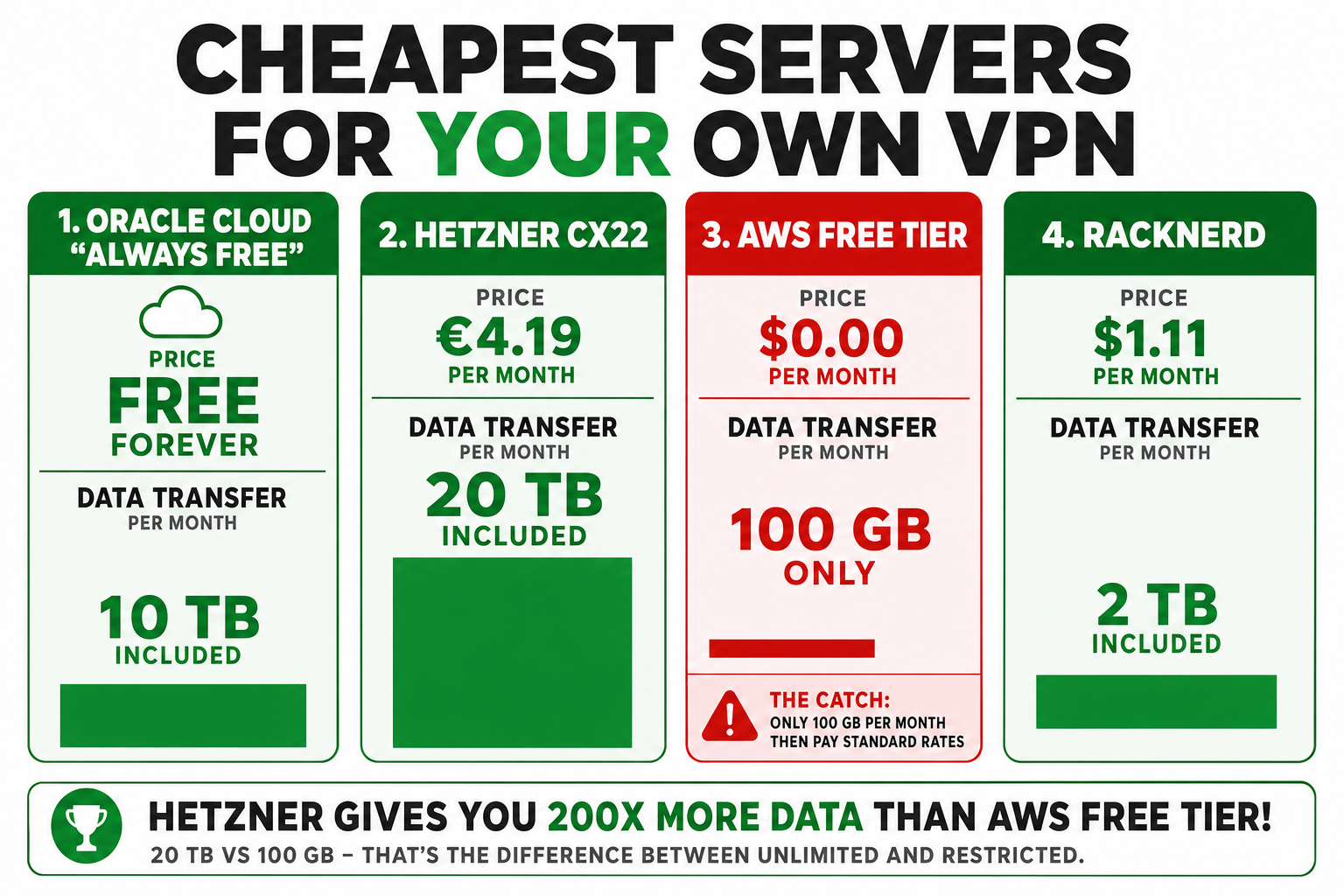
⚠️ The catch that catches everyone
The catch is data transfer, not the server itself. A VPN pushes all your traffic through that server, so the amount of data allowed out (egress) matters more than CPU or RAM. This is exactly where the "free" options get tricky.
Oracle Cloud "Always Free" — the best genuinely-free option. Permanent (not a trial), Arm-based compute, and generous egress. If you want a free DIY VPN in 2026, start here.
AWS Free Tier — read the fine print, it changed. AWS overhauled its free tier on 15 July 2025. Accounts created before that date keep the classic 12-month deal (750 hours/month of a t2.micro or t3.micro — enough to run one small server 24/7 for a year). Accounts created after get a 6-month, credit-based plan instead — up to $200 in credits, then it stops. Either way, there's a 100 GB/month outbound data cap; past that it's around $0.09/GB, so a heavy month of streaming through it could cost real money.
Hetzner — the best-value paid option. Their entry cloud server (the CX22) is a few euros a month and includes 20 TB of traffic in the EU — two hundred times AWS's free 100 GB. For a VPN, that traffic headroom is the whole game.
RackNerd / low-end VPS providers — often the cheapest headline prices via promos, with generous bandwidth. Good value if you don't mind less polish than Hetzner.
✅ My honest recommendation
Use Oracle's free tier to learn on and prove it works, then move to a cheap Hetzner box if you want something dependable with room to breathe. Skip AWS for this unless you already have a legacy free-tier account — that 100 GB cap turns a VPN into a metered taxi.
Step-by-Step: Set Up a DPI-Proof VPN Server
This is the part that does the real work — the configuration that makes your traffic undetectable rather than just encrypted. The steps below are what actually make VPN undetectable-grade traffic possible: you wrap the tunnel in Reality instead of merely encrypting it. On a fresh Ubuntu server it takes about fifteen minutes, and these are the real commands — run them on the server you provisioned in the last section.
Install Xray-core with the official installer:
bash -c "$(curl -L https://github.com/XTLS/Xray-install/raw/main/install-release.sh)" @ install
Generate your three secrets. These are what separate you from a probe:
xray uuid              # your client ID, e.g. 4d75c183-6e6a-42eb-a8d8-b5aa6fd31ec5
xray x25519            # a key PAIR: PrivateKey (stays on the server) + Password/PublicKey (goes to the client)
openssl rand -hex 8    # a shortId, e.g. c0f2917c5ad08823
The one thing people get wrong here: the PrivateKey goes in the server config, the PublicKey goes in the client link. Never the other way round.
Write the server config to /usr/local/etc/xray/config.json. This is a complete, working file — swap in your own UUID, PrivateKey, shortId, and decoy:
{
  "inbounds": [{
    "listen": "0.0.0.0", "port": 443, "protocol": "vless",
    "settings": {
      "clients": [{ "id": "YOUR-UUID", "flow": "xtls-rprx-vision" }],
      "decryption": "none"
    },
    "streamSettings": {
      "network": "tcp", "security": "reality",
      "realitySettings": {
        "dest": "www.apple.com:443",
        "serverNames": ["www.apple.com"],
        "privateKey": "YOUR-SERVER-PRIVATEKEY",
        "shortIds": ["YOUR-SHORTID"]
      }
    }
  }],
  "outbounds": [{ "protocol": "freedom" }]
}Start it and check the config is valid:
xray -test -config /usr/local/etc/xray/config.json   # expect: "Configuration OK"
systemctl restart xray && systemctl enable xray
Open the firewall for port 443 — both directions. This is the trap that cost me twenty minutes: on a locked-down server, allowing traffic in to 443 isn't enough if the server's own replies out are blocked. Connections half-open and time out. Allow both:
# allow NEW inbound to 443, and the server's reply out from 443
iptables -I INPUT -p tcp --dport 443 -m state --state NEW,ESTABLISHED -j ACCEPT
iptables -I OUTPUT -p tcp --sport 443 -m state --state ESTABLISHED -j ACCEPT
Build your connection link. Everything the client needs packs into one vless:// URI. Fill in your own values:
vless://YOUR-UUID@YOUR-SERVER-IP:443?encryption=none&security=reality&sni=www.apple.com&fp=chrome&pbk=YOUR-PUBLICKEY&sid=YOUR-SHORTID&flow=xtls-rprx-vision&type=tcp#My-Reality
That single link (or a QR code of it) is what you'll import on every device. That's the whole server.
⚠️ The bug that cost me an hour — worth knowing
When I first set this up, the handshake failed every single time, even though every setting was correct: keys matched, IDs matched, the decoy was fine. The cause turned out to be a genuine, documented Xray limitation (issue #6356): Reality rejects a decoy whose TLS certificate is larger than 8192 bytes, and www.microsoft.com's certificate is 8273 bytes — just over the line. The fix was a thirty-second change: switch the decoy to www.apple.com, whose certificate is well under the limit. Nothing in the setup guides mentions it, which is exactly why I'm mentioning it here.
Choosing Your Decoy Website (The Mistake Everyone Makes)
Here's the misunderstanding I see constantly: people think they have to build or host the decoy website. You don't. You borrow the identity of a real, existing website that you have nothing to do with. Your server simply points at it.
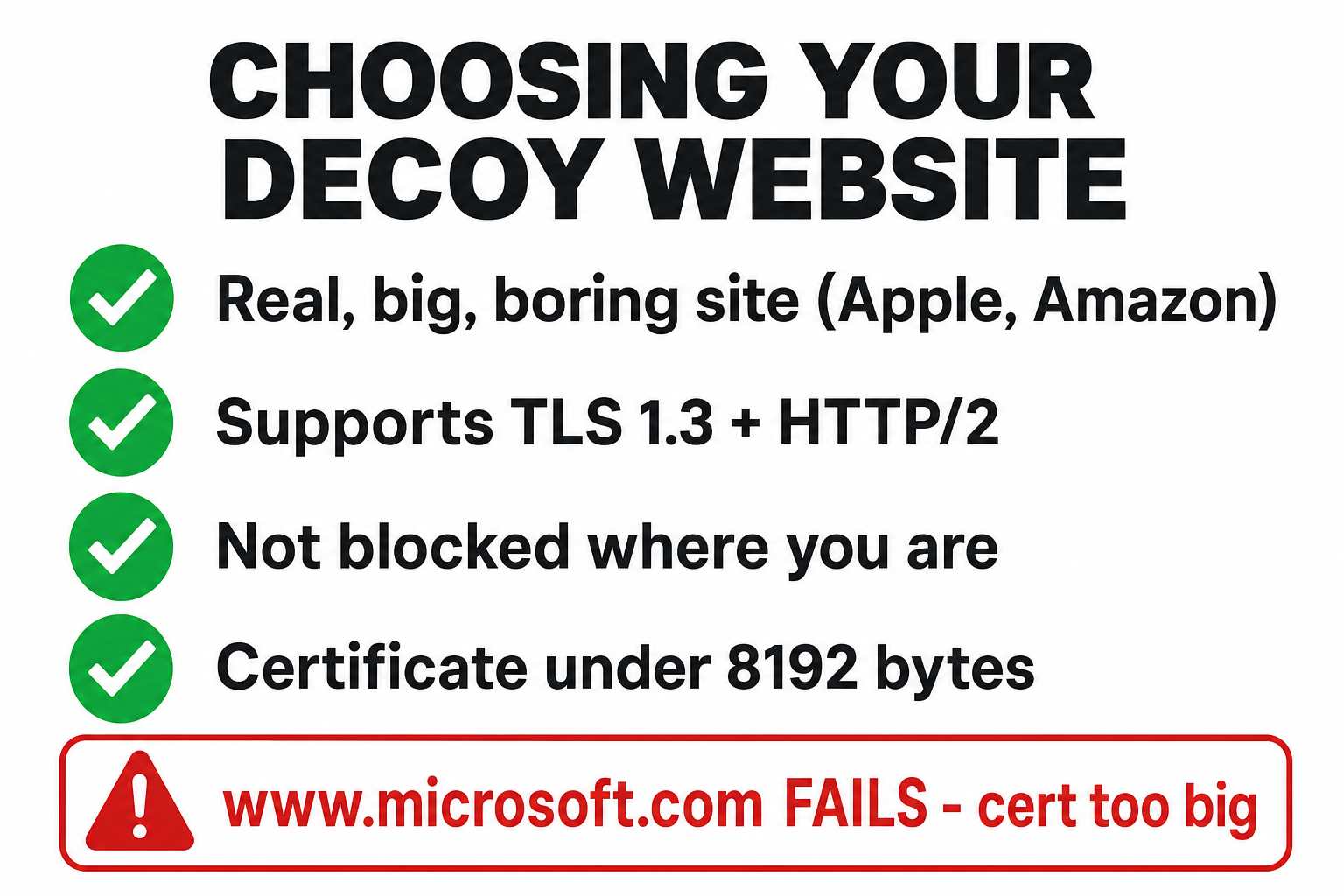
For the disguise to hold, that decoy has to meet a few conditions:
A real, big, boring website — Apple, Microsoft, Amazon, a major CDN. Something that's expected traffic.
Supports TLS 1.3 and HTTP/2. Reality requires both. (Most large sites do.)
Not blocked where you are. The whole point is that it looks like normal browsing, so it must be a site your firewall actually allows.
Not your own domain, and not a known VPN provider. Borrow a stranger's respectable face, not your own.
A TLS certificate under 8192 bytes — the trap from the last section. www.apple.com works; www.microsoft.com currently doesn't.
Get the decoy right and your server blends in: probe it or inspect it, and all you find is a popular website. Get it wrong and either the disguise looks odd, or (as I learned) it silently refuses to connect at all.
You don't have to guess whether a candidate site qualifies — you can check it in one command. This confirms TLS 1.3 and HTTP/2 support and shows the certificate size:
echo | openssl s_client -connect www.apple.com:443 -servername www.apple.com -alpn h2 -tls1_3 2>/dev/null | grep -E "Protocol|ALPN"
If it comes back with TLSv1.3 and ALPN protocol: h2, the site supports what Reality needs. If the connection fails or shows an older protocol, pick a different decoy.
Connecting Your Devices
The good news: once the server is up, the client side is dead simple, and it's the same everywhere. This is where you actually get past a firewall in day-to-day use — your one vless:// link works on every device, phone and laptop.
Android — v2rayNG. Tap +, import the QR code, connect.
iPhone / iPad — Shadowrocket (small paid app) or the free Streisand. Scan the QR, connect. (In some regions you'll need an App Store account set to another country to download these.)
Windows — v2rayN. Add the link from clipboard, enable.
macOS / cross-platform — Amnezia VPN is the friendliest single app that runs on everything and imports the same link. If you want one app to explain to one person, this is it.
Whatever the device, the routine is identical: install the app, scan the QR or paste the link, press connect, then check your IP shows the server's country. That's it.
Frequently Asked Questions
Does a VPN bypass a firewall?
A basic one, yes — a VPN on port 443 gets past a firewall that only blocks by port. But it won't get past a firewall doing Deep Packet Inspection, which spots the VPN handshake regardless of port. For that you need traffic that impersonates real web browsing, like VLESS+Reality.
Is it legal to bypass a firewall?
It depends entirely on the firewall and where you are. Circumventing government censorship to access the open internet is a digital right in many people's eyes, but some countries criminalise VPN use — know your local law. Getting around a workplace or school firewall you've agreed to abide by is a different matter and usually against policy. This guide is for education and for people who genuinely need safe access.
Will this work in China or Iran — how do I get past a firewall that strict?
Knowing how to get past a firewall in those countries comes down to protocol choice, and VLESS+Reality is currently one of the few methods that does hold up against the deep-inspection-plus-active-probing firewalls in those countries, which is precisely what it was built for. Nothing is guaranteed forever — it's an arms race — but as of 2026 it's the strongest option, ideally paired with a backup protocol like AmneziaWG.
Is OpenVPN dead?
For privacy on a normal network, no — it's still a solid VPN. As a tool for getting past a firewall that's actively hunting for VPNs, effectively yes. Even on port 443 or with obfuscation added, its traffic has a fingerprint that modern DPI catches.
How much does it cost to run my own?
It can be free on Oracle Cloud's Always Free tier, or a few euros a month on Hetzner with 20 TB of traffic. The main thing to watch is data transfer limits, not the server price — that's the "gotcha" on AWS's free tier, which caps you at 100 GB a month.
Can they still tell I'm using something?
Done right, no — a probe or inspection of your server finds only a real, popular website. That's the entire design. The bigger real-world risk in the strictest countries isn't the traffic on the wire; it's someone physically inspecting your phone and finding a VPN app installed.
About the Author

Nathan House, Founder & CEO of StationX
Nathan House has 30 years of hands-on cybersecurity experience and is Cambridge-educated, holding CISSP, CISA, CISM, OSCP, CEH, and SABSA. He founded StationX in 1999 — one of the UK’s first cybersecurity companies — and has secured £71 billion in UK mobile banking transactions and the London 2012 Olympics, advising clients including Microsoft, Cisco, BP, Vodafone, and VISA. He authored the world’s most popular cybersecurity course — a #1 Udemy bestseller taken by over 500,000 students — and was named Cyber Security Educator of the Year 2020, AI Security Educator of the Year, and a UK Top 25 Security Influencer 2025. A DEF CON speaker and featured expert on CNN, Fox News, NBC, and the BBC, Nathan leads StationX’s training of more than half a million students worldwide.