Best AI for Hacking? How to Actually Choose (2026)
Search "best AI for hacking" and you'll get a dozen lists, each crowning a different model, most of them already out of date. That's not laziness. It's that the question has a short shelf life. The model that tops the leaderboard this month gets overtaken next month, and any article built around a single winner is stale before it ranks.
But the deeper problem is that "which model" is the wrong question to lead with. Most security people using AI today are prompting a raw chatbot for one answer at a time, and getting a fraction of what's possible out of it. There's a wide gap between what people do with AI and what a security professional can do with it, and it isn't the model that closes that gap. You need the model, no argument. On its own, though, it's a limited thing: spiky and inconsistent, it forgets you between sessions, and it refuses a lot of legitimate security work by default. The people pulling ahead aren't the ones who found this month's smartest model. They're the ones who built a system around it to direct it. That's where the leverage lives, and it's the thread running through everything below.
So this guide doesn't hand you a winner. It gives you the parts that don't expire: how working pentesters and bug bounty hunters actually use AI (narrower and more honest than the hype), how to judge a model for security specifically, and the part almost nobody explains, which is the three ways to get past the guardrails when the strongest models refuse your work by default. I've just been through the main one myself, across three accounts, so I'll show you exactly how it works.
TL;DR — if you've only got 30 seconds
"Which model is best?" is the wrong question — it changes monthly. The durable edge is the system you build around a model to direct it, not the model itself.
Working pros treat AI as an assistant for the boring 80% — recon, triage, reading code, report writing. It's a first pass, not a final answer, and weak at business logic.
The step most people never take: build an agentic system that orchestrates an offensive job end-to-end — recon, review, exploit, sandbox validation, repeat — with you defining the steps, checks, and final calls. It adapts to many authorised offensive jobs you can break into tool-driven steps. That's AI-driven security engineering, and it's a different league from prompting a chatbot.
Judge models on security benchmarks (Cybench, NYU CTF, AutoPenBench), not coding leaderboards. Raw scores have climbed fast — the frontier has all but saturated Cybench — but a human directing the model still beats the model alone by roughly 3×, and that gap is the signal that lasts.
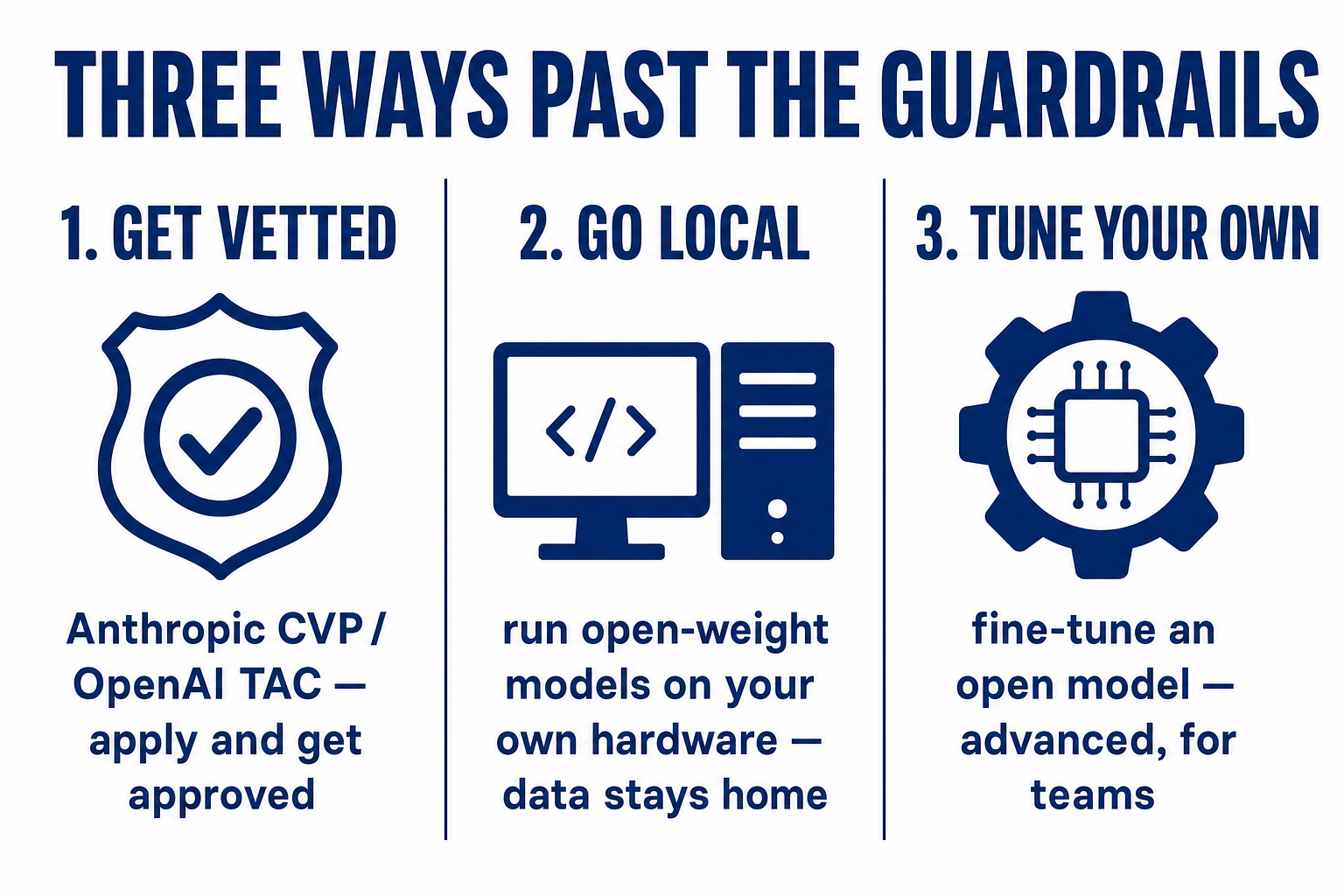
There are three honest ways past the guardrails on authorised work: get vetted access (Anthropic CVP / OpenAI Daybreak), go local, or fine-tune your own. Authorised work only.
One line before we go deeper, because the title is broad and the intent here isn't. This is for authorised work: pentesting under contract, bug bounty inside a program's scope, red teaming systems you have written permission to touch. That's not a disclaimer at the bottom of the page. It's the frame the whole thing is built on, and by the end you'll see the access programs are designed around exactly that distinction. Let's get into it.
What Security Pros Actually Do With AI (Not the Hype)
A raw chatbot won't hack for you. From the people doing it for a living, it's a very good assistant that does the boring 80% while you do the part that matters. (Wrap it in the right system and that changes, which is the whole point of this piece, but we'll get there.)
Bugcrowd's 2026 survey of over 2,000 hackers found 82% now use AI in their workflow, up from 64% in 2023. But only 27% believe AI actually outperforms hackers. The pros overwhelmingly treat it as augmentation, not a replacement. (Bugcrowd, Inside the Mind of a Hacker 2026)
What they actually point it at is specific and unglamorous:
Recon and triage. Paste in noisy scanner output, config dumps, logs, and get back a concise summary of what's unusual and what to test first. This is the big time-saver.
Reading messy code. Parsing huge or unformatted codebases into something you can reason about.
Report writing. The paperwork every hunter dreads. One hacker in the Bugcrowd report calls it likely the most popular use of all, and anyone who's written up findings at 11pm knows why.
Payloads, deobfuscation, and learning. Generating boilerplate, unpicking obfuscated scripts, getting up to speed on an unfamiliar framework fast.
Then there's the half the marketing leaves out. Ask hunters where AI fails and they're blunt: business-logic bugs, multi-step chained logic, genuinely novel attack paths. As one put it after testing AI scanners against ten real products, they're good at textbook vulnerabilities and "terrible at understanding business logic… it requires understanding how the pieces connect." The phrase you'll hear again and again is that AI is "a first pass, not a final answer." (r/bugbounty)
AI handles the volume; you supply the judgement. So the real question was never "which model is smartest." It's which model, wrapped in what, run by someone who knows what they're doing. That "wrapped in what" is where the whole thing is won: a raw model you prompt one question at a time is where most people stop, and it's the least you can do with it. The edge is the system you build to direct it.

What That Actually Looks Like
To make that concrete, because "build a system" sounds vague until you see what it does:
Here's one example — and I want to stress one, because it's a single narrow slice of what this does. Reviewing web-app source for vulnerabilities is one job out of dozens. The same infrastructure can be extended, with the right tools and controls, to network recon, cloud misconfiguration review, API fuzzing, phishing-campaign simulation, malware analysis, or stages of a full red-team engagement. I'm using a source-review job here only because it's easy to picture end-to-end.
So here's that one job, handed to my AI infrastructure as a single instruction. Take a set of web-app plugins, download them, run a multi-agent adversarial review over the source (different models arguing about the same code so one isn't marking its own homework), then run the usual tools against them, collect the candidate vulnerabilities, spin up a fresh Docker environment to test in, write an exploit for the most promising finding, run it, and confirm whether it actually works. Then move to the next target and do it again.
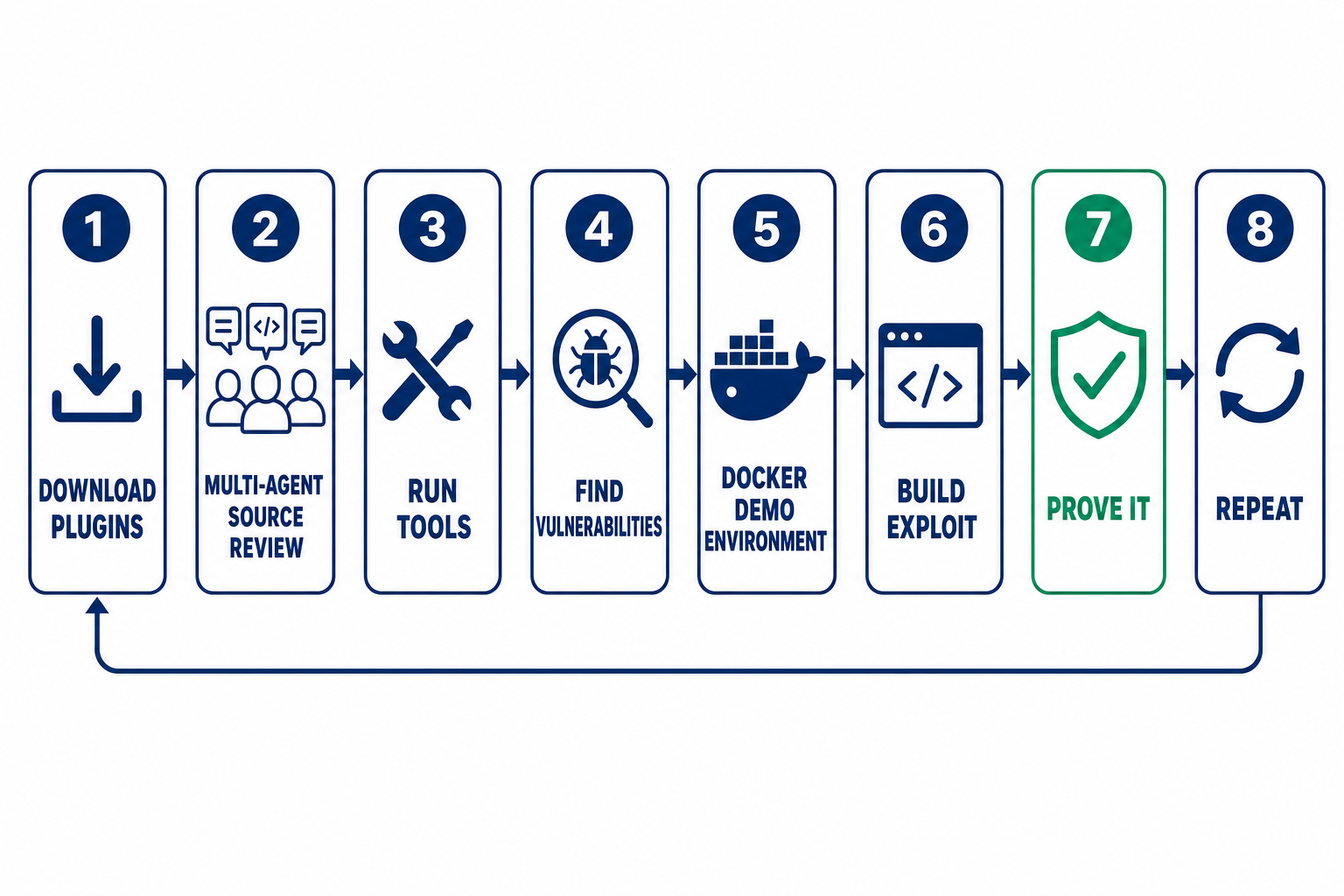
I don't sit and drive each of those steps. The system does the download, the review, the tooling, the environment, the exploit attempt, and the proof, then hands me back the ones that are real. My job is to point it at authorised targets, set the standard, and make the final call.
I've run exactly this against a security plugin installed on around four million WordPress sites. The system reviewed the source, identified a known authentication-bypass flaw, stood up a throwaway WordPress in Docker, wrote the exploit, and fired it. One unauthenticated request, no password, and WordPress handed back a valid administrator session. I used a known flaw on purpose here, since I'm not about to publish a live zero-day against four million sites, but the method doesn't care whether a bug has a CVE number yet: it reads the source and finds what's there. The whole chain, from reading the code to proving the exploit in a live environment, ran as one directed job instead of a week of manual work.
That's the difference the whole article is about. Prompting a chatbot for a payload is one keystroke in that chain. What most people call "using AI for security" is that single keystroke, over and over, by hand. What's possible is the whole chain running itself, with you directing it — and again, that source-review job was just one example. The same orchestration pattern can support many kinds of authorised offensive work once you build in the right tools and checks: recon and enumeration, exploit development, credential attacks in an authorised lab, cloud and container review, wireless, social-engineering simulations, malware reverse-engineering, individual stages of red-team campaigns. Many programmatically executable workflows can be built around the same principles, though the tooling, controls, and reliability differ from one to the next. A chatbot's ceiling is one conversation. A system's ceiling is however much you're willing to build.
The catch is that a chain that can prove an exploit can also do real damage if you point it at the wrong thing. That's why the next section isn't optional.
First, the Line That Matters: Authorised Work Only
This one's quick but non-negotiable, because "best AI for hacking" attracts two very different readers.
If you're a penetration tester, a bug bounty hunter working inside a program's rules, or a red teamer with written scope, this is for you, and all of it is aimed at making authorised work faster.
✅ The frame this whole guide is built on
If you're looking to attack systems you don't have permission to touch, nothing here helps, and the access programs below are built specifically to keep you out. The providers vet applicants so that adjusting a guardrail goes to people doing legitimate work. Authorisation is the hinge the whole access system turns on, which is why the process looks the way it does.
The Benchmarks That Predict Offensive-Security Performance
If you're going to judge a model for security work, judge it on security tasks, not the coding or general-reasoning leaderboards most "best model" lists lean on. There's a specific set built for this, and knowing them is most of the skill. (The general craft of reading any benchmark without being fooled, contamination and gaming and the private-eval habit, I've written up in full in our guide to choosing a model; it applies here unchanged, so I won't repeat it.)
The ones worth knowing, all checked against their source papers:
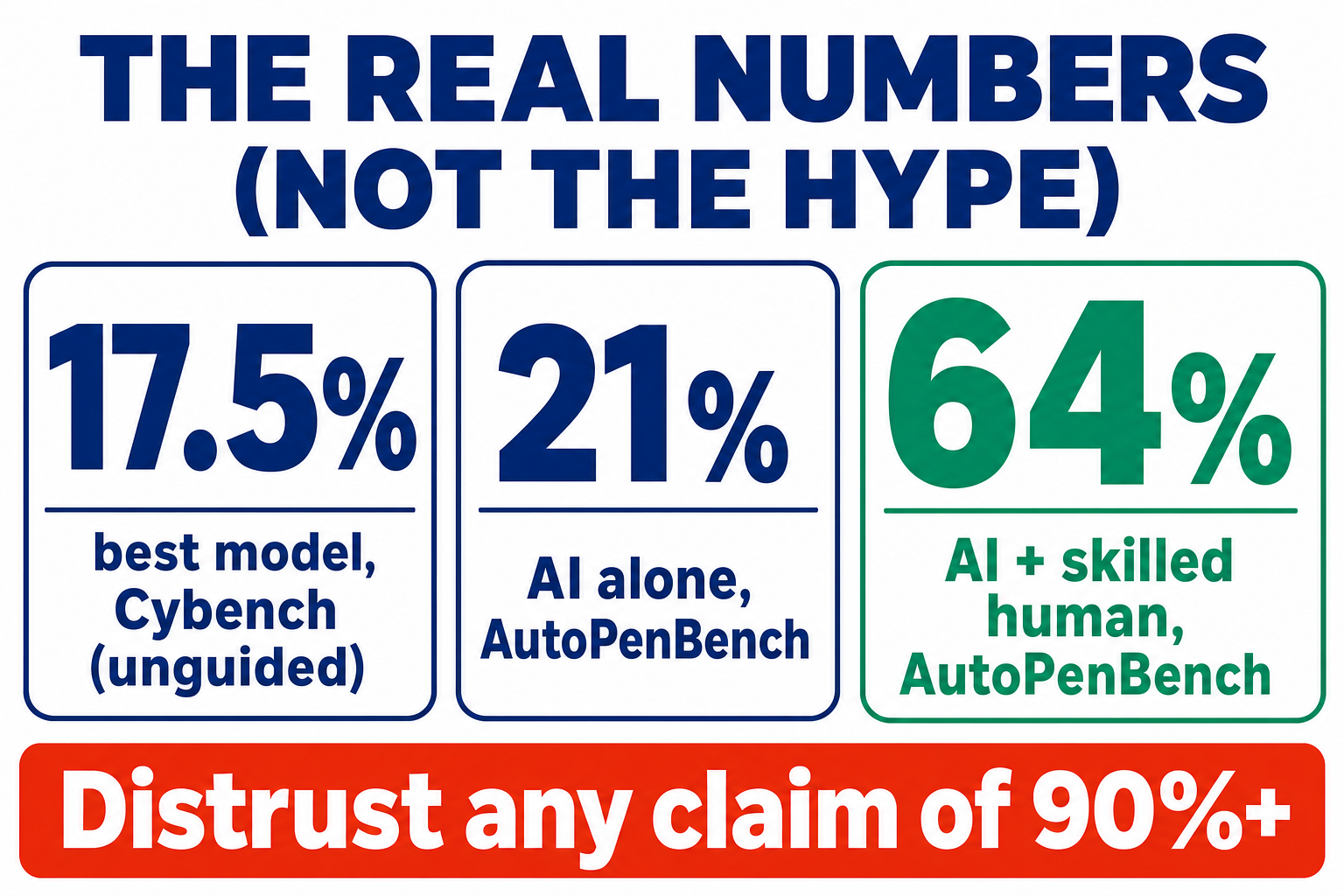
Cybench. 40 capture-the-flag tasks from four real competitions, useful precisely because CTF work mirrors real offensive reasoning. When it launched in 2024 the scores ran low: the best model solved just 17.5% of tasks unguided (Claude 3.5 Sonnet; GPT-4o managed 12.5%). (arXiv 2408.08926) Two years on that's been demolished — the top model on the public Cybench leaderboard now scores 100%. (LLM-Stats, Cybench) The benchmark that once separated models has largely saturated, which is itself the lesson about how fast this moves.
NYU CTF Bench. 200 CTF challenges across six categories, same shape at launch — models scored low and several open ones solved almost none. (arXiv 2406.05590) But it has climbed just as fast: the best agent now solves around 79% (Claude Opus 4.6, early 2026), up from roughly 22% a year earlier. (NYU CTF Bench run, Feb 2026)
CyberSecEval 3 (Meta). Less a capability score, more a safety-and-capability probe across eight risk areas including offensive ones. It's the source for one genuinely useful number I'll use in the next section.
AutoPenBench. An autonomous-pentesting benchmark, and the one that makes the single most important point on this page.
Here's that point, and it's the one that survives every leaderboard shuffle. In AutoPenBench's 2024 GPT-4o experiment across 33 tasks, a fully autonomous agent solved 21%. Swap the architecture for one where a human decomposes each goal into steps and it solved 64%, three times as many. (arXiv 2410.03225) Raw model scores have shot up since — but that operator gap is the part that persists, and it's why "AI plus a skilled operator beats AI alone" is the durable finding, not this month's benchmark number. First pass, not final answer.
⚠️ Two cautions on reading these numbers
Read headline scores with suspicion — but not because they're always low. Two years ago they were sobering (17.5% unguided on Cybench, 21% autonomous on AutoPenBench); today the frontier has saturated Cybench and cracked ~79% on NYU CTF. The catch is that these are still benchmark conditions: known challenges, forgiving pass metrics, often smaller task subsets. A high number tells you a model can, not that it will on your unseen target — and a human directing the model still beats it running alone. Use them to shortlist, then confirm on your own tasks.
So benchmarks get you a shortlist. But there's a wall every security professional hits within a day, and no benchmark shows it to you.
The Three Ways Past the Guardrails
The wall is refusals. The best-aligned models block a lot of legitimate security work out of the box: explaining how a published CVE is exploited, walking through what a known piece of malware does, writing a realistic phishing sample to test a defence pipeline, generating red-team variations for an authorised engagement. Meta's CyberSecEval 3 gives one concrete data point on how often a safety filter wrongly blocks benign requests. Testing the Llama Guard filter on a borderline-request benchmark, the false-refusal rate came out at 2% as an output-only guard and 10% when used as both an input and output filter. (CyberSecEval 3, arXiv 2408.01605) For a professional, that friction is constant, and it's the real tax on using aligned models for security.
Here is how to get around it, in rough order of how most professionals should weigh the options.
1. Get vetted access (the big one)
The two largest providers now run formal programs that relax their safeguards for vetted professionals. Not a blanket switch-off, but an approved adjustment for the security work you describe. This is the part almost nobody explains, so here's how it actually works. I've applied to both, and here is where each one stands as of 5 September 2026.
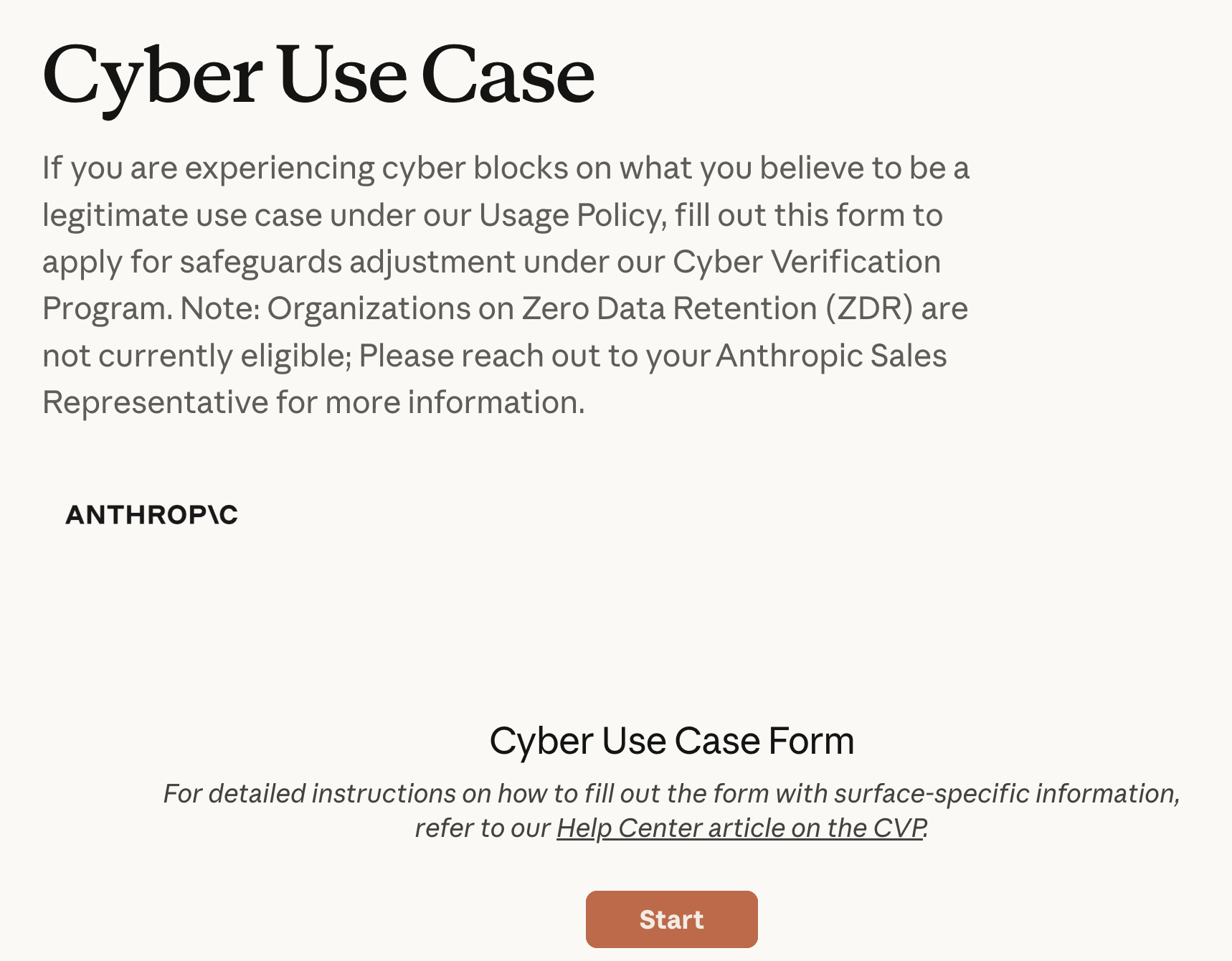
Anthropic's Cyber Verification Program (CVP) is free and application-based. You describe the security work you do, provide something that proves you're a real practitioner (a LinkedIn profile, a conference talk, a bug-bounty history, or a security lead who'll vouch), and if approved, Anthropic adjusts its real-time cyber safeguards for your organisation, so Claude will help with dual-use pentesting, bug bounty, and red teaming it would otherwise refuse. (Anthropic CVP application) And vetted access is about to get more architectural, not less: Anthropic's GRAM research would bake the capability tiers into the model weights themselves.
Two things I learned doing it that the form doesn't spell out. Approval is tied to a specific organisation ID. It doesn't carry across accounts, so if you work under more than one, you apply for each. I did three; all three came back approved, and each took about twenty minutes, though Anthropic quotes up to a couple of business days. And in my experience the use-case answer wants a concrete task, not a category: "I run Claude against our own and client codebases to review for vulnerabilities and explain the exploitation path," worked far better for me than "we do security." What it never adjusts is genuinely prohibited use. Ransomware and mass data exfiltration stay blocked regardless. That's the authorisation line, enforced in the product.
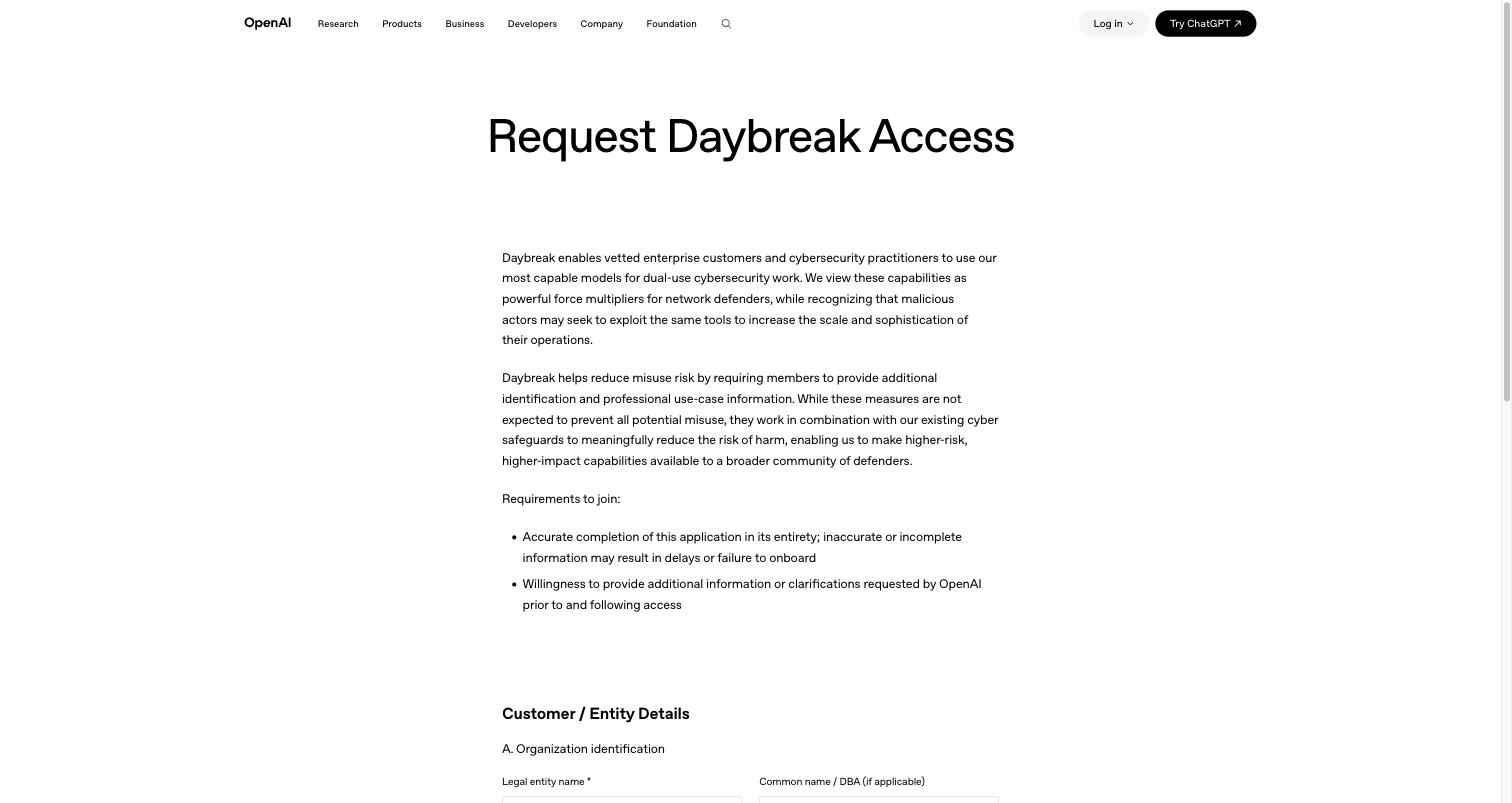
OpenAI's Daybreak Access, still formally called Trusted Access for Cyber (TAC), is the heavier lift, and worth knowing before you start. When I applied in July the page was headed "Request OpenAI Pilot: Trusted Access For Cyber". It is now headed "Request Daybreak Access", and OpenAI says Daybreak already covers thousands of defenders across 2,000 approved organisations and workspaces, with $1 billion of subsidised access on the table over six months and a separate track for open-source maintainers run with Trail of Bits. It is an enterprise intake, not a quick form. You apply as an organisation: legal entity name, public website, a government-entity declaration and your OpenAI organisation ID are the first required fields, so there is no route for an individual without a legal entity and an OpenAI organisation behind them. The form then asks for a named point of contact, your relationship with OpenAI, the surfaces you will use, your intended use cases (penetration testing, red teaming, vulnerability assessment and exploitation, detection evasion and bypass investigation, malware reverse engineering, cryptographic research, threat intelligence), every country you will use it in, the accreditations you hold, and a block of legally binding security-posture attestations headed "check all the below that apply": SOC 2 Type II or ISO 27001 or equivalent, SSO and MFA with least-privilege role-based access, API key governance, monitoring with retained usage logs, a documented incident response process, domain-specific email addresses, enterprise-controlled devices. Tick only what is true of your organisation. Don't attest to a certification you don't hold: the form makes false information a material breach, and the Services Agreement's limits on your liability do not apply to that addendum. After you submit, OpenAI's stated next step is a government-ID check and basic business information; in my case that meant a face scan and a separate business-verification step. Access is tiered. Daybreak Blue covers common defensive work on OpenAI's mainline models; Daybreak Red gives approved organisations the specialised cyber models for more sensitive, technically demanding work. Since GPT-6 Astra launched on 3 September 2026 as the first model OpenAI rates Critical for cyber capability, OpenAI says its advanced cyber work goes to a group of testers first, then out through Daybreak Blue. (OpenAI Daybreak Access application)
I applied on 15 July 2026: submitted the form, cleared the government-ID and face-scan check and the separate business-verification step, all of which moved quickly. As of 5 September 2026, seven weeks on, there has been no decision either way, so I still can't tell you first-hand what access it actually grants. I'll update this when it lands.
Those two are the whole of the formal vetted-access route today — Anthropic and OpenAI are the only providers running one. The other hosted frontier models are worth knowing but sit outside it. xAI's Grok tends to refuse less offensive-security work by default and has sat near the top of the public Cybench board, and Google's Gemini is the strong all-rounder with a huge context window. Neither runs a comparable authorised-access program, so for dual-use work that an aligned model would otherwise block, they're situational: useful when they'll do the task, with no recourse when they won't. For authorised work you want a supported route, the two programs above are still the clean answer.
2. Go local — when the data can't leave your machine
The second route removes the provider's enforcement layer: run an open-weight model on your own hardware. Two reasons a professional cares. Depending on the model, it refuses far less of your security work, and there's no program to apply to (some open models still carry trained-in refusals, so this varies). And, more importantly for anyone under an NDA, a properly configured fully-local stack keeps your prompts and your client's data on your own machine, where a hosted API would ship them to a third party. (Worth being precise: "local" only holds if the whole stack is local, so watch for telemetry, update checks, or plugins that phone home.) For contracted engagement work, that data-residency point is often the deciding factor, not a nice-to-have.
The honest catch: several of the strongest, loosest open models come from Chinese labs (the GLM, DeepSeek, and Qwen families), and looser guardrails cut both ways. You inherit whatever bias and provenance came baked into weights you can't fully inspect. Running them locally rather than through a hosted API at least keeps the data-residency win intact. The mechanics of picking and running a local model I cover in the choosing-a-model guide and the free-API setup guide, so I won't duplicate them here.
You don't have to self-host to try the open models, either. GLM, DeepSeek, Qwen and Kimi are all reachable through hosted gateways like OpenRouter, DeepInfra, Novita, Together, Fireworks and SiliconFlow. Going direct to the vendor — Z.ai for GLM, DeepSeek's own API — is usually cheaper still than routing through an aggregator, so if cost matters and you're only testing capability, direct wins. But whichever route you take, it trades the data-residency win straight back — your prompts leave your machine again — so treat it as a way to test, not to handle NDA'd client data, and be doubly careful about sending anything confidential to an endpoint whose provenance you can't audit. And don't write the open tier off on capability: GLM-5.2 has beaten Claude on Semgrep's IDOR detection, so for cheap static-analysis triage it's genuinely competitive with the frontier, at a fraction of the cost.
3. Tune your own (real, but not for most hunters)
The advanced end: fine-tune an open model on offensive-security data, which can reduce how much it refuses and sharpen it on the specific work, though how much you gain is evaluation-dependent, not guaranteed. It's more accessible than it sounds. One hobbyist recipe fine-tuned a small Qwen model on about 2,800 examples drawn from public sources like GTFOBins, HackTricks, and PayloadsAllTheThings, and trained it on a single consumer GPU in under twenty minutes. And at lab scale, tuned mid-size models can punch above their weight. xOffense, a Qwen3-32B model fine-tuned on chain-of-thought pentest data and wrapped in a multi-agent framework, reported a 79.17% sub-task completion rate on the AutoPenBench and AI-Pentest benchmarks, ahead of the far larger general-purpose Llama-3.1-405B at 69%. Read that number honestly: it's a lab benchmark, it counts a sub-task as solved if any of five runs succeeds (the all-five-runs figure was lower), and it credits the whole system, not the model alone. (arXiv 2509.13021) Cisco's Foundation-Sec-8B makes a similar point on the defensive side, an 8B security-tuned model rivalling models nearly ten times its size.
But be honest about who it's for. For a team or company with data and an evaluation pipeline, fine-tuning pays off, and that's where every credible result above comes from. For a solo bug bounty hunter, it mostly doesn't: security knowledge goes stale fast (tens of thousands of new CVEs a year), a fine-tuned model ages with it, and retraining is costly. That's exactly why the working hunters in the survey don't train their own weights. They prompt and orchestrate a strong base model and feed it fresh context with retrieval. The edge, for almost everyone, isn't a custom model. It's the system you build around a good one. (If you want to see what a real security fine-tune looks like, the open ones, WhiteRabbitNeo and Foundation-Sec-8B, are on Hugging Face to inspect.)
However you get to an unrefusing model, don't lock yourself to one provider. A local router or proxy, like 9Router or Claude Code Router (tools that run on your own machine), lets you point the same tooling (Claude Code, Cursor, Codex, whatever you use) at different model backends and switch between them, including the local models you're running yourself. That's the part that matters here: a hosted aggregator only reaches the models it hosts, whereas a local router puts your own models in the mix and keeps the switching on your machine. It's a portability layer, not a way around anyone's guardrails, so a request sent to an aligned model through any proxy still gets refused the same way. The setup, including pointing your coding assistant at a different model, is in our free-API guide.
The Actual Tool List Lives Here
You'll notice I haven't handed you a ranked list of tools. That's deliberate. We already maintain one, and keeping it in a static article would just let it rot. Our AI security tool directory is a filterable, regularly-updated list of the security-relevant AI tools with my verdict on each. If you want the inventory, that's the place; this article is about how to choose and access, which a directory can't be.
Keeping Your Pick Current
The models move monthly, so treat your choice as a subscription, not a purchase. The habit takes about ten minutes a month: check the security benchmarks for new entrants, then confirm your shortlist on a handful of your own real tasks, the ones you actually run, scored by you, since that's the one test a vendor can't game. The full version of that routine is in our choosing-a-model guide; the security-specific tweak is just swapping the coding leaderboards for the CTF ones above.
The model does the work, but it isn't the edge. On its own an LLM is the labourer: fast, capable, and spiky. The edge is the system you build around it. Orchestration, so it runs a fleet of agents at once instead of one chat at a time. Governance, so a bad output gets caught before it ships. Memory, so the problems you solve stay solved instead of starting fresh every session. A capable model inside a strong system will out-produce a brilliant model with none, repeatedly and by a wide margin.
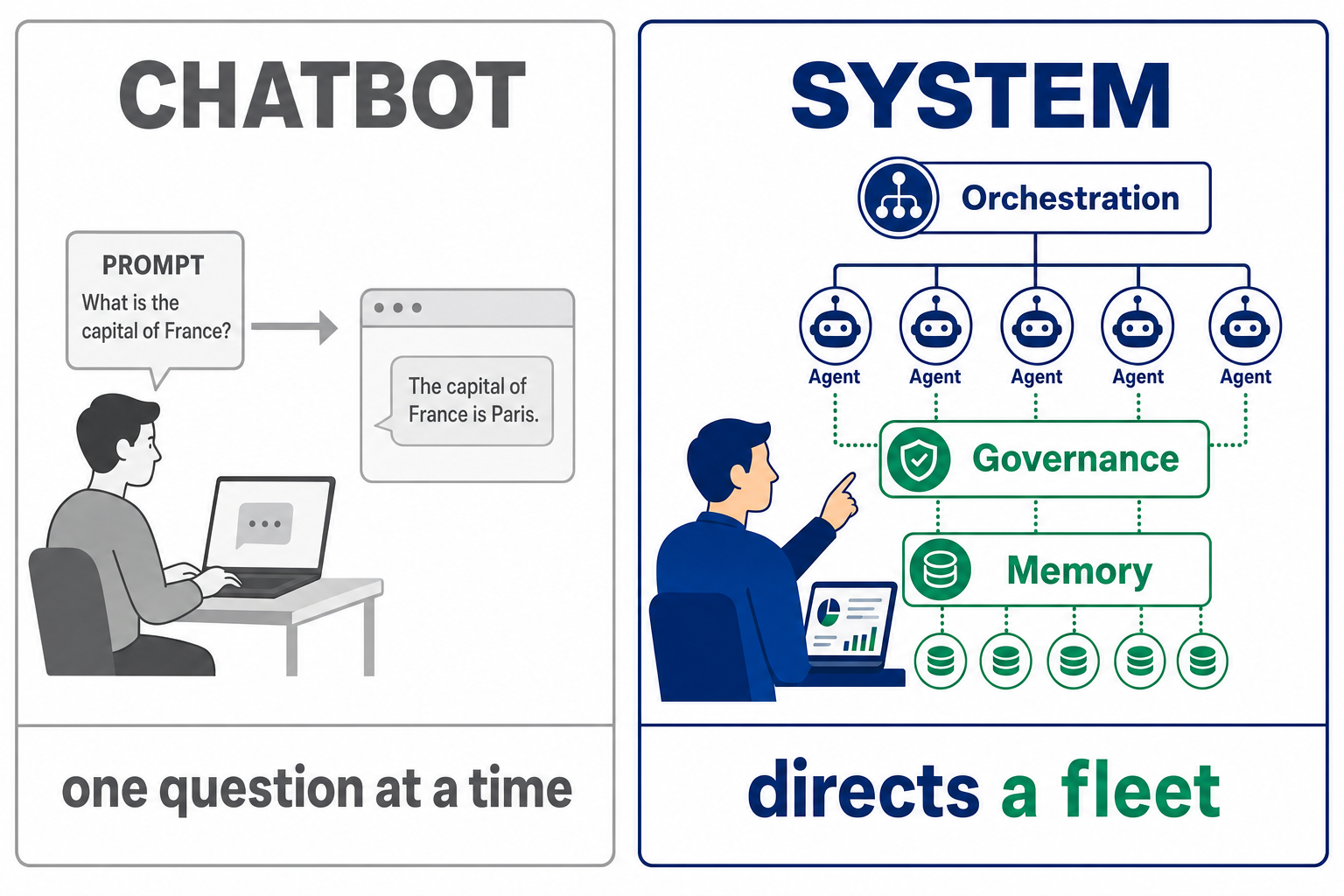
That's the real gap in security right now. Most people are prompting a raw model and calling it AI; the ones pulling ahead have stopped shopping for models and started building the infrastructure that directs them. That's what we teach at StationX: how to turn the assistant you already have into an AI-driven security engineering system, with the orchestration and governance and compounding memory, that works the way you do. Get authorised access to a good model, then build the system around it. The model on top this month matters a lot less than what you wrap it in.
Frequently Asked Questions
What's the best AI for hacking in 2026?
There isn't a single best one, and any article naming one is out of date by the time you read it, because the models leading offensive-security benchmarks change month to month. The durable approach: judge models on security-specific benchmarks (Cybench, NYU CTF Bench, CyberSecEval), confirm on your own tasks, and get access to the models that refuse security work by default via a vetted program. For legitimate, authorised work only.
Why does ChatGPT / Claude refuse security questions?
The major aligned models block a lot of dual-use security work by default, like explaining CVEs, malware behaviour, phishing samples, and red-team prompts, because the same capability can be misused. Safety filters also wrongly refuse benign requests some of the time; in one CyberSecEval 3 test, Meta's Llama Guard filter had a false-refusal rate of 2% to 10% depending on how it was deployed. For authorised professionals the fix is a vetted-access program: Anthropic's Cyber Verification Program or OpenAI's Daybreak Access (formally Trusted Access for Cyber).
How do I get approved for Anthropic's Cyber Verification Program?
Apply through Anthropic's cyber use-case form, describe a concrete security task (not a vague category), and provide something that verifies you're a genuine practitioner: a LinkedIn profile, a talk, a bug-bounty history, or a vouch from a security lead. Approval is tied to a specific organisation ID, so apply once per org you work under. It's free, and in my experience approval was fast.
How do I get OpenAI Daybreak (Trusted Access for Cyber)?
Apply as an organisation through OpenAI's Daybreak Access form (formally Trusted Access for Cyber). Legal entity name, public website, a government-entity declaration and your OpenAI organisation ID are required fields, so there is no route for an individual without a legal entity and an OpenAI organisation behind them. You name a point of contact, list your intended use cases and every country you will use it in, tick the accreditations you hold, and complete a block of security attestations headed check all the below that apply: SOC 2 Type II or ISO 27001 or equivalent, SSO and MFA with least-privilege role-based access, API key governance, monitoring with retained usage logs, a documented incident response process, domain-specific email addresses, and enterprise-controlled devices. Tick only what is true of your organisation, because false information is a material breach. After submitting, OpenAI says you complete a government-ID check and provide basic business information. Access is tiered: Daybreak Blue for common defensive work on the mainline models, Daybreak Red for approved organisations that need the specialised cyber models.
Is it legal to use AI for penetration testing?
Authorisation is the essential condition: a signed engagement, a bug bounty program's scope, or systems you own. AI doesn't change the rule that's always applied to pentesting, which is that you need permission for the target. Beyond authorisation, legality also depends on your jurisdiction, how you handle any data involved, export rules, and your contracts, so scope it properly. The vetted-access programs are built around exactly this line, with adjusted safeguards for authorised work and prohibited use blocked regardless.
Should I fine-tune my own model for security work?
Usually not, if you're a solo hunter. Fine-tuning offensive models is real and now cheap enough to try on a single GPU, and at lab scale a tuned mid-size model can beat much larger general ones on specific tasks. But security knowledge goes stale fast, so a fine-tuned model ages and needs costly retraining. For most people the higher-return move is to prompt and orchestrate a strong base model and feed it fresh context with RAG, reserving fine-tuning for teams with data and evaluation pipelines.
What do bug bounty hunters actually use AI for?
Bugcrowd's 2026 survey found 82% of hackers use AI, and only 27% think it outperforms them. The tasks hunters describe using it for include recon and triage (summarising noisy scanner output), parsing large codebases, generating payloads, deobfuscation, and report writing. That last one, a contributor to the report singles out as probably the most popular. Where it struggles: business-logic flaws, chained multi-step vulnerabilities, and novel attack paths. The consensus is that it's a first pass, not a final answer.
About the Author

Nathan House, Founder & CEO of StationX
Nathan House has 30 years of hands-on cybersecurity experience and is Cambridge-educated, holding CISSP, CISA, CISM, OSCP, CEH, and SABSA. He founded StationX in 1999 — one of the UK’s first cybersecurity companies — and has secured £71 billion in UK mobile banking transactions and the London 2012 Olympics, advising clients including Microsoft, Cisco, BP, Vodafone, and VISA. He authored the world’s most popular cybersecurity course — a #1 Udemy bestseller taken by over 500,000 students — and was named Cyber Security Educator of the Year 2020, AI Security Educator of the Year, and a UK Top 25 Security Influencer 2025. A DEF CON speaker and featured expert on CNN, Fox News, NBC, and the BBC, Nathan leads StationX’s training of more than half a million students worldwide.